
Mosaddek Hosen Sajeeb
Data Analyst and AI Automation Specialist
- 21
- Followers


I kept losing clients while I was asleep. So I built an AI to fix it. 🤖
I'm an AI automation freelancer, and most of my clients are from outside Bangladesh. 🌍
Different time zones meant one brutal problem — while I was sleeping, leads were messaging me on Instagram, ready to buy. By the time I woke up, they were gone. Cold. Or already talking to someone else. 😴
I was literally losing sales in my sleep.
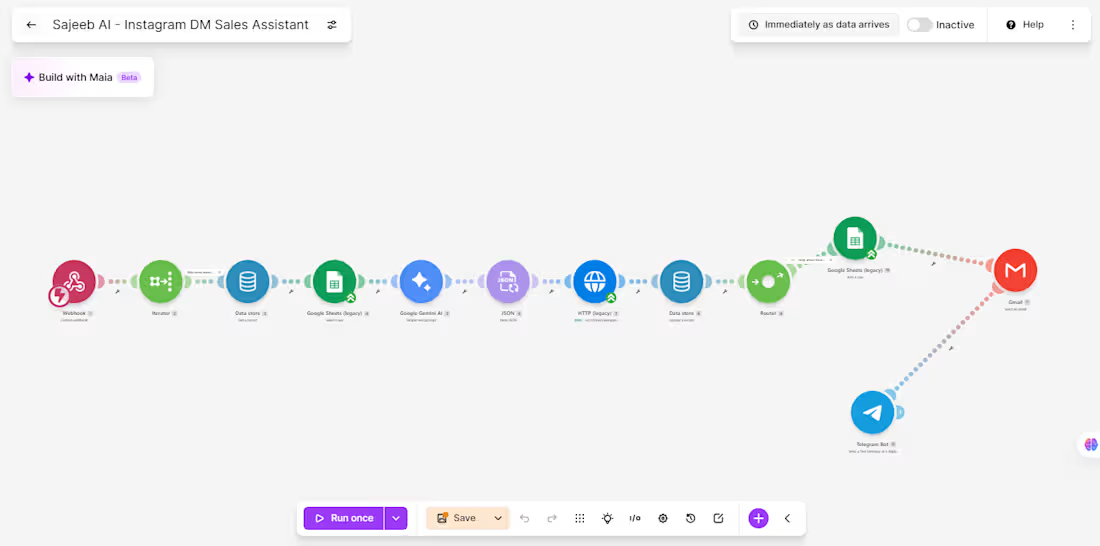
So I built my own AI Sales Agent for Instagram DMs. 👇
✅ Replies to every incoming DM instantly, 24/7 — no time zone, no sleep, no delay
✅ Talks naturally with leads, like a real conversation, not a robotic script
✅ Understands what they need and explains exactly why my service is the right fit for them
✅ Handles objections and questions on its own
✅ Convinces interested leads and takes the order details
✅ Notifies me instantly on Telegram and Gmail the moment a lead is ready
Now I wake up to confirmed leads and orders instead of cold, missed conversations. 💬✨
If you're a freelancer or business owner dealing with international clients across different time zones, you already know this pain. Your leads don't wait for your time zone — but your AI agent can be there for them.
This is exactly the kind of system I now build for other businesses too — AI sales agents, lead qualifiers, and automated follow-up systems that work while you sleep. 💤➡️💰
Check out my work here 👇
https://sajeeb-the-analyst.vercel.app/
#AIAutomation #AIAgent #InstagramDM #SalesAutomation #Chatbot #NoCode #MakeDotCom #Freelancer #LeadGeneration #BusinessAutomation #Entrepreneurship #AIForBusiness
1
5
Muse AI on the free plan is INSANE. 🤯
I asked Muse AI to review my portfolio website, and what happened next genuinely surprised me.
It visited my website, explored the pages, checked the details, and provided a complete website audit.
And honestly? I was shocked by how accurately it identified and evaluated everything.
The funny part? These are exactly the kinds of productivity workflows I've always wanted to explore with Claude and ChatGPT. But getting this level of hands-on website analysis can be difficult with free-tier limitations.
With Muse AI, I got to experience this kind of workflow without paying for a premium plan.
This is what excites me most about AI—not just generating text or answering questions, but actually doing the work, inspecting real things, and helping us get things done.
We're moving beyond AI that simply tells us what to do toward AI that can help us do it.
And if this is what Muse AI can do on its free plan, I'm genuinely curious to see what comes next.
Have you tried Muse AI yet? What's your experience been like?
#MuseAI #ArtificialIntelligence #AITools #Productivity #Automation
2
30
🚨 A dental clinic was losing patients every single day.
Not because of bad service. Not because of high prices.
Because nobody was replying to messages.
Patients messaged on WhatsApp, Messenger, SMS… And waited. And waited. And left.
The clinic owner contacted me with one simple ask:
“I can’t hire someone to reply 24/7. Can you help?”
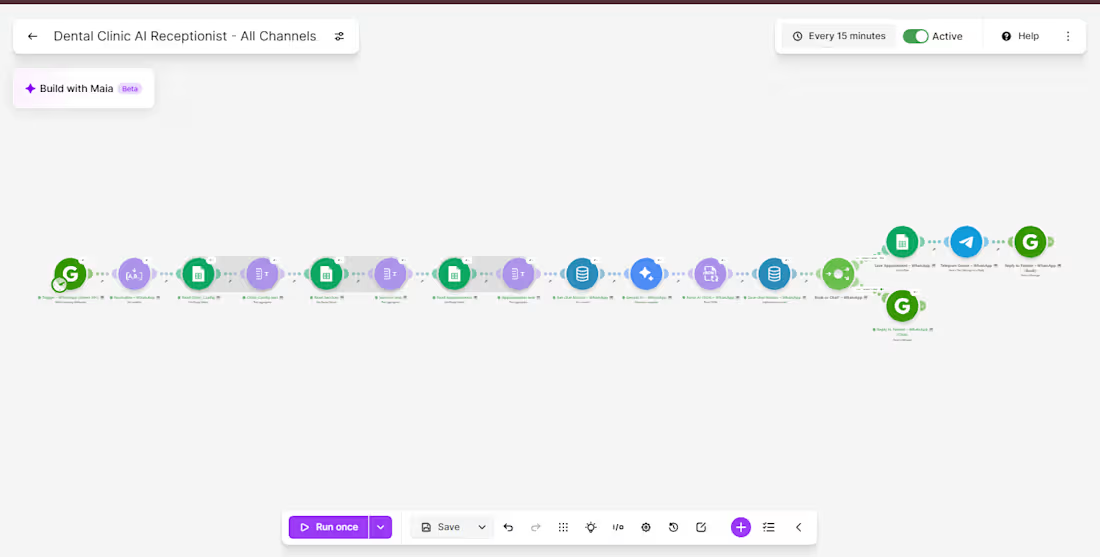
So, I built them an AI receptionist that never sleeps. 👇
Here’s exactly what it does:
✅ Omnichannel Support: Instantly replies to patients on WhatsApp, Facebook Messenger & SMS — all from one system.
✅ Human-like AI: Google Gemini AI understands the message, detects intent, and replies naturally.
✅ Smart FAQ Handler: Answers questions about services, pricing & clinic hours by pulling live data from Google Sheets.
✅ Automated Booking: Checks availability, blocks double-bookings, and confirms only after saving to the sheet.
✅ Instant Alerts: Notifies the clinic owner instantly via Gmail + Telegram on every new booking.
✅ Smart Reminders: Sends automated email reminders — 2 hours and 1 hour before the appointment.
✅ No-Show Recovery: Detects missed appointments and automatically sends a polite rescheduling email after 12 hours.
The Tech Stack 🛠️:
⚙️ Make.com (http://Make.com) — Automation backbone
🧠 Google Gemini 2.0 Flash — AI brain
📊 Google Sheets — Live clinic database
💬 Green API — WhatsApp integration
📱 Facebook Messenger API & Twilio — Chat & SMS
✉️ Brevo — Email reminders
📢 Telegram Bot — Owner notifications
💾 Make.com (http://Make.com) DataStore — Conversation memory per patient
The Result? 📈
Every patient gets an instant, intelligent reply — 24/7. No missed bookings. No forgotten appointments. No manual follow-ups.
The clinic owner now wakes up to confirmed appointments already in the sheet with zero manual effort.
This is what I build for businesses. If you’re still replying manually and losing leads while you sleep — DM me. Let’s fix that. 👇
#MakeAutomation #AIAutomation #NoCode #Makecom #GeminiAI #WhatsAppAutomation #BusinessAutomation #AIReceptionist #FreelanceAutomation #Upwork #Fiverr
6
4
82
One business problem. Three analytical routes. One data-driven story. ☕📊
I turned raw business data into actionable decisions—not just another Power BI dashboard.
For the Onyx Data October 2026 Challenge, I worked on the Sunrise Coffee Chain analytics project, analyzing store performance, profitability, customer loyalty, revenue mix, and trading patterns across 60 UK stores (2023–2024).
🔹 My Analytical Approach
1️⃣ Python — Data Preparation
Cleaned and prepared the source datasets to establish a reliable foundation for analysis.
2️⃣ SQL — Business Analysis
Investigated store-level profitability, cost pressure, customer loyalty, revenue contribution, and trading patterns.
3️⃣ Power BI — Interactive Dashboards
Built a 3-page interactive report featuring advanced DAX measures, KPI cards, YoY comparisons, profitability analysis, and business-focused visualizations.
📊 Key Findings
• £89.7M Revenue | £16.9M Net Profit
The business recorded an aggregate net profit margin of 18.8% across the analysis period.
• Store Location Matters
Transport-Hub stores achieved a 25.1% aggregate net profit margin, compared with 18.6% for High-Street stores.
• An Area Requiring Attention
South London Corner recorded a £50.5K net loss over 24 months.
• Product Revenue Contribution
Espresso contributed 45.7% of daily revenue, while food contributed 26.1%.
• Trading Patterns
Average daily revenue was approximately 24% lower on weekends and 33% lower on UK bank holidays than on regular trading days.
💡 My Biggest Takeaway
Revenue alone does not tell the whole story. Understanding profitability, cost pressure, product contribution, and trading patterns helps businesses identify where to improve performance and make better decisions.
🔗 Explore the Complete Project
GitHub: https://github.com/SajeebTheAnalyst/sunrise-coffee-chain-analytics
If you were advising the management team, which finding would you investigate first—and why?
#DataAnalytics #SQL #PowerBI #Python #DAX #BusinessIntelligence #DataVisualization #OnyxData
4
3
367