Geethasree Naguboina's Work | ContraWork by Geethasree Naguboina
Geethasree Naguboina
pro

Geethasree Naguboina

Excel & KPI Dashboards for Small Business Decisions

New to Contra

Geethasree is ready for their next project!

Cover image for The difference between a report
The difference between a report and a dashboard Most people use these words interchangeably. They're not the same thing. A report tells you what happened. A dashboard shows you what's happening. The difference: Report → static, detailed, built for documentation Dashboard → dynamic, visual, built for decisions The mistake I see most often: People build dashboards that are actually just reports. The result? — Decision makers scroll through pages of data — Numbers are outdated by the time anyone reads them — No one knows what to act on The fix is simple: A report answers: "What happened last month?" A dashboard answers: "What do I need to do right now?" When you design for the right purpose: Reports become clear records. Dashboards become decision tools. One looks back. The other drives forward.
2
81
Cover image for Most people think a spreadsheet
Most people think a spreadsheet and a dashboard are the same thing. They're not. A spreadsheet is where data lives. A dashboard is where decisions happen. The difference: Spreadsheet → raw, editable, flexible, built for input Dashboard → structured, visual, built for reading and decisions The mistake I see most often: People try to do both in the same sheet. The result? Decision makers see too much raw data Numbers get accidentally edited No one knows what to trust The fix is simple: Keep your data layer and your presentation layer separate. Raw data in one sheet. Dashboard in another. One is for building. One is for reading. When you separate them, updates become clean, mistakes become rare, and your reports actually get used. A spreadsheet stores your data. A dashboard tells its story.
2
4
128
Cover image for Optimize Your Spreadsheets: Structure Over Formulas for Success
Most spreadsheet problems are not Excel problems. They’re structure problems. I often see spreadsheets where: • formulas reference half the sheet • headers change across tabs • logic is embedded inside long nested formulas • no one knows where the numbers actually come from The result? Small updates quietly break the entire model. A simple structure solves most of this: Raw Data → Processing → Output → Documentation Raw data stays untouched. Processing handles the logic. Output shows only what decision-makers need. Documentation explains how metrics are calculated. Clean structure reduces fragility and makes updates predictable. Good spreadsheets aren't just about formulas. They’re about clear data flow and transparent logic.
3
3
183
Cover image for Most dashboards don’t have a
Most dashboards don’t have a visualization problem. They have a KPI problem. I’ve reviewed dozens of reporting systems recently and the pattern is consistent: Metrics are defined differently across sheets “Revenue” means one thing in finance and another in marketing KPIs are tracked… but not tied to decisions Dashboards look clean but don’t answer operational questions When metric logic isn’t aligned, teams don’t have a data problem. They have a decision problem. That’s why I’ve started offering a structured KPI & Revenue Diagnostic Audit — focused on: • Metric consistency • Reporting logic • Revenue driver alignment • Decision-readiness If you're building dashboards or scaling reporting systems, this layer matters more than design.
8
8
289
Cover image for Most dashboards fail before they
Most dashboards fail before they are even built. Not because of bad charts. Not because of wrong formulas. Because the data underneath is structurally broken. Here’s what I see often in small businesses: • Dates stored as text • Multiple columns for the same metric • Inconsistent naming (Revenue / Sales / Total Sales) • Manual copy-paste every week • No clear data flow Then they ask: “Why doesn’t this dashboard update properly?” A dashboard is just a mirror. If the data structure is messy, the reflection will be distorted. Before I build any report, I focus on 3 things: Standardized column logic Single source of truth Repeatable data flow (no manual dependency) Clean structure → Reliable metrics → Better decisions. If your reporting feels fragile, the issue usually isn’t Excel. It’s the foundation.
15
8
316
Cover image for Most spreadsheets don’t have a
Most spreadsheets don’t have a formula problem. They have a structure problem. When reporting feels unreliable, it’s rarely because Excel is limited. It’s usually because the data flow was never designed. Before I build any dashboard, I check: 1️⃣ Where does the data originate? 2️⃣ Is there one clear source of truth? 3️⃣ Are inputs separated from calculations? 4️⃣ Can someone else maintain this in 6 months? Dashboards are the visible layer. Structure is the foundation. When the structure is right: ✔️ Reports update automatically ✔️ Errors drop ✔️ Decisions get faster If your spreadsheet needs manual fixing every week, the issue probably isn’t formulas — it’s system design. What’s the biggest spreadsheet headache you’re dealing with?
5
220
Cover image for Messy Excel data → Decision-ready
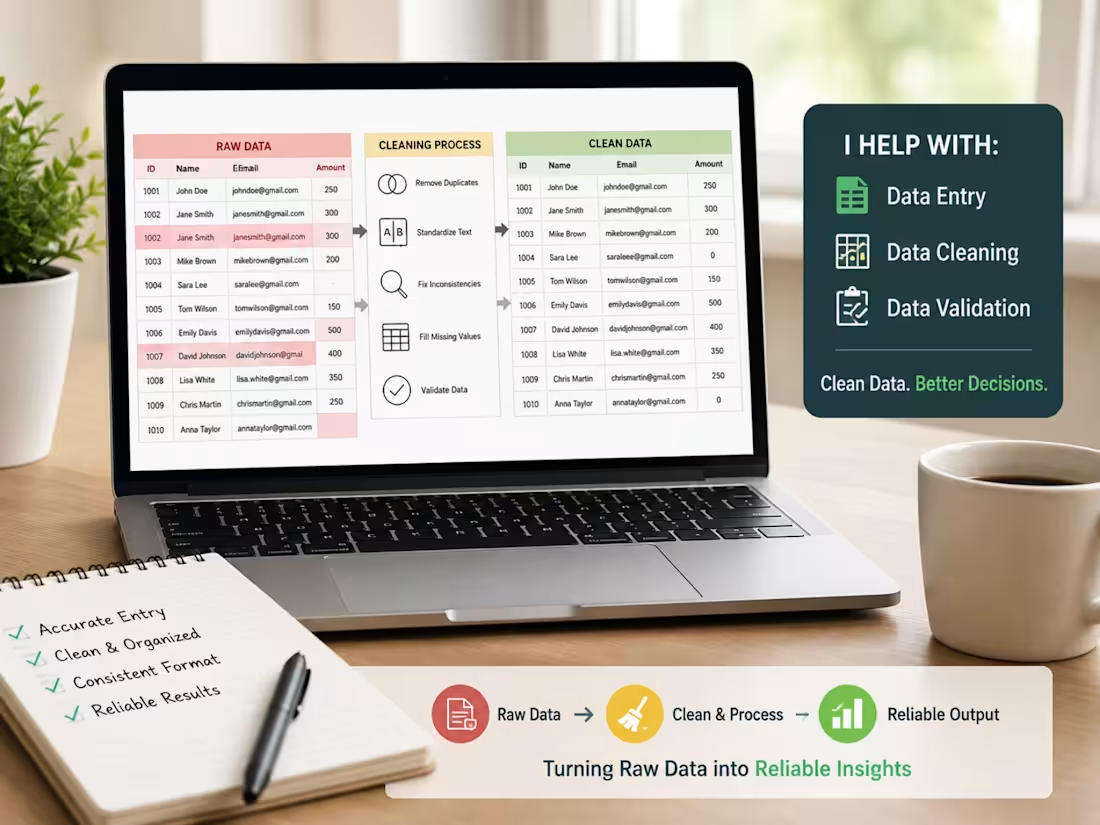
Messy Excel data → Decision-ready dashboard 📊 A recent Excel workflow I worked on involved raw, unstructured data that wasn’t usable for analysis or reporting. What I did: Cleaned and structured the raw dataset Fixed formatting and consistency issues Built pivot tables and an interactive Excel dashboard Result: ✔️ Clear insights ✔️ Faster reporting ✔️ No manual rework This is the kind of Excel cleanup + reporting support I help teams with regularly. If you’re dealing with messy spreadsheets and need clean, reliable Excel reports — happy to help.
5
5
279
Cover image for Executive Excel Dashboard for Business Reporting
Executive Excel Dashboard for Business Reporting
5
5
Cover image for Market & Competitor Research (E-Learning Industry)
Market & Competitor Research (E-Learning Industry)
2
2
Cover image for Turning messy Excel data into an interactive dashboard 📊 In...
Turning messy Excel data into an interactive dashboard 📊 In my latest Excel case study, I worked with a raw, unstructured dataset (8,700+ rows) and focused on doing the fundamentals right: • Cleaned inconsistent time, date, and text values • Structured the data for accurate analysis • Built pivot tables with day, month, and time logic • Added slicers and conditional formatting for interactivity No fancy tools — just solid Excel workflows that make data reliable and easy to explore. This is exactly how I approach real client data: clean first → structure next → visualize last. 👉 Full case study is live on my profile.
6
10
340
Cover image for Excel Data Cleaning & Dashboard Reporting
Excel Data Cleaning & Dashboard Reporting
4
7
Cover image for 📊 Clean Excel Data = Better Decisions Most teams don’t have...
📊 Clean Excel Data = Better Decisions Most teams don’t have a data problem — they have a messy Excel problem. Common issues I see: ❌ Broken formulas ❌ Manual workflows ❌ Reports that fail with new data When Excel data is structured properly: ✅ Dashboards stay accurate ✅ Automation works ✅ Decisions get faster Clean data isn’t about neat sheets — it’s about trustworthy insights. I help teams clean, structure, and automate Excel data for decision-ready reporting.
4
6
250
Cover image for Verified Web Research for Business Decisions
Verified Web Research for Business Decisions
2
2
Cover image for Excel Data Cleanup → Dashboard Reporting
Excel Data Cleanup → Dashboard Reporting
2
10
Cover image for Why Clean Data = Better Decisions 🧼📊 Most teams don’t have...
Why Clean Data = Better Decisions 🧼📊 Most teams don’t have a data problem — they have a messy data problem. Dirty data causes: ❌ Wrong insights ❌ Slow reporting ❌ Confusing dashboards ❌ Missed opportunities But when your data is clean and structured: ✅ Decisions get faster ✅ Dashboards get clearer ✅ Teams trust the numbers ✅ Automation works ✅ Revenue opportunities appear Clean data isn’t “making it look nice.” It’s the foundation of accurate forecasting, better targeting, and smarter strategy. If your business is running on messy spreadsheets, you’re not just losing time — you’re losing clarity. I help teams turn chaotic data into clean, decision-ready datasets. Need help cleaning or organizing your data? Let’s talk 🤝
4
230
Cover image for Here’s one of my favorite Excel tricks that saves 40–60% cle...
Here’s one of my favorite Excel tricks that saves 40–60% cleanup time—instantly. Whenever I receive messy spreadsheets, I start with this quick trio: 🟢 =TRIM() – removes unwanted spaces 🟢 =CLEAN() – fixes hidden formatting issues 🟢 =PROPER() – makes text clean + uniform You’d be surprised how many “complex” data issues are solved with these three simple functions. I use this approach in my client projects before building dashboards, reports, or analyses—it ensures the entire workflow is smooth and error-free. If you want your Excel files cleaned, structured, or automated, I offer professional Excel support for both short and long projects.
7
253
Cover image for 🚀 Automating Small Tasks = Big Productivity Gains One thing...
🚀 Automating Small Tasks = Big Productivity Gains One thing I’ve noticed while working across Excel, data cleanup, and workflow optimization: Most teams don’t need a full system rebuild — they just need small automations that remove daily friction. Here are 3 micro-automations I recently built that made a big impact: 🔹 Smart data cleanup rules — auto-standardizing names, dates, and formats 🔹 Auto-generated summaries — creating insights without manually filtering every time 🔹 Monthly rollover logic — treating late-month income/expenses as the next month’s budget These tiny improvements save hours, reduce errors, and make tools easier for anyone to use — not just “Excel experts.” If you could automate one small task in your workflow, what would it be? 👇 #Excel #Automation #Productivity #DataEntry #WorkflowOptimization
9
6
287