Projects using FlowstepProjects using FlowstepIntroducing KEEPS: A Digital Home for Physical Memories
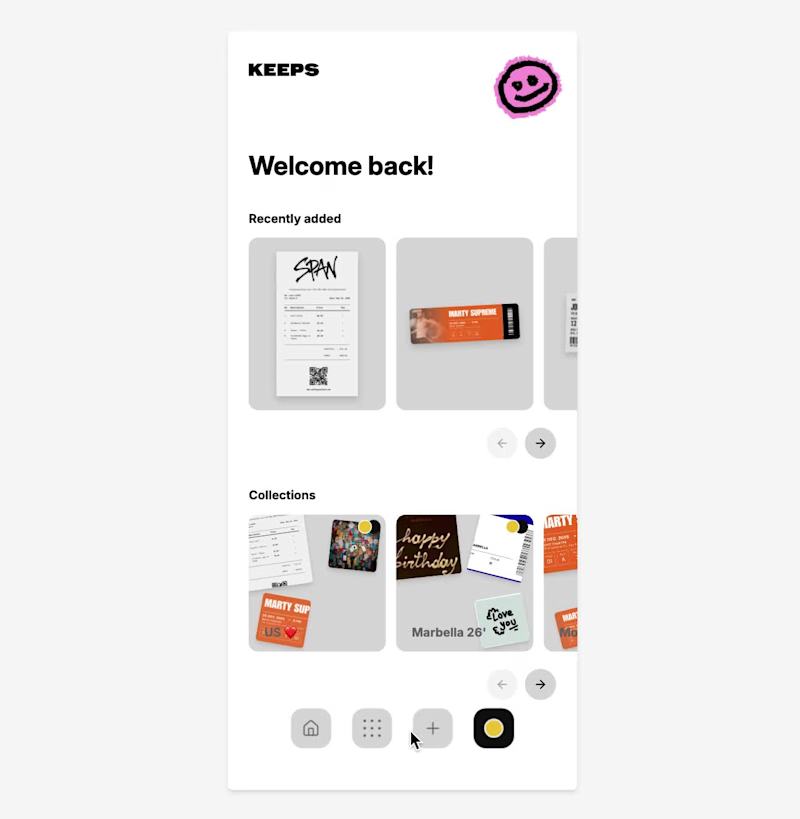
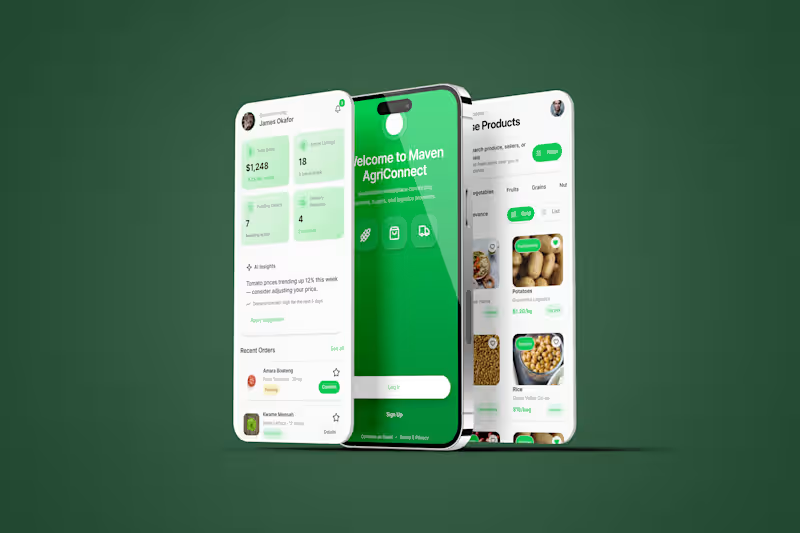
KEEPS is a mobile app designed to preserve the physical objects that carry our memories.
While most memory apps are built around photos, KEEPS is built around everything else.
Concert tickets, boarding passes, receipts, handwritten notes, invitations, conference badges, and other small objects that people often keep long after their practical purpose has ended.
The idea came from a simple observation: many of us keep these items because they represent experiences, relationships, milestones, and moments we don’t want to forget. Over time, they become scattered across drawers, wallets, books, and boxes, making them difficult to revisit and easy to lose.
KEEPS transforms these physical keepsakes into digital artifacts.
Users can scan real objects, remove backgrounds, add contextual information such as location, date, people, and personal notes, and organize them into custom collections. Artifacts can also be created from templates, allowing users to recreate memories that no longer exist physically.
The prototype includes onboarding, collections, artifact detail pages, discovery flows, creation flows, profile experiences, and a connected navigation system that allows users to move through their archive naturally.
Rather than generating the entire product in a single prompt, I used Flowstep as a design engineering tool.
I started with a visual direction created in Figma, including custom illustrations, typography, layout systems, and the overall structure.
From there, I rebuilt the product inside Flowstep screen by screen, using detailed prompts to define hierarchy, spacing, interactions, navigation patterns, and user flows.
Each screen became the foundation for the next. Existing components were reused, refined, and expanded to create a cohesive design system across the entire application. The process was highly iterative: generating, reviewing, refining, and rebuilding until the product felt consistent both visually and functionally.
The result is not simply a collection of screens, but a connected prototype with clear user journeys, interaction logic, and product intent.
KEEPS is built around a simple belief:
The smallest objects often carry the biggest memories.
Flowstep file link: https://app.flowstep.ai/file?activeFileId=cb23715a-64af-4fb6-822a-c789fb99b461
X Post: https://x.com/webdesign_alice/status/2081713836613050543?s=46&t=1ZFswUtJzT6BPLQaoOweGw
The walkthrough, screen recording of the prototype working in Flowstep, my custom illustrations, and the screens designed in Flowstep are included below. For years I've done the same pointless thing: I pause a film because someone's wearing the exact coat I've been looking for, then I screenshot it, reverse-search it, scroll past forty results that aren't it, and give up.
The thing I wanted was right there in the frame. It just wasn't connected to anything.
So I built it.
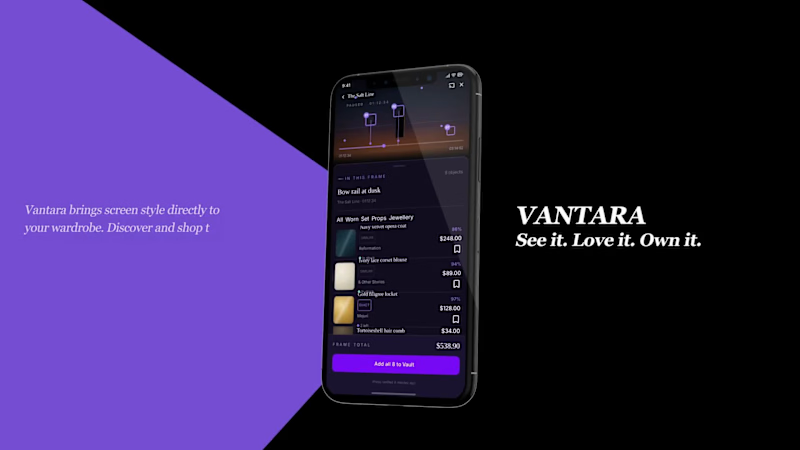
Vantara is a streaming service where you pause any moment and it tells you what's in the shot and where to buy it: the exact piece, or its closest match. Because you're never going to find the real 1912 opera coat from the costume department, and you don't want to pay for it either. You want the look, at a price that makes sense.
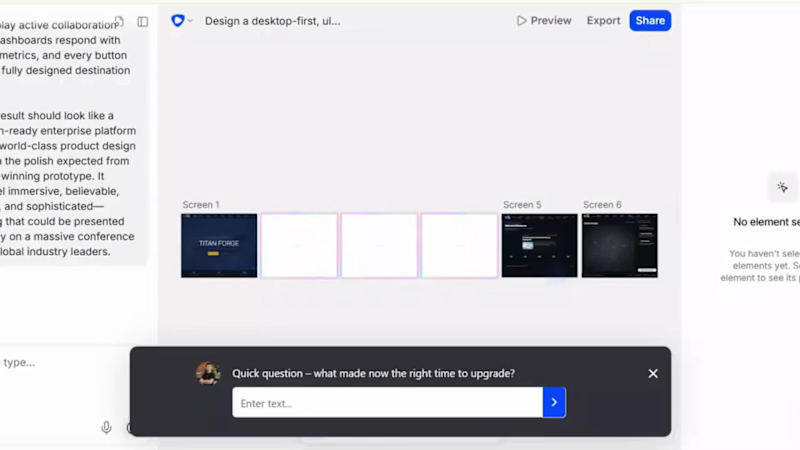
It's 11 screens across desktop and mobile, including the player, the pause-to-shop panel, item pages with real prices and delivery, a Vault that watches prices and tells you when something drops, and a search that runs backwards. Describe a look, and it finds you the scene it lives in.
I built every screen in Flowstep, driven through the Flowstep MCP server with Claude, on one design system applied across the whole thing.
This is the idea I keep coming back to. Full walkthrough video + case study here: Full Walkthrough (https://contra.com/p/sABEseFe-development-of-vantara-the-shoppable-streaming-platform?referralExperimentNid=DEFAULT_REFERRAL_PROGRAM&referrerUsername=SalmanDevelops)
Flowstep Link: https://app.flowstep.ai/file?activeFileId=7d8b3596-23aa-46c4-a5d9-1793ff2b862a
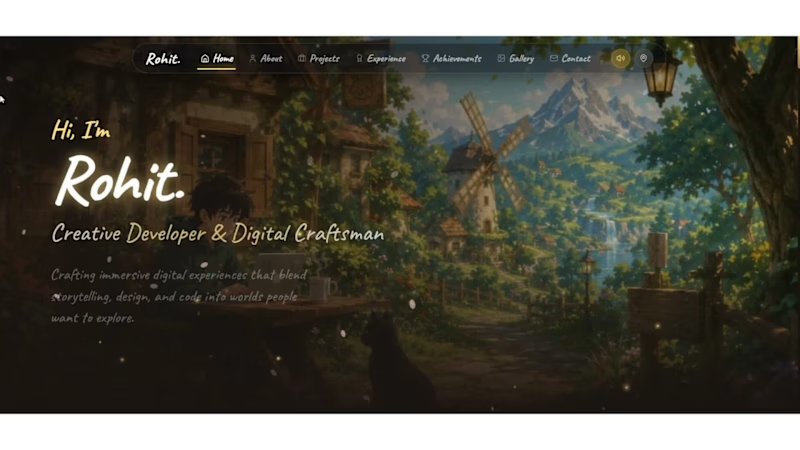
Built with @flowstep_ai #FlowstepChallenge Built an immersive fantasy portfolio where every section becomes part of a living world instead of another webpage.
Designed the entire experience in @flowstep_ai using Flowstep + MCP (Antigravity).
Connected Flowstep MCP with Antigravity, then iterated directly on the canvas using prompts—refining layouts, components, navigation, interactions, and the design system without rebuilding screens from scratch.
Created reusable design tokens, cinematic UI, glass navigation, parchment components, handcrafted cards, and a consistent visual language across every scene.
Once the prototype was finalized, I replicated the entire Flowstep canvas into a Next.js application and polished interactions with modern animation libraries before deploying.
The workflow:
🌿 Idea → Prompt Flowstep
🎨 Refine with MCP (Antigravity)
🧩 Build reusable design system
🖼 Iterate every screen on the canvas
⚛ Replicate to Next.js
▲ Deploy on Vercel
🏡 9 connected fantasy scenes
✨ 1 immersive portfolio
Project link : https://portfolio-6asf.vercel.app/
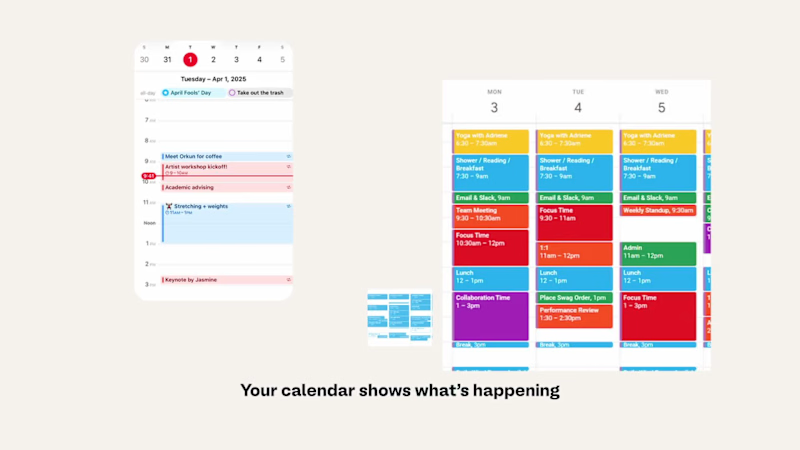
flowstep link : https://app.flowstep.ai/file?activeFileId=dd5c563d-33a1-4b37-8b24-3669efac9652 The calendars show what's happening; they never show how it's going to feel.
So I built Barometer in @Flowstep , an emotional weather report for your week. It reads the shape of your calendar and gives you an honest heads-up about the next week.
❓Why I built this:
I like taking a moment to reflect on my day, sometimes looking back at it, sometimes looking ahead at what's coming. I always wished calendars did a bit of that too. Plus, it also helps you answer the question “Am I just lazy or was my day really exhausting?”
⚒️ How I built it:
- Started in Claude: app brief, user flows, and a design system.
- Connected Claude to Flowstep and prompted straight from that project context.
- Built home, one example day in full, then generated the rest as variants of it to keep the system consistent.
- Used Flowstep's design panel for the small, final tweaks.
📚 What I learned along the way:
- Flowstep needs clear color, copy, and reference, but also room to make its own decisions. Over-specify and the layout gets confused; give it space and it makes a really good judgment.
- Prompting multiple related screens in one pass kept the system tighter than one screen at a time. But even prompted individually, it remembered the guidelines across screens.
- Sometimes plain chat, not a structured prompt, got the better result for a tweak.
🧐 One thing I kept thinking while building this: it doesn't need to be its own app. This could just as easily live as a "forecast" layer inside a calendar app you already use.
Flowstep file (https://app.flowstep.ai/file?activeFileId=cab3b0bc-9d6d-4354-b2ca-1f14826e2a12) & Prototype (https://app.flowstep.ai/prototype?activeFileId=cab3b0bc-9d6d-4354-b2ca-1f14826e2a12) 🎨
X post (https://x.com/_anaVy/status/2083300146020819195?s=20) ✨
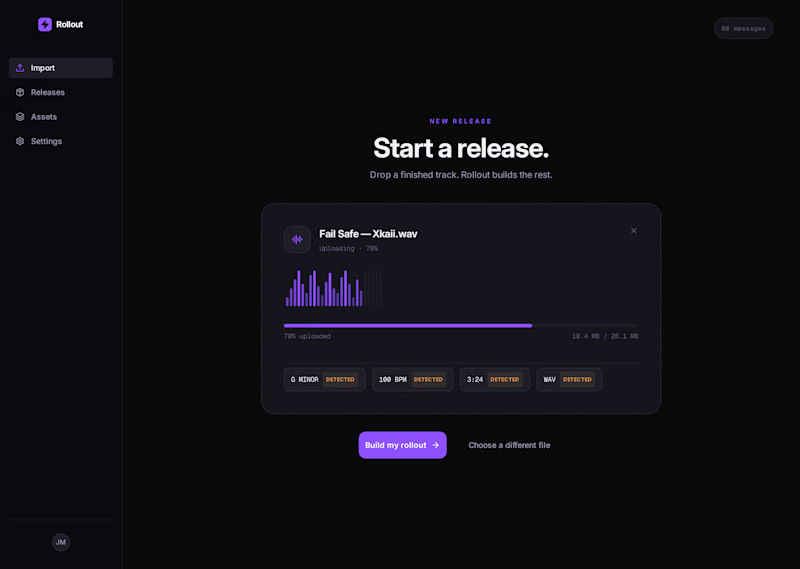
ROLLOUT: the tool an artist opens the day they finish a song.
Every artist knows the feeling. You finish a song, you sit back, and for about ten seconds it's pure magic. Then reality hits. Because a finished song is only half the job. Now you need the cover art, the visualizer, the TikToks, the press kit, the release page, and a plan to get it everywhere on the same day. That mountain is where most songs quietly die. Not because they were bad, but because the artist ran out of energy before the world ever heard them.
I've lived in that exact gap for years, and I kept asking one question: why is there no tool that takes my finished song and just builds the entire release for me? Not ten different apps. Not a spreadsheet and a prayer. One place.
So I built it. It's called Rollout. You drop in one finished track and it generates your whole release kit in minutes: cover art, an animated visualizer, ready-to-post social clips, an EPK, and a release page, all staged for launch day. Then it hands you the wheel, so you can direct every single piece until it feels like you.
And it's not a flat mockup. It's a real, clickable product you move through, seven connected screens:
Import: drop in your finished track, and Rollout reads the key, BPM, and length.
Building: you watch it generate the release kit in real time.
Ready: the whole kit lands, done.
Dashboard: your release command center, with every asset, a readiness ring, and a distribution checklist for Spotify, Apple, TikTok, Instagram, and YouTube.
Cover Art: you direct the AI with mood, palette, and prompt, then pick the cover.
Social Cutdowns: auto-cut vertical clips for TikTok, Reels, and Shorts, captioned and ready.
Launch: everything staged with a countdown to release day, one button to schedule it all.
Here's the part that gave me chills. I didn't build it with fake demo data. I built it around my own song, Fail Safe. That's my real cover art living inside the app. Those are my actual lyrics turning into the social clips. My release, my art, my words, running through a tool that only existed in my head an hour earlier. I described the exact product I wished existed, connected right into my workflow through Flowstep's MCP, and watched it become real, screen by screen.
Rollout is the tool I'd open the day I finish my next song. And now it actually exists. That's the whole point of building the thing you wish someone would make: sometimes that someone is you.
Live prototype (click through all 7 screens): https://app.flowstep.ai/file?activeFileId=39201e1f-e478-400a-93c9-8d9eea6d4ade
Video walkthrough: attached
Posted on X: https://x.com/XkaiiMusic/status/2081289140382097848 Been heads down on this for a bit and I'm genuinely hyped to share it 🎸
Jamly - everyone deserves an instrument 🎸🎹🥁
I always wanted to learn guitar. I just never wanted to buy one. So instead of buying one, I built it
Turns out tools that let you play piano off your keyboard already exist, but why does literally none of them feel like an actual instrument, something worth touching? 🤔
That question turned into Jamly, built for the Flowstep Challenge - guitar, keys, and drums, played entirely off the keyboard you already have. Free. No login. Nothing to download.
🎯 What it does
🎸 Guitar - six strings, live. Fret with your fingers, strum with space, and the string actually rings out and fades, the way a real one does
🎹 Keys - two full octaves, playable with both hands, notes fading in over 300ms
🥁 Drums - five pieces, snappy 150ms hits that feel percussive, not laggy
Guided Play - real songs, chord by chord, at your pace, ending in a jam-ticket recap screen instead of a plain checkmark
Upload your own chords and play your own song, your way
✨ How Flowstep made it possible
Every screen was designed in Flowstep - including the three instruments themselves, down to the guided-play animations. Getting the instruments right took a few honest misses first: an early pass leaned on a reused reference photo, then a stock image standing in for it, then flat shapes with no real depth. The actual fix was staying in Flowstep and iterating hard, screen by screen, until the material and depth genuinely looked right
Claude Code was connected straight into Flowstep through its MCP server, and that connection did double duty: first, prompting and refining Flowstep's own design tools until the instruments hit real fidelity; then same connection, building and shipping the actual live site
This was never really about a cheaper guitar. It's a bet that the only real gate between curiosity and actually playing was ever the price of admission, and once that's gone, it's just you, deciding if you want to keep going. 🎶
🎨 Flowstep file: Jamly Design (https://app.flowstep.ai/file?activeFileId=f31e7f50-3ca4-4dbb-af42-9da94f33c183)
🔗 Try it : https://jamly-muxic.vercel.app/