




Web Scraping & Data Extraction Solutions | Python & Scrapy
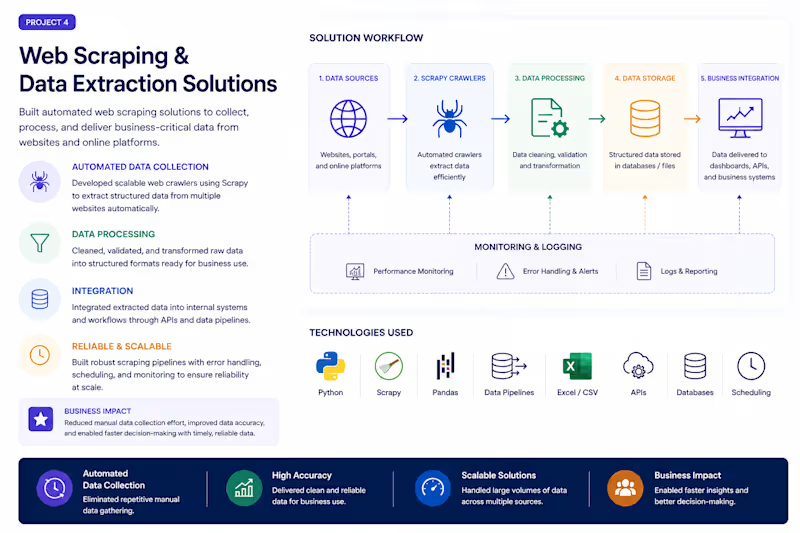
Developed automated data extraction solutions to collect, process, and deliver business-critical information from websites and online platforms.
Full Description:
As part of my work at Cotefácil, I developed web scraping solutions using Python and Scrapy to gather information from partner platforms and e-commerce websites.
The extracted data was processed and integrated into internal systems, supporting automation workflows and business operations.
The focus was on creating reliable, maintainable, and scalable scraping solutions capable of handling large volumes of information efficiently.
Technologies: Python, Scrapy, Data Extraction, Web Crawling, Automation, Data Processing.
Key Achievements:
✔ Developed scalable web scraping solutions using Scrapy
✔ Automated data collection from external platforms
✔ Reduced manual effort through automated extraction workflows
✔ Supported business integrations with high-quality structured data
0
82

N8N HR Document Automation Flow — Portfolio Explanation
Overview
This workflow automates the process of onboarding new employee files into an organized Google Drive structure. Whenever a new file is uploaded to Drive, the system automatically identifies the employee, validates them against a roster, notifies them by email, and logs everything — all without any manual intervention.
Integrations Used
IntegrationPurposeGoogle DriveDetects new files and moves them to the correct folderGoogle SheetsStores the employee registry for lookupGmailSends notifications and admin alertsN8N Code NodeExtracts and parses data from the file
Flow Breakdown
1. Trigger — New File on Drive
Novo Arquivo no Drive
The flow is triggered automatically whenever a new file is created in a monitored Google Drive folder. This is the entry point — no manual action needed.
2. Extract Name & Data from File
Extrair Nome e Dados do Arquivo
A Code node parses the uploaded file to extract key information — primarily the employee's name and any relevant metadata embedded in the file name or content.
3. Search Employee in Spreadsheet
Buscar Funcionário na Planilha
Using the extracted name, the flow queries a Google Sheets spreadsheet (the employee registry) to check whether this person exists in the system.
4. Employee Found? (Conditional Branch)
Funcionário Encontrado?
A Switch/Router node evaluates the lookup result and splits the flow into two paths:
✅ Path A — Employee Found (True)
StepActionMove to Employee FolderThe file is moved to that employee's dedicated Google Drive folderNotify Employee by EmailA Gmail message is sent to the employee confirming the file was receivedSuccess LogA record is written to a Google Sheets log (append/update)
❌ Path B — Employee Not Found (False)
StepActionError LogThe failed attempt is recorded in a separate Google Sheets error logAlert Admin by EmailGmail sends an alert to the administrator reporting the unrecognized file
Key Features
✅ Fully automated — triggered by file upload, zero manual steps
✅ Smart file routing — files land in the right employee folder automatically
✅ Validation layer — cross-references a live employee spreadsheet before acting
✅ Dual-path error handling — failures are logged and the admin is immediately notified
✅ Audit trail — both successes and errors are recorded in Google Sheets
✅ Email notifications — employees and admins are kept in the loop automatically
0
45

PewStats is a custom football analytics platform I developed to automate data collection, processing, and statistical analysis. It provides team statistics, match insights, comparisons, trends, and custom analytical tools through an intuitive web interface. The project combines Python automation, data processing, APIs, and full-stack web development.
1
247