Heber Conrado
n8n Automation & AI Workflows for Growing Businesses
New to Contra
Heber is ready for their next project!
N8N WhatsApp Financial Bot — Portfolio Explanation
Overview
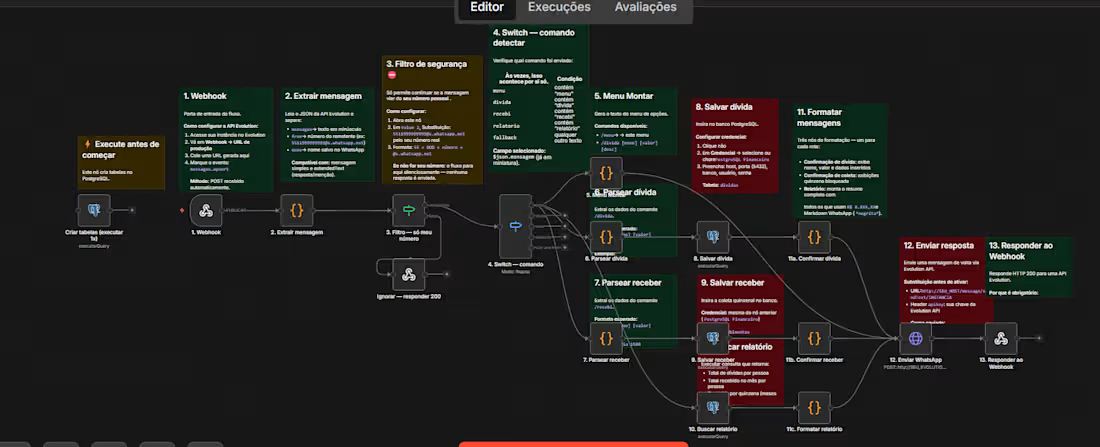
This workflow is a WhatsApp-based personal finance bot built in N8N. Users interact with it by sending text commands directly via WhatsApp, and the bot responds with debt tracking, income recording, and financial reports — all stored in a PostgreSQL database.
Integrations Used
IntegrationPurposeEvolution API + WhatsAppReceives and sends WhatsApp messagesPostgreSQLStores debts, income records, and financial dataN8N Code NodesParses commands and formats responsesWebhookEntry point for incoming messages
Flow Breakdown
0. Setup — Create Tables
Criar tabelas (executar 1x)
A one-time PostgreSQL node that creates the necessary database tables before the flow goes live. Run once during setup.
Webhook (Entry Point)
Webhook
Configured with the Evolution API to receive all incoming WhatsApp messages via HTTP POST. Setup requires pointing the Evolution instance's Webhook URL to this node and subscribing to the messages.upsert event.
Extract Message
Extrair mensagem
A Code node reads the Evolution API's JSON payload and extracts:
The message text (lowercased)
The sender's phone number
The sender's name from WhatsApp
Security Filter — My Number Only
Filtro — só meu número
A security gate that only allows messages from the owner's own number to proceed. Any message from an unknown number is silently ignored and a 200 OK is returned to avoid retries.
Switch — Command Detection
Switch — comando
Routes the flow based on the command detected in the message:
CommandActionmenuShows the options menudividaDebt registration flowrecebiIncome registration flowrelatorioFinancial report flow(anything else)Fallback / ignored
Menu
Menu Montar
Generates and sends a formatted options menu to the user via WhatsApp, listing all available commands with usage examples.
Parse Debt Command
Parsear dívida
Extracts structured data from the /divida command. Expected format:
/divida [name] [value]
Parse Income Command
Parsear receber
Extracts structured data from the /recebi command. Expected format:
/recebi [name] [value]
8 & 9. Save to PostgreSQL
Salvar dívida / Salvar receber
Inserts the parsed debt or income record into the PostgreSQL dividas table, using the configured financial database credentials (host, port, database, user, password).
Fetch Report
Buscar relatório
Runs a PostgreSQL query that returns a financial summary including:
Total debts per person
Total income received per month
Breakdown by fortnight (installment periods)
11a/b/c. Format Messages
Formatar mensagens / Confirmar dívida / Confirmar receber / Formatar relatório
Three formatting nodes — one per command path — that shape the response into WhatsApp-friendly Markdown (bold, line breaks, currency formatting like R$ 1.000,00).
Send WhatsApp Response
Enviar WhatsApp
Sends the formatted reply back to the user via the Evolution API HTTP endpoint:
POST http://{SEU_HOST}/message/sendText/{INSTANCE}
with the API key in the request header.
Respond to Webhook
Responder ao Webhook
Returns an HTTP 200 response to the Evolution API to confirm the message was successfully processed and prevent retry loops.
Available Commands (User-Facing)
CommandDescription/menuShows all available commands/divida [name] [value]Registers a debt owed to you/recebi [name] [value]Logs a payment received/relatorioGenerates a full financial summary report
Key Features
✅ WhatsApp-native interface — no app needed, just chat commands
✅ Owner-only security filter — private and protected by default
✅ Multi-command routing — clean switch logic for each feature
✅ PostgreSQL persistence — all financial data stored reliably
✅ Formatted reports — human-readable summaries with WhatsApp Markdown
✅ Webhook handshake — proper HTTP 200 handling to prevent duplicate triggers
✅ Zero UI required — fully operated through natural WhatsApp messages
0
33
N8N HR Document Automation Flow — Portfolio Explanation
Overview
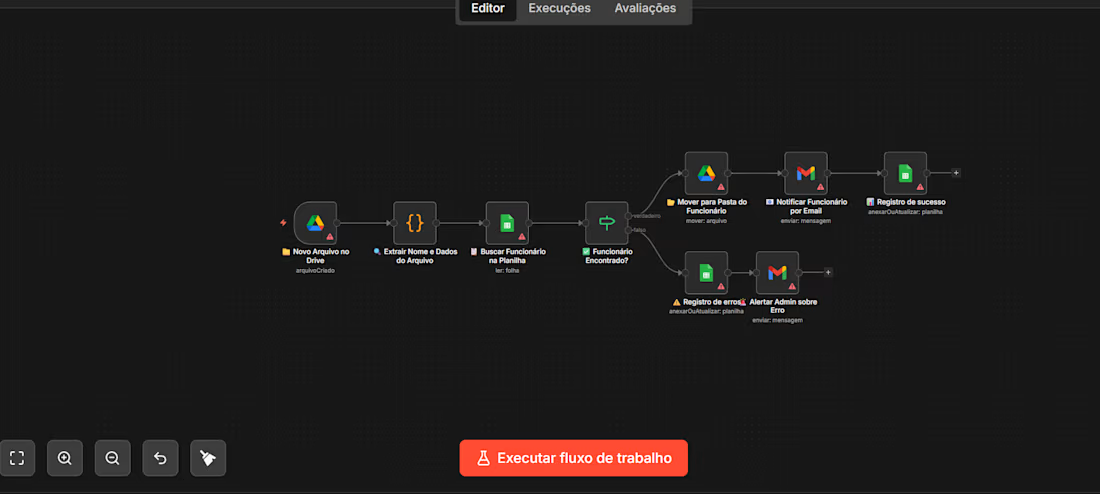
This workflow automates the process of onboarding new employee files into an organized Google Drive structure. Whenever a new file is uploaded to Drive, the system automatically identifies the employee, validates them against a roster, notifies them by email, and logs everything — all without any manual intervention.
Integrations Used
IntegrationPurposeGoogle DriveDetects new files and moves them to the correct folderGoogle SheetsStores the employee registry for lookupGmailSends notifications and admin alertsN8N Code NodeExtracts and parses data from the file
Flow Breakdown
1. Trigger — New File on Drive
Novo Arquivo no Drive
The flow is triggered automatically whenever a new file is created in a monitored Google Drive folder. This is the entry point — no manual action needed.
2. Extract Name & Data from File
Extrair Nome e Dados do Arquivo
A Code node parses the uploaded file to extract key information — primarily the employee's name and any relevant metadata embedded in the file name or content.
3. Search Employee in Spreadsheet
Buscar Funcionário na Planilha
Using the extracted name, the flow queries a Google Sheets spreadsheet (the employee registry) to check whether this person exists in the system.
4. Employee Found? (Conditional Branch)
Funcionário Encontrado?
A Switch/Router node evaluates the lookup result and splits the flow into two paths:
✅ Path A — Employee Found (True)
StepActionMove to Employee FolderThe file is moved to that employee's dedicated Google Drive folderNotify Employee by EmailA Gmail message is sent to the employee confirming the file was receivedSuccess LogA record is written to a Google Sheets log (append/update)
❌ Path B — Employee Not Found (False)
StepActionError LogThe failed attempt is recorded in a separate Google Sheets error logAlert Admin by EmailGmail sends an alert to the administrator reporting the unrecognized file
Key Features
✅ Fully automated — triggered by file upload, zero manual steps
✅ Smart file routing — files land in the right employee folder automatically
✅ Validation layer — cross-references a live employee spreadsheet before acting
✅ Dual-path error handling — failures are logged and the admin is immediately notified
✅ Audit trail — both successes and errors are recorded in Google Sheets
✅ Email notifications — employees and admins are kept in the loop automatically
0
40
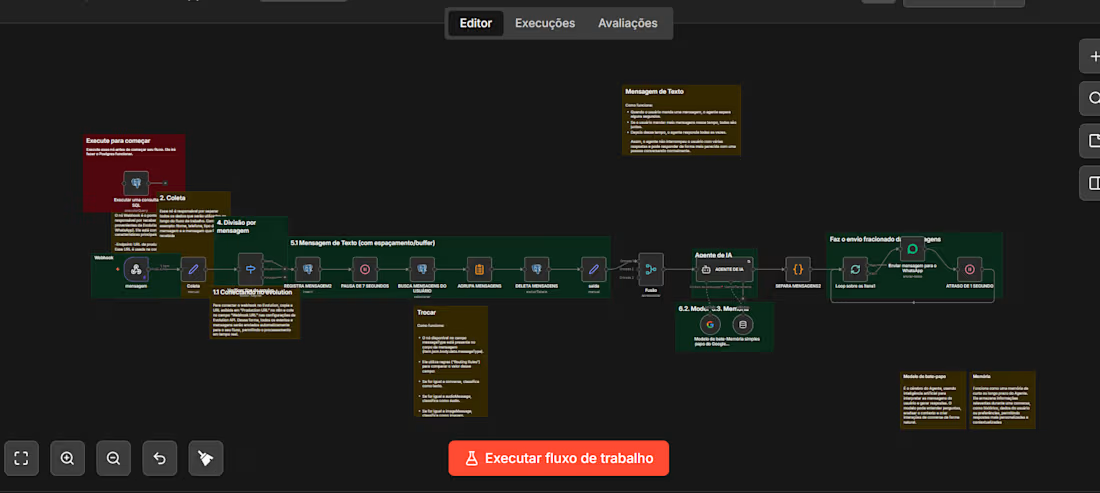
N8N WhatsApp AI Agent Flow — Portfolio Explanation
Here's a clear breakdown of your automation workflow for your portfolio:
1
88
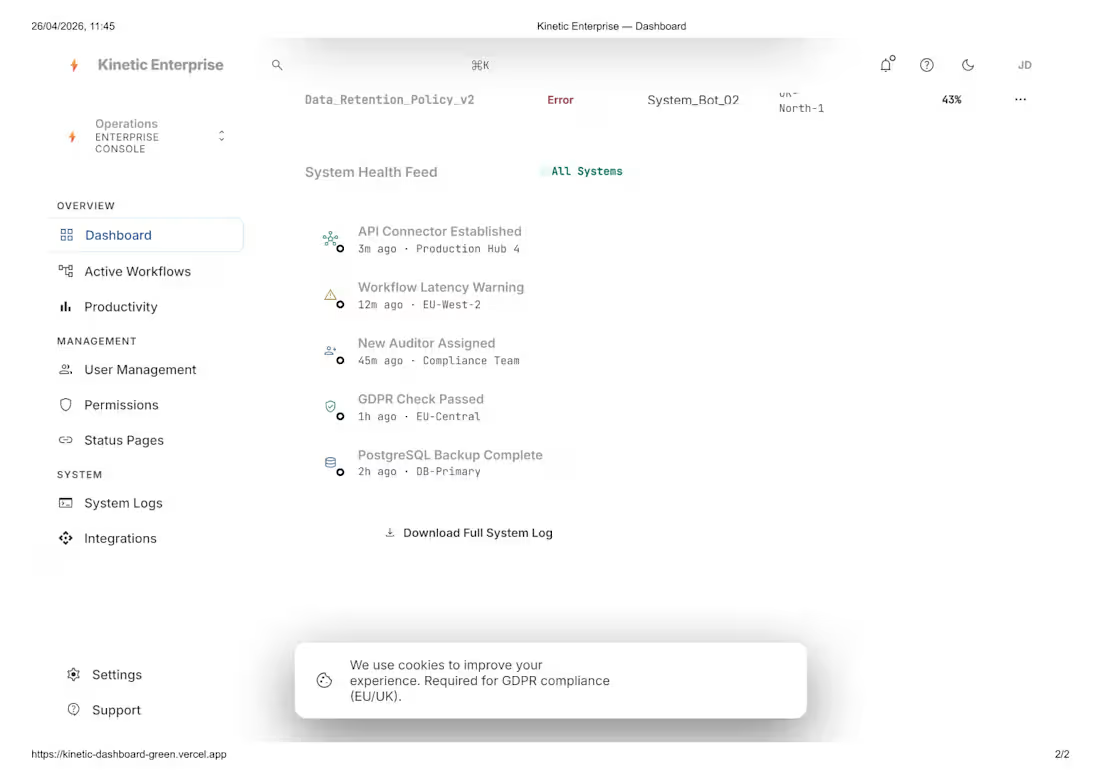
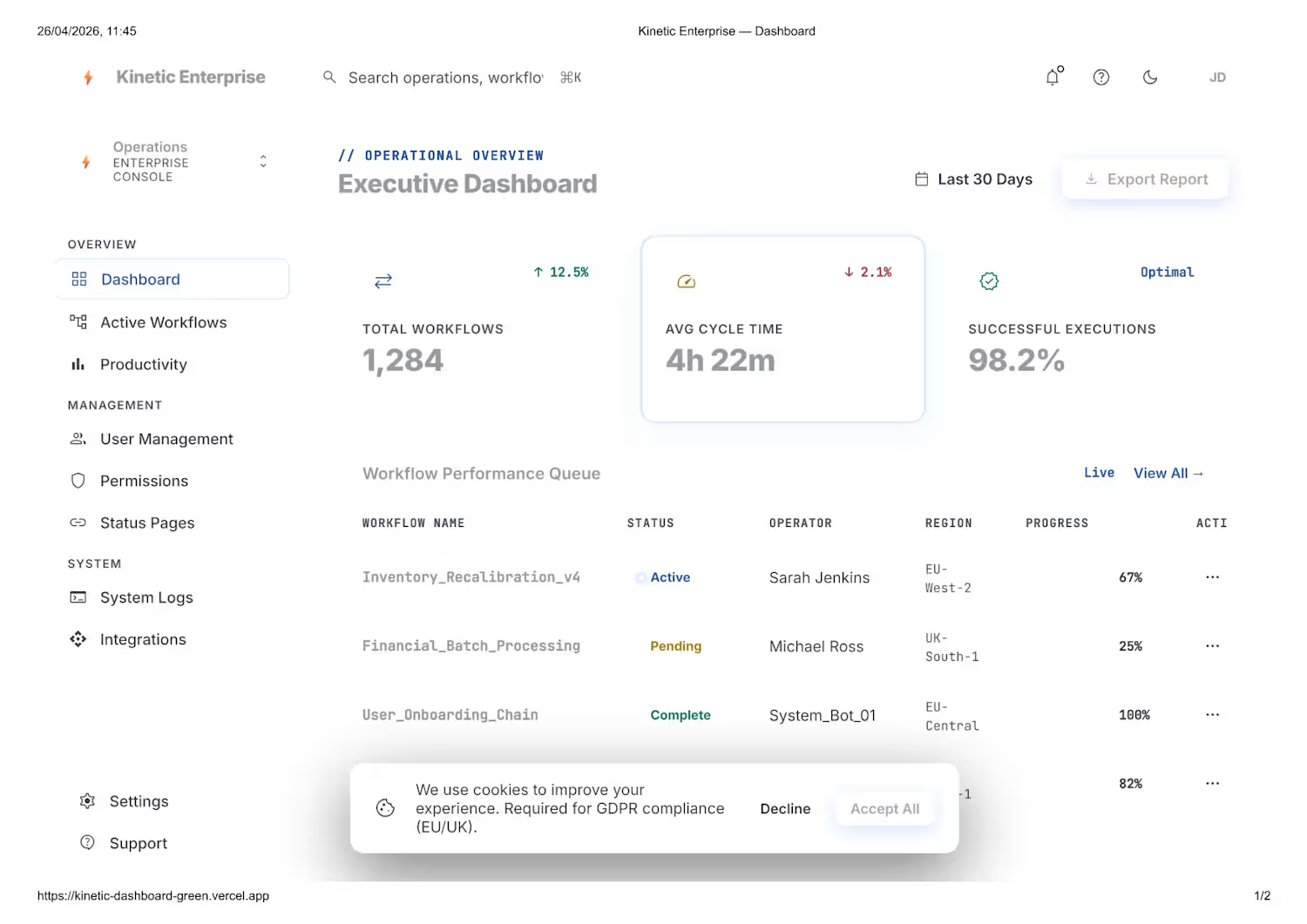
Kinetic Dashboard — SaaS Front-End Experience
Kinetic Dashboard is a high-performance front-end built for modern SaaS applications, focused on usability, scalability, and real-time data-driven decision making.
This project was developed using solid engineering and product design principles, delivering a smooth, intuitive, and highly responsive user experience.
🔹 Key Features & Strengths
1. Modern data-driven UI/UX
Clean and professional interface with clear visual hierarchy, making it easy to analyze critical metrics such as performance, workflows, and operational insights.
2. Scalable architecture (SaaS-ready)
Built to scale, enabling seamless integration with multiple services, APIs, and environments (multi-region and multi-tenant ready).
3. Optimized performance
Fast rendering, reusable components, and efficient state management ensure smooth performance even with large data volumes.
4. Consistent Design System
Standardized visual patterns (colors, typography, spacing, components) for easier maintenance and long-term product evolution.
5. Executive dashboard focus
Strategic data visualization with clear KPIs, trend indicators (↑ ↓), and quick insights for decision-making.
6. User-centered experience
Intuitive navigation with a structured sidebar, visual feedback (status, alerts, progress), and quick actions like report export.
7. Compliance-ready (GDPR & UX best practices)
Includes essential components such as cookie consent and privacy-focused UX for global applications.
8. Modular and reusable components
Well-structured component system that simplifies maintenance, testing, and scalability.
💡 Technologies & Best Practices
Component-based architecture
API integrations
Fully responsive design
Clean Code principles
Accessibility and readability focus
🚀 Outcome
A robust, elegant, and production-ready SaaS dashboard, ideal for companies that need to monitor operations, workflows, and performance in real time with clarity and efficiency.
If you're looking for a professional SaaS front-end focused on performance, scalability, and user experience, Kinetic Dashboard represents the level of quality I deliver.
Link - kinetic-dashboard-hmdphc48w-heberconrado-4074s-projects.vercel.app (https://kinetic-dashboard-hmdphc48w-heberconrado-4074s-projects.vercel.app)
0
58