Freelance Presentation Designers in NairobiFreelance Presentation Designers in Nairobi
Administrative Virtual Assistant | AI Automation of workflow
10
Followers
Administrative Virtual Assistant | AI Automation of workflow
Cover image for AI-Powered Gmail Inbox Assistant: Turning
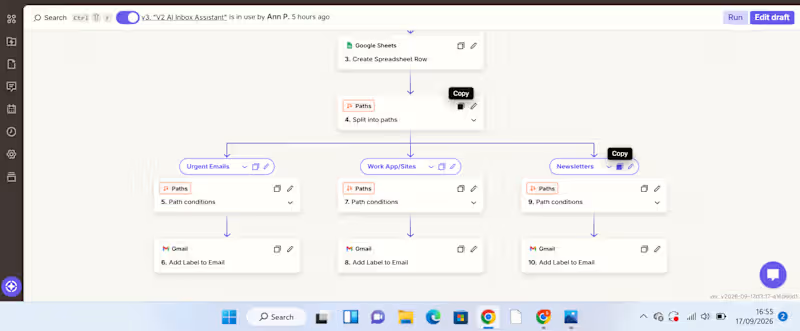
AI-Powered Gmail Inbox Assistant: Turning Email Overload into an Organized Workflow A busy inbox can become a productivity problem. For a VA or business owner handling a high volume of emails, manually reading every message, deciding its priority, summarizing it, determining what action is needed, and organizing it takes time. And when everything sits in one inbox, important messages can easily get lost among routine notifications and newsletters. I built an automation to solve that problem. The Solution I created an AI-powered Gmail inbox assistant that captures, analyzes, organizes, and records incoming emails automatically. The workflow starts when a new email arrives in Gmail. New Gmail β†’ AI analyzes the email β†’ Information is recorded in Google Sheets β†’ Zapier Paths route the email β†’ Gmail label is applied The AI extracts useful information from each email, including: Priority – how urgently the email needs attention Email summary – a concise explanation of what the message is about Recommended action – what should be done next Service/category – used to determine how the email should be handled The information is then captured in a Google Sheet, creating a structured record that can be reviewed, tracked, and used for further workflows. From there, Zapier Paths use the classification to route the email to the appropriate action. For example: Urgent email β†’ AI identifies the priority and summarizes the message β†’ information is recorded in Google Sheets β†’ Urgent Path runs β†’ Gmail applies the Urgent label. WorkApp/Sites notification β†’ AI identifies the category β†’ details are recorded in Google Sheets β†’ WorkApp/Sites Path runs β†’ the corresponding Gmail label is applied. Newsletter β†’ AI classifies and summarizes it β†’ information is recorded in Google Sheets β†’ Newsletter Path runs β†’ the Newsletters label is applied. What Problem Does This Solve? This automation addresses several repetitive administrative tasks at once. Instead of manually opening emails, interpreting them, recording important details, and organizing them, the workflow handles the first layer of processing automatically. It helps create: Less manual sorting Emails are categorized automatically. Better visibility The Google Sheet provides a structured overview of incoming messages, their priority, summaries, and recommended actions. Faster prioritization Users can identify emails requiring attention without reading through the entire inbox first. A searchable record Important email information is captured in one place instead of remaining buried inside an inbox. How Businesses Can Use It The workflow can be adapted to different businesses and inboxes. For example, a company could create categories such as: Client enquiries | Leads | Support requests | Finance | Internal communication | Urgent | Newsletters The Google Sheet can then become a simple operational dashboard or the starting point for additional automations. For example, a business could later extend the workflow to: Urgent email β†’ notify the responsible team member Client enquiry β†’ create a lead in a CRM Follow-up required β†’ create a task Support request β†’ route to the appropriate team This makes the workflow more than an inbox organizer. It can become part of a wider business process automation system. Tools Used Gmail – captures incoming emails and applies labels AI by Zapier – analyzes and classifies email content Google Sheets – stores the email priority, summary, recommended action, and category Zapier Paths – applies conditional logic and routes emails based on their classification What This Project Demonstrates My approach to automation is simple: Find the repetitive problem first. Then build the system around it. This project started with a common administrative problemβ€”too much email and too much manual sortingβ€”and turned it into a workflow that can analyze information, structure it, make routing decisions, and trigger actions automatically. I'm building my skills in AI automation with a VA mindset: understanding the business problem first, then creating practical systems that reduce manual work and improve how information flows.
1
70
Cover image for AI-Powered Client Enquiry Automation
Project Overview:
I
AI-Powered Client Enquiry Automation Project Overview: I built an AI-powered client enquiry automation workflow using Zapier, Google Forms, Google Sheets, AI by Zapier, Gmail, and Google Calendar. The goal was to automate the initial handling of client enquiries from receiving the enquiry to understanding the client's needs, sending an acknowledgement, and creating a follow-up task. The Problem: Managing client enquiries manually can be repetitive and time-consuming. Each new enquiry needs to be reviewed, categorized, summarized, responded to, and followed up. Without a structured process, it's easy for enquiries to be delayed or follow-ups to be missed. The Solution: I designed a workflow that automates these repetitive administrative tasks while using AI to analyze the information provided by the client. The automation follows this process: Client submits enquiry ↓ Google Sheets captures the enquiry ↓ AI analyzes the enquiry ↓ Gmail sends an acknowledgement ↓ Google Calendar creates a follow-up How It Works: 1. Enquiry Collection. The client submits their details and enquiry through a Google Form. The information is automatically recorded in Google Sheets. 2. AI Analysis. AI by Zapier reviews the enquiry and extracts key information such as the service category, priority, concise summary of the client's needs, and recommended next action. This eliminates the need to manually review every enquiry just to determine what it is about and how it should be handled. 3. Automated Client Response. After the enquiry is processed, Gmail automatically sends the client an acknowledgement, ensuring they receive a timely response. 4. Follow-Up Management. The workflow creates a Google Calendar follow-up, helping ensure that the enquiry doesn't get lost after the initial response. Result: The completed workflow turns a manual enquiry process into a structured automated system: Capture β†’ Analyze β†’ Respond β†’ Follow Up The key improvement is the use of AI as a decision-making layer, rather than simply moving information from one application to another. This demonstrates how AI automation can reduce repetitive administrative work, improve response consistency, and help businesses stay organized with client enquiries. Tools Used: Zapier | AI by Zapier | Google Forms | Google Sheets | Gmail | Google Calendar Skills Demonstrated: AI Automation β€’ Workflow Design β€’ Administrative Automation β€’ AI Prompting β€’ Client Enquiry Management β€’ Email Automation β€’ Calendar Automation β€’ Process Optimization
4
4
1.2K
Graphic Designer Making Your Brand Stand Out
Brand Designer & Content Strategist | Purpose-Driven
5.0
Rating
35
Followers
Brand Designer & Content Strategist | Purpose-Driven
Cover image for PREMIUM BRAND DECK FOR Galaxy
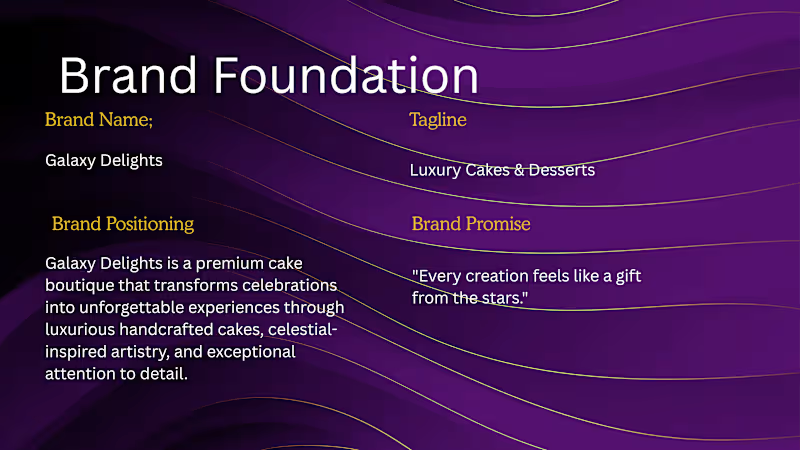
PREMIUM BRAND DECK FOR Galaxy Delights Designed a complete luxury brand identity system for Galaxy Delights, a premium cakes and desserts brand inspired by celestial elegance and handcrafted indulgence. The project involved developing a cohesive visual identity that positioned the brand as a high-end dessert experience rather than a traditional bakery. Drawing inspiration from cosmic imagery, luxury hospitality brands, and premium confectionery packaging, I created a sophisticated design system centered around rich midnight tones, metallic gold accents, and celestial motifs. Scope of Work β€’ Brand Strategy & Positioning β€’ Logo Design & Logo Variations β€’ Brand Guidelines Development β€’ Color Palette & Typography System β€’ Visual Mood Board Creation β€’ Packaging Design Concepts β€’ Luxury Cake Box Mockups β€’ Branded Tissue Paper & Ribbon Concepts β€’ Thank You Cards & Product Tags β€’ Social Media Template System β€’ Instagram Feed & Story Templates β€’ Brand Voice & Messaging Framework Design Outcome The final identity combines luxury, craftsmanship, and imagination through a premium visual language that reflects the brand's promise of transforming celebrations into memorable experiences. The packaging and social media system were designed to ensure consistency across customer touchpoints while creating a distinctive and recognizable market presence. Deliverables A comprehensive brand kit including visual identity guidelines, packaging concepts, social media assets, marketing collateral, and scalable design systems ready for implementation across digital and physical platforms.
1
78
Your VA for Strategy, Canva Design & Getting Things Done
5.0
Rating
8
Followers
Your VA for Strategy, Canva Design & Getting Things Done
An experienced UI/UX designer in Figma, Framer & Adobe suite

Executive Virtual Assistant | Save 30+ Hours a Week
11
Followers
Executive Virtual Assistant | Save 30+ Hours a Week
Presentations, Infographics & Graphic Design Pro