Frontend Development Projects in KarachiFrontend Development Projects in KarachiCase Study: Turning Interview Prep into Structured, Real-Time Coaching
Most candidates do not struggle because they lack potential. They struggle because interview preparation is usually fragmented, repetitive, and hard to measure.
You can read guides, rehearse answers in your head, and watch endless advice videos, but none of that truly recreates the pressure of a real interview. And even when candidates do practice, they rarely get clear, actionable feedback on how they performed.
That was the gap AgentPrep AI set out to solve.
AgentPrep AI was designed as an intelligent interview coach, a platform that simulates realistic interview scenarios, listens to responses, and gives users personalized feedback so they can improve with every session.
The Challenge
Interview preparation is often far less effective than it should be.
For most users, realistic practice is time-consuming to set up. Simulating a proper interview requires structure, relevant questions, timing, and ideally someone capable of evaluating the answer. Most candidates do not have that.
Feedback is another major problem. Practicing alone may build familiarity, but it does not reveal whether an answer was clear, confident, relevant, or persuasive. Without feedback, users repeat the same weaknesses without knowing it.
There is also the issue of inconsistency. One practice session may feel productive, while the next is completely unstructured. Without a guided system, preparation quality varies too much to create reliable progress.
The challenge was to build a platform that made interview preparation feel realistic, structured, and measurably useful, not just interactive.
Our Approach
We approached AgentPrep AI as more than a mock interview tool. It needed to behave like an intelligent preparation system.
That meant designing an experience that could guide users from session setup to live verbal response to post-interview analysis without friction. Every part of the journey needed to feel intentional: choosing interview length, answering questions naturally through voice, receiving feedback instantly, and tracking growth over time.
The product had to do three things well at once.
First, it needed to simulate realistic interview conditions so users could practice under pressure rather than passively consume advice.
Second, it needed to generate personalized, actionable feedback that users could apply immediately.
Third, it needed to create a repeatable learning loop so preparation became structured and cumulative rather than random.
To support that experience, we built the platform using Next.js for a responsive product experience, Tailwind CSS for a clean and efficient interface system, Whisper AI for voice transcription, and Anthropic Claude Sonnet 4.5 to power interview logic, feedback generation, and personalized response analysis.
The Solution
We delivered a fully functional AI-powered interview preparation platform built around realism, feedback, and continuous improvement.
1. AI-powered mock interviews
AgentPrep AI simulates realistic interview scenarios with dynamic questioning, giving users a more authentic practice environment than static question lists or generic prep materials.
Instead of simply reading prompts, users engage in an interview experience that feels active and responsive. This helps them practice not only what they say, but how they say it under realistic conditions.
2. Real-time voice interaction
The platform supports voice-based responses, allowing users to answer naturally rather than typing rehearsed text.
This was a critical part of the experience. Interviews are spoken, not written. By enabling voice interaction through Whisper AI, the platform helps users practice delivery, pacing, and verbal confidence in a way that is much closer to the real thing.
3. Instant, personalized feedback
After each response, the system provides AI-generated feedback that highlights strengths and identifies areas for improvement.
Using Claude Sonnet 4.5, the platform turns each answer into a coaching opportunity, helping users understand not just what they said, but how effectively they communicated it.
4. Personalized question sets and adaptive learning paths
To make preparation more relevant, the platform tailors question sets to the user and supports adaptive learning paths that evolve over time.
This creates a more focused experience and helps users spend time where it matters most. Rather than repeating the same generic prompts, they move through a preparation journey that becomes more useful with continued use.
5. Performance analytics dashboard
We also built a performance dashboard that helps users track progress over time.
This gives the platform a coaching layer, not just a simulation layer. Users can see how they are improving, where they still need work, and whether their preparation is becoming more consistent and effective.
Product Experience
The platform was designed to guide users through interview preparation in a way that feels simple, focused, and encouraging.
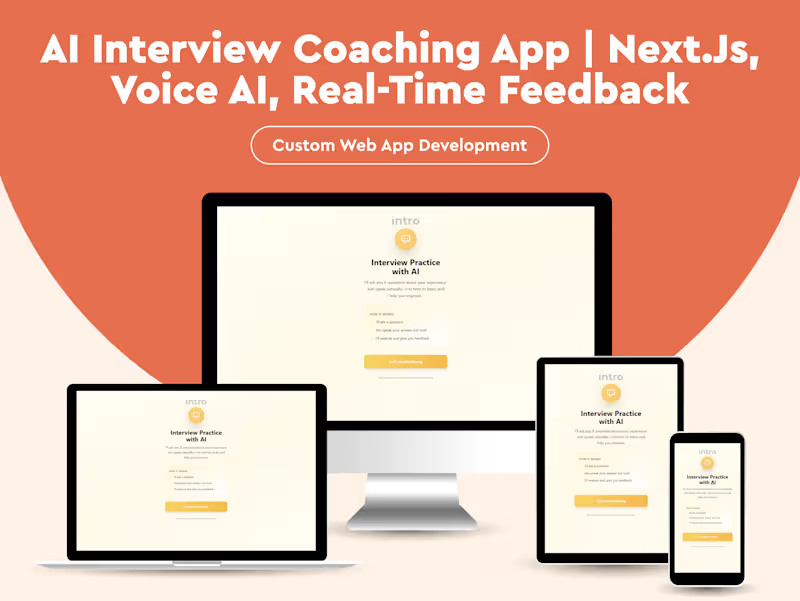
Session introduction screen
The first screen introduces users to the AI-driven mock interview experience and clearly explains how the session works. It sets expectations for verbal answers, real-time feedback, and the interactive nature of the interview flow, helping users feel prepared before they begin.
Interview length selection
Users can choose between a short or long mock interview depending on the time they have available and the depth of practice they want. This flexibility makes the platform more usable in real-world preparation routines.
Live question and voice response screen
During the session, users are presented with a question and prompted to respond through voice input. The interface keeps attention on the answer itself, creating a focused environment that mirrors live interview conditions.
Feedback screen
Once the response is complete, the platform delivers AI-generated feedback that points out what worked well and what can be improved. This makes each session feel constructive and actionable rather than purely evaluative.
The Impact
AgentPrep AI transformed interview preparation from a loosely structured activity into a guided, feedback-driven system.
Users were able to prepare 75 percent more efficiently, reducing the time and friction typically involved in realistic interview practice.
The platform also helped improve confidence and response quality by giving users a safe place to practice out loud, receive personalized feedback, and refine their answers over time.
Most importantly, it created a more consistent preparation process. Instead of relying on scattered resources and irregular practice habits, users gained a structured system with measurable progress built in.
AgentPrep AI now helps candidates prepare smarter, practice more effectively, and walk into interviews with stronger answers and greater confidence.
Tech Stack
1. Core Technologies
2. Next.js
3. Tailwind CSS
4. Whisper AI
5. Anthropic Claude Sonnet 4.5
What Each Tool Enabled
Next.js powered the application experience and supported a fast, responsive interview flow.
Tailwind CSS helped create a clean, consistent, and user-friendly interface.
Whisper AI enabled voice transcription so users could answer naturally in spoken form.
Anthropic Claude Sonnet 4.5 powered interview simulation, personalized feedback, and adaptive coaching logic.
Why This Matters
Interview preparation is one of those areas where effort does not always translate into results. People can spend hours preparing and still feel unsure because the process lacks realism, structure, and feedback.
AgentPrep AI solves that by turning preparation into an active learning experience.
It does not just help users practice more. It helps them practice better, with realistic simulations, immediate feedback, and a system designed to improve performance over time.
That is what makes the platform valuable. It bridges the gap between preparation and actual readiness.
I designed this concept website for a custom home builder. The idea was to let people design their house themselves and see a real price before they ever speak to a salesperson. The challenge was to make something as complex as building a home feel simple, visual and even fun.
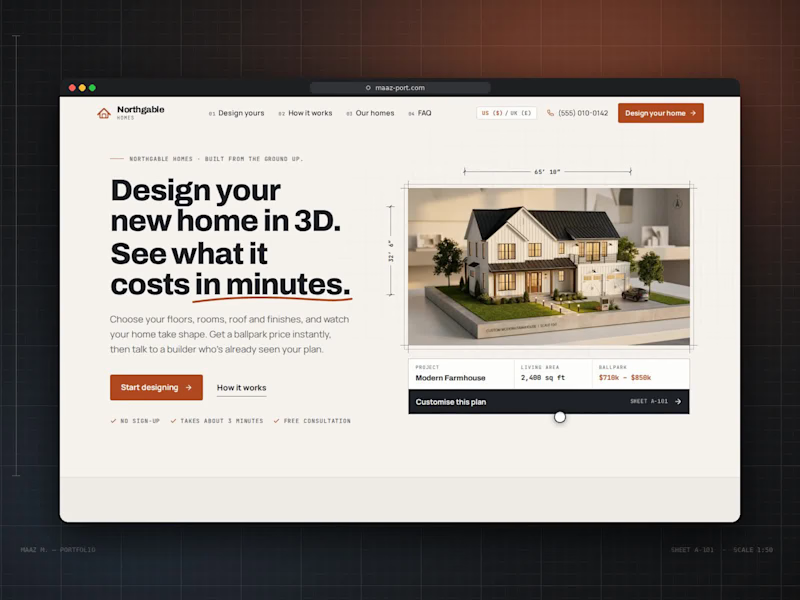
Hero. The headline makes the promise in bold, tightly set type: "Design your new home in 3D. See what it costs in minutes.", with a hand-drawn rust underline beneath "in minutes." On the right, a model farmhouse sits inside an architect's frame with dimension lines (65′ 10″ × 32′ 6″) and a north arrow. Under it, a project card shows the design name, living area and ballpark price, with a dark "Customise this plan" bar. Three small checkmarks, "No sign-up," "Takes about 3 minutes" and "Free consultation," remove hesitation before the visitor starts.
Visual language. I built the whole site around an architectural drawing set:
Numbering: every section is labelled like a blueprint sheet (A-102, A-201, A-301), and monospace labels read like annotations on a plan.
Grid: a faint drafting grid runs behind the page.
Palette: warm paper cream, charcoal ink and one rust-orange accent for buttons and key prices.
The navigation is numbered too (01 Design yours, 02 How it works, 03 Our homes, 04 FAQ), with a US/UK currency switch and a click-to-call phone number.
The 3D designer. This is the heart of the site. On the left, a live 3D model of the house; on the right, a step-by-step panel:
Start: choose from four starting designs (Contemporary, Modern Farmhouse, Traditional, Single-Storey) or start from scratch.
Size: storeys, a living-area slider, a rectangle or L-shaped footprint, ceiling height and basement.
Rooms: steppers for bedrooms and bathrooms, plus chips for a home office, laundry, pantry or media room.
Roof: shape, pitch, material and colour swatches.
Exterior: cladding type, colour and accent options like a stone base.
Windows: window count, window style, rear doors and balconies.
Outdoor: garage size, porch and patio, plus a roof terrace or fireplace.
Finish: Essential, Premium or Luxury, ending on a summary.
Every choice rebuilds the 3D house instantly, and a live estimate at the bottom of the panel updates with each decision. The viewer has its own controls: front, back, side and aerial cameras; a night mode with glowing windows; an inside cutaway of the floor plan; dimension overlays; and zoom.
Supporting the decision. The rest of the page answers what a buyer asks next:
"Three steps from first sketch to front door" uses large outlined numbers and simple line icons.
"One team. One price. No surprises." lists the builder's guarantees.
"Start from a favourite" shows four home designs as plan cards with specs and prices, each loading straight into the designer.
The build schedule is a Gantt-style timeline across 11 months, from consultation to handover, separating "with you" steps from "we handle it."
Client notes and FAQ: client notes pull out one large quote, and the FAQ gives five straight answers.
The page closes on a dark section, "Your home, designed in minutes.", with a line drawing of a house and two clear actions: design your home or talk to the team.