Freelancers using CSS in IslamabadFreelancers using CSS in Islamabad
Full-stack developer building high-impact web products.
$25k+
Earned
3x
Hired
5.0
Rating
51
Followers
Full-stack developer building high-impact web products.
SaaS| Browser Extension Developer| Save Time with automation
New to Contra
SaaS| Browser Extension Developer| Save Time with automation
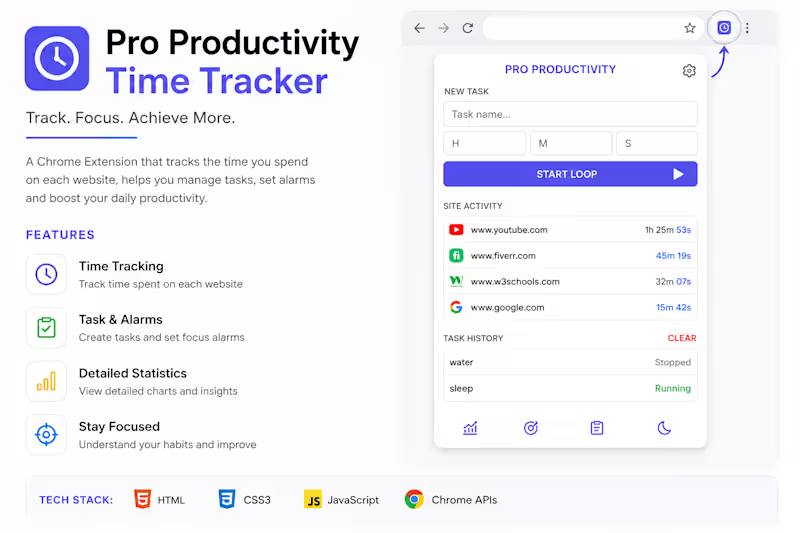
Cover image for Description
Pro Productivity is a Chrome
Description Pro Productivity is a Chrome extension designed to help users understand and improve their online habits. The extension automatically tracks the time spent on each website, providing detailed insights into daily browsing behavior. Users can create tasks, set focus timers, and receive reminders to stay productive throughout the day. The extension features real-time website activity tracking, task management, focus alarms, and productivity analytics in a clean and intuitive interface. By visualizing browsing patterns and tracking task progress, users can identify distractions, manage their time more effectively, and build better productivity habits. Key Features ✅ Website Time Tracking Automatically tracks time spent on every website. Displays real-time browsing activity. ✅ Task Management Create and manage productivity tasks. Monitor active and completed tasks. ✅ Focus Timers & Alarms Set custom focus sessions. Receive alerts when task timers expire. ✅ Activity Dashboard View browsing history and usage statistics. Analyze productivity trends over time. ✅ Clean User Interface Modern dark-themed design. Easy-to-use and distraction-free experience. Technologies Used React WXT Framework JavaScript Chrome Extension APIs Local Storage HTML5 CSS3 Problem Solved Many users underestimate how much time they spend online. Pro Productivity provides clear visibility into browsing habits while helping users stay focused on important tasks through time tracking and smart reminders. Results The extension enables users to: Track online activity accurately. Reduce distractions. Improve time management. Increase productivity through focused work sessions. Gain valuable insights into their daily digital behavior. Role: Full-Stack Chrome Extension Developer Project Type: Productivity & Time Management Tool Platform: Google Chrome Extension
1
40
Expert Website Designer: Boost Your Online Presence

Expert Custom Website Developer
1x
Hired
5.0
Rating
1
Followers
Expert Custom Website Developer
AI Architect | SaaS, Voice AI & Automation
9
Followers
AI Architect | SaaS, Voice AI & Automation
Web Developer | UI/UX| 3D Product Animation |
9
Followers
Web Developer | UI/UX| 3D Product Animation |

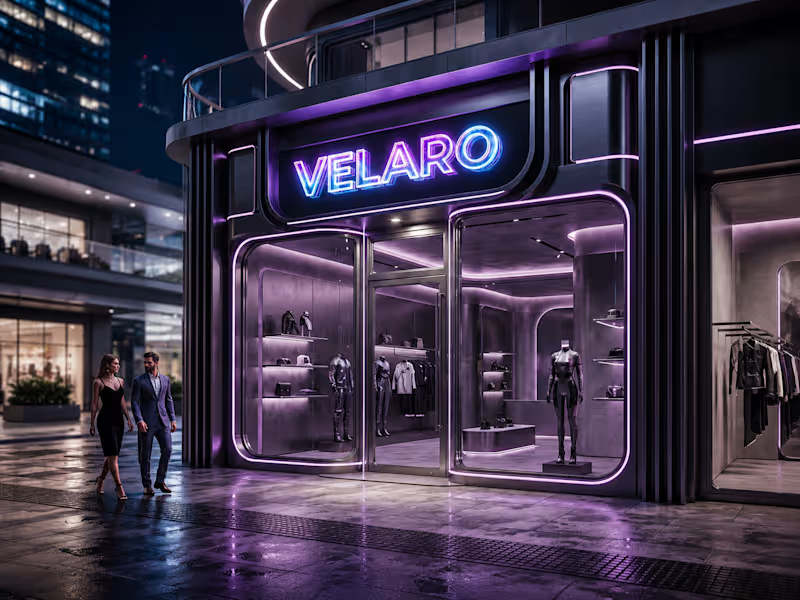
Cover image for 🖤 Velaro — Technical Architecture
🔗
🖤 Velaro — Technical Architecture 🔗 Live Website https://saif-velaro-clothing-brand.netlify.app 📌 Overview Velaro is a single-page application (SPA) for a fashion/clothing brand, built with React + TypeScript, bundled by Vite, and styled with Tailwind CSS. The entire UI renders on one HTML page and updates dynamically as the user scrolls, searches, or interacts with the cart — no full page reloads. The architecture follows a standard modern frontend pattern: a single entry point boots the app, a root App component composes independent section components, and a global context manages shared state (the shopping cart) across all of them. ⚙️ Build & Tooling Layer These files configure how the project compiles, lints, and runs — they aren't part of the visible website, but control everything behind it. vite.config.ts — Configures Vite, the build tool/dev server. Defines how .tsx/.ts files are compiled, how the dev server runs (npm run dev), and how the production bundle is generated (npm run build). tsconfig.json — Root TypeScript config — points to the two more specific configs below via project references. tsconfig.app (http://tsconfig.app).json — TypeScript rules specifically for the application code in src/ (JSX handling, module resolution, strictness, the @/ path alias). tsconfig.node.json — TypeScript rules for Node-context files (like vite.config.ts itself), since those run outside the browser. tailwind.config.js — Configures Tailwind CSS — defines the design system (colors, spacing, fonts) and which files Tailwind scans to generate only the CSS classes actually used. postcss.config.js — Configures PostCSS, the tool that processes Tailwind's output and applies vendor prefixing/optimization during build. eslint.config.js — Defines linting rules — catches code-quality issues, unused variables, and React/TypeScript best-practice violations during development. package.json — Lists all dependencies (React, Vite, Tailwind, etc.) and defines the npm scripts (dev, build, preview). package-lock.json — Locks exact dependency versions so the build is reproducible across machines. .gitignore — Tells Git which files/folders to exclude from version control (e.g. node_modules, dist). index.html — The single real HTML file. Contains a root <div> that React mounts into — everything else is injected by JavaScript. dist/ — Auto-generated production build output (plain HTML/CSS/JS) created by npm run build. This is the folder actually deployed to Netlify. node_modules/ — Auto-generated folder holding all installed dependencies (created by npm install, never edited manually). 🚪 Application Entry & Root src/main.tsx — The true entry point of the app. Imports React, imports App.tsx, and mounts it into the <div> inside index.html. This is the first application code that runs. src/App.tsx — The root component. Doesn't contain page content itself — instead it imports and arranges every section component (Navbar, Hero, About, etc.) in order, and wraps everything in the CartProvider so cart state is available app-wide. src/index.css — Global stylesheet — imports Tailwind's base/utility layers, applied once at the root so every component can use Tailwind classes. src/vite-env.d.ts — TypeScript type declarations for Vite-specific features (like importing images/CSS as modules) — lets TypeScript understand syntax that isn't standard JavaScript. 🛒 State Management src/cart.tsx — Implements the CartProvider, a React Context that holds global cart state (items, quantities, totals) and exposes functions to add/remove items. Any component wrapped inside it (via App.tsx) can read or update the cart without prop-drilling. src/data.ts — Static data module — likely product listings, collection info, or other content consumed by components like FeaturedCollection and Showcase, kept separate from UI logic. 🧱 Component Layer (src/components/) Each file is a self-contained, single-responsibility UI section. App.tsx stacks them vertically to form the full page. Navbar.tsx — Persistent top navigation — branding, menu links, and likely triggers for search/cart. Hero.tsx — The primary landing banner — headline, tagline, and call-to-action (e.g. "Shop Collection"). HeroCanvas.tsx — A visual/animated layer paired with Hero.tsx — likely a canvas-based or decorative background effect behind the hero text. FeaturedCollection.tsx — Renders a curated set of products, pulling structured data from data.ts. About.tsx — Brand-story section — static content describing the label's identity. Lookbook.tsx — A style/editorial gallery — visually presents outfits or campaign imagery. Showcase.tsx — An additional highlight section, likely for a specific collection, drop, or promotional content. Testimonials.tsx — Displays customer reviews/social proof. Newsletter.tsx — Email capture form/section for marketing signups. SearchOverlay.tsx — A modal/overlay component for in-site product search, toggled from the Navbar. CartDrawer.tsx — A slide-out panel UI that reads from the CartProvider (cart.tsx) to display current cart items and totals. Footer.tsx — Bottom-of-page section — links, contact details, social icons. 🔄 How It All Connects (Data Flow) The browser loads index.html, which pulls in the compiled JS bundle. main.tsx runs first and mounts App.tsx into the page. App.tsx wraps all sections in CartProvider, so cart state is shared without passing props down manually through every component. Each section component renders independently — some are purely static/presentational (About, Footer), while others are interactive and tied into shared state (CartDrawer, SearchOverlay). Tailwind classes used throughout every component are compiled once into index.css based on what's scanned via tailwind.config.js. On npm run build, Vite compiles and bundles all of this into optimized static files inside dist/ — which is what gets deployed to Netlify and served to visitors. 🧠 Why This Structure Works Separation of concerns — each component owns one visual section; layout composition happens only in App.tsx. Centralized state — cart logic lives in one file (cart.tsx) instead of being duplicated across components. Data/UI separation — data.ts keeps content separate from rendering logic, making it easy to update products without touching component code. Type safety — TypeScript configs enforce consistent typing across the whole src/ folder, catching errors before runtime. Optimized output — the dev-only tooling (Vite, Tailwind, ESLint, TS configs) never ships to production; only the final compiled dist/ bundle is deployed.
0
55
Cover image for StreamPro — Brand Website for
StreamPro — Brand Website for a Live Event Broadcasting Studio Live Website: saif-stream-pro-website.netlify.app (http://saif-stream-pro-website.netlify.app) What I built😍 A fully responsive, mobile and web based single-page marketing website for StreamPro, a Brisbane-based live-streaming production studio that broadcasts memorial services, weddings, sports events, and community occasions. The site was designed and developed from scratch to establish a premium, trustworthy brand presence and convert visitors into booking inquiries — working seamlessly whether accessed from a phone, tablet, or desktop. What it does🙌 The website guides visitors through a structured narrative — introducing the brand, building credibility, showcasing services, explaining the booking process, displaying social proof, and closing with a direct contact/quote form. It's built to load fast, adapt fluidly across mobile and web based environments, and feel as polished and reliable as the broadcast service it's selling. Core concepts & techniques applied💯 Semantic document structure — content organized into meaningful, accessible sections rather than generic divs, improving both SEO and screen-reader usability. Design system / design tokens — a centralized set of reusable variables (colors, gradients, typography, spacing) so the entire visual identity stays consistent and can be updated globally from one place. Responsive, mobile-first layout design — fluid grids and breakpoints so the layout adapts smoothly across mobile and web based screens without needing separate versions. Scroll-based interactivity — dynamic navbar states, scrollspy navigation (highlighting the active section as the user scrolls), and progressive scroll-reveal animations for content. DOM manipulation & event handling — mobile menu toggling, animated statistic counters, and form interaction logic, all built with vanilla JavaScript (no frameworks). Accessibility considerations — visible focus states, reduced-motion support for users sensitive to animation, and descriptive alt text on all imagery. Brand identity integration — a custom 3D gradient logo mark and supporting visual graphics applied consistently across the navigation, hero section, and footer to reinforce brand recognition. Conversion-focused UX — strategic placement of trust signals (stats, testimonials, direct phone contact) and a structured lead-capture form to turn visitors into inquiries. Outcome🚀 A performant, framework-free static website that's lightweight, cheap to host, easy to maintain, fully mobile and web based responsive, and built entirely around fundamental web development principles — structure, styling systems, interactivity, accessibility, and conversion design.
0
99
Frontend Developer / React / Vue / Next / Angualr / HTML&CSS
New to Contra
Frontend Developer / React / Vue / Next / Angualr / HTML&CSS

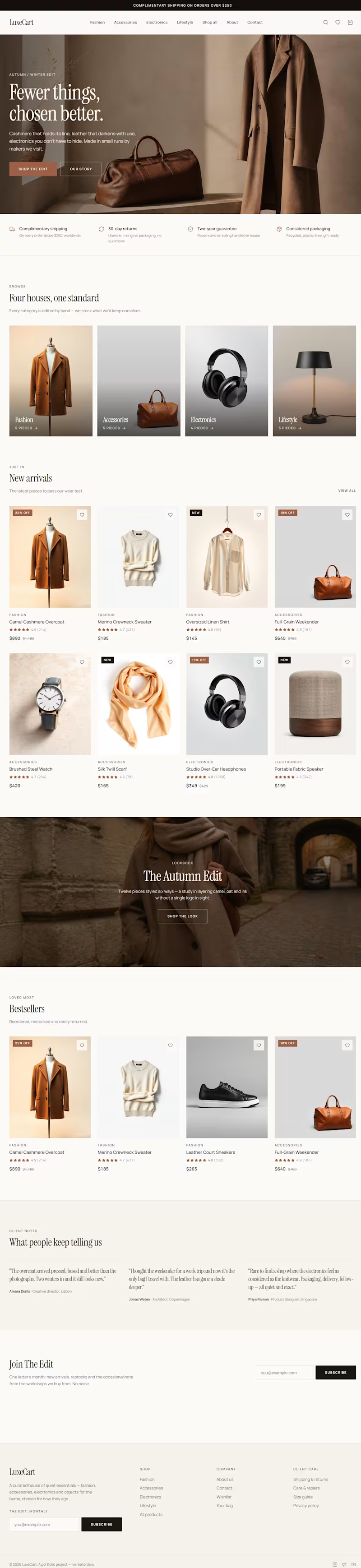
Cover image for LuxeCart — Premium E-commerce Website
LuxeCart
LuxeCart — Premium E-commerce Website LuxeCart is a modern, premium e-commerce website built to create a polished online shopping experience for fashion, accessories, electronics, and lifestyle brands. I designed and developed the frontend with a focus on premium UI/UX, responsive design, product discovery, conversion-focused layouts, and a smooth shopping journey across desktop and mobile. What I Built Modern e-commerce homepage designed for product discovery Responsive product listing and category pages Product cards with pricing, ratings, discounts, and wishlist actions Category-based browsing and filtering Interactive shopping cart with quantity controls Responsive cart drawer for a seamless shopping experience Dedicated checkout page with shipping selection Dynamic order summary and total calculations Mobile-first responsive layouts Clean, modern typography and premium visual design Demo checkout/payment interaction for portfolio purposes The Experience The shopping flow was designed around a simple conversion-focused journey: Discover products → Browse categories → View products → Add to cart → Checkout The goal was to make the interface feel luxurious and minimal while keeping the shopping experience intuitive and easy to use. Why This Project LuxeCart demonstrates how I turn an e-commerce concept into a production-style frontend experience with reusable components, responsive layouts, modern UI patterns, and a complete customer journey. It showcases my experience with e-commerce website development, React frontend development, responsive web design, UI implementation, and modern shopping experiences. Tech Stack React · TypeScript · Tailwind CSS · Responsive Web Design · Modern UI/UX · E-commerce Development · AI-Assisted Development Project Type E-commerce Website · Frontend Development · UI/UX Design · Responsive Web Development Looking for a Similar Website? I can build modern, responsive e-commerce websites and online stores for startups, businesses, brands, and product-based companies — from product browsing and cart experiences to polished checkout flows. Portfolio / Demo Project: This is a concept project created for demonstration purposes. No real orders or payment transactions are processed.
0
50
Webflow Expertise: Figma to Custom Code Solutions