Freelancers using Cloud Firestore in IndiaFreelancers using Cloud Firestore in India
Design, Build, AI, Automation
$50k+
Earned
19x
Hired
5.0
Rating
72
Followers
Design, Build, AI, Automation
Cover image for Tempies / LevMaps | Social
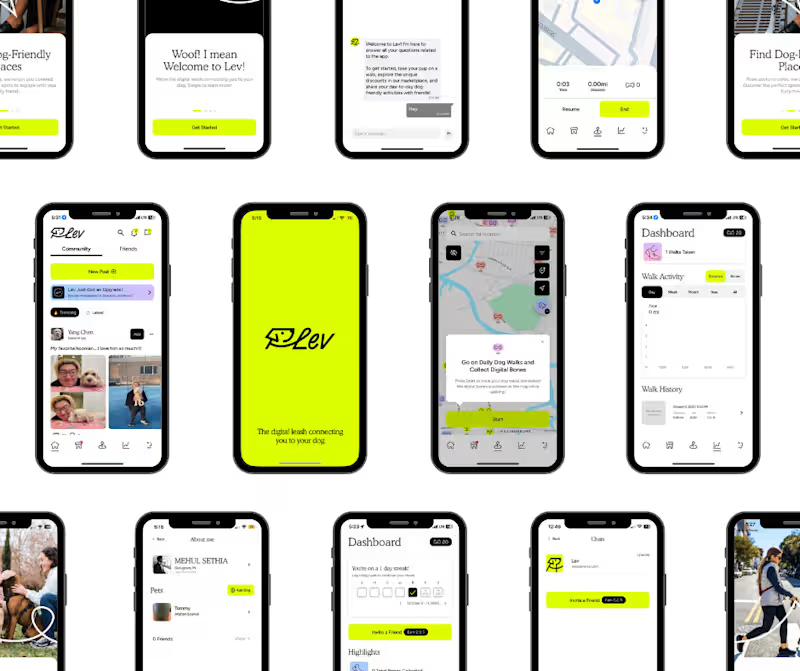
Tempies / LevMaps | Social Pet Walking, Discovery & Location App Flutter • Firebase • Shopify • Google Maps • iOS & Android Built a full-featured cross-platform mobile app that brings pet discovery, real-world exploration, social interaction, and commerce into one experience. Tempies / LevMaps lets pet owners discover nearby pets and places, connect with the community, track walks and journeys in real time, and access an integrated shopping experience, all from a single mobile app. I worked across the complete product lifecycle, from application architecture and complex mobile interactions to backend integrations and production deployment across iOS and Android. The app includes real-time GPS tracking and route visualization, interactive maps, user and pet profiles, social feeds, authentication, media and data management, and a Shopify-powered commerce layer. Firebase powers authentication, application services, analytics, performance monitoring, and crash reporting, while the mobile experience is built in Flutter for a consistent native experience across platforms. One of the more technically interesting parts was building the location experience beyond a basic map integration. The app handles live movement tracking, route plotting, distance calculation, journey state, and location permissions, including the additional native considerations required when tracking continues outside the foreground app experience. What we built: Cross-platform iOS + Android app • Real-time GPS & journey tracking • Interactive maps & route visualization • Social/community experience • Pet & user profiles • Authentication • Shopify commerce integration • Firebase backend & services • Crashlytics & performance monitoring • Native mobile permissions & integrations • TestFlight & Google Play deployment Tech stack: Flutter, Firebase, Shopify, Google Maps APIs, native iOS/Android integrations From product UI to real-time location infrastructure to App Store deployment, this was a proper end-to-end mobile build rather than a dressed-up web app in a mobile shell. Built for the real world. Literally. http://levmaps.com./
0
51
Founding AI Engineer, Agents, Automation, Cloud, Full-Stack
$1k+
Earned
8x
Hired
4.7
Rating
55
Followers
Founding AI Engineer, Agents, Automation, Cloud, Full-Stack
Tailor-Made iOS Solutions with a Decade of Expertise
$1k+
Earned
4x
Hired
5.0
Rating
70
Followers
Tailor-Made iOS Solutions with a Decade of Expertise
Mobile MVP Developer for Startups | Flutter, React Native.
5.0
Rating
5
Followers
Mobile MVP Developer for Startups | Flutter, React Native.
Cover image for Careezy
Turning everyday home-care visits into
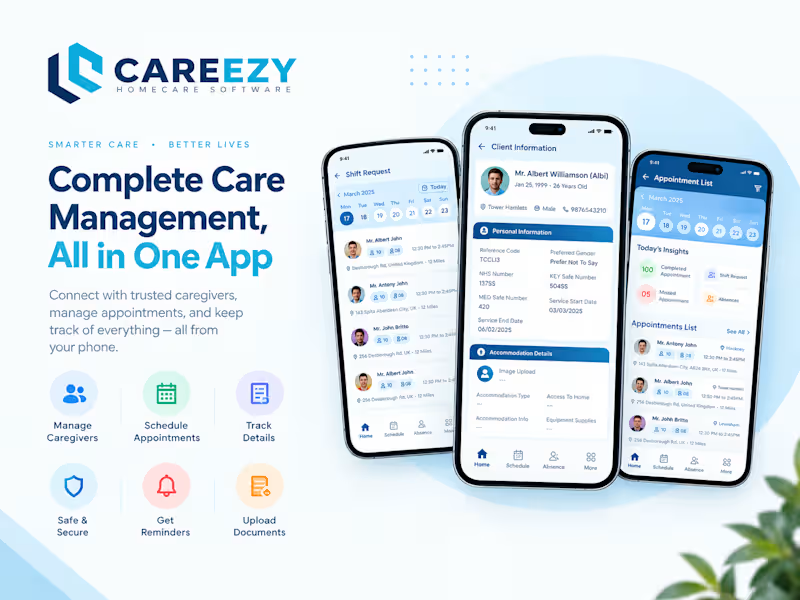
Careezy Turning everyday home-care visits into a structured, trackable workflow for caregivers. Overview Careezy is a mobile home-care management application designed to help caregivers manage client visits, medication schedules, service tasks, and care documentation from a single mobile experience. The app focuses on the caregiver's day-to-day workflow: arriving at a client's location, verifying the visit through GPS, clocking in, completing assigned care tasks, managing medication-related information, recording observations, and clocking out when the visit is complete. I worked on the mobile application with a focus on making these workflows simple, reliable, and practical for caregivers who need to use the app while actively providing care. The Problem Home-care visits involve more than simply showing up at a client's address. Caregivers need to know what tasks need to be completed, which medications require attention, what happened during previous visits, and how to document important observations. At the same time, care providers need confidence that scheduled visits are actually taking place at the client's location and that visit information is accurately recorded. Careezy brings these activities into one mobile workflow. GPS-based attendance helps validate that caregivers are physically near the client's address, while task tracking, medication information, notes, and reporting create a digital record of the visit. Key Features GPS-Based Clock-In / Clock-Out — Caregivers can record the start and end of a visit, with location validation restricting clock-in/out to a predefined radius around the client's location. Medication Management — Caregivers can view medication schedules and receive reminders to help ensure medications are handled at the appropriate time. Service Task Tracking — Each client visit can include an organized list of care/service tasks. Caregivers can mark tasks as completed so important activities are not missed. Care Plan Details — Client profiles provide access to relevant care-plan information, giving caregivers important context before and during a visit. Visit Notes & Reporting — Caregivers can document observations and visit details, supporting better communication and continuity of care. Appointment Notes — Appointment-related notes can be edited when information needs to be corrected or updated. Body Map — A dedicated body-map view provides a visual way to work with medication-related information. Client-Centric Workflow — The application organizes information around individual clients and their visits rather than forcing caregivers to manage disconnected workflows. Location Validation One of the more important implementation challenges was location-based attendance. A simple clock-in button could allow a caregiver to register a visit from anywhere. Careezy instead uses the client's stored location and a predefined radius to determine whether the caregiver is close enough to the client address to clock in or clock out. This creates a more reliable connection between the digital attendance record and the real-world care visit. Caregiver Workflow The core workflow is designed around the actual sequence of a home-care visit: View the assigned client and visit information. Review care-plan and medication details. Arrive at the client's location. Complete GPS-based location validation. Clock in. Review and complete assigned service tasks. Manage medication-related activities. Record visit observations and notes. Complete the visit. Clock out. This keeps the most important information available within the caregiver's mobile workflow instead of requiring multiple disconnected systems. Technical Challenges GPS Accuracy & Location Validation — Location-based attendance needs to account for real-world GPS accuracy while still enforcing the required client-location radius. Time & Timezone Handling — The application required attention to date/time handling, including fixes for timezone-related issues identified during production updates. Healthcare Workflow Usability — Caregivers may use the application while moving between tasks and clients, so workflows need to remain clear and require minimal unnecessary interaction. Production Reliability — The app has gone through multiple production iterations involving feature improvements, design updates, bug fixes, and timezone-related fixes. Platform Android & iOS Category Healthcare / Home Care / Caregiver Management Production Status Live application with ongoing production updates and improvements. Key Takeaways The most important lesson from Careezy was that healthcare workflow applications need to connect digital actions with real-world events. A clock-in feature by itself is simple. Making that clock-in meaningful requires location validation, accurate time handling, client-specific context, and a workflow that caregivers can use without slowing down the actual care process. Careezy combines these pieces into one focused mobile experience for home-care professionals.
1
39
Cover image for RentNest Mobile App Development
RentNest is
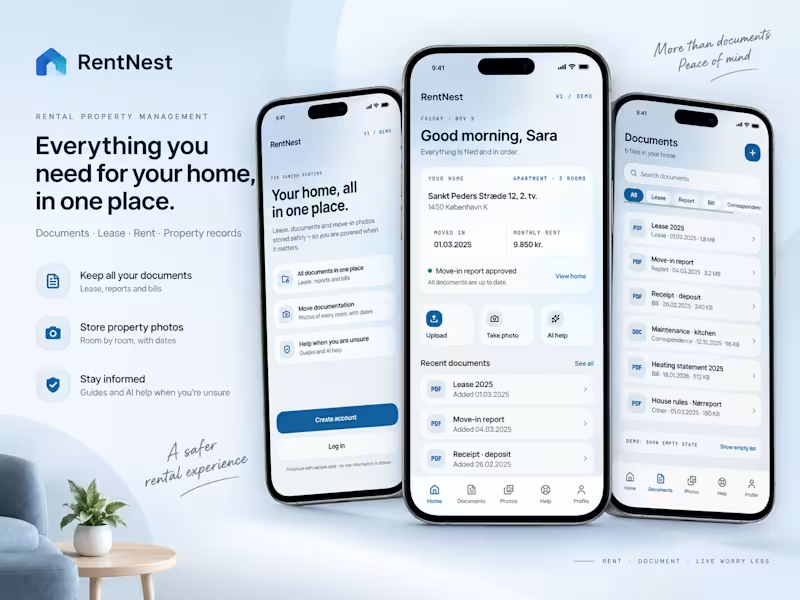
RentNest Mobile App Development RentNest is a mobile app that helps Danish renters manage their lease documents, move-in/move-out photo documentation, and tenancy questions in one place. I contributed as a Full-Stack Developer, building both the Flutter mobile client and the backend services powering document storage, photo management, and AI-assisted help with a focus on giving renters a reliable, all-in-one system for staying covered throughout their tenancy. My Role Full-stack development across Flutter mobile client and backend services Firebase integration for auth, data storage, and file handling Feature implementation for document management, photo documentation, and AI-driven help Quality assurance and testing across core user flows Technology Flutter Dart Firebase The work The app was built around three core renter needs: keeping lease and financial documents organized, documenting the condition of a home at move-in and move-out, and getting fast, reliable answers to common tenancy questions. On the document side, I built a categorized document library (Lease, Report, Bill, Correspondence) with search and file-type support for PDFs and other formats, so renters can quickly retrieve anything from their lease to deposit receipts and heating statements. For move documentation, I implemented a room-by-room photo capture flow with separate Move-In and Move-Out states, giving renters clear, dated visual evidence of a property's condition useful for resolving disputes at move-out. I also worked on the AI help experience, which lets renters ask questions grounded in their own lease and get guided answers alongside a structured help center covering topics like deposits, notice periods, and maintenance responsibilities. Using Flutter allowed the mobile app to be built and maintained from a single cross-platform codebase, while Firebase handled authentication, real-time data sync, and secure file storage for uploaded documents and photos. Alongside development, I carried out testing and quality checks across account creation, document upload, and photo capture flows to ensure a stable release. Outcome Delivered full-stack development for RentNest's renter-focused platform, including a Flutter mobile app with integrated document management, move-in/move-out photo documentation, and AI-assisted tenant support.
2
125
Flutterflow expert building Fintech Applications
1x
Hired
13
Followers
Flutterflow expert building Fintech Applications
I help startups and businesses bring their app ideas to life
Team Of Full Stack Dev, Dedicated Design & QA
New to Contra
Team Of Full Stack Dev, Dedicated Design & QA
Cover image for Project Title: ThoppuNDV – Civic
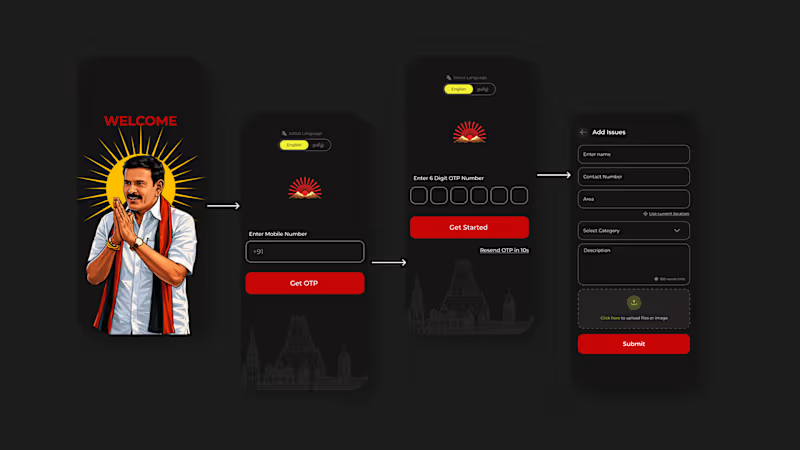
Project Title: ThoppuNDV – Civic Grievance Registration Mobile App Project Overview ThoppuNDV is a localized civic grievance mobile application designed to bridge the gap between citizens and local administration. The platform allows users to quickly report community infrastructure problems—such as drainage malfunctions, water supply failures, and road damage—directly through a streamlined, user-friendly interface. How We Built It (Our Trio's Process) 🎨 UI/UX Design: Designed with a clean, highly accessible dark-mode interface tailored for seamless community interaction. The workflow focuses on minimizing friction, featuring clear category selections, live location tagging, and structured forms to make filing a complaint effortless for users of all technical levels. 💻 Full-Stack Development: Built the core mobile architecture integrated with a robust backend to handle real-time issue logging. Features include a secure OTP-based authentication system, dynamic geolocation tagging ("Use Current Location"), media upload capabilities for photo proof, and a admin panel, categorized community dashboard feed. 🛡️ Quality Assurance & Testing: Subjected to rigorous manual and automated test cycles to ensure smooth form submissions, accurate location capture under varying network conditions, and flawless media upload performance across different mobile devices. Key Features Secure OTP Authentication: Fast and trusted user onboarding. Interactive Issue Feed: A categorized, chronologically organized timeline tracking local reports (e.g., Drainage, Water, and Road issues). Smart Grievance Reporting: Form-based reporting with built-in character limits, category dropdowns, and file/image upload functionality. One-Tap Geolocation: Uses current device location to automatically pin and map infrastructure issues accurately.
0
79