The network for creativity
Join 1.25M professional creatives like you
Connect with clients, get discovered, and run your business 100% commission-free
Creatives on Contra have earned over $150M and we are just getting started
Back to feedPost

Why I Built It: The Design Philosophy
1. The Problem with Modern Video Players
Most video player skins today have converged into identical, forgettable tropes: amorphous semi-transparent black pills, generic 9999px rounded border radii, and floating controls that detach the video from the editorial identity of the publication. Web video feels disconnected from the craft of graphic design, typography, and physical architecture.
2. The Solution: Architectural Brutalism & Swiss Modernism
I designed Mux Brutalist to demonstrate that a web video interface can be as physically satisfying, disciplined, and tactile as a high-end Swiss art monograph or an architectural blueprint:
Strict 0px Geometry: Every border, button, indicator, and flyout drawer adheres to unapologetic 0px rectangular geometry. No rounded corners.
Authentic Materiality (Dual Palette System):
Normal Mode (Raw Cardstock / Putty #e2e4dd): A tactile, physical paper-like texture rooted in Swiss editorial print, with solid 2px black brutalist hairline borders and offset block shadows (-5px 5px 0 #242628).
Obsidian Noir Mode (#0c0d0f / #121418): A dramatic dark room transformation with illuminated controls and a signature Hot Pink (#FF2D55) playhead indicator.
Tactile Spring Physics: Every button doesn't just lighten on click—it tilts -8° with an elastic spring easing curve (cubic-bezier(.3, 1.6, .5, 1)) and scales down, mimicking physical mechanical micro-switches.
Core Features & Innovations
1. Architectural Slatted Buffer Scrubber
Instead of a plain gray progress bar, the buffer state is rendered with 135° diagonal architectural slatted hatching.
As chunks are buffered from Mux's HLS CDN, the slatted pattern fills the track, evoking drafting schematics.
Precise SMPTE chapter tick notches are stamped directly along the timeline.
Dragging or hovering reveals a zero-jitter, brutalist timecode tooltip (MM:SS).
2. The Swiss Spec & Preferences Flyout Drawer
Anchored above the bottom dock bar, clicking the settings gear launches a slide-up technical specification sheet:
Playback Speed Matrix: Granular toggles for 0.5x, 1.0x, 1.25x, 1.5x, and 2.0x.
Adaptive Quality: Instant resolution switching (1080p, 720p, Auto) mapped to Mux HLS rendition tracks.
Accessible Closed Captions: Toggleable English CC with an elevated, high-contrast subtitle pill floating at 78px above the dock bar to prevent control overlap.
Color Theme Switcher: Instant switching between Normal (Putty) and Dark (Obsidian) with live theme persistence.
Direct Chapter Telemetry: Quick-jump chapter navigation with timestamps.
3. InDesign CS 12-Column Alignment Grid (Hotkey: E)
Pressing E projects a live 12-column editorial grid and 24pt margin guides across the entire player viewport, accompanied by broadcast SMPTE 24.00 FPS telemetry badges in Mux hot pink and cyan. It showcases the mathematical grid discipline behind the layout.
4. 10-Second Tactile Spring Dials
Flanking the giant central play button, twin 10-second rewind and fast-forward tactile dials feature directional spring rotations (-8° and +8°) for rapid video navigation.
5. 100% WCAG AA Accessibility
Minimum 44px × 44px hit targets across all interactive elements.
High-visibility 3px solid #FF2D55 focus rings with 4px outer glow for keyboard-only navigation.
Full keyboard hotkey map:
Space / K — Play / Pause
Left / Right Arrows — 10s Rewind / Fast-Forward
Up / Down Arrows — Volume Up / Down
M — Mute / Unmute
F — Fullscreen toggle
P — Picture-in-Picture (PiP)
C — Closed Captions toggle
E — InDesign 12-Column Alignment Grid toggle
T — Color Theme toggle (Putty ⇄ Dark Mode)
Technical Architecture
Zero Bloat / Zero Framework Lock-in: Engineered in clean, standards-compliant HTML5 and Vanilla ES6+ with PostCSS utility tokens.
Video.js v10 Ready: Architected to seamlessly mount over any standard Video.js DOM node (.vjs-tech, .vjs-control-bar) or run autonomously as a drop-in standalone skin.
Adaptive HLS Engine: Integrated directly with Mux HLS streaming endpoints with custom error recovery, buffer telemetry, and 60FPS canvas fallback.
Performance: Sub-150ms build time with Vite, 0 runtime dependencies, and buttery 60 FPS spring physics.

Tying the player to the publication's editorial identity is a great point. Nice write-up.
The network for creativity
Join 1.25M professional creatives like you
Connect with clients, get discovered, and run your business 100% commission-free
Creatives on Contra have earned over $150M and we are just getting started



Related posts


Here’s a little piece from my current project. As I watch the Swiss design concept become a part of my creative DNA, I find myself constantly gravitating towards this direction in web design.
What’s really interesting is that Volume 3 studio and I are experimenting here, mixing things that seem completely unmixable at first glance.
Since Volume 3 is a CGI and VFX studio, it was crucial to incorporate a 3D dimension into their brand communication. On top of that, a Terminal UI is exactly what keeps that technical vibe going.
So, the final mix is International (Swiss) style, a Terminal UI, and a 3D feel brought to life by neumorphism. Crazy, right???
It looks simple and clean, but behind the scenes, there’s a massive amount of work on the details. We focused on all those little things that push the UX/UI into the premium segment — the things you don't necessarily see right away, but you definitely feel when you're on the page.
The work is still ongoing, so I can't dive into reflecting on the whole process just yet, but I'm gonna keep revealing small parts here.


Swiss grids on the web never get old when they're this clean. What are you and Volume 3 mixing it with?

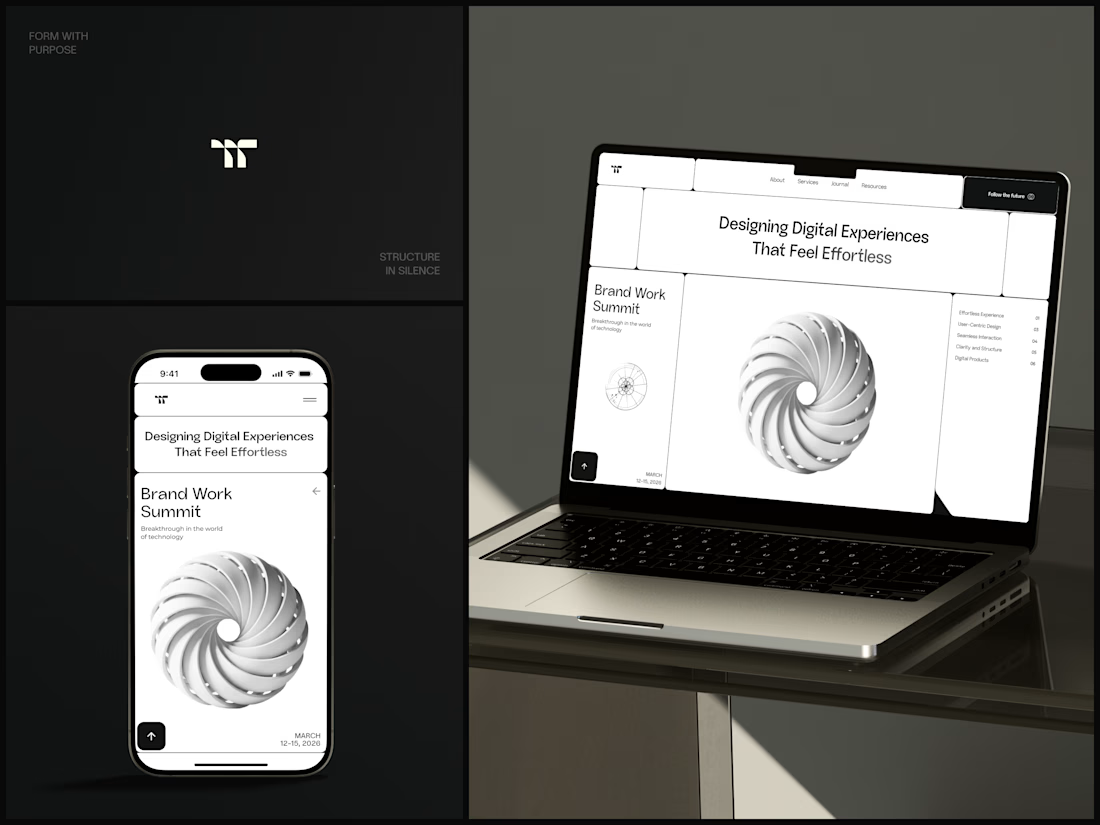
Design Agency Website
Only one cell on this homepage is black.
The rest of the page is a grid of rounded white cells: the headline, an event card, a white 3D spiral and a list of services. The black one, top right, holds the "Follow the future" button and stands out against all that white.
On the phone, the cells stack into a single column. The navigation folds into a menu icon, and the event card and spiral merge into one cell.
The headline reads "Designing Digital Experiences That Feel Effortless", so the grid has to look organized before anyone reads a word.
Designed by the Hue & Machine team.
#DesignAgency #WebDesign #AgencyWebsite #LandingPage #BentoGrid #MinimalDesign #UIDesign #ResponsiveDesign #MobileDesign #FigmaDesign


Looks cool

Deep Focus is a fictional macOS app that silences notifications so people can do deep work. The catch is the audience: people who need a productivity app are already tired of apps. Every competitor promises more features, so this page had to promise relief and turn it into a download within seconds.
What I did
I started from the pain, not the product. The second screen lists what a normal day looks like: push notifications, endless pings, 142 unread emails, context switching. I styled those chips like the four benefit chips in the hero, only white instead of frosted, so the visitor reads before and after without a line of explanation.
The hero section design shows no interface on purpose. This product is about absence, and a screenshot would add noise, so a person alone in a field does the proving. The headline “Deep focus. Anywhere.” is a high-contrast serif because every tool in this category speaks in a grotesque, and a serif sounds calm and human.
I kept one action, Download for macOS, with no pricing and no form. The first job of this landing page design is a download, and everything else can wait until after it.
Would you keep the serif for the headline, or switch to a grotesque so it feels more like software?


Love this!