The network for creativity
Join 1.25M professional creatives like you
Connect with clients, get discovered, and run your business 100% commission-free
Creatives on Contra have earned over $150M and we are just getting started
Back to feedPost

The phantom socket crisis: Why long-lived background jobs and database connections hang mysteriously across cloud NAT gateways and firewalls.
Every backend engineering team has witnessed this perplexing incident: an application background worker (Celery, Sidekiq, Go worker) or long-running database connection suddenly hangs indefinitely. No error is thrown. No TCP RST packet is received. The connection simply stops responding, and threads remain blocked forever.
The root cause is a fundamental mismatch between Linux TCP defaults and stateful middlebox connection tracking:
1. The 5-Day Linux Default: By default, the Linux kernel assumes an established TCP connection remains open indefinitely unless explicitly closed. In fact, Linux sets net.netfilter.nf_conntrack_tcp_timeout_established = 432000 (5 full days), and kernel TCP keepalive probes only start after an idle time of 7,200 seconds (2 hours!).
2. The 5-Minute Middlebox Prune: Cloud NAT gateways (AWS NAT Gateway, GCP Cloud NAT), stateful hardware firewalls, and Kubernetes ingress routers maintain finite in-memory connection tracking (conntrack) tables. To preserve memory, they aggressively evict idle TCP flows—typically after just 350 seconds (under 6 minutes) of silence.
3. The Phantom Socket: When a middlebox evicts an idle connection, it does not notify either endpoint. Both the application worker and the database server believe the TCP socket is still valid. When the application finally attempts to send a query on that idle socket, the firewall drops the packet silently as invalid state, leaving the application waiting for a TCP ACK that will never arrive.
Eliminating phantom socket hangs requires deliberate Layer-4 kernel tuning and application keepalive discipline:
• Tune Kernel TCP Keepalives: In /etc/sysctl.d/99-network.conf, lower kernel keepalive probe timings: set net.ipv4.tcp_keepalive_time = 300 (send first probe after 5 minutes of idle), net.ipv4.tcp_keepalive_intvl = 15 (retry every 15 seconds), and net.ipv4.tcp_keepalive_probes = 5 (terminate dead sockets after 5 failed probes).
• Configure Database Client Keepalives: Explicitly pass keepalive parameters in database connection strings (in PostgreSQL: keepalives=1&keepalives_idle=60&keepalives_interval=10&keepalives_count=3).
• Implement Application-Level Heartbeats: For WebSockets, gRPC streams, and message queue consumers (RabbitMQ, Kafka), enable application-layer ping/pong heartbeats at 30-second intervals to keep middlebox conntrack state constantly refreshed.
• Enforce Socket Read/Write Timeouts: Always set explicit socket read/write timeouts in application code to prevent threads from blocking forever when network paths degrade.
Ensure continuous, uninterrupted connectivity across your distributed applications and cloud VPCs.
Deploy hardened, enterprise network infrastructure with our 1-week Core Sovereign Network Services Sprint on Contra:
#Networking #Linux #Cloud #Database #Infrastructure #SRE #Architecture


The network for creativity
Join 1.25M professional creatives like you
Connect with clients, get discovered, and run your business 100% commission-free
Creatives on Contra have earned over $150M and we are just getting started



Related posts

This case study showcases a complete brand identity and interface design for Aegis Hub, a fictional, privacy-first, offline smart home ecosystem.


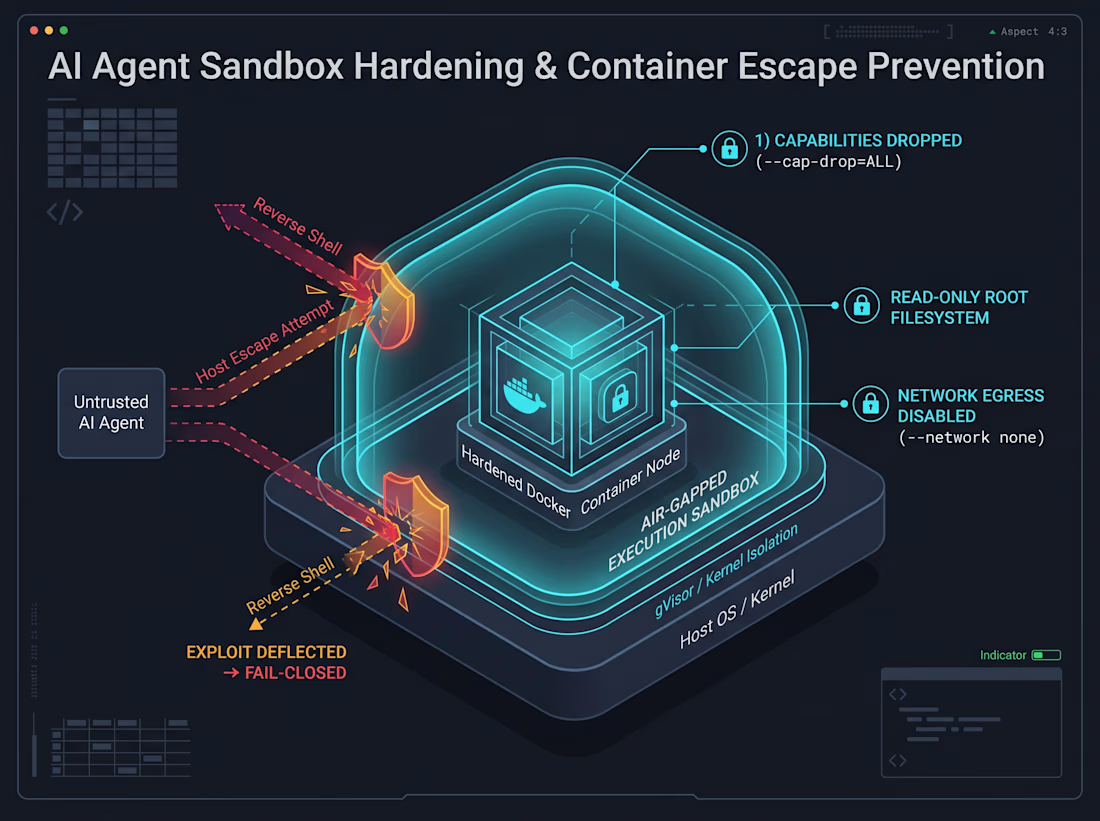
Running your AI agent inside a standard Docker container does not mean it’s sandboxed—it’s just isolated until something breaks.
When an autonomous agent gets terminal execution privileges (Bash tools, package installs, code evaluation), naive containerization is a security illusion. If your container runs as root (UID 0), retains default Linux capabilities, or has network egress, a prompt injection or malicious patch can exploit kernel boundaries to escape to the host.
In our Escape-Lab attack simulations, default Docker runtimes failed against privilege escalation and cgroup release agents. The container boundary alone was never designed to be an adversarial security boundary.
To build a truly air-gapped sandbox for autonomous tool execution:
Drop All Linux Capabilities: Enforce --cap-drop=ALL. Explicitly prevent privilege escalation with security_opt: [no-new-privileges:true].
Immutable Filesystem: Mount root as strictly read-only (--read-only) with ephemeral, non-executable in-memory tmpfs mounts for /tmp.
Zero Network Egress: Lock the container to --network none. Agents evaluating untrusted code have zero legitimate reasons to initiate outbound sockets.
How do you harden container runtimes when giving AI agents shell access?
#DevSecOps #Docker #Linux #AIEngineering #CloudSecurity

The final presentation is so polished! Was this a client project or a personal concept?