The network for creativity
Join 1.25M professional creatives like you
Connect with clients, get discovered, and run your business 100% commission-free
Creatives on Contra have earned over $150M and we are just getting started
Back to feedPost

How Offline-First POS Systems Keep Businesses Running During Internet Outages
Modern businesses rely heavily on digital systems to process sales, manage inventory, track employees, and generate reports. However, one major challenge remains: what happens when the internet goes down?
For a retail store, restaurant, supermarket, pharmacy, or hospitality business, even a short internet outage can disrupt daily operations. Cloud-based systems may become inaccessible, payment workflows can be affected, inventory updates may stop, and employees may struggle to continue serving customers.
This is where an offline-first POS software development solution becomes valuable.
Unlike a traditional cloud-dependent system, an offline-first Point of Sale system is designed to continue performing essential functions even when an internet connection is unavailable. Transactions and other operational data can be stored locally and synchronized with the cloud once connectivity returns.
In this article, we explore how offline-first POS systems work, why businesses need them, and what companies should consider when developing a reliable POS solution.
Why Internet Outages Are a Serious Problem for POS Operations
Businesses increasingly depend on cloud-based technology. While cloud POS systems offer flexibility, remote access, and centralized management, a system that depends entirely on a live internet connection can create operational risks.
During an outage, a business may experience problems such as:
Inability to access sales data
Delays in processing certain transactions
Inventory synchronization failures
Interrupted order management
Loss of access to cloud-hosted features
Employee productivity issues
Customer frustration and longer queues
For high-volume businesses, downtime can directly affect revenue.
Imagine a busy restaurant during lunch hours or a supermarket during the weekend. If the POS system becomes completely unusable because the internet connection fails, employees may be forced to process orders manually. This increases the risk of errors and slows down customer service.
An offline-first POS software development solution helps reduce this dependency by ensuring that core business functions remain available locally.
What Is an Offline-First POS System?
An offline-first POS system is designed with the assumption that internet connectivity may not always be available.
Instead of requiring every operation to communicate with a remote server in real time, the application stores essential data locally on the device. This allows employees to continue using important POS features even when the network connection is interrupted.
For example, an offline-first POS system may allow users to:
Create and record sales
Add products to an order
Calculate taxes and discounts
Print receipts
Access locally stored inventory information
Manage cash transactions
Continue basic employee operations
Once the internet connection is restored, the system synchronizes locally stored information with the central server.
The key principle is simple:
The internet improves the system, but its absence should not completely stop the business.
How Offline-First POS Architecture Works
An effective offline-first architecture typically combines local storage with cloud infrastructure.
1. Local Data Storage
The POS application maintains a local database on the device.
Depending on the platform and technology stack, developers may use local databases or storage technologies that allow structured business data to remain available without a network connection.
This local data may include:
Product catalogs
Pricing information
Tax rules
Customer information, where appropriate
Inventory snapshots
Employee permissions
Sales transactions
Store configuration
The application can access this information directly from the local device during an outage.
2. Local Transaction Processing
When the internet is unavailable, the POS system records eligible transactions locally.
For example, a retail employee may continue scanning products and generating an order. The application stores the transaction in a local queue rather than immediately sending it to the central cloud server.
Each transaction can be assigned a unique identifier and timestamp to help maintain accurate records.
3. Synchronization Queue
Once connectivity is restored, the application detects the available connection and begins synchronizing pending data.
A synchronization engine may upload:
Completed transactions
Inventory changes
Refund records
Customer updates
Employee activity
Store-level reports
The synchronization process should be designed carefully to prevent duplicate records or accidental data loss.
4. Conflict Resolution
One of the biggest technical challenges in offline-first systems is handling conflicting data.
For example, imagine two store devices updating the inventory quantity of the same product while both are offline.
When both devices reconnect, the cloud server receives two different updates.
A robust POS software development solution needs clear rules for resolving these conflicts. Depending on the business requirements, developers may use strategies such as:
Last-write-wins
Version-based synchronization
Server-authoritative data
Transaction logs
Conflict detection and manual review
Inventory reconciliation workflows
The right approach depends on the type of data and how critical accuracy is for the business.
Key Benefits of Offline-First POS Systems
1. Business Continuity
The biggest advantage is continuity.
Employees can continue performing essential tasks even when the internet connection becomes unavailable. This reduces operational disruption and helps businesses continue serving customers.
2. Faster Local Performance
Offline-first applications can often provide faster responses because frequently used information is available locally.
Instead of waiting for a remote server to respond, the application can access product information, pricing, and other data directly from the device.
This can improve the checkout experience, particularly in high-traffic environments.
3. Better Customer Experience
Customers generally do not care whether a store is experiencing a network problem. They expect quick service.
An offline-capable POS system can help reduce:
Long queues
Delayed order processing
Manual recordkeeping
Customer frustration
Businesses can continue providing service while background synchronization resumes later.
4. Increased Resilience
Internet outages can occur for many reasons, including:
ISP failures
Router problems
Power interruptions
Network maintenance
Poor connectivity in remote locations
Temporary infrastructure issues
An offline-first architecture provides an additional layer of operational resilience.
5. Better Support for Remote Locations
Some businesses operate in areas where internet connectivity is unreliable.
This may include:
Remote retail stores
Mobile businesses
Pop-up stores
Events and exhibitions
Food trucks
Rural locations
For these businesses, an offline-first POS software development solution may be more practical than a fully cloud-dependent system.
Important Features of an Offline-First POS System
Businesses should identify which features must remain available during an internet outage.
A typical offline-capable POS may include the following.
Local Product Catalog
Employees should be able to search, scan, and add products to an order without requiring a live connection.
Offline Transaction Storage
Transactions performed while offline should be securely stored and queued for synchronization.
Inventory Snapshots
The system can maintain a local copy of relevant inventory information.
However, businesses should understand that real-time inventory accuracy across multiple locations may be temporarily limited while devices are offline.
Receipt Generation
The POS should continue generating printed or digital receipts where technically appropriate.
User Authentication and Access
Offline authentication requires careful design.
The system may maintain securely cached authorization data for approved users while applying policies that limit how long offline access remains valid.
Automatic Synchronization
Once connectivity returns, the system should automatically synchronize pending data.
Users should not need to manually export and upload files after every outage.
Sync Status Dashboard
Employees and administrators should be able to see:
Whether the system is online or offline
The number of pending transactions
Synchronization progress
Any failed records
Data conflicts requiring attention
This improves transparency and helps teams identify issues quickly.
Security Considerations for Offline POS Systems
Offline capability should never mean ignoring security.
Because business data may be temporarily stored on local devices, security must be considered at every stage of development.
Important measures may include:
Data Encryption
Sensitive locally stored information should be protected using appropriate encryption and secure key-management practices.
Role-Based Access Control
Employees should only access features and information required for their role.
For example, a cashier may not require access to administrative reports or system configuration settings.
Secure Authentication
Authentication systems should balance offline availability with security.
Developers may implement secure session management and carefully controlled offline authentication policies.
Device Security
Since local devices may store business data, organizations should consider:
Device encryption
Screen locks
Secure operating systems
Remote device management
Application-level security controls
Secure Synchronization
When the internet connection returns, data should be transmitted through secure communication channels and validated by the server.
Challenges of Developing an Offline-First POS System
Although the benefits are significant, building an offline-first system is technically more complex than developing a simple cloud-connected application.
Data Synchronization Complexity
Developers must determine how local and cloud data will remain consistent.
This includes handling:
Duplicate transactions
Failed uploads
Partial synchronization
Conflicting updates
Deleted records
Device-specific changes
Multi-Store Inventory Management
Real-time inventory synchronization becomes more difficult when multiple stores or devices operate offline.
The system needs clear rules for reconciling inventory changes once all devices reconnect.
Storage Management
Local databases must be designed to store sufficient information without unnecessarily consuming device resources.
Older data may need to be archived or securely removed according to business and regulatory requirements.
Payment Limitations
Not every payment method can operate offline.
Payment processing requirements depend on the payment provider, acquiring bank, card network, terminal capabilities, and applicable security rules. Businesses should never assume that an offline-capable POS application can authorize every type of electronic payment without connectivity.
This should be addressed during the architecture and payment integration planning stages.
Choosing the Right Technology Architecture
The technology stack for an offline-first POS system depends on the target platform and business requirements.
A development team may consider technologies for:
Native mobile applications
Cross-platform applications
Desktop POS terminals
Local databases
Cloud infrastructure
APIs
Real-time synchronization
Message queues
Hardware integrations
The most important factor is not simply choosing a popular technology. The architecture must support reliable local operations and controlled synchronization.
A scalable POS software development solution should also consider future requirements such as multi-location management, analytics, integrations, and increasing transaction volumes.
Offline-First vs Cloud-Only POS Systems
Feature Offline-First POS Cloud-Only POS Works during internet outages Yes, for supported features Often limited or unavailable Local data storage Yes Usually limited Synchronization Syncs when connectivity returns Requires continuous connectivity Development complexity Higher Lower Resilience High Dependent on network availability Multi-location visibility Delayed during outages Real-time when connected Best for Businesses requiring continuity Businesses with highly reliable connectivity
For many organizations, the ideal solution is not completely offline or completely cloud-based.
Instead, a hybrid architecture can combine local reliability with cloud-based management and reporting.
How to Build an Offline-First POS System
A structured development process can help reduce technical risks.
Step 1: Identify Critical Offline Features
Start by defining what employees must be able to do when the internet is unavailable.
For example:
Create sales
Access products
Apply discounts
Generate receipts
Record cash transactions
Not every feature needs to work offline.
Step 2: Design the Local Data Model
Identify which information should be stored locally and how frequently it should be updated.
The data model should support synchronization, version tracking, and conflict management.
Step 3: Build a Reliable Sync Engine
The synchronization layer should handle interrupted connections, retries, duplicate prevention, and error reporting.
Step 4: Define Conflict Resolution Rules
Different types of data may require different conflict strategies.
For example, a completed sale may require immutable transaction handling, while product descriptions may follow a server-authoritative update model.
Step 5: Test Real-World Failure Scenarios
Testing should include more than normal online workflows.
Development teams should simulate:
Sudden internet loss
Repeated connection failures
Device restarts
Partial synchronization
Multiple devices reconnecting simultaneously
Duplicate transaction attempts
Step 6: Monitor and Improve
After deployment, businesses should monitor synchronization failures, device performance, and operational issues to improve the system over time.
How Dev Technosys Can Help Build an Offline-First POS Solution
Dev Technosys provides custom software and POS development services designed around specific business requirements. For businesses that need operational continuity, a tailored POS software development solution can be designed with offline functionality, local data management, synchronization workflows, inventory features, reporting, and integrations.
The development approach can focus on understanding which operations are essential during connectivity outages and designing the system accordingly.
Depending on project requirements, an offline-first POS platform may include:
Custom POS workflows
Local database integration
Cloud synchronization
Multi-store management
Inventory tracking
Hardware integration
Role-based access
Reporting and analytics
API integrations
Secure data handling
The goal is to create a system that supports business operations even when connectivity is unreliable while restoring centralized visibility once synchronization is complete.
Conclusion
Internet connectivity is essential for many modern business operations, but businesses should not come to a complete stop when a connection fails.
An offline-first POS system allows organizations to continue performing critical operations by storing relevant data locally and synchronizing it with cloud infrastructure when connectivity returns.
From retail stores and restaurants to pharmacies and multi-location enterprises, an offline-capable POS software development solution can improve resilience, reduce operational disruption, and support a smoother customer experience.
However, building an effective offline-first system requires careful planning. Data synchronization, conflict resolution, security, inventory management, and payment workflows must all be considered during the architecture stage.
With the right development strategy and technology partner, businesses can build a modern POS platform that delivers the benefits of cloud connectivity without making daily operations completely dependent on it.
Looking to build a reliable POS system that keeps your business running online or offline? Connect with Dev Technosys to discuss a custom POS software development solution tailored to your operational needs.

devtechnosys.com
POS Software Development Company
Get custom POS software development from Dev Technosys for retail & restaurants. Streamline sales, inventory, and payments securely online.
The network for creativity
Join 1.25M professional creatives like you
Connect with clients, get discovered, and run your business 100% commission-free
Creatives on Contra have earned over $150M and we are just getting started

Challenges
View all


Related posts


Launching a product is exciting—watching your backend crash under real traffic is not.When your CRM, payments, databases, and team alerts don't talk to each other, your business loses dozens of productive hours every week. We build real-time REST and GraphQL data pipelines with automated webhook retry logic to keep your entire stack in perfect harmony.


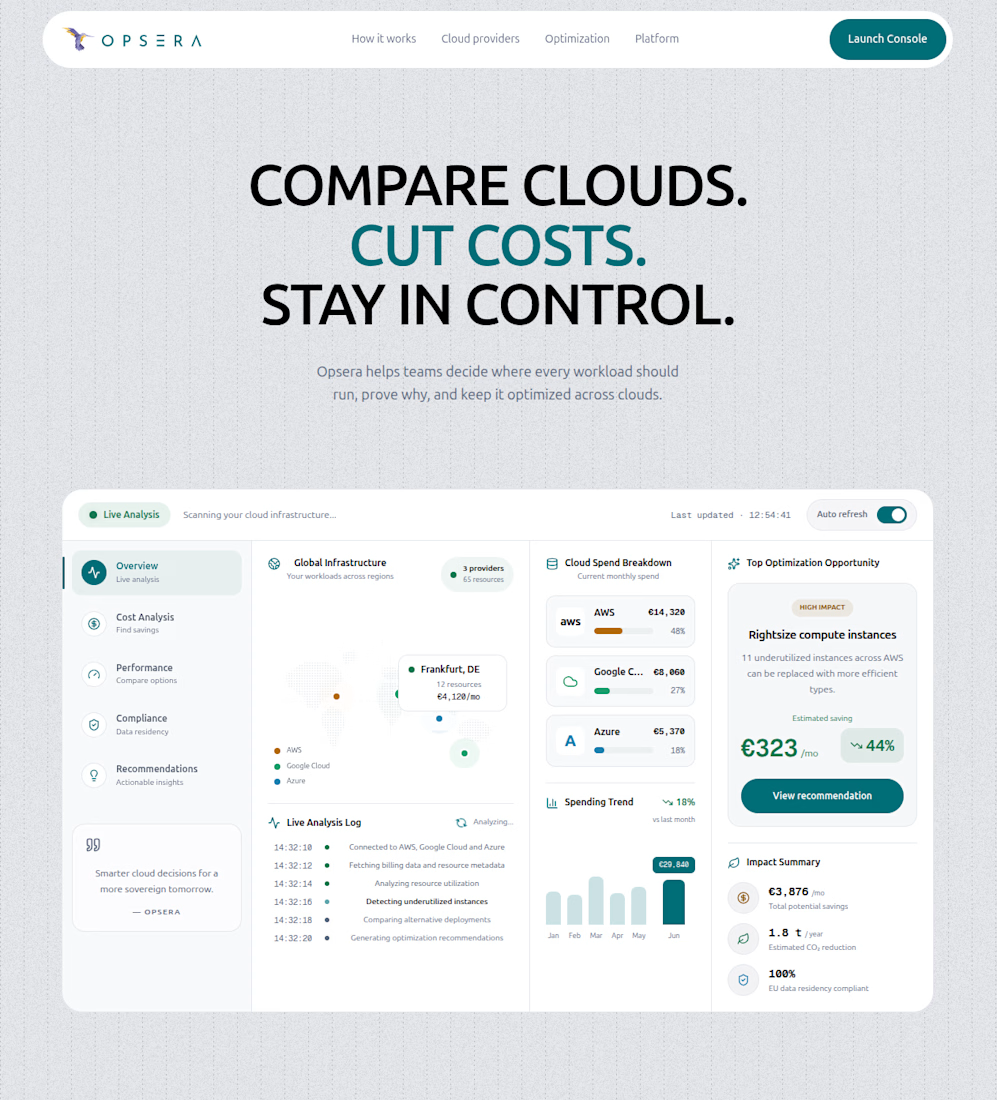
Opsera is a modern multi-cloud infrastructure optimization platform designed to help organizations understand, compare, and optimize their cloud environments.
The platform provides a unified view across providers such as AWS, Google Cloud, Azure, IONOS, Hetzner, OVH, and STACKIT. It analyzes cloud spending, resource utilization, performance, compliance, data sovereignty, and sustainability to identify inefficiencies and recommend better infrastructure decisions.



A product page should do more than look good. It should make buying feel easy.
Built with 100% Shopify Liquid, this redesign brings together benefit-led copy, clearer product options, shipping reassurance, and a sticky ATC button.
Every change has a CRO purpose: communicate value, reduce hesitation, and create a smoother path to checkout.