


I fixed a problem that had frustrated me for years in just two days.
As an Arabic creator who naturally mixes Arabic and English, I could never find a video editor that truly understood my workflow.
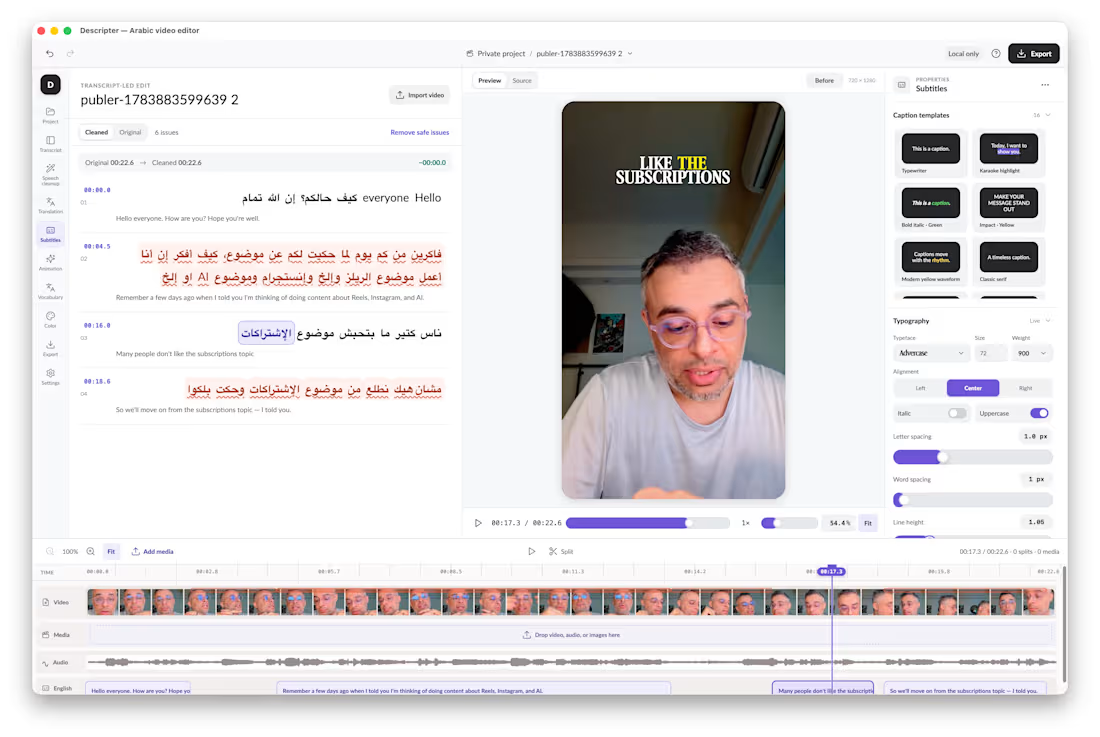
So I built Descriptor an editor with AI in its DNA.
AI isn’t a feature added on top. It’s the operating layer of the entire experience.
I import my footage, and the app helps handle the work:
• Transcribes Arabic and mixed English speech
• Synchronizes every subtitle with my voice
• Detects mistakes, false starts, and long pauses
• Lets me edit the video simply by editing words
• Updates repeated transcript mistakes across the project
• Translates and prepares English subtitles
• Keeps captions synchronized after cuts and edits
• Suggests cleanup while keeping me in control
• Handles trimming, splitting, clip movement, and deletion
• Applies subtitle templates without changing the words or timing
• Supports color grading, detailed adjustments, and custom LUTs
• Prepares the final video for export at its original resolution
Instead of manually controlling every technical detail, I focus on the story and tell the app what I want.
The AI handles the repetitive work while every change remains editable, reversible, and private on my Mac.
What makes this meaningful isn’t only that I built an app.
It’s that a problem I had accepted as “just part of the process” for years became solvable in a weekend.
Two focused days. One persistent frustration. A working, AI-native product built around the way I actually create.
We’re entering a time when you don’t have to wait for someone else to build the tool you need.
You can build it yourself with AI.
#BuildInPublic (https://www.linkedin.com/search/results/all/?keywords=%23buildinpublic&origin=HASH_TAG_FROM_FEED) #AI (https://www.linkedin.com/search/results/all/?keywords=%23ai&origin=HASH_TAG_FROM_FEED) #AIFirst (https://www.linkedin.com/search/results/all/?keywords=%23aifirst&origin=HASH_TAG_FROM_FEED) #VideoEditing (https://www.linkedin.com/search/results/all/?keywords=%23videoediting&origin=HASH_TAG_FROM_FEED) #ColorGrading (https://www.linkedin.com/search/results/all/?keywords=%23colorgrading&origin=HASH_TAG_FROM_FEED) #ArabicCreators (https://www.linkedin.com/search/results/all/?keywords=%23arabiccreators&origin=HASH_TAG_FROM_FEED) #IndieHacker (https://www.linkedin.com/search/results/all/?keywords=%23indiehacker&origin=HASH_TAG_FROM_FEED) #MacApp (https://www.linkedin.com/search/results/all/?keywords=%23macapp&origin=HASH_TAG_FROM_FEED)
2
101
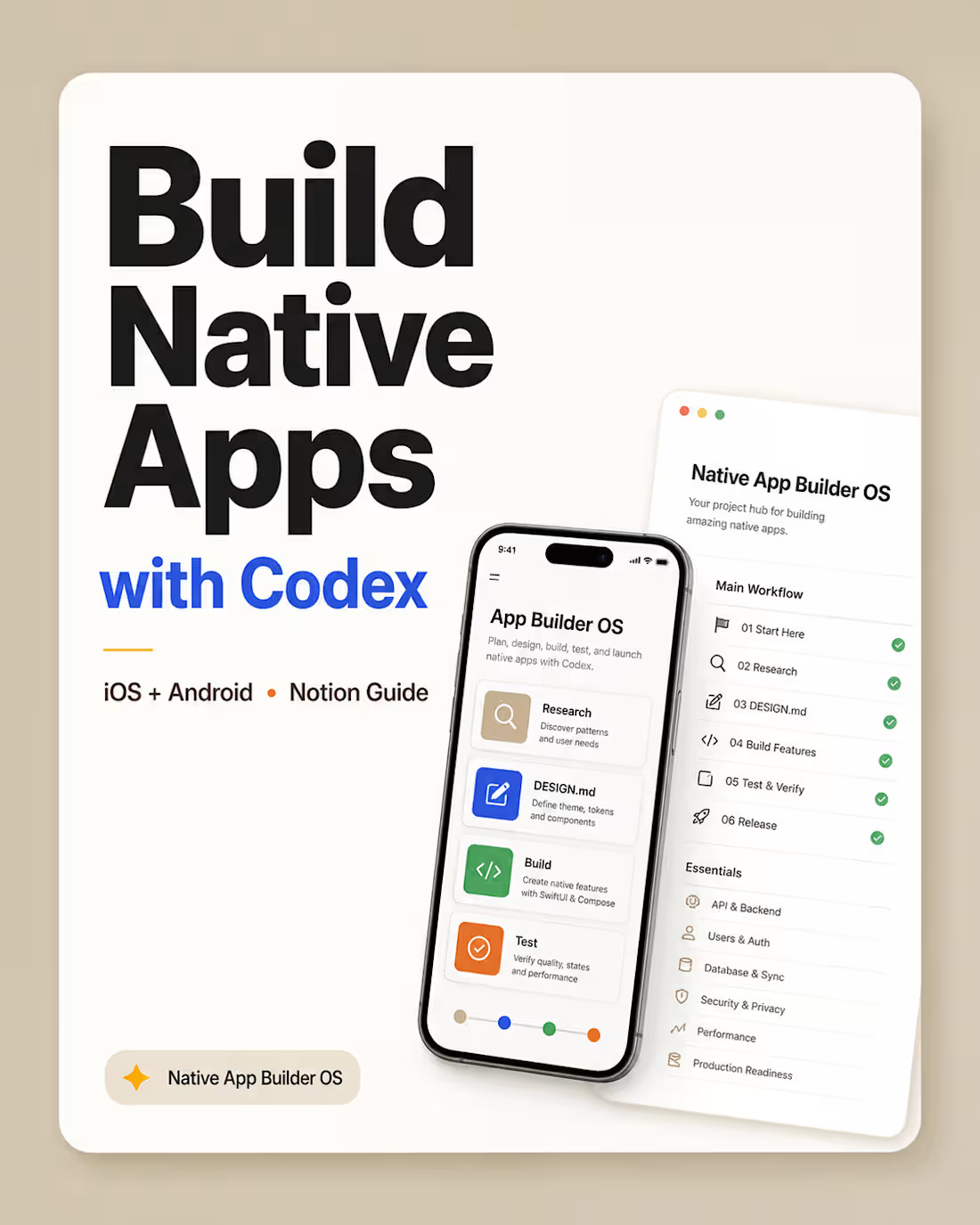
I built Native App Builder OS for Codex, a complete Notion-based system for using Codex Desktop to build native iOS and Android apps from idea to launch.
Most people use AI coding tools with random prompts.
This template gives you a structured workflow instead.
It helps you use Codex Desktop as your main app-building workspace while keeping Xcode and Android Studio for builds, previews, simulators, emulators, logs, and release workflows.
Inside the guide, you’ll find:
App idea to product plan workflow
UX research and Mobbin design-memory process
SwiftUI and Jetpack Compose guidance
DESIGN.md (http://DESIGN.md) rules for app themes, components, and UI consistency
iPad and Android tablet compatibility rules
GitHub, Xcode, Android Studio, Apple Developer, and Google Play setup
API, auth, database, security, privacy, and sync planning
Testing, performance, production readiness, and release safety workflows
App icon, store screenshot, landing page, and privacy policy guidance
Beginner-friendly Codex prompts for every major step
This is made for founders, indie hackers, designers, students, and beginner developers who want to build real native mobile apps with more structure, less guesswork, and better product thinking.
The goal is simple:
Turn Codex from “a coding chatbot” into a practical mobile app-building operator.
Available now: https://lnkd.in/gWPHBJn4
0
56
FrameOrbit — Config Makeathon Submission 📸🌀
Sharing second project for the Config Makeathon: FrameOrbit.
https://cedar-thaw-04755246.figma.site/
Project published to the community.
FrameOrbit is a playful camera canvas experience where taking photos feels more spatial, visual, and alive.
The idea started from a simple question:
What if captured photos didn’t disappear into a hidden gallery, but stayed around your camera as part of the experience?
In FrameOrbit, the camera view sits in the center of a soft canvas. Every time the user captures a photo, it instantly appears as a framed image around the camera. As more photos are taken, the canvas starts to build a visual orbit of moments around the live camera view.
Users can:
Capture photos directly from the center camera frame
See each image appear instantly around the canvas
Apply different photo styles like Normal, Noir, Warm, Cool, Vivid, Fade, Retro, and Neon
Drag photos around the canvas
Tap any photo to open it in a cinematic full-screen viewer
Move between images using previous/next navigation
Save all captured images or reset the canvas
The goal was to make photo capturing feel less like a utility and more like a small creative ritual, a live memory board that grows with every shot.
Built with Figma Make, I focused on creating a polished interactive prototype with a soft visual system, floating photo cards, smooth viewer experience, and a simple flow that can be understood in seconds:
Capture → frame appears → build your orbit → explore your moments.
FrameOrbit turns the camera into a canvas. ✨
#ConfigMakeathon #FigmaMake #FrameOrbit #ProductDesign #UXDesign #UIDesign #CreativeTools #CameraApp #Prototype #Makeathon
14
14
466
Here is my submission for the #makeathon
FocusDock is a calming focus timer designed for work, study, reading, and deep focus sessions.
https://detach-lime-09329627.figma.site/
The idea started from a simple problem: most focus timers are functional, but they don’t feel personal or emotionally engaging. I wanted to create a timer that feels more like a small ritual, choosing your environment, placing your clock, setting the mood, and starting a focused session with intention.
With FocusDock, users can:
Choose a focus duration
Pick from different illustrated desk, shelf, and table backgrounds
Select a clock style
Place the clock naturally inside the scene
Start a clean, distraction-free focus session
Use ambient sounds or music to support concentration
The design direction is soft, calm, and minimal, using 2D illustrated backgrounds with clear surfaces where the clock can sit naturally. The goal is to make the clock feel like an object inside the workspace, not just a floating timer UI.
I’m using Figma’s suite of tools to explore the visual system, generate the interface direction, and build the interactive prototype with Figma Make. A big part of the challenge is making the experience feel polished: smooth transitions, thoughtful placement, responsive layouts, and a focus flow that feels simple but meaningful.
For me, this project is about turning time management into a calmer, more intentional experience.
social post: https://x.com/sir_hsn/status/2063623301201858694?s=20
16
24
1.6K