Apache Superset conditional-formatting feature

Mohammad Al-Qasem


User description
SUMMARY
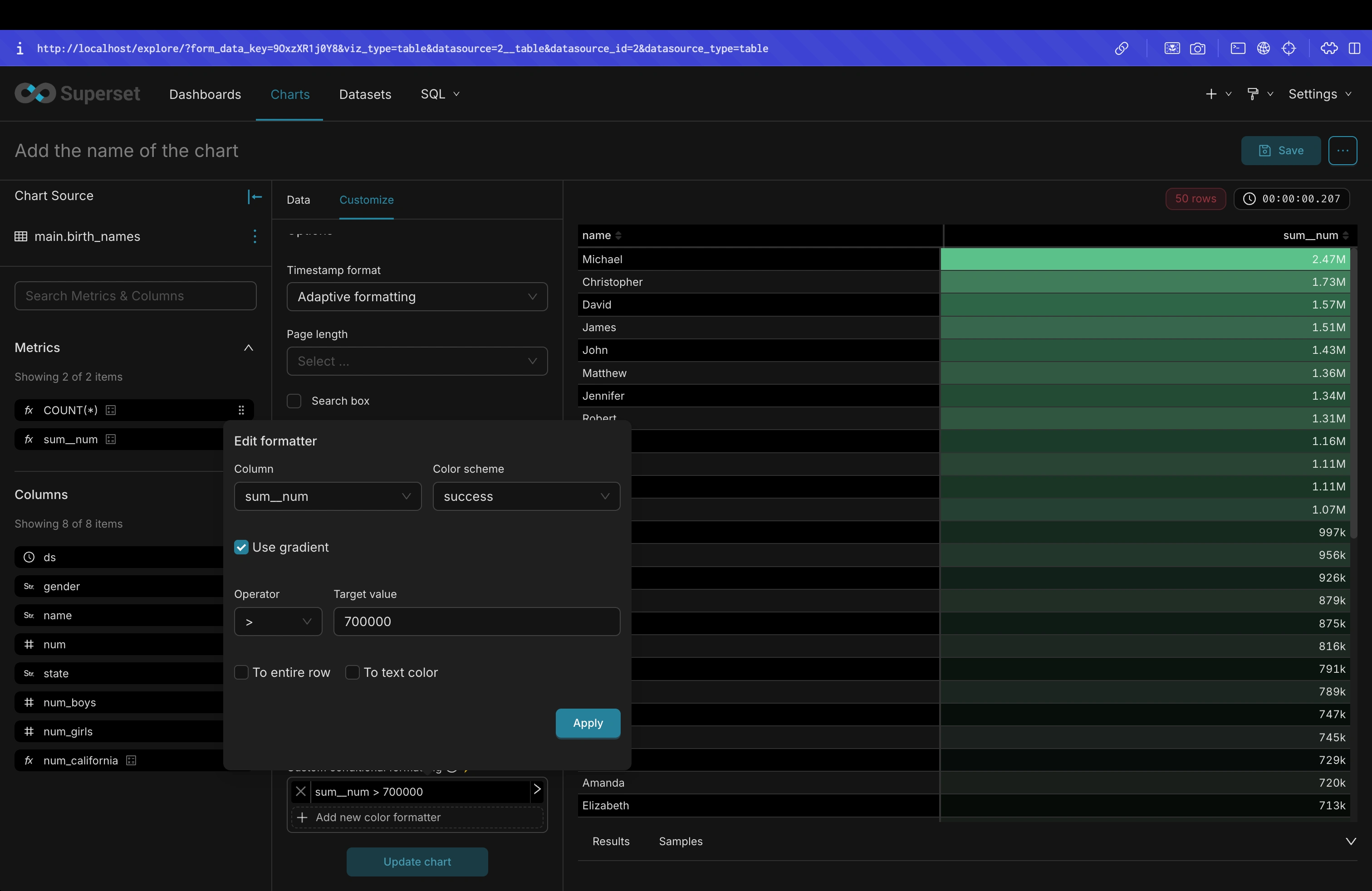
This PR adds a "Use gradient" toggle to the table chart’s conditional formatting configuration.
Previously, conditional formatting always rendered colors using a gradient (via varying opacity). With this change, users can explicitly choose between:
Gradient mode (current behavior): apply a color gradient by varying opacity based on the metric value.
Solid mode (new behavior): render all formatted cells using the selected color at full opacity.
This gives users finer control over the visual styling of conditional formatting, especially in cases where gradients can be visually noisy or conflict with existing themes.
Key changes:
Extend
ConditionalFormattingConfig with a useGradient flag.Update the color computation logic (
getColorFunction) to respect useGradient and fall back to solid colors when disabled.Add a "Use gradient" checkbox to the
FormattingPopoverContent UI.Default
useGradient to true for backward compatibility with existing saved charts and dashboards.AFTER SCREENSHOTS
TESTING INSTRUCTIONS
Basic UI behavior
Create or open a Table chart.
Open the Customize / Conditional formatting panel.
Confirm that a "Use gradient" checkbox is visible in the formatting popover.
Ensure the checkbox is checked by default for:
Newly created conditional formatting rules.
Existing charts with conditional formatting.
Gradient mode (backward compatibility)
With "Use gradient" checked:
Apply a conditional formatting rule on a numeric column.
Verify that cell colors are rendered using varying opacity (gradient behavior).
Confirm that existing dashboards continue to look the same as before.
Solid mode behavior
Uncheck "Use gradient" for a conditional formatting rule.
Apply the rule and run the query.
Verify that formatted cells are rendered with solid colors (full opacity).
Toggle the checkbox on/off and confirm the visual changes update accordingly.
Automated Tests:
cd superset-frontend && npm run testRun specific unit tests added in this pr:
npm run test -- getColorFormatters && npm run test -- TableChart && npm run test -- FormattingPopoverContentADDITIONAL INFORMATION
CodeAnt-AI Description
Let table conditional formatting switch between solid and gradient colors
What Changed
Added a "Use gradient" option in the table conditional formatting popover, checked by default for new and existing rules
When "Use gradient" is unchecked, highlighted cells use a single solid color instead of varying opacity based on value
Kept existing charts behaving the same as before unless "Use gradient" is manually turned off
Impact
✅ Less visually noisy table highlighting
✅ More control over conditional formatting appearance
✅ Backward-compatible table styling behaviorLike this project
Posted Aug 8, 2026
Merged a backward-compatible React and TypeScript feature into Apache Superset, adding solid or gradient conditional formatting with tests across seven files.
Likes
0
Views
2