StakeHive DeFi Staking Protocol Development

Didarul Alam Rahat


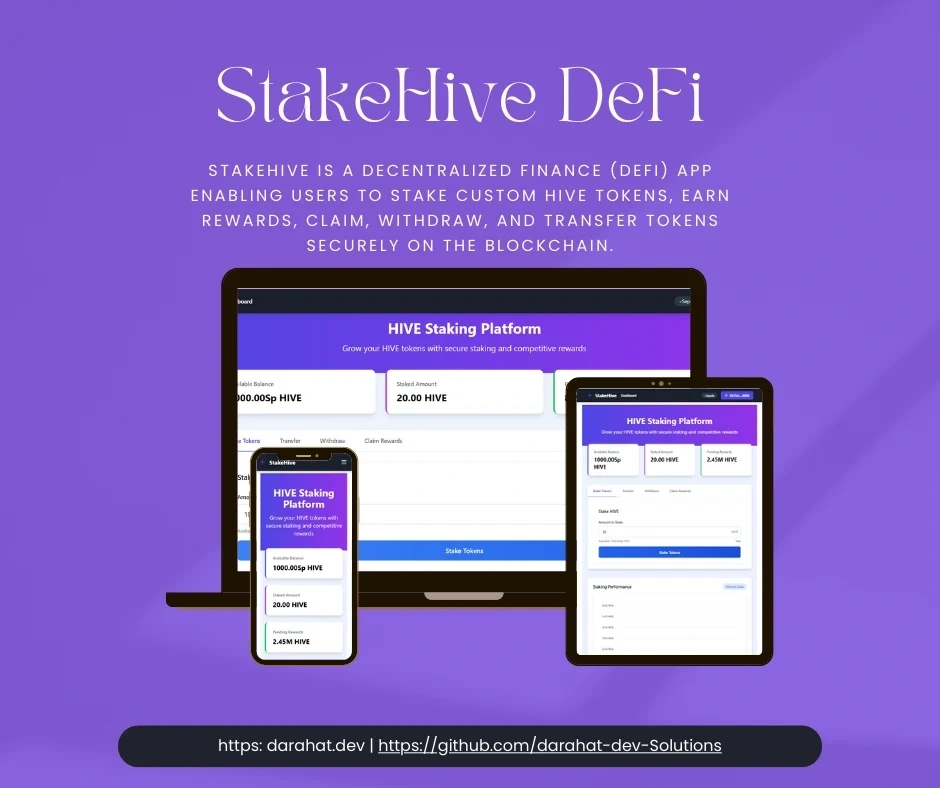
🚀 StakeHive — Enterprise-Grade DeFi Staking Protocol
🔥 Live Demo
Explore the app live here: https://stakehive-defi-dapp.netlify.app/
StakeHive is a decentralized finance (DeFi) app enabling users to stake custom HIVE tokens, earn rewards, claim, withdraw, and transfer tokens securely on the blockchain.
🧪 How to Use StakeHive
Want to start staking with StakeHive? Follow these simple steps:
🔹 Step 1: Enable Test Networks in MetaMask
By default, MetaMask hides test networks. To enable them:
Open MetaMask.
Click on your account icon → Settings.
Navigate to Advanced.
Scroll to Show test networks and toggle it ON.
Return to the main screen, and you’ll now see Sepolia in the network dropdown.
🔹 Step 2: Add Sepolia Testnet (If Not Visible)
If Sepolia isn’t showing:
Click "Select Network" → "Add network" → "Add network manually".
Fill in the following:
Click Save.
🔹 Step 3: Get Sepolia ETH for Gas
You’ll need Sepolia ETH to pay for gas fees. Use one of the following faucets:
Paste your MetaMask wallet address and request test ETH.
🔹 Step 4: Add HIVE Token to MetaMask
To see your HIVE token in MetaMask:
Open MetaMask → go to Assets → click Import tokens.
Enter your deployed token details:
Click Add Custom Token → Import Tokens.
You'll now see your HIVE balance.
⚠️ Note: This is the current Sepolia deployment address. If you deploy your own contracts, use the address printed in your deploy output.
🔹 Step 5: Connect Wallet to StakeHive
Visit the live app: https://stakehive-defi-dapp.netlify.app
Click Connect Wallet.
Choose MetaMask or another supported wallet via Web3Modal.
🔁 StakeHive Features & How to Use Them
✅ Stake HIVE Tokens
Go to the Stake section.
Enter the amount of HIVE you want to stake.
Click Stake, then approve the transaction in MetaMask.
Your tokens are now staked and earning rewards.
💸 Claim Rewards
Navigate to the Rewards section.
Click Claim and approve the transaction.
Your rewards are sent to your wallet instantly.
🔓 Withdraw Staked Tokens
⚠️ You can only withdraw after the lock duration expires.
Go to your Staked Balance.
Click Withdraw, confirm in MetaMask.
Staked tokens will return to your wallet.
🔁 Transfer HIVE Tokens
Open the Transfer tab.
Enter the recipient wallet address and amount.
Click Send and confirm the transaction.
Tokens are transferred peer-to-peer via blockchain.
🎯 Pro Tips
Make sure you have Sepolia ETH in your wallet for transactions.
View all your blockchain activity on Sepolia Etherscan.
If tokens aren’t showing in MetaMask, use "Import Tokens" with your HIVE token contract address.
Use this app for educational and testing purposes only — the tokens and network are not real/mainnet.
✨ Key Features
Feature Description Tech Used Custom ERC20 Token
HIVE token with minting and burning functionality Solidity, OpenZeppelin Staking Contract Time-locked staking with secure rewards distribution Solidity, Hardhat Token Transfer Transfer HIVE tokens between accounts with blockchain verification Ethers.js, MetaMask Real-Time Updates Reactive UI reflecting live balances, rewards, and transaction statuses Vue 3, Nuxt 3, Tailwind Wallet Integration Supports MetaMask, WalletConnect, and Coinbase Wallet Web3Modal Responsive UI Mobile and desktop friendly dashboard with staking analytics and charts Tailwind CSS, Chart.js🏗️ Architecture Overview
Here’s a simplified view of the StakeHive architecture — how components connect and communicate:
Ethers.js
Frontend: Nuxt3
Smart Contracts
Blockchain
Users
Loading
🛠️ Technology Stack
Smart Contracts
Language: Solidity (v0.8+)
Frameworks: Hardhat for development, testing, and deployment
Testing: Mocha, Chai, and Slither static analysis for security checks
Network: Deployed on Sepolia Testnet (Etherscan verified)
Frontend
Framework: Nuxt 3 with Composition API (Vue 3)
Blockchain: Ethers.js v6 for smart contract interaction
Wallets: MetaMask, WalletConnect, Coinbase Wallet through Web3Modal
Styling: Tailwind CSS + DaisyUI for rapid, responsive UI development
Charts & Analytics: Chart.js for staking and reward visuals
Deployment: Hosted on Netlify
📦 Getting Started
Prerequisites
Node.js v16+ and npm
MetaMask or compatible Web3 wallet
Sepolia testnet ETH (from faucet)
Git
🚀 Quick Start (Testing Only)
Want to just test the dApp without deploying? Use the pre-deployed contracts:
The dApp is pre-configured with deployed Sepolia contracts:
HiveToken:
0x359863fB0ca4E4be77daD9dFFBB0BbdA94690cCCStakeHiveFarm:
0x3531D47A28Aa87Bd5F9eaD3D2d8Fe07Ce16C8DDcJust connect your wallet and you're ready to go! 🎉
🛠️ Full Development Setup
For developers who want to deploy their own contracts:
Environment Variables (.env) - Only needed for Sepolia deployment:
🔴 CRITICAL: Understanding Contract Addresses
The project uses dynamic address mapping based on network chain ID. Contract addresses are stored in
frontend/utils/contract.js:When you connect MetaMask, the dApp automatically:
Detects your network's chain ID
Loads the correct contract addresses for that chain
Queries those contracts for balances and data
⚠️ Important: Running deployment scripts creates NEW contracts with NEW addresses. The frontend must be updated with these new addresses.
🟢 Option A: Automated Deployment (Recommended)
Use this script that automatically updates frontend addresses:
What this does:
✅ Deploys HiveToken
✅ Deploys StakeHiveFarm
✅ Transfers tokens to farm
✅ Sets reward rate
✅ Automatically updates
frontend/utils/contract.js✅ Prints new addresses and next steps
After automated deployment:
🔴 Option B: Manual Deployment (Not Recommended)
If you prefer manual control:
⚠️ You MUST manually update addresses after this!
Method 1: Use the address update script
Method 2: Manually edit
frontend/utils/contract.jsOpen
frontend/utils/contract.js and update the ADDRESS_MAP:After manual update:
🧪 Running Tests
Comprehensive test suite with 10+ tests:
Test coverage includes:
✅ Staking functionality
✅ Reward calculations
✅ Withdraw operations
✅ Token transfers
✅ Error handling
✅ Edge cases
🎓 Usage Guide & Best Practices
Connecting Your Wallet
Ensure you're on Sepolia Testnet in MetaMask
Click Connect Wallet in the dApp
The dApp automatically detects your network and loads correct addresses
Browser console shows:
🔗 Connected to chain 11155111 (sepolia)Getting HIVE Tokens
If using pre-deployed contracts: Request tokens by opening an issue with your wallet address.
If you deployed your own: Transfer tokens from the deployment account:
Importing HIVE Token to MetaMask
Open MetaMask
Go to Assets → Import tokens
Enter the contract address (check console logs or
frontend/utils/contract.js)Token Symbol: HIVE
Decimals: 18
Using StakeHive Features
Staking: Enter amount → Click Stake → Approve in MetaMask
Claiming Rewards: Navigate to Rewards → Click Claim → Approve transaction
Withdrawing: After lock period expires → Click Withdraw → Approve transaction
Transferring: Enter recipient address and amount → Click Transfer → Approve
Important Notes
Gas Fees: You need Sepolia ETH for all transactions. Get it from Sepolia Faucet
Token Balances: Displayed dynamically from blockchain, updated automatically
Staking Limits: Can only stake up to your current HIVE balance
Lock Period: Check staking dashboard for withdraw availability
Real-Time Updates: Vue watchers ensure UI reflects blockchain state automatically
Transaction Confirmation: All actions require MetaMask approval
📊 Performance Highlights
Metric Value Contract Size ~24.5 KB Average Gas Cost ~142,000 gas Transactions Per Sec ~18.7 TPS (testnet) Frontend Load Time ~1.2 seconds
🔧 Developer Tools & Scripts
Available Scripts
Script Command Description Deploy (Auto)
npx hardhat run scripts/deploy-and-update.js --network sepolia Recommended: Deploys and auto-updates frontend Deploy (Manual) npx hardhat run scripts/deploy.js --network sepolia Standard deployment (requires manual address update) Update Addresses node scripts/update-addresses.js <chainId> <tokenAddr> <farmAddr> Manually update frontend addresses Transfer Tokens npx hardhat run scripts/transfer-tokens.js --network sepolia Transfer HIVE to your wallet Run Tests npx hardhat test Run full test suite Start Frontend cd frontend && npm run dev Launch development server Build Frontend cd frontend && npm run build Production buildProject Structure
Key Files to Know
frontend/utils/contract.js: Contains ADDRESS_MAP - update after deployingfrontend/stores/walletStore.js: Wallet connection and blockchain interactionshardhat.config.js: Network configurations and compiler settings.env: Your private key and RPC URLs (NEVER commit this!)Debugging Tips
Check browser console for logs:
🔗 Connected to chain 11155111 - Network detected📍 Using addresses: {...} - Addresses loaded for current chain💰 Fetching balance from HIVE token at: 0x... - Balance query📊 Raw balance (wei): ... - Retrieved balance before formattingCommon console errors and solutions:
❌ No contract code at 0x... → Wrong network or address mismatchError fetching token balance → Check provider initializationUnknown Token → Import token to MetaMask with correct address⚠️ Troubleshooting Guide
🔴 "Available Balance: 0.00 HIVE" but MetaMask shows tokens
Cause: Contract address mismatch between MetaMask and frontend
Solution:
Open browser console (F12)
Find log:
💰 Fetching balance from HIVE token at: 0x...Compare with MetaMask token address
If different, either:
Option A: Update MetaMask with the address from console log
Option B: Update
frontend/utils/contract.js with MetaMask's addressRestart frontend and hard refresh (Ctrl+Shift+R)
Reconnect wallet
🔴 "Unknown Token" in MetaMask
Solution: Manually import the HIVE token:
MetaMask → Assets → Import tokens
Enter contract address (check console logs or
frontend/utils/contract.js)Symbol:
HIVE, Decimals: 18🔴 Transaction Failures
Check these:
✅ Enough Sepolia ETH for gas? (Get from faucet)
✅ Enough HIVE tokens for the transaction?
✅ Token approval granted for staking contract?
✅ On correct network (Sepolia = Chain ID 11155111)?
🔴 Frontend doesn't recognize deployed contracts
After deploying new contracts:
Verify addresses updated in
frontend/utils/contract.jsRestart frontend dev server
Hard refresh browser (Ctrl+Shift+R)
Reconnect MetaMask wallet
Check console for correct addresses being loaded
🔴 "Receiver must be an instance of class" error
Cause: Using Pinia store proxy instead of actual ethers provider
Solution: Already fixed in codebase. Update to latest version.
🔴 Wallet not detected
Solution:
Install MetaMask
Refresh page after installation
Check if MetaMask is unlocked
🔴 Contract deployment fails
Common causes:
❌ Missing or invalid
SEPOLIA_RPC_URL in .env❌ Missing or invalid
PRIVATE_KEY in .env❌ Not enough Sepolia ETH in deployment wallet
❌ Network congestion (retry after a moment)
💡 Best Practices
✅ Always use
deploy-and-update.js for deployments✅ Test on local Hardhat first before Sepolia
✅ Check console logs for debugging information
✅ Document new addresses after deployment
✅ Transfer tokens to test accounts after deployment
❌ Never commit
.env file with private keys❌ Don't manually edit deployment scripts unless you know what you're doing
👨💻 Developer Notes
This app uses Ethers.js v6 — syntax differs from v5 (especially
parseEther and contract calls).Smart contracts include reentrancy guards and gas optimizations.
Vue 3 Composition API provides modular and reactive state management with watchers for blockchain state.
The frontend automatically updates staking and rewards info on wallet events.
The backend admin panel (Laravel) manages off-chain data and analytics (not included in this repo).
📬 Contact & Collaboration
Didarul Alam Rahat Senior Full Stack & Web3 Developer
🔗 LinkedIn
Open to senior Web3 roles, audits, consulting, and collaborations.
📜 License
MIT License © 2023 Didarul Alam Rahat
Feel free to open issues or submit pull requests to improve the project! Your feedback and contributions are welcome.
Happy BUIDLing! 🚀🐝
Like this project
Posted Dec 1, 2025
Developed StakeHive, a DeFi app for staking HIVE tokens on Sepolia Testnet.
Likes
0
Views
2
Timeline
Jun 30, 2025 - Aug 20, 2025