Development of SensorLab Application

Didarul Alam Rahat


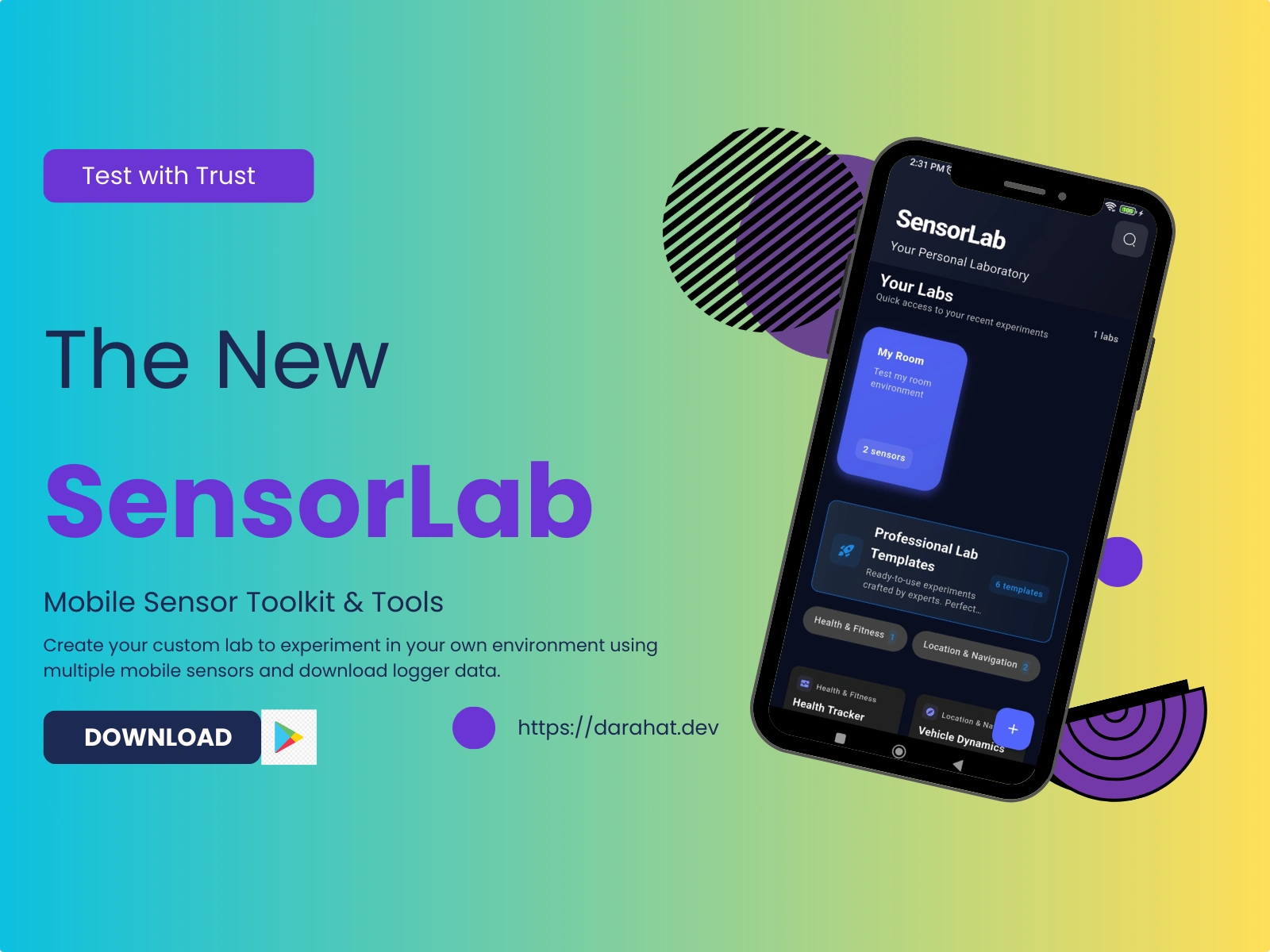
📱 SensorLab - All-in-One Sensor Toolkit



A comprehensive Flutter application that provides access to all device sensors with an intuitive, multi-language interface
🚀 Features
🌐 Multi-Language Support
4 Languages: English, Spanish, Japanese, Khmer
500+ Localized Strings: Complete internationalization
Dynamic Language Switching: Change language on-the-fly
📊 Comprehensive Sensor Suite
Motion Sensors: Accelerometer, Gyroscope, Magnetometer
Environmental: Light, Humidity, Noise, Proximity
Location & Navigation: GPS, Compass
Health & Fitness: Heart Rate, Activity Tracking, Calorie Counter
Utility: QR/Barcode Scanner, Flashlight
🎨 Modern UI/UX
Material Design 3: Latest design system
Dark/Light Themes: System-adaptive theming
Responsive Layout: Optimized for all screen sizes
Accessibility: Full screen reader support
📋 Requirements
System Requirements
Flutter SDK:
>=3.0.0Dart SDK:
>=3.0.0Android Studio: Latest version (for Android development)
Xcode: Latest version (for iOS development, macOS only)
Platform Support
Platform Minimum Version Recommended Android API Level 21 (5.0) API Level 33+ iOS iOS 11.0 iOS 15.0+ Web Modern browsers Chrome 90+
Hardware Requirements
RAM: 8GB minimum, 16GB recommended
Storage: 10GB free space
Processor: Intel i5 / AMD Ryzen 5 or better
⚙️ Setup & Installation
1. Prerequisites Setup
Install Flutter SDK
Install Android Studio
Configure Development Environment
2. Project Setup
Clone Repository
Install Dependencies
Configure Gradle (Android)
Ensure your
android/build.gradle has:Generate Localization Files
3. Running the Application
Development Mode
Build for Production
4. Environment Configuration
🔐 Android Signing Setup
For building release APKs, you need to configure Android app signing:
⚠️ Security Note: Never commit
key.properties or keystore files to version control!For detailed setup instructions, see: Android Setup Guide
🔑 Environment Variables Setup
For optional features (AdMob, API keys), configure environment variables:
⚠️ Security Note: Never commit
.env files to version control!Configuration Overview
The app uses a two-file configuration system:
android/key.properties - Android signing and AdMob App ID.env - AdMob ad unit IDs and API keys (optional)Both files are excluded from version control for security.
🏗️ Architecture
Clean Architecture Pattern
📚 Modules Documentation
Core Modules
Module Description Documentation 🏥 Health Activity tracking, calorie counter, health metrics 📖 Health Module 📊 Accelerometer 3-axis acceleration measurement 📖 Accelerometer Module 🌀 Gyroscope Device rotation and angular velocity 📖 Gyroscope Module 🧭 Compass Magnetic field and navigation 📖 Compass Module 📍 Geolocator GPS positioning and location services 📖 Geolocator Module 💡 Light Meter Ambient light measurement 📖 Light Meter Module 🔊 Noise Meter Sound level monitoring 📖 Noise Meter Docs 💧 Humidity Environmental humidity sensing 📖 Humidity Module 📏 Proximity Distance detection sensor 📖 Proximity Module ❤️ Heart Beat Heart rate monitoring via camera 📖 Heart Beat Module 📱 QR Scanner QR code and barcode scanning 📖 QR Scanner Module 🔦 Flashlight Device flashlight control 📖 Flashlight Module ⚙️ App Settings Application configuration 📖 Settings Module
🔧 Integration & Usage
For Developers
Want to use SensorLab features in your own app? We've got you covered!
Guide Description Best For 🚀 Quick Start Template Ready-to-use health app template Beginners, rapid prototyping 📖 Integration Guide Complete feature integration guide Custom implementations 📚 Module Documentation Individual module guides Specific feature integration
Popular Use Cases
Health & Fitness Apps - Activity tracking, user profiles, settings
IoT Sensor Dashboards - Real-time sensor data visualization
Educational Projects - Learning Flutter, sensors, localization
Prototype Development - Quick sensor integration testing
🤝 Contributing
Development Setup
Fork the repository
Create a feature branch:
git checkout -b feature/amazing-featureCommit changes:
git commit -m 'Add amazing feature'Push to branch:
git push origin feature/amazing-featureOpen a Pull Request
Coding Standards
Follow Dart Style Guide
Use Flutter Linting
Write tests for new features
Update documentation
📄 License
This project is licensed under the MIT License - see the LICENSE file for details.
Made with ❤️ using Flutter Made with ❤️ by darahat ⭐ Star this repository if you find it helpful! ⭐
flutter dart mobile sensors accelerometer gyroscope compass gps health tracker qr scanner internationalization cross platform android ios real time data clean architecture material design riverpod sensor toolkit measurement app
Like this project
Posted Dec 3, 2025
Developed SensorLab, a multi-language app for sensor access using Flutter.
Likes
0
Views
3
Timeline
Apr 4, 2025 - Oct 15, 2025