Selected Personal Automation Projects

Shane

Shane Sapolis

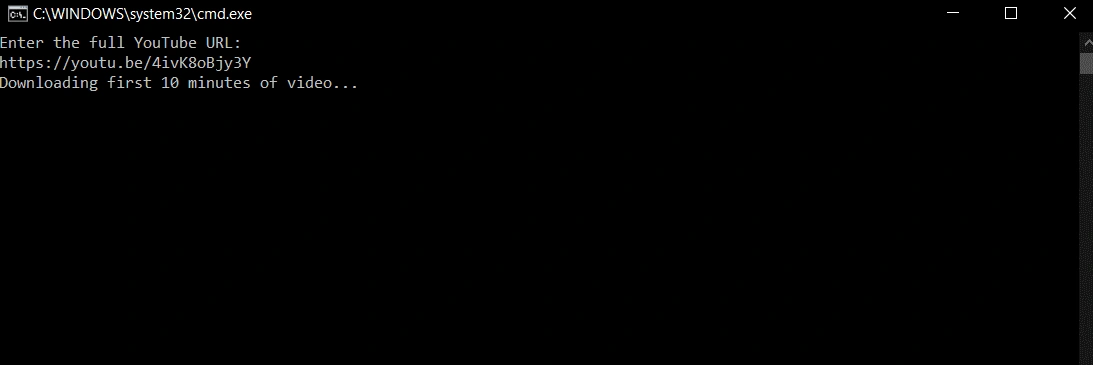
Quick & Dirty YT Downloader
@echo off
setlocal

:: Set path to yt-dlp executable; ensure it's in the same folder as this script or update accordingly.
set "YTDLP=yt-dlp.exe"

:: Set the output file name; adjust if desired.
set "OUTPUT=C:\[filepath]\[clip_filename].mp4"

:: Specify the full path to your ffmpeg executable's folder.
set "FFMPEG_LOC=C:\[ffmpeg_filepath]\ffmpeg-5.1.2-full_build\bin"

echo Enter the full YouTube URL:
set /p VIDEO_URL=

if not exist "%YTDLP%" (
echo ERROR: yt-dlp.exe not found in current directory.
echo Download it from: https://github.com/yt-dlp/yt-dlp/releases/latest
pause
exit /b
)

echo Downloading first X minutes of video...
"%YTDLP%" --ffmpeg-location "%FFMPEG_LOC%" -f best -o "%OUTPUT%" --download-sections "*##:##:##-##:##:##" "%VIDEO_URL%"

echo.
if exist "%OUTPUT%" (
echo Download complete: %OUTPUT%
) else (
echo Download failed.
)

pause

A lightweight script designed for quick YouTube video downloads via terminal. Users can easily configure the ffmpeg binary path, target download directory, and specify custom start/end timestamps to trim the downloaded video segment. Built for efficiency, portability, and ease of use without bloated frontends.
Video Reversal PowerShell Script
# === CONFIGURATION ===
$ffmpeg = "C:\[ffmpeg_filepath]\ffmpeg-5.1.2-full_build\bin\ffmpeg.exe"
$input = "C:\[input_filepath]\[input_filename].mp4"
$output = "C:\[output_filepath]\[output_filename].mp4"
$chunkLength = 60
$workdir = Join-Path $env:TEMP ("waterfall_reverse_" + (Get-Random))
$chunkDir = "$workdir\chunks"
$reverseDir = "$workdir\reversed"
$listFile = "$workdir\reversed_list.txt"
$trimmed = "$workdir\trimmed_input.mp4"

# === PREP DIRECTORIES ===
New-Item -ItemType Directory -Force -Path $chunkDir | Out-Null
New-Item -ItemType Directory -Force -Path $reverseDir | Out-Null

Write-Host "Trimming input to first X minutes..."
& $ffmpeg -y -ss 0 -t ### -i $input -c copy $trimmed

if (!(Test-Path $trimmed)) {
Write-Error "❌ Trimmed file was not created. Aborting."
exit 1
}

Write-Host "Splitting into chunks..."
& $ffmpeg -i $trimmed -c copy -map 0 -f segment -segment_time $chunkLength "$chunkDir\chunk_%03d.mp4"

Write-Host "Reversing each chunk..."
Get-ChildItem "$chunkDir\chunk_*.mp4" | ForEach-Object {
$name = $_.Name
$revPath = Join-Path $reverseDir ("rev_" + $name)
Write-Host " → Reversing $name"
& $ffmpeg -y -hwaccel cuda -i $_.FullName -vf reverse -af "pan=stereo|c0=FL|c1=FR,areverse" -c:v h264_nvenc -preset fast $revPath
}

Write-Host "Building reversed chunk list..."
Get-ChildItem "$reverseDir\rev_chunk_*.mp4" | Sort-Object Name -Descending | ForEach-Object {
"file '$($_.FullName)'" | Out-File -Append -Encoding ascii $listFile
}

Write-Host "Concatenating reversed chunks..."
& $ffmpeg -f concat -safe 0 -i $listFile -c copy $output

if (Test-Path $output) {
Write-Host "`n Success! Output saved to: $output"
} else {
Write-Error "`n Final output not created."
}

Write-Host "`nCleaning up temp files..."
Remove-Item -Force -Recurse $workdir

pause

A simple yet flexible PowerShell script for reversing video clips using ffmpeg. Built with anonymized variables and customizable fields, allowing users to set input/output paths, filenames, and target durations without modifying the core logic.
Monthly Ledger Rollover Macro
Sub ComprehensiveMonthlyUpdateRevised()
Dim ws As Worksheet
Set ws = ThisWorkbook.Sheets("Checking")

' Dynamically update the month names in H20:M20 and shift values for H21:M22
Dim currentMonth As Date
currentMonth = Date ' Today's date to determine the current month
Dim currentMonthName As String
currentMonthName = Format(currentMonth, "mmmm")
Dim prevMonthName As String
prevMonthName = Format(DateAdd("m", -1, currentMonth), "mmmm")

ws.Cells(20, 8).Value = Format(DateAdd("m", -3, currentMonth), "mmmm")
ws.Cells(20, 10).Value = Format(DateAdd("m", -2, currentMonth), "mmmm")
ws.Cells(20, 12).Value = Format(DateAdd("m", -1, currentMonth), "mmmm")
ws.Cells(20, 13).Value = currentMonthName

For i = 8 To 11
ws.Cells(21, i).Value = ws.Cells(21, i + 2).Value
ws.Cells(22, i).Value = ws.Cells(22, i + 2).Value
Next i

ws.Cells(21, 13).Formula = "=H17"
ws.Cells(22, 13).Formula = "=ABS(SUM(H5:I16))"

' Revised logic for K39:L50 based on the new requirements
Dim monthRow As Long
Dim foundCurrentMonth As Boolean
foundCurrentMonth = False

For monthRow = 39 To 50
If ws.Cells(monthRow, 11).Value = currentMonthName And Not foundCurrentMonth Then
ws.Cells(monthRow, 12).Formula = "=E350"
foundCurrentMonth = True
ElseIf ws.Cells(monthRow, 11).Value = prevMonthName Then
ws.Cells(monthRow, 12).Value = ws.Cells(350, 5).Value
End If
Next monthRow
....................
Truncated for Display
A personal-use macro built to automate transitions in a custom Excel budgeting ledger. It rolls over balances, resets spending categories, and prepares monthly sheets—showcasing practical Excel automation applied to real-world financial tracking.
Skedpal Automator and Generative AI Integration
skedpal_automator.py
import asyncio
from datetime import datetime
from playwright.async_api import async_playwright, TimeoutError as PlaywrightTimeoutError

class SkedpalAutomator:
def __init__(self):
self.browser = None
self.page = None

async def launch_browser(self):
playwright = await async_playwright().start()

self.browser = await playwright.chromium.launch(
headless=False,
args=[
"--disable-blink-features=AutomationControlled",
"--no-sandbox",
"--disable-web-security",
"--disable-extensions",
"--disable-gpu",
"--disable-features=IsolateOrigins,site-per-process"
]
)

context = await self.browser.new_context(extra_http_headers={
"Referrer": "https://app.skedpal.com/",
"Origin": "https://app.skedpal.com/",
"User-Agent": "Mozilla/5.0 (Windows NT 10.0; Win64; x64) AppleWebKit/537.36 (KHTML, like Gecko) Chrome/110.0.0.0 Safari/537.36"
})
self.page = await context.new_page()
#Truncated for display#
skedpal_command_listener.py
import asyncio
import re
import threading
from skedpal_automator import SkedpalAutomator

class SkedpalCommandListener:
def __init__(self, automator, loop):
self.automator = automator
self.loop = loop
self.running = True

async def listen_loop(self):
await self.loop.run_in_executor(None, self._blocking_input_loop)

def _blocking_input_loop(self):
while self.running:
user_input = input("\n>>> Enter command: ")
coro = self.parse_and_execute(user_input)
asyncio.run_coroutine_threadsafe(coro, self.loop)

async def parse_and_execute(self, command):
command = command.strip()

try:
title_match = re.search(r'Create new task:\s*(.*?)\s*(\||$)', command, re.IGNORECASE)
if not title_match:
print("[!] Could not parse task title.")
return
title = title_match.group(1).strip()
#Truncated for display#
An ambitious automation project aimed at streamlining task scheduling in Skedpal using Python and Playwright. Currently focused on automating fixed-time task creation, with future plans to integrate ChatGPT’s API—enabling users to workshop, plan, and execute scheduling changes conversationally through AI.
Like this project

Posted Jun 17, 2025

Personal tools and automations built in Excel, Python, and PowerShell—solving real problems and showcasing initiative through hands-on projects.