Calendar & Time Zone Management

Ann Syombua Peter


Calendar & Time Zone Management for Busy Entrepreneurs | Google Calendar Scheduling VA.
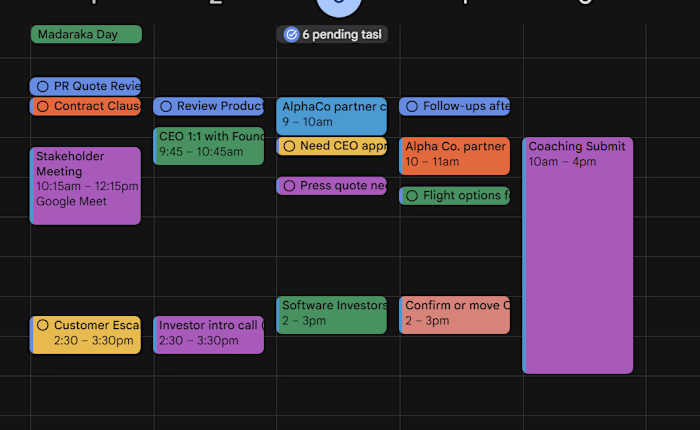
This project demonstrates how I handle calendar coordination across different time zones using Google Calendar and supporting tools.
🧠 My approach to calendar management:
I focus on building a system where every meeting is clear, intentional, and error-free:
• Confirming accurate time zones before scheduling.
• Setting event-specific time zones in Google Calendar.
• Using structured, clear meeting titles.
• Including full context (agenda, links, expectations) in every invite.
• Verifying participant emails before sending invitations.
• Building buffer time between meetings to maintain flow and avoid overlap.
⚙️ Tools used in this workflow:
• Google Calendar — core scheduling system.
• World Time Buddy — time zone coordination.
• Calendly — simplified booking and scheduling.
• Zoom / Google Meet — seamless meeting integration.
• Notion / Trello — context tracking and follow-ups.
🎯 Outcome:
A structured scheduling system that ensures:
✔ No missed meetings.
✔ No time zone confusion.
✔ No scheduling back-and-forth.
✔ Smooth, predictable calendar flow.
💡 What this project demonstrates:
This reflects my ability to support clients with:
- Calendar organization across multiple time zones.
- Executive-level scheduling support.
- Operational coordination for busy professionals.
- Reliable, detail-focused virtual assistance.
Like this project
Posted Jun 4, 2026
Calendar & Time Zone Management for Busy Entrepreneurs | Google Calendar Scheduling VA. This project demonstrates how I handle calendar coordination acro...
Likes
0
Views
3