LiveSync, Google Photos

Kalyan Kadavanti Sudhakar
Evolving Google Photos with LiveSync Album
A Micro-Restructuring UX Case Study Based on Real User Behavior
June 2025
UX Research
Behavioral Pattern Analysis
Micro-Restructuring Strategy
Real-Time Collaboration UX
📝 Short Overview
A chaotic road trip exposed a common problem: delayed, fragmented photo sharing. Instead of building a new app, I identified a white space in Google Photos and added a micro-restructured feature that’s intuitive, private, and instantly collaborative. This isn’t UX reinvention — it’s thoughtful evolution, built on what people already do.
The process
Personal Trigger → Real-World Observation
Comparative App Audit
Feature Structuring via Micro-Restructuring Lens
Survey Mining + Behavioral Research
Technical Feasibility + Privacy Modeling
Gap Identification: Strategic White Space
🚗 It All Started on a Road Trip
Four friends. One car. A journey from LA to San Diego. And about a thousand photos — most of which ended up on someone else’s phone.
At every beach, overlook, gas station snack stop, someone would yell, “Wait, take one of me!” We obliged. But after the trip? Absolute chaos.


We told ourselves we’d share everything later. The result? A jumbled mess of WhatsApp messages, Google Drive links that took 30 minutes to upload/download, AirDrop fumbles, and several “I forgot to send it” apologies.
And then I started wondering: Is there a simpler way to do this? Is there something that already exists — or could exist — that makes this process easier, without waiting, uploading, or relying on someone to remember to share?
🔎 From Personal Chaos to Collective Pattern Recognition
I started with my own experience — and then investigated if others were quietly suffering too.
Turns out, yes. A lot.
I explored:
Cluster: Real-time group album, but only works when open. Meh.
Kululu: QR-code based sharing at events. No app needed. Pretty clever.
FamilyAlbum: Designed for parents, grandparents — not ideal for squad trips.
ClickClick, Guestpix, Memento, Lapse: Each of these apps serves its own unique purpose — from event-specific QR sharing to private family albums.
They’re well-crafted for their niche use cases, but none are built for broad, real-time group sharing that’s frictionless and collaborative by default.
Most are app-dependent, slow, or designed for hyper-specific use cases. Also: nobody wants another photo app.
📚 So I Turned Into a Research Monster
To understand if this post-trip photo-sharing mess was just our group’s problem or a widespread behavior, I dove into a range of academic papers, user surveys, and behavioral insights. The goal wasn’t just to validate pain points, but to understand the psychology of photo sharing and why existing platforms often fail to support real-time group collaboration.

🔬 Studies & Surveys That Shaped the Solution
Think with Google & UX Collective:
Identified the "photo fatigue" phenomenon — where users intend to share but drop off due to post-event exhaustion or friction.
Balestrini et al. (2014):
People often forget or feel awkward asking for photos from others post-event — this creates emotional tension and missed memories.
McKinsey & Co. + Gen Z Reports:
This generation expects instant gratification, visual validation, and seamless UX — they’re less tolerant of effort-heavy sharing processes.
The Travel Psychologist Blog:
Sharing photos contributes to collective memory but also introduces stress when people feel pressured or delayed in receiving them.
Frontiers in Psychology:
Photo sharing enhances travel satisfaction and strengthens social bonding — especially when done during or shortly after the experience.
SAGE Journals – The Distorted Gaze:
81% of users edit their photos before posting, reflecting emotional investment, self-curation, and the desire for control.
Zenger News Survey:
Users take an average of 6+ photos a day, yet struggle to consolidate or share them — especially when multiple people contribute to the same experience.
Brocade Radar, Amberstudent, GuestCam blog posts:
Emphasized platform fragmentation, inconsistent ownership of albums, and lack of reminder systems as causes of frustration.
📉 Synthesized Pain Points from Across the Research
🚫 Scattered Memories: Photos are lost across multiple platforms, with no central, unified memory bubble
📆 Delayed Sharing: Often happens days (or weeks) after the event — losing the emotional freshness
🔄 Platform Fragmentation: People juggle WhatsApp, Drive, iCloud, Telegram, AirDrop — but none offer seamless collaboration
🔗 Link Fatigue: Shared albums feel one-sided; users forget or ignore uploads
🔕 No Triggers or Prompts: No built-in reminders or nudges to encourage full participation
😬 Emotional Hesitation: People hesitate to ask others for photos post-event
📸 Loss of Control or Ownership: Albums feel like they “belong” to the creator, not the group
Together, these studies revealed a modern UX gap — not in image quality or app performance, but in real-time, low-friction, shared emotional experiences.
The real insight? Photo sharing is not just a utility task. It’s a social ritual. And rituals work best when they’re seamless, collaborative, and immediate.
🕳️ Enter the White Space
I wasn’t interested in building Yet Another Photo App™. I wanted to identify the missing puzzle piece.
And this was it:
Real-time, cross-user, collaborative syncing inside an app people already use and trust.
No new login. No QR code. No waiting.
Just a camera. A click. And the image shows up on everyone’s album — instantly.
🔧 Meet LiveSync Album: A Behavior Upgrade
Not a new app. Not a redesign. Just an evolution — inside Google Photos.
Because:
It has 2B+ users
It spans both Android and iOS
It’s already a part of people’s daily photo flow
But what it lacked? Live, multi-user sync.
🎯 Why Google Photos Was the Perfect Host
Platform
iCloud Apple-only, still manual
WhatsApp Compresses images, unorganized chats
ClusterApp must be open, not scalable
Guestpix/Kululu Event-only, QR-dependent
Limitations
Google Photos?
✔️ Trusted platform
✔️ Cloud-native, fast
✔️ Already has shared album infra
✔️ Familiar flow for 2B+ users
This isn’t reinventing the wheel. It’s making the wheel self-driving.
🛠️ Feature Breakdown
Create Shared LiveSync Album
Accessible via the “+” button
Invite others → Accept → Done
Photos sync as you click, in real time
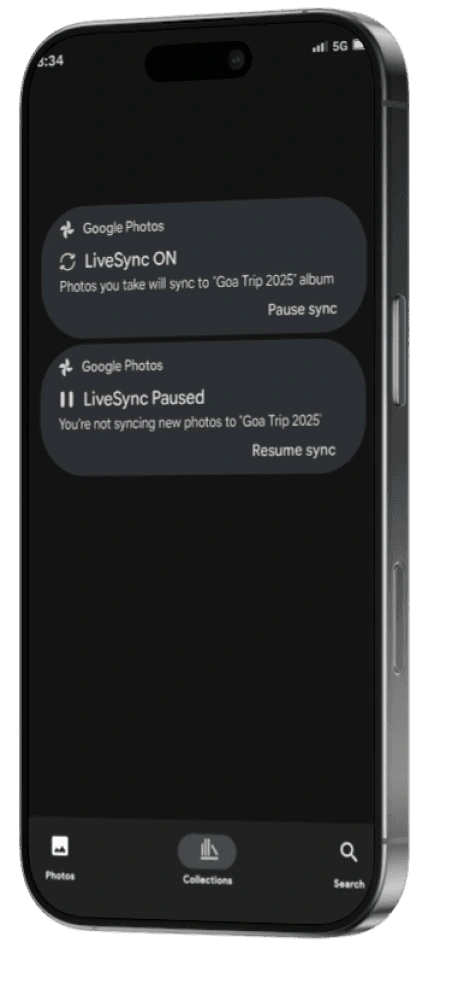
Persistent Notification Toggle
Status bar says: “LiveSync On” → Tap to pause
No digging into the app to stop sharing
Social + Emotional Layer
“Karan just added 3 photos”
❤️ 😍 🔥 reactions available immediately
Feels like a private feed, not a static dump
Privacy-Friendly Sync Controls
Wi-Fi only uploads
Location-filtered sync zones
Optional upload approval — private moments stay private
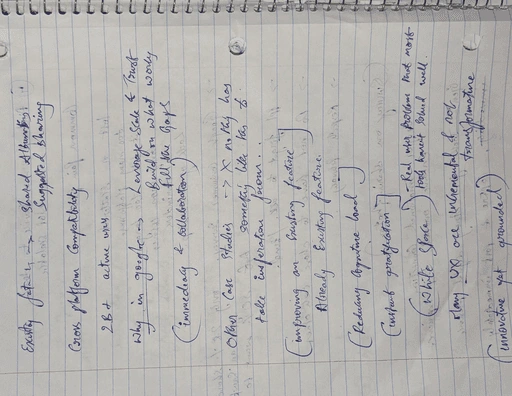
✍️ From Notes to Interface: Raw Thinking to Real Design
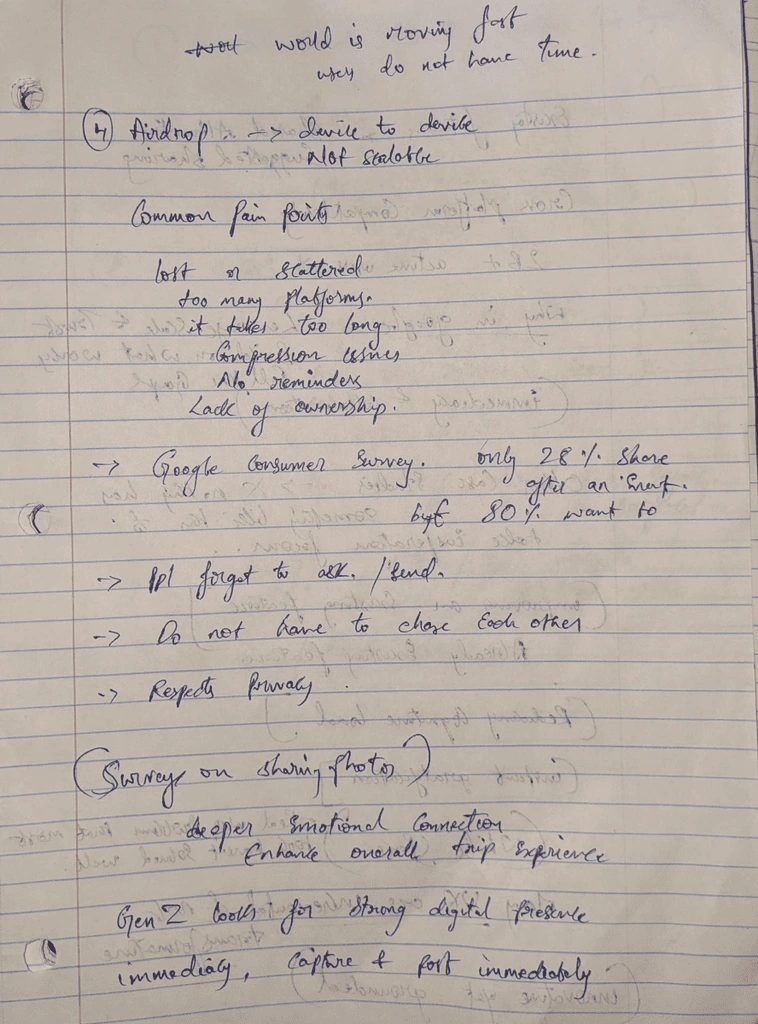
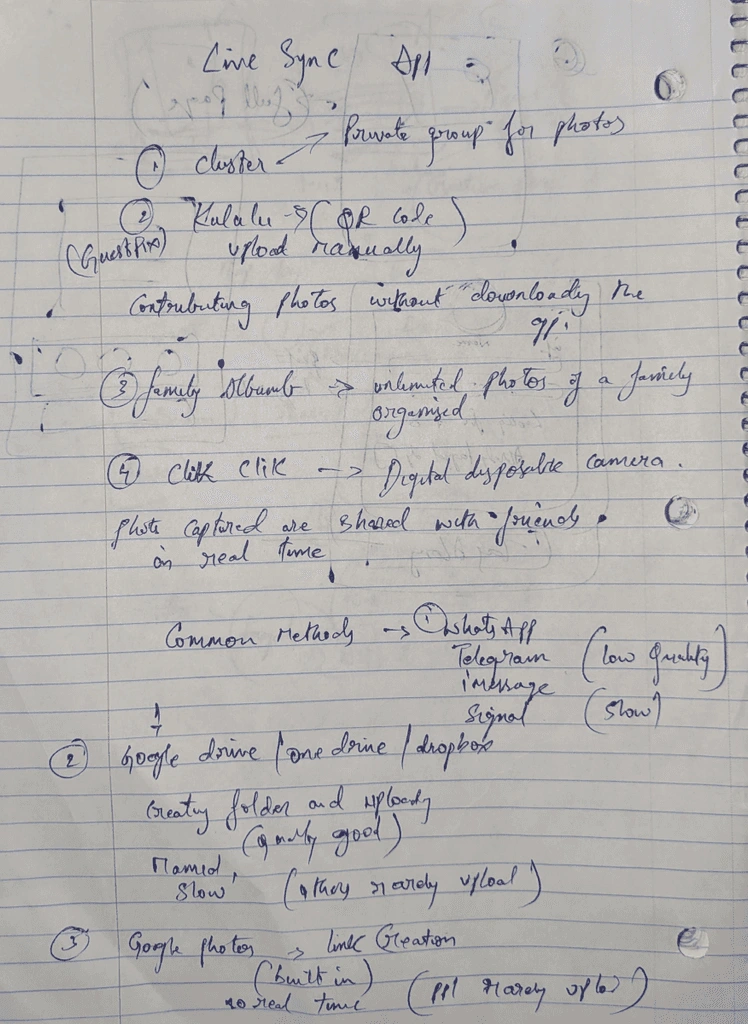
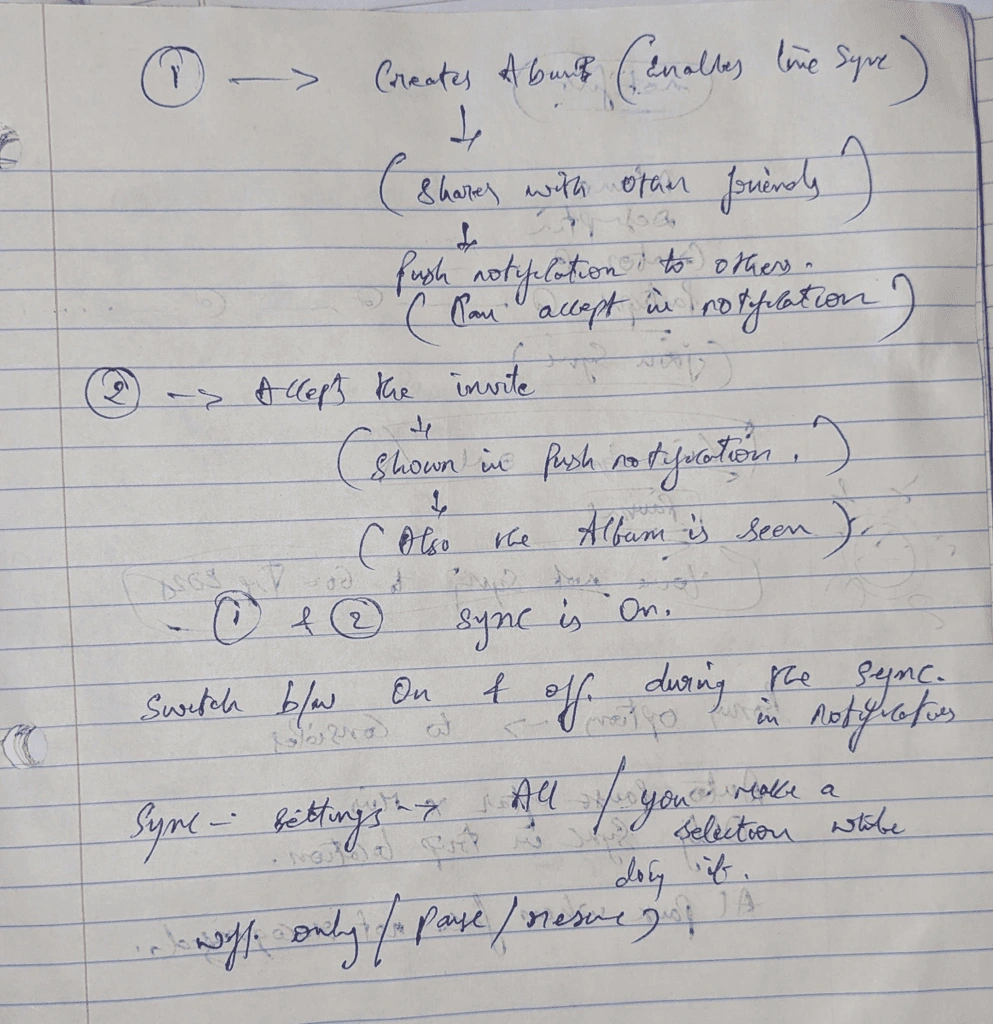
🧪 But… Can It Actually Work?
Yes. Here’s the technical backbone:
On Device (Frontend):
iOS: PhotoKit + background refresh + MediaStore (Android)
Monitors camera roll for new entries → filters → queues
Backend (Firebase-inspired stack):
Firestore DB: Real-time photo syncing across users
Firebase Cloud Storage: Holds uploaded images
Firebase Auth: Account-based control
Cloud Functions: Metadata processing, permission logic
FCM: Push notifications and LiveSync status alerts

Note: This is a Firebase-inspired implementation model for prototyping purposes. While Google Photos operates on its own internal infrastructure, this stack demonstrates how LiveSync can be technically viable using industry-standard tools.
🧑🎨 Prototype Preview: Bringing LiveSync to Life
Here’s how I translated the idea into a working interface — designed directly inside the existing Google Photos experience to feel familiar, fast, and flexible.
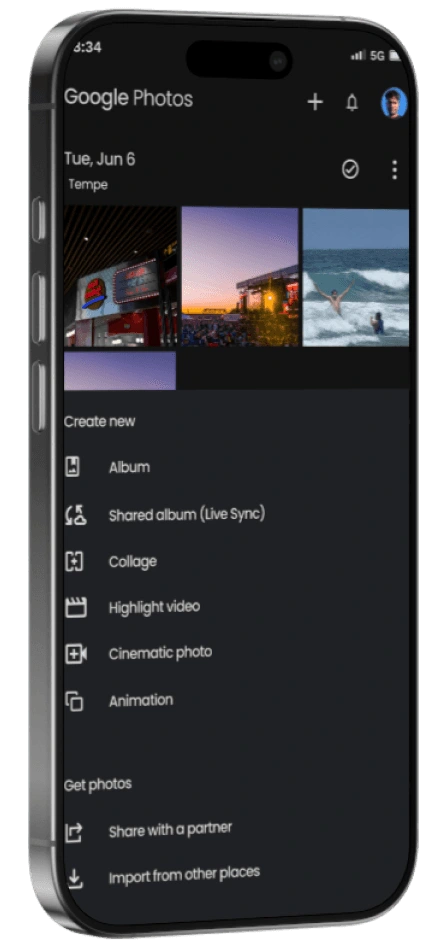
🧷 Entry Point: '+' Button Flow
Tap the ‘+’ icon at the top right
Overlay opens with options like:
Album
Shared Album (Live Sync)
Collage, Cinematic Photo, Highlight Video, etc.
🧩 LiveSync Album Creation Flow
Add album title + optional description
LiveSync toggle appears with a brief explanation:
“Photos you take will be automatically added and shared in real time.”
Invite users directly or share a link
Tap Create → album is live
📡 Album Behavior
Album appears like any other shared album
As users capture photos, they are synced in real-time
Users can pause/resume syncing using persistent notification overlay (shown above)
Everyone in the album can react, view, and co-own the memory bubble
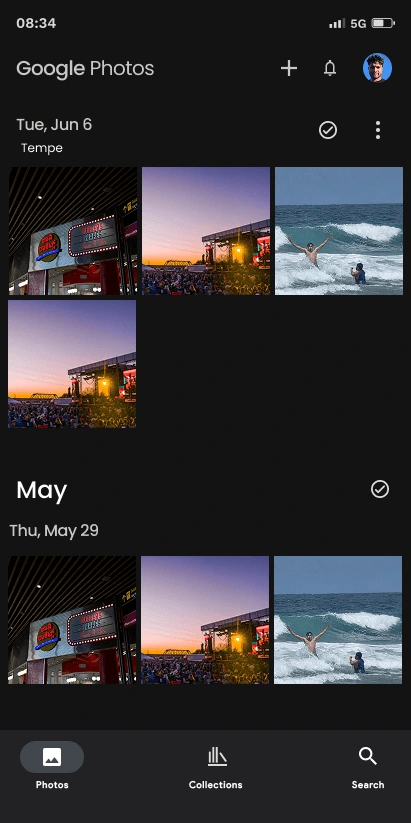
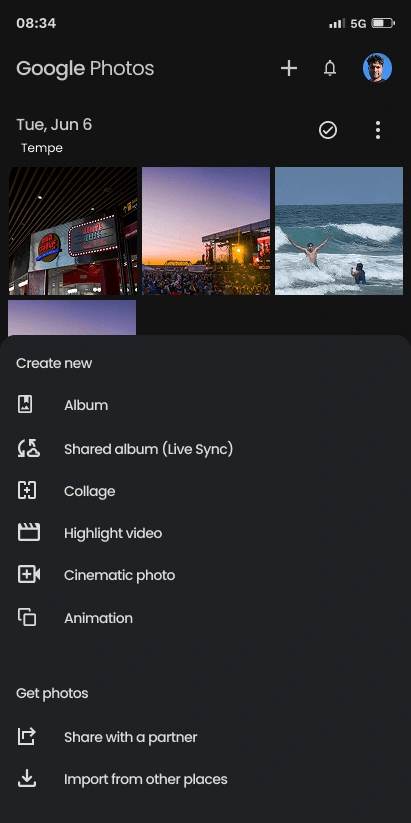
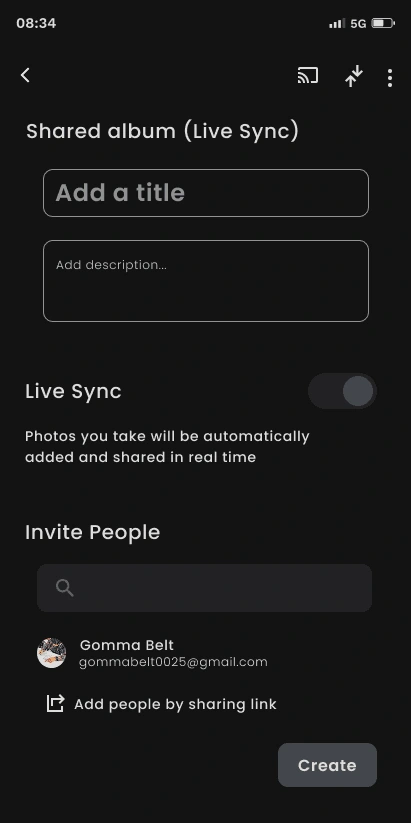
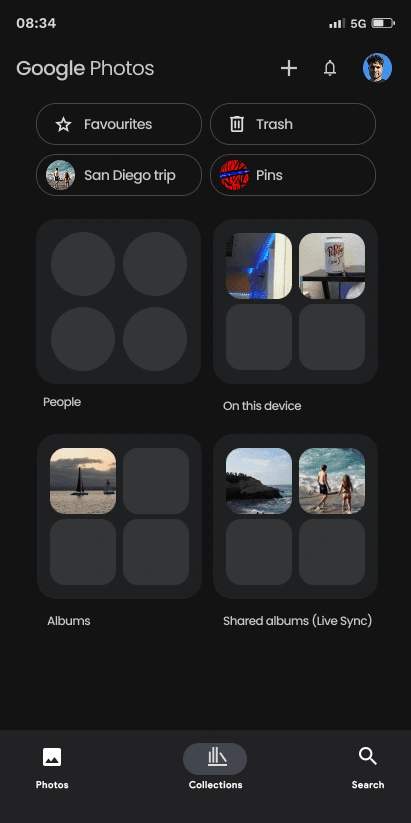
Selecting “Shared Album (Live Sync)” opens a familiar album creation interface with LiveSync enhancements
This prototype aligns with familiar Google Photos workflows, so there’s no learning curve — just a meaningful upgrade.
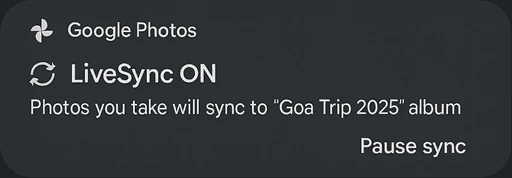
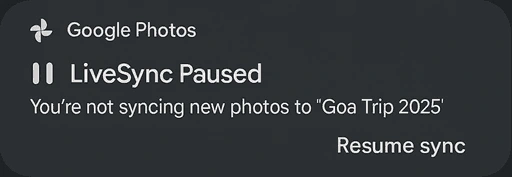
LiveSync ON: Actively syncing — new photos you take are added to the shared album in real-time.
LiveSync Paused: Syncing is paused — tap to resume anytime.
🤯 The Behavior Shift in One Line
Magic...

From:
To:
“Hey, can you send me those pics later?”
“They’re already in the album.”
⚡ What LiveSync Unlocks
✅ No forgetting
✅ No manual upload burden
✅ No awkward reminders
✅ Instant group memory — shared, not chased
🧠 Final Reflection: Evolution, Not Reinvention
What started with one messy Google Drive link turned into a behavioral redesign of memory itself.
This wasn’t about UI polish. It was about:
Let memories sync themselves. We’ve got sunsets to chase.
🚀 Future Enhancements & Conceptual Add-ons
⏱️ Auto Pause After Duration: Automatically pause LiveSync after a set time (e.g., 30 mins) to avoid oversharing.
📍 Location-Based Sync Activation: Limit syncing to specific geofenced areas like trip destinations or event venues.
👥 Face Match-Based Sync: Only sync photos when familiar album member faces are detected — ensures group context and avoids accidental uploads.
📶 Wi-Fi-Only Smart Sync: Delays uploads until connected to stable Wi-Fi — great for remote trips or roaming situations.
🔄 Back-Sync on Request: Allow late joiners to request previously taken photos — album creator approves manually.
Amplifying what people already do
Fixing something everyone accepts as “just how it is”
Designing within the system, not outside it
UX doesn’t always have to be shiny. Sometimes, it just has to feel like magic — and LiveSync Album does.
🎓 What I Learned
This wasn’t just a UX exercise — it was a deep exploration into the full spectrum of product evolution. I discovered that great UX design doesn't always need to be loud or revolutionary — it can be both transformative and incremental.

🧩 I learned to identify white spaces — subtle yet high-impact gaps in products people use every day.
🧠 I experienced how micro-restructuring can lead to system-level upgrades that feel intuitive and delightful.
⚡ I explored how to create innovation that’s grounded, not flashy — rooted in behavior, context, and trust.
🔄 And I saw how even within established systems like Google Photos, there's room to design smarter, leaner, more human-first experiences.
UX isn’t just about transforming the interface. It’s about evolving the experience — step by step, sync by sync.

Like this project
Posted Jul 7, 2026
LiveSync Album — micro‑restructuring Google Photos to support real‑time, cross‑user album syncing and low‑friction group sharing.
Likes
0
Views
0