Built with Webflow
BlueCheck - Age Verification API Page

Ariyibi Tomiwa
Verified


How I Took a Tourism Website From 83 to 97 on Lighthouse — Without Redesigning a Single Page
Client
Quinta do Rapozinho — a family-run rural tourism estate in northern Portugal, offering restored farmhouse cottages surrounded by green valleys, river beaches, and mountain trails. The property has been in the family for over 120 years.
The Brief
Paulo, the owner, needed someone to audit and improve the performance of his Webflow-built website. The site scored 83 on desktop and around 55 on mobile. Core Web Vitals — specifically First Contentful Paint, Largest Contentful Paint, and Total Blocking Time — needed to be brought into the green.
The timeline was fast.
What I Found
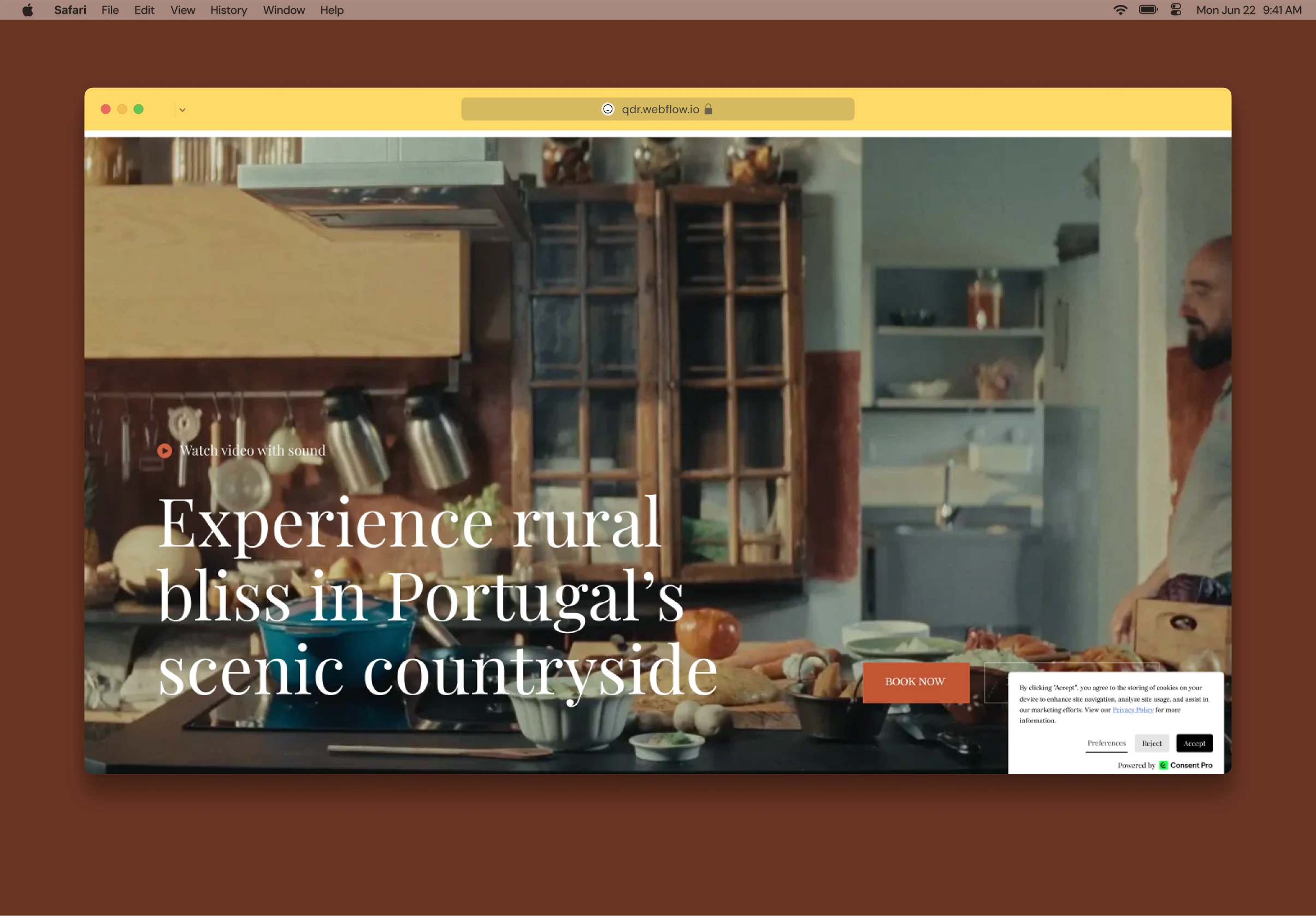
The homepage hero section was the heart of the problem. It featured a full-viewport background video with an animated intro overlay ("Welcome to the countryside") and a play-with-sound lightbox. Visually, it was beautiful. Under the hood, it was held together by runtime scripts doing work that Webflow's Designer could handle natively.
Here's what was happening on every page load:
The hero was invisible until JavaScript ran. A custom script called
v320herovalfix fired at DOMContentLoaded to inject the background video, override the CSS to make the content layer transparent, and fix z-index stacking. Until that script executed, visitors saw a black box. The hero literally could not appear until the browser had downloaded and parsed jQuery, two Webflow runtime chunks, and the script itself.A watchdog was polling to fix a race condition. Because the script and the intro animation were fighting over the same element's opacity, a
setInterval was running every 1.5 seconds to force the hero content visible. This was a band-aid, not a fix.The lightbox was hijacking native Webflow components. Another script stripped Webflow's native lightbox classes from the play button and intercepted clicks to open a custom Gumlet video overlay. Fragile, and prone to breaking on Webflow updates.
A footer video was loading an entire player framework. The footer CTA section used a Gumlet iframe embed instead of a native video tag. This pulled in ~219 KiB of Gumlet player JavaScript on every page load — for a video that most visitors never scrolled to.
Beyond the hero, the site had 11 unused preconnect hints wasting browser connections, oversized images served at 2–4x their display dimensions, a synchronous cookie consent script with zero cache, and Google Tag Manager loading during initial render.
What I Did
Rebuilt the Hero Natively
I set the hero's CSS properties (position, z-index, transparent background) directly in the Webflow Designer and placed the Gumlet video as a native
<video> tag in the HTML Embed. The hero now works without any script. It's visible in the Designer instead of being a black box, and it loads immediately instead of waiting for JavaScript.The
v320herovalfix script was deleted entirely.Replaced the Lightbox With a Clean Modal
I built a custom modal in the Designer, wired it to an IX2 click interaction, and wrote a small script that injects the Gumlet iframe only when someone clicks play — and destroys it on close. No more hijacking native components.
The
v321lightboxsound script was deleted entirely.Fixed the Intro Animation
The original 4.7-second IX2 intro animation was the single biggest LCP bottleneck. Lighthouse measured it as the largest visible element for nearly 4 seconds. IX2 animations can't start until the Webflow runtime JavaScript is fully downloaded and parsed — that's ~434 KiB of JS before the animation even begins.
I rebuilt it as a 3.5-second CSS
@keyframes animation. CSS animations start the moment the stylesheet loads, with no JavaScript dependency. The text fades in, holds for a breath, then dissolves to reveal the hero. Same emotional pacing, lighter foundation.This was a UX decision I made sure to discuss with the client. Paulo's brand is about space, time, and silence — the intro sets that tone for every visitor. We tested several durations together and landed on 3.5 seconds as the right balance between brand feel and performance.
Converted the Footer Video
Replaced the Gumlet iframe embed with a native
<video> tag pointing to the direct MP4 URL. Same video, same visual result, zero JavaScript overhead. The 219 KiB Gumlet player bundle stopped loading entirely.Cleaned Up the Loading Pipeline
Deferred Google Tag Manager to load after the page is fully rendered
Made the ConsentPro cookie script asynchronous
Removed 9 unused preconnect hints (duplicate Google Fonts entries, Vimeo origins, legacy CDN references)
Neutralised a redundant
webfont.js loader that was duplicating the existing font preloadDeferred the SEO meta tag script using
requestIdleCallbackRemoved 3 injected scripts that were re-adding preconnects we had already cleaned up
Replaced the Lottie Hamburger
The hamburger menu used a Lottie animation that sat at the deepest point of the critical request chain — 1,177ms, chained through jQuery and the Webflow runtime just to animate three lines into an X. Replaced it with a pure CSS version. Same animation, zero network requests.
Optimised Images
Re-exported and replaced oversized images across the site. Many were being served at resolutions far exceeding their CSS display dimensions. Total page weight dropped from 6,041 KiB to approximately 3,100 KiB.
Results
Before
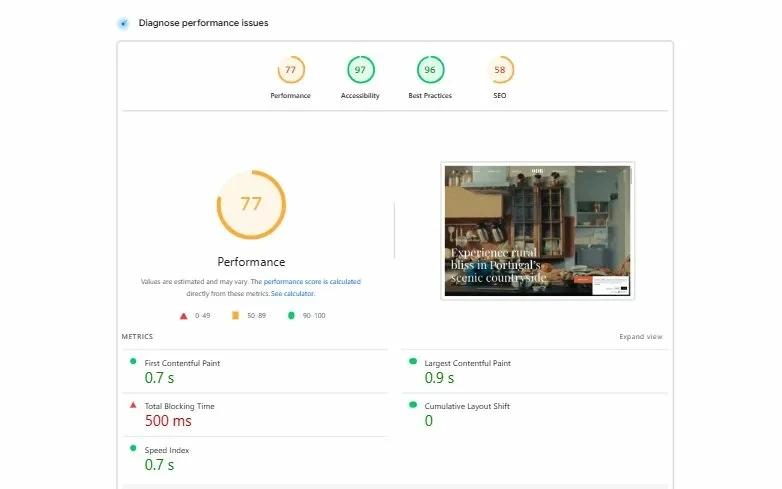
metric before
After
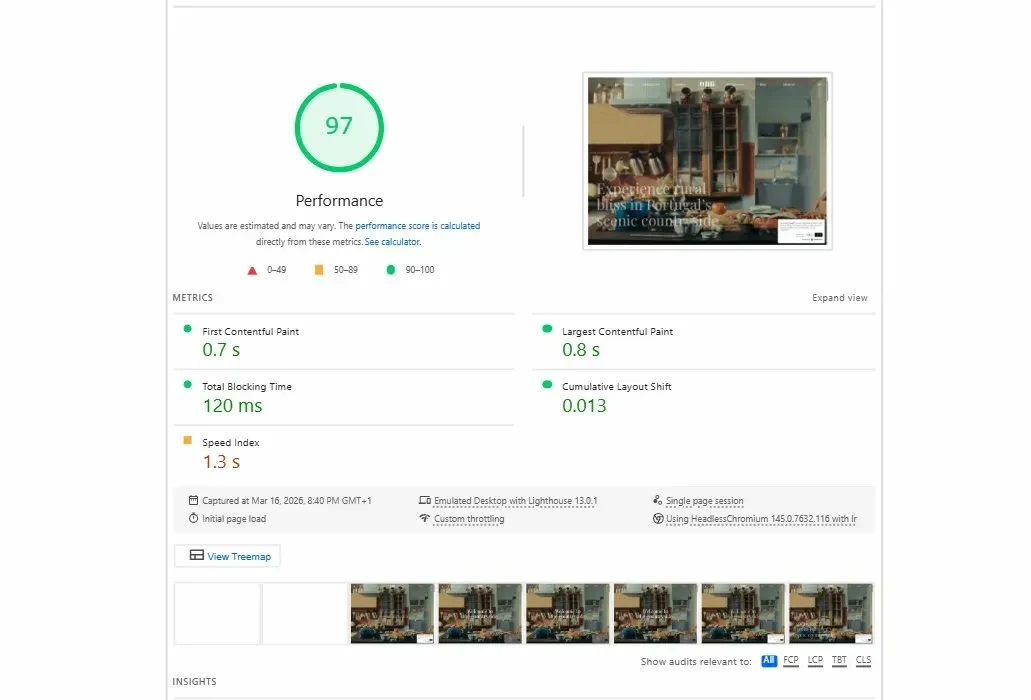
metric after
What the Client Said
"Generally, I congratulate you for a good work. You made the numbers add up."
— Paulo Moura, Quinta do Rapozinho
Key Takeaway
The biggest performance gains didn't come from compression tricks or caching headers. They came from removing unnecessary JavaScript. The hero video, the lightbox, the footer CTA, the intro animation — all of these were being controlled by scripts doing work that CSS and native HTML could handle. Every script removed was a chunk of JavaScript the browser no longer had to download, parse, and execute before the visitor could see the page.
Performance optimisation on Webflow isn't about fighting the platform. It's about knowing what the platform already does well and stopping custom code from getting in the way.
Like this project
Posted Apr 18, 2026
Optimized Quinta do Rapozinho's website, enhancing performance without redesigning pages.
Likes
0
Views
13
Timeline
Jan 26, 2026 - Ongoing