Customizable invoice preview experience (case study)

Claudiu Tudose

Intro
This is a task I was involved in, where I worked on creating a customisable invoice preview experience within a web-based software tool for managing projects, tasks, time tracking, invoices, and related workflows.
The focus of the product was to make project management and time tracking as simple, intuitive, and enjoyable as possible.
But my task was the invoice task, and based on this, I was hired to do the job. Anyway, this is what I am currently allowed to share with you. Anything beyond this I can't share, as a result of signing an NDA with the contractor.
Below, I want to share with you the experience I created while working on this task, based on measured user behaviour from the current old invoice, which gave me the insights to work to satisfying the user needs and also fixing the pain points they had encountered during the current(old) invoice.
In this case study you will find challenges I encountered and new ideas I brought to the new redesigned invoice. I have solved several problems such as reducing user errors and helping users understand which fields are editable and which fields are optional, unlike wha the old invoice does, but the most challenging part was the fact that users had to switch between editing and preview invoice, so I solved this in the new one, so users can see their changes instantly without going back and forth.
_____________________________________________________________________________________________________________________________________
I used AI to generate a sampe. And this is what AI generated me ar first …
… but I had to improve the experience, the usability and also the interface, which resulted in the new experience I am going to show you next.
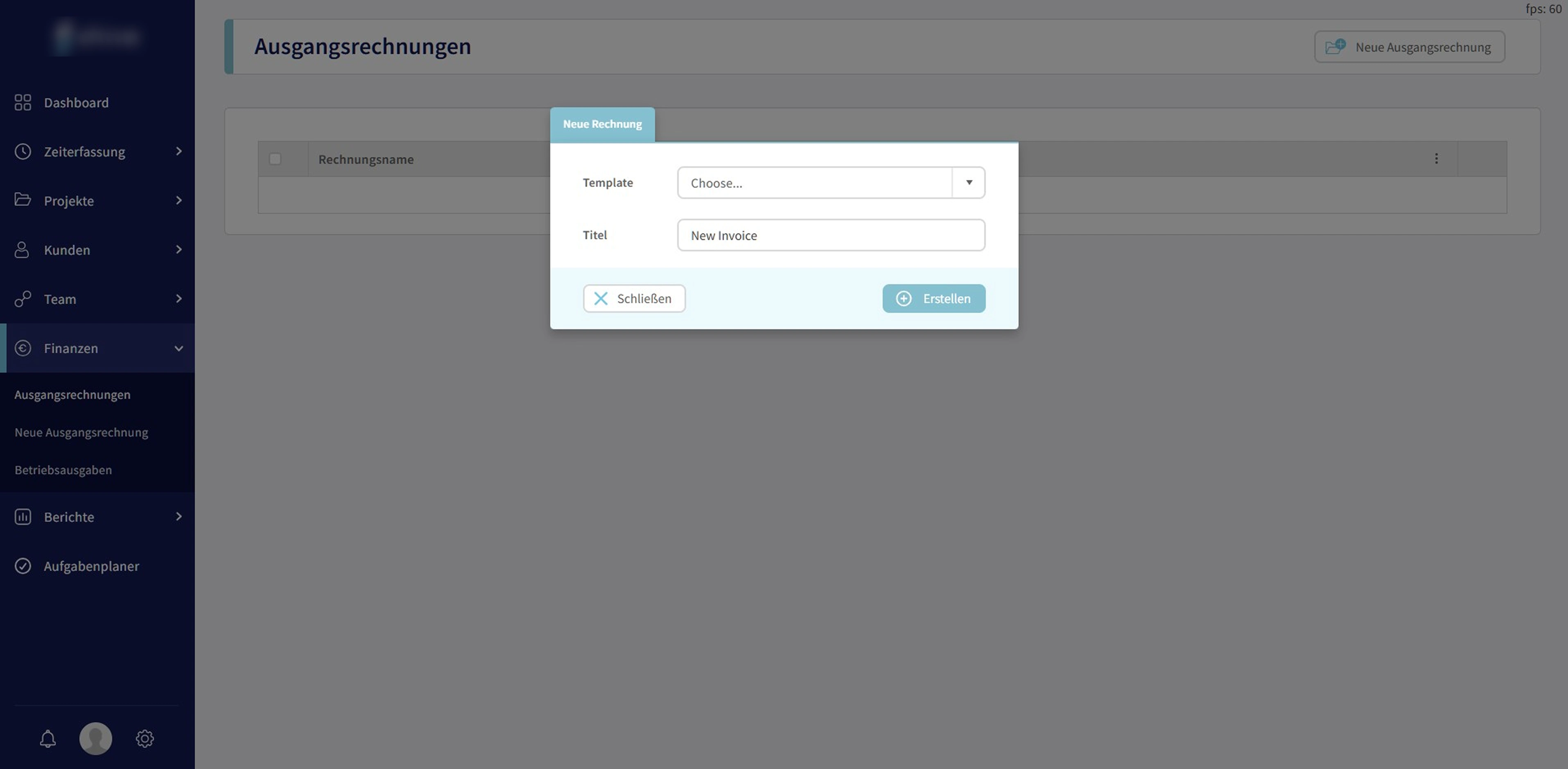
The current language of the platform was German, but client allowed me to work by replacing the german with English version.
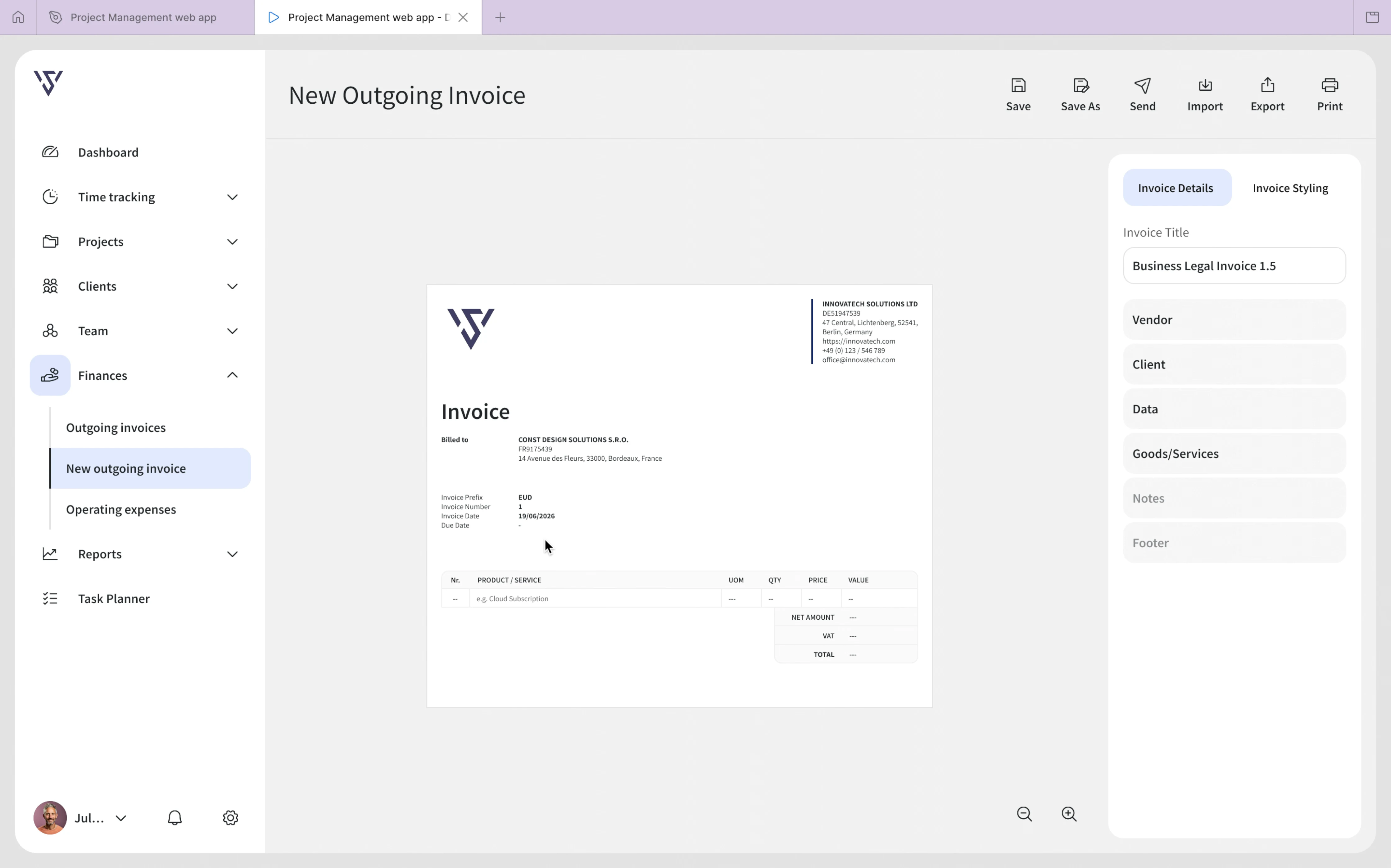
New Outgoing Invoice is the place where all the edited and created invoices from Outgoing Invoice are displayed.
To create or edit an invoice, you have to go to the Finances menu item, then choose the Outgoing Invoice sub-menu item, and there you can create new ones or edit the current ones.
After clicking the Create invoice button, a modal appears where you can choose your type of template or invoice name.
After you hit Create, the customizable invoice preview experience begins. To mention that, users can complete the fields in the order they want, so they don't need to start with Vendor and then Client and so on. They can skip this and they can start with Data for example, and then with the other ones.
Unlike other types of invoice creation tools, in my case, the user can complete the fields and view the updated invoice results instantly.
Also, in settings, they have an option to display the company logo on their invoice. Users can choose to do that or not. In my case, I chose to display the logo.
_____________________________________________________________________________________________________________________________________
View the video above in Full Screen
The Vendor is mandatory for an invoice and present the details of the seller of the products/services in a business.
To make the client user aware of the mandatory fields, I marked them with asterics (*). As you can see, the vendor name and country are at least the mandatory fields for an invoice. In this case, these fields also appear locked or greyed out because the system automatically imports them from the details the user entered at the beginning of account setup. Other fields can also be mandatory, depending on the country and type of the transaction.
As per their needs, I was thinking to add an option for adding additional fields, in case there is a specific info they want to appear on vendor details.
I also proposed to add a globally option in setting, where users can opt to display or not the label of each field. So instead DE51947539, it displays VAT: DE51947539.
_____________________________________________________________________________________________________________________________________
View the video above in Full Screen
Client details will follow the same rules as Vendor, so fields like Client name and Country are mandatory. Clients can also add additional fields if they want to.
_____________________________________________________________________________________________________________________________________
View the video above in Full Screen
Regarding to Invoice Data, the mandatory fields are ID, Number, and Date. These are the mandatory fields that should be visible on each invoice. According to invoice rules, the Number field automatically displays the invoice number in order. For example. If you have invoices starting with number 1. The order should be 1, 2, 3, 4, 5, 6, and so on. So in case of EUD prefix, if 1, 2 and 3 has been assigned already to previous invoices, then creating a new invoice will display automatically number 4 once the EUD prefix has been selected. So you can't skip a number to go to a higher number if it hasn't already been assigned to an invoice, because this will generate an error. At first, my idea was to make the field editable, but later we disabled the Number input because the user doesn't need to edit it first. After selecting the prefix, the number appear automatically and come in ascending order.
If mandatory fields of the invoice are not filled, hitting Save generate an error. So the mandatory fields can't be empty. So if a section has fields that are mandatory to be filled, you have to fill them before.
_____________________________________________________________________________________________________________________________________
View the video above in Full Screen
Goods/Services is another mandatory section of the invoice. Unlike other invoice creation tools, users can add, edit, or remove items directly on the same page without navigating through multiple steps.
_____________________________________________________________________________________________________________________________________
View the video above in Full Screen
Notes is an optional section that allows users to add additional information related to the invoice. It is hidden by default to keep the interface focused and avoid displaying unnecessary content. Users can enable the section from the right-side panel whenever they need to add any important notes.
Footer is another optional section that allows users to include additional business-related information. The content can be organized into up to four columns, so users can structure it according to the amount and type of information they need to display without making the footer feel crowded.
_____________________________________________________________________________________________________________________________________
View the video above in Full Screen
Users can adjust the invoice style to better fit their preferences or business identity.
I placed these options in the Invoice Styling tab, where users can change the invoice font and customize the colors of different elements. This keeps the styling controls separate from the invoice content, making it easier to focus on the visual appearance without affecting the information itself.
They can undo/reset their changes and return to the previous invoice style at any time.
_____________________________________________________________________________________________________________________________________
View the video above in Full Screen
Even though users are aware of mandatory fields marked by an asterisk (*), they can still save or export the invoice and obtain a final representation of it. I intentionally preserved this flexibility because users may want to review, or share an incomplete invoice before all required information is available. This approach allows users to decide when the invoice is ready to be completed or finalised.
Users can save an invoice at any point while working on it, or save it as a template and import it later when they need to create a similar invoice. Once the invoice is ready to be shared, users can export it as a PDF or PNG, or print it directly from the platform.
Although users are aware of the standard mandatory information required for an invoice, requirements can vary between countries and may include additional fields. For this reason, the experience does not try to determine whether an invoice is legally complete before allowing users to save, export, print, or send it. Instead, it gives users the flexibility to work with the invoice according to their specific requirements and workflow.
_____________________________________________________________________________________________________________________________________
View the video above in Full Screen
The invoice preview supports zooming in, zooming out, and move, giving users more control when reviewing the document and making it easier to check whether the information is displayed correctly.
I covered also the user’s need of editing each of the invoice section, directly in the preview.
_____________________________________________________________________________________________________________________________________
View the video above in Full Screen
This is the menu navigation experience, which is pretty intuitive because users can easily figure out if a sub-menu item is open by seeing the highlighted menu item (the icon gets highlighted), regardless of whether its dropdown is open or closed, so they won’t get lost!
_____________________________________________________________________________________________________________________________________
View the video above in Full Screen
Everything was created within a design system. Above you can see an example that demonstrates a scalable design system, ensuring consistency across the entire product.
_____________________________________________________________________________________________________________________________________
View the video above in Full Screen
To facilitate a better handoff to the developer, I used variables and tokens for properties such as color, typography, spacing, elevating and other styles.
_____________________________________________________________________________________________________________________________________
Final words!
This task was about understanding how users interact with the existing invoice experience(the old one) and how to make it more user-friendly and easier for them to create an invoice. I also followed a new UI direction according to business guidelines. I reduced the user errors and making editable and optional fields clearer, to allowing users to work in the order they prefer. Each decision was made to give users more control and a clear path over how they create and manage the invoice.
But one of the biggest improvements was bringing the editing and preview experience together. Instead of forcing users to switch back and forth, they can now make changes directly in the preview and immediately see how the final invoice looks.
Like this project
Posted Sep 24, 2026
Intro A customisable invoice preview experience within a web-based software tool for managing projects, tasks, time tracking, invoices, and related workflows.
Likes
0
Views
3