Zeffy Tap to Pay UX/UI Design

Liuru FAN


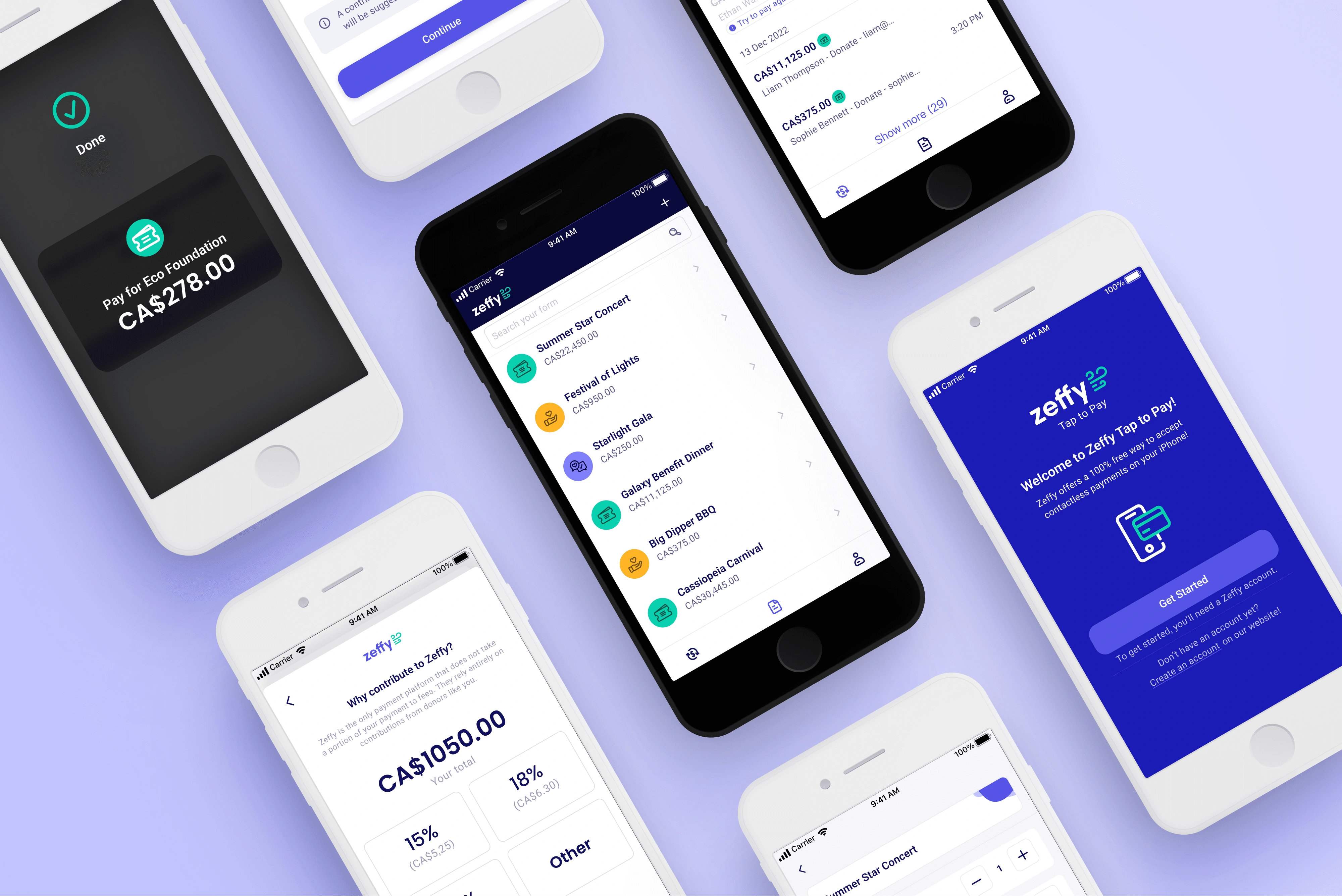
Designed the user flow and interface for Zeffy’s Tap to Pay — the first completely free point-of-sale solution for nonprofits in North America. It allows organizations to effortlessly accept in-person, contactless payments using just a smartphone — no hardware, no transaction fees.
Nonprofits often face high costs when accepting in-person donations. Traditional POS systems require expensive hardware and charge transaction fees of up to 5% or more—taking away from funds meant to support their cause. These barriers make it harder for nonprofits to collect donations during events and face-to-face interactions.
The Solution
Zeffy introduced Tap to Pay, the first completely free POS system for nonprofits in North America. It allows organizations to accept contactless payments—including credit cards, Apple Pay, and Google Pay—directly on their iPhone with no additional hardware and no transaction fees. The platform is funded by optional donor contributions, ensuring 100% of the donation goes to the nonprofit.
This solution empowers nonprofits to raise more funds with less friction—offering a user-friendly, cost-effective way to accept donations in person.
Designing a secure, seamless POS experience without external hardware—built entirely by a team with no prior experience in iOS design or development.
Launching the MVP
To bring Zeffy’s Tap to Pay to life, we launched a focused Minimum Viable Product designed for fast, in-person transactions—without requiring any external hardware or donor-side apps.
Enter the U.S. market early
Launched the MVP to deliver a seamless Tap to Pay experience starting with nonprofits in the U.S.
Get real-world feedback fast
Skipped traditional user testing to launch quickly and become the first nonprofit platform to support Tap to Pay.
Test technical feasibility
Validated iOS development and Tap to Pay integration with a new in-house team.
On-screen interface highlights key app features.
Easily switch between different organizations.
Receive feedback par email.
02.Forms & Transactions flow
Focused only on core features: Forms, Transactions, and My Account.
Use pre-configured forms to collect donations or sell tickets.
03.Ticketing and Donation flow
Collect minimal buyer information when needed.
Encourage platform support through optional contributions (tips).
Accept contactless payments directly from an iPhone.
While the MVP focused on speed and usability for in-person nonprofit events, several opportunities remain for future development.
We plan to iterate based on real-world user feedback to improve clarity, flow, and feature usefulness. Key areas of consideration include:
Fundraising creation in-app: Bringing campaign creation capabilities into the mobile app for greater autonomy.
Android support: Expanding beyond iOS to reach a broader user base.
Localization: Preparing for a launch in the Canadian market with bilingual support (English/French) and regional compliance.
More customization for forms: Enabling flexible input types, donation presets, and real-time inventory updates.
Enhanced analytics and dashboards: Giving organizations deeper insight into transaction trends on mobile.
These next steps aim to scale Zeffy’s Tap to Pay experience while keeping the interface simple, accessible, and mission-aligned.
Like this project
Posted Jul 8, 2025
Designed user flow and interface for Zeffy's Tap to Pay, a free POS solution for nonprofits.
Likes
0
Views
10
Timeline
Nov 8, 2022 - Feb 8, 2023
Clients
Zeffy