MatchUp Events — Event-Based Social Matching Platform

Asad Yousaf


Project overview
MatchUp Events is a social matching platform designed to help people form meaningful connections through real-world events.
Instead of relying on endless profile swiping, users join curated events, check in using QR codes, complete a values and personality assessment, discover compatible attendees, communicate during the event, and choose whether they would like to meet someone again.
I worked on MatchUp Events as a Bubble developer, building the responsive application, database architecture, authentication, onboarding, profiles, event discovery, QR ticketing, matching workflows, communication features, payments, and email integrations.
The problem
Many dating and social platforms focus on profile browsing and prolonged online conversations. This can make interactions feel superficial and disconnected from real life.
MatchUp Events needed a different experience—one where:
People connect through real events
Profiles become available only in the correct event context
Matching considers values and personality
QR codes verify attendance
Attendees can communicate safely
Mutual interest can lead to another meeting
Organizers can manage events and participation
The platform required careful coordination between events, attendees, hosts, profiles, check-ins, matches, messages, payments, and privacy permissions.
My role
I worked across the product as a Bubble developer, covering both frontend and backend development.
My responsibilities included:
Responsive Bubble development
Database architecture
Authentication and onboarding
User-profile functionality
Event discovery and booking
QR-code generation and check-in
Role-based access
AI-assisted assessment workflows
Matching logic
Messaging and Social Hub access
Second-date booking workflows
Payment-related functionality
Transactional emails
Newsletter integration
Privacy and security improvements
Production debugging
The solution
I helped build an event-based social platform with a clear user journey:
Create an account
Complete a personal profile
Define interests, values, and preferences
Discover and join an event
Receive an event QR code
Check in at the venue
Access verified attendee profiles
Discover compatible connections
Communicate during the event
Express interest in meeting again
Arrange a second date when interest is mutual
This structure makes real-world interaction the central experience rather than an optional final step.
Authentication and account access
I developed the signup and login experience, including account creation, secure authentication, and user onboarding.
The authentication flow supports:
Email and password login
Google authentication
Account registration
Password recovery
Logged-in and logged-out navigation
Conditional access to protected areas
User-profile creation
Role and account-state management
The interface was designed to remain clear and responsive across screen sizes.
User onboarding
After registration, users complete their profile and provide the information needed for event participation and matching.
The onboarding structure includes:
Personal information
Profile image
Short biography
Relationship preferences
Interests and hobbies
Social preferences
Availability
Contact details
Privacy-related choices
The information collected during onboarding supports both profile presentation and matching workflows.
Member profiles
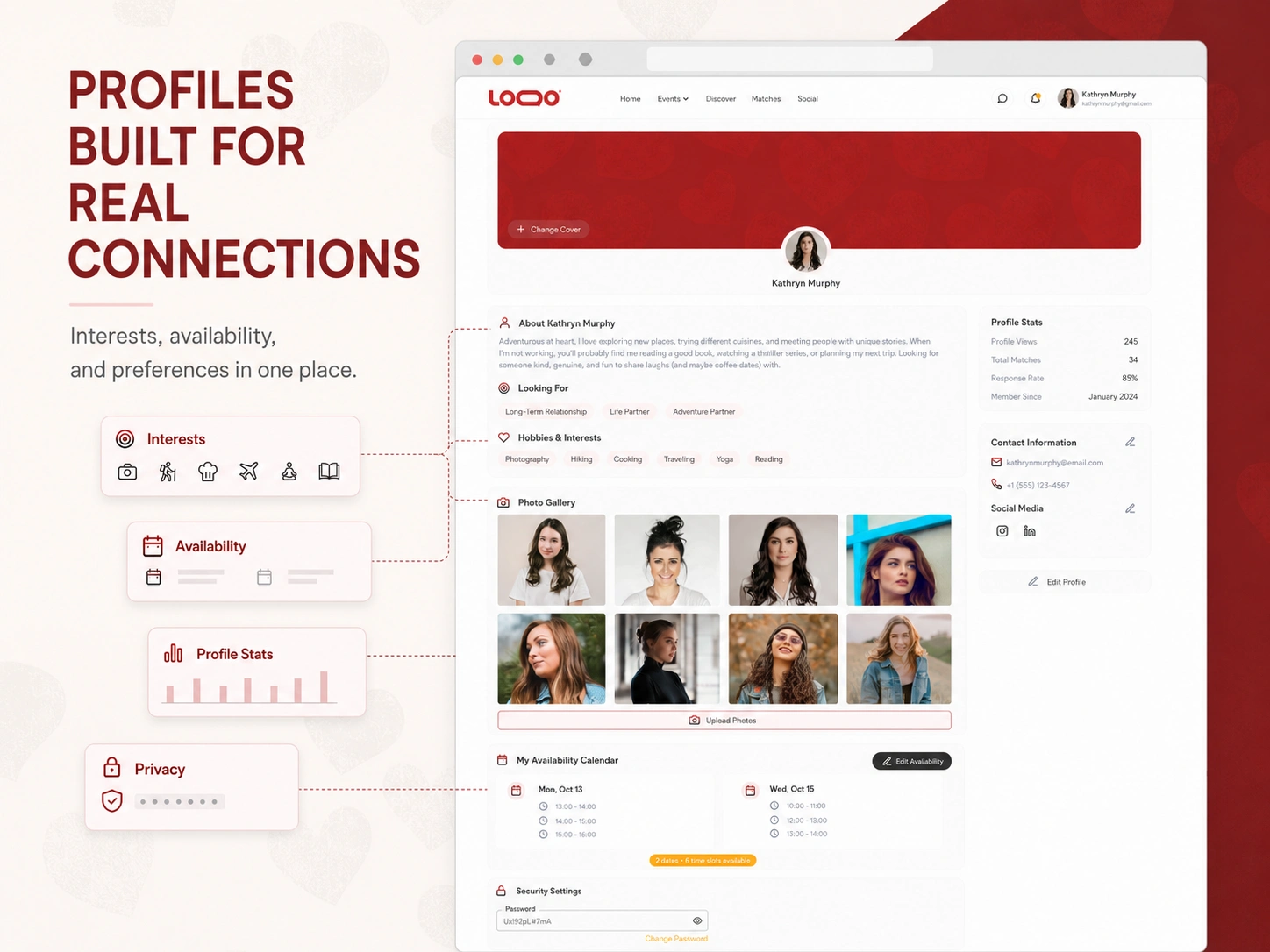
Each user has a detailed profile designed to communicate more than basic personal information.
Profiles can include:
Personal introduction
Relationship goals
Interests and hobbies
Photo gallery
Availability calendar
Social information
Contact preferences
Match-related information
Profile statistics
Account and security settings
Users can manage their own information while access to other profiles is controlled by event and matching conditions.
Event discovery
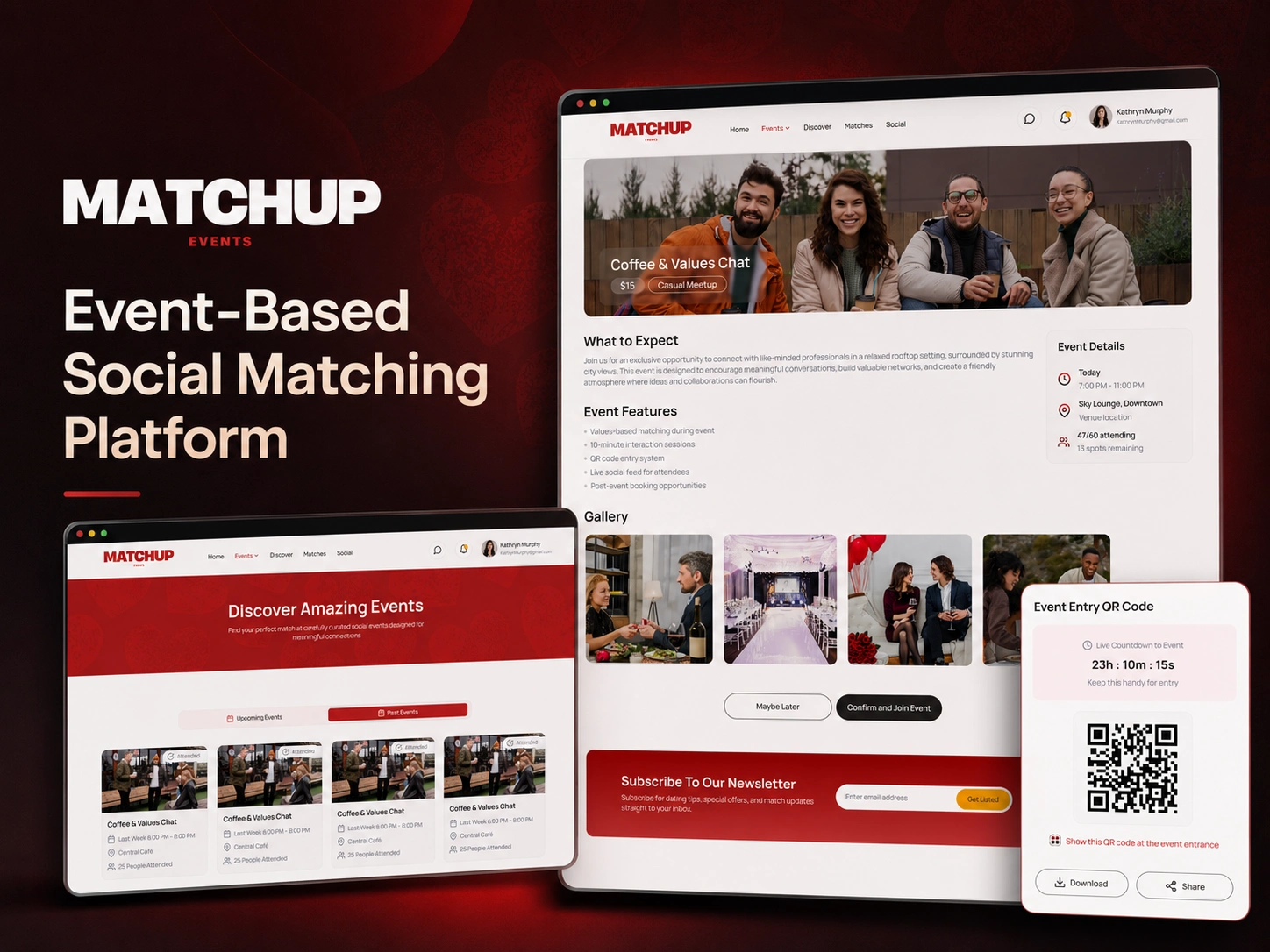
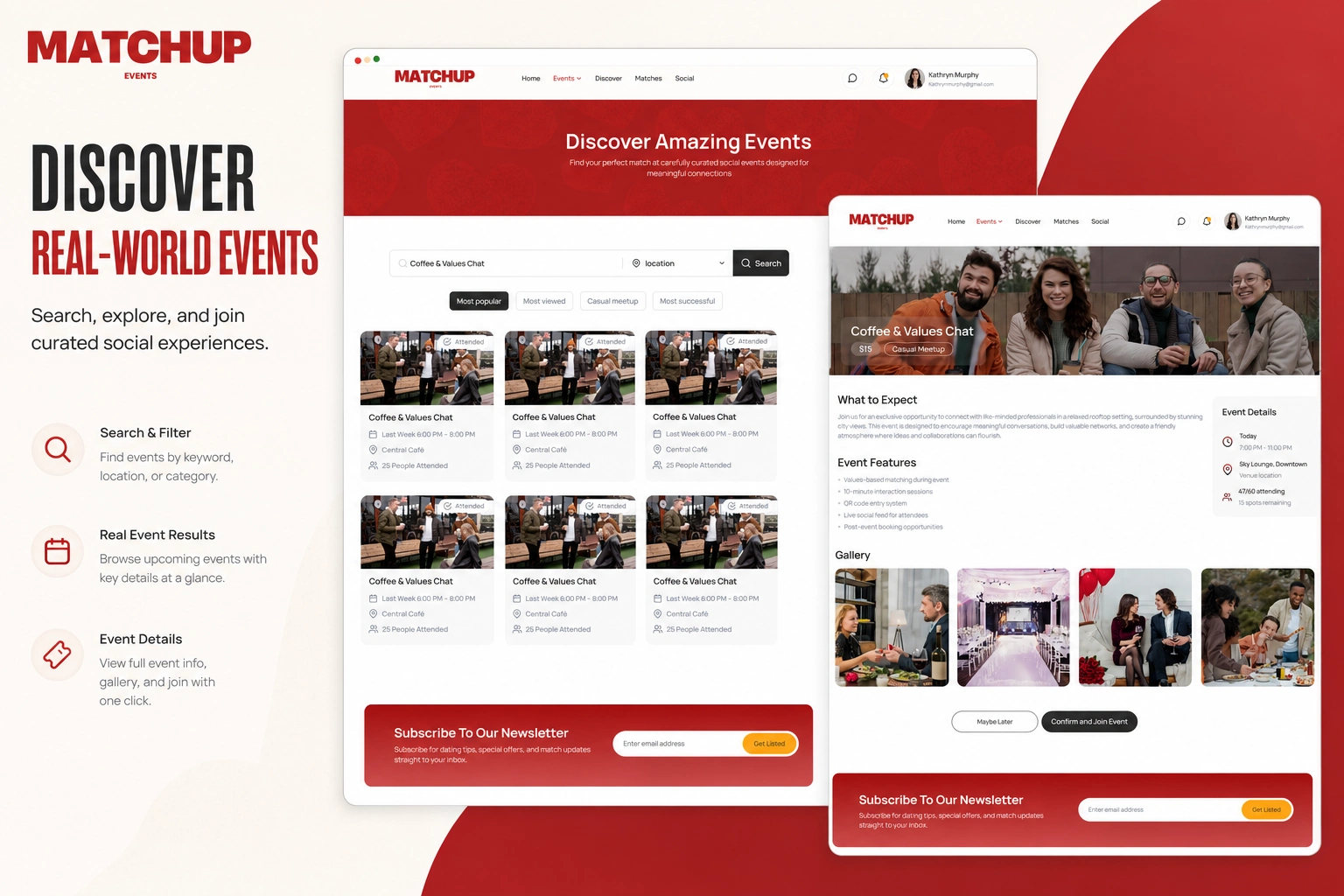
I developed the event-discovery experience where users can browse and search curated social events.
Users can:
Browse upcoming events
Search by keyword
Filter by location or category
View popular events
Review event capacity
View time and venue information
Open complete event details
Join an available event
Review upcoming and past events
Event cards display the important information required for users to make a decision without overwhelming them.
Event details and joining
Each event includes a dedicated details page containing:
Event name
Event category
Entry price
Date and time
Venue information
Capacity and remaining places
Description of what to expect
Event features
Photo gallery
Join-event action
When a user confirms participation, the platform creates an event-attendance record connecting the user with the selected event.
QR event tickets
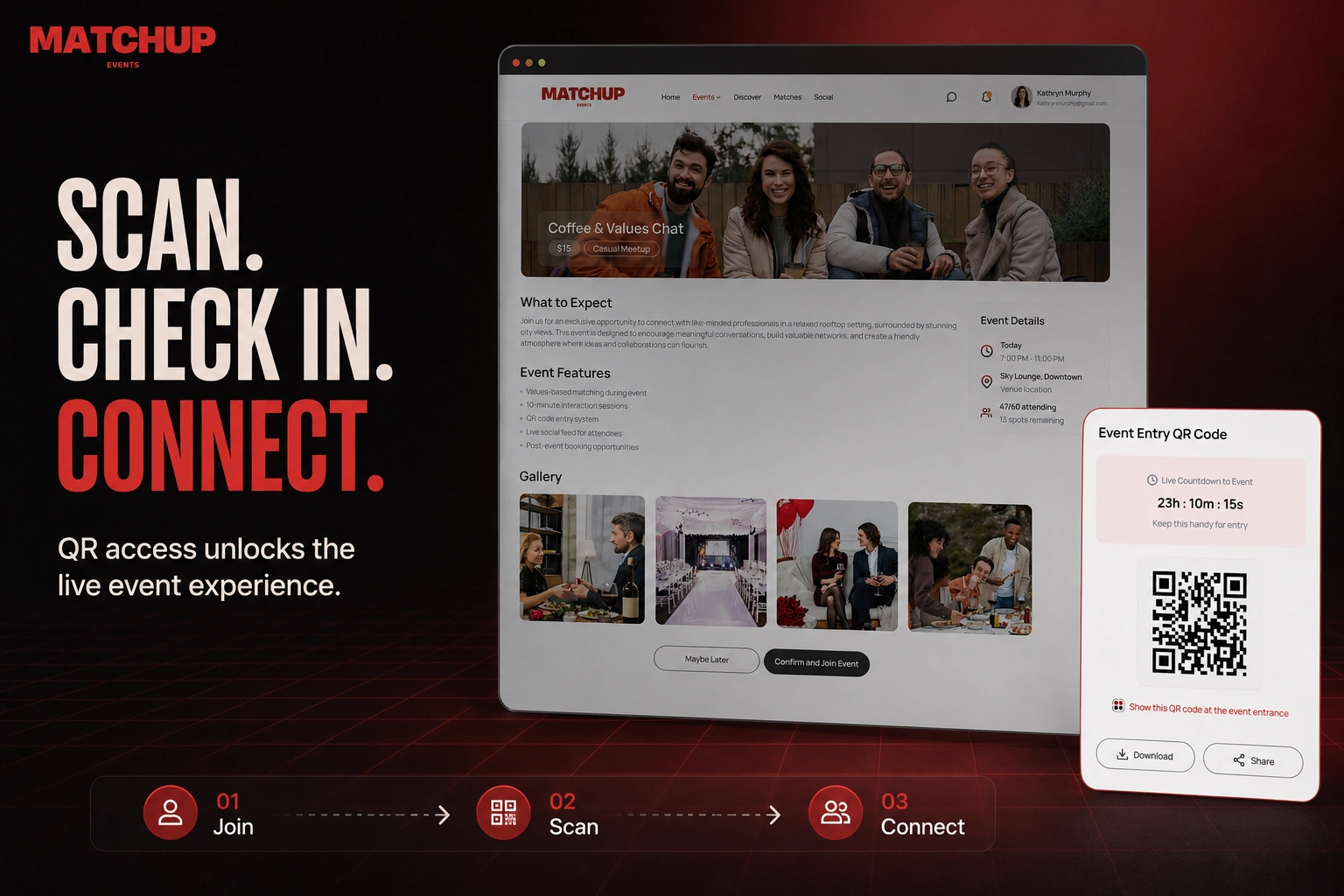
After joining an event, the user receives a unique event-entry QR code.
The ticket experience includes:
A unique QR code
Live countdown to the event
Event-entry instructions
Download option
Sharing option
Connection to the correct attendee and event
Validity based on the event and booking state
This provides a simple check-in method while reducing manual verification for organizers.
Host QR check-in
I worked on the check-in flow used by event hosts.
At the venue, the host scans the attendee’s QR code. The system verifies that:
The ticket belongs to the correct event
The user has joined the event
The booking is active
The QR code has not been used incorrectly
The attendee is eligible for event access
After successful verification, the attendee’s event status is updated to checked in.
Check-in-based feature access
Checking in does more than confirm attendance. It activates the event experience for the user.
Successful check-in can unlock:
Attendee profiles
Match discovery
Messaging
Social Hub access
Event conversations
Compatibility information
Post-event connection features
This helps ensure that users only interact with people who are genuinely attending the same event.
Values-based matching
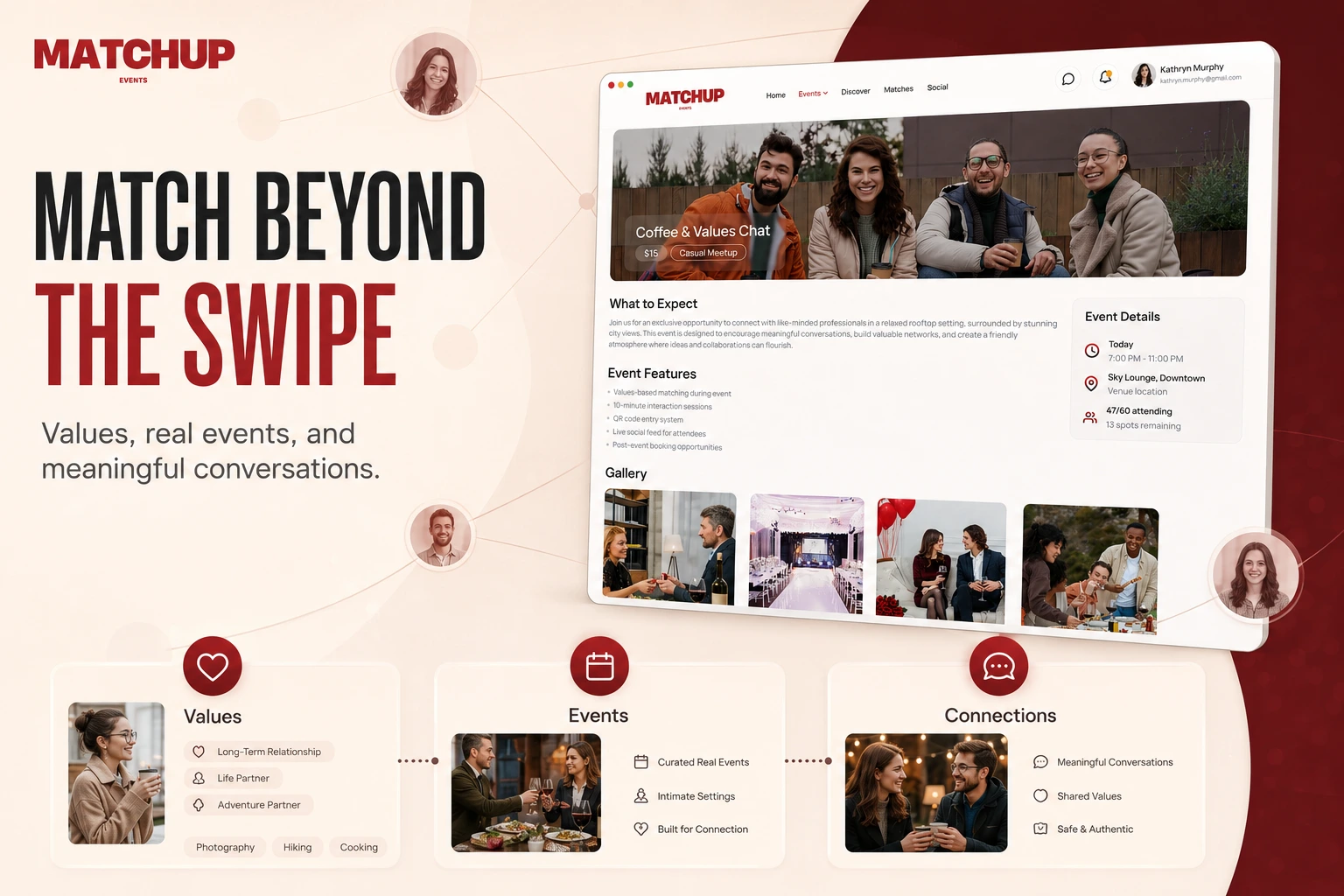
MatchUp Events is designed around compatibility and shared values rather than only profile appearance.
Users provide information about:
Core values
Personality traits
Lifestyle preferences
Relationship goals
Interests
Communication preferences
Social expectations
This information can be compared with other checked-in attendees to identify potentially meaningful connections.
AI-assisted assessment
I worked on the structure for integrating OpenAI into the personality and matching experience.
AI-assisted workflows can support:
Generating relevant assessment questions
Processing user responses
Structuring personality information
Identifying shared values
Producing conversation starters
Creating more useful match explanations
The AI functionality is integrated into the wider event and matching journey instead of operating as a separate chatbot.
Time-limited attendee discovery
The platform uses event context and controlled access to make profile discovery more intentional.
Profiles can be restricted according to:
Event membership
Check-in status
Matching eligibility
Availability window
Privacy settings
User account status
This helps keep the experience focused on active event participants.
Social Hub and messaging
After checking in, attendees can communicate through the Social Hub and messaging features.
This can include:
Event-level conversations
Direct communication
Match-specific conversations
Conversation starters
Event announcements
Controlled access based on check-in
Message histories
Access conditions ensure that communication remains connected to the correct users and events.
Mutual matching
Users can express interest in someone they met during an event.
The platform tracks each person’s selection separately. A match is created only when interest is mutual.
The matching workflow supports:
User A expresses interest in User B
The selection remains private
User B independently responds
The system compares both selections
A match is created when both users agree
Both users receive access to the next step
This avoids revealing one-sided interest unnecessarily.
Second-date booking
When two users mutually select that they would like to meet again, the platform can unlock a second-date booking experience.
Users can:
Review the mutual connection
Select suitable availability
Choose from recommended venues
Consider sponsored venue options
Search for another venue
Confirm the meeting details
Store the agreed selection
Receive booking communication
Availability information from both profiles can be used to identify suitable times.
Availability scheduling
The user profile includes an availability calendar that supports future meetings.
Users can:
Add available dates
Define available time slots
Edit availability
Remove unavailable times
Use availability during second-date planning
This reduces unnecessary back-and-forth when arranging another meeting.
Event and payment communication
I also worked on transactional email templates associated with event payments.
The email workflows can notify:
The attendee after successful payment
The event host after a new paid booking
Users when event participation is confirmed
Relevant parties when booking information changes
Emails include the important event and payment information needed by each recipient.
Newsletter integration
I worked on the newsletter functionality and SendGrid integration for MatchUp Events.
The newsletter system supports:
Subscriber registration
Saving newsletter contacts
Preparing campaign content
Drafting newsletters
Sending communications
Managing subscriber records
This enables the platform to communicate upcoming events, announcements, and product updates.
Event history
Users can access their upcoming and past events from one area.
The event history supports:
Upcoming-event records
Past-event records
Attendance status
Event time and location
Previous participation
Access to relevant post-event actions
This creates a persistent record of the user’s activity on the platform.
Responsive development
The platform was developed with responsive behaviour in mind so the main flows remain usable across desktop, tablet, and mobile screens.
Responsive work covered:
Navigation
Authentication
Event cards
Profile sections
Event details
QR tickets
Forms
Matching experiences
Messaging
Scheduling
Privacy and security
MatchUp Events manages personal profiles, preferences, messages, availability, event attendance, and match decisions. Privacy rules were therefore an important part of the application architecture.
Access was structured so that:
Users manage only their own private account information
Event attendees are visible only under appropriate conditions
Match decisions remain private until mutual
Messages are visible only to their participants
QR codes are connected to specific users and events
Check-in actions are restricted to authorized hosts
Administrative data remains protected
Sensitive workflows run through controlled backend actions
The platform was also developed with Australian privacy requirements in mind, including the Privacy Act 1988 and Australian Privacy Principles.
Database architecture
The application required connected data types for:
Users
User profiles
Events
Event attendance
QR tickets
Check-ins
Assessment questions
Assessment responses
Interests and values
Match selections
Mutual matches
Messages
Conversations
Availability
Second-date requests
Venues
Payments
Newsletter subscribers
Relationships between these records allow the application to control what each user can access throughout the event lifecycle.
Core features delivered
Responsive Bubble application
Email and Google authentication
User onboarding
Detailed member profiles
Interests and relationship preferences
Photo galleries
Availability calendars
Event discovery
Search and event filters
Event-detail pages
Event joining
Upcoming and past events
Unique QR tickets
Host QR check-in
Conditional event access
Values-based matching structure
AI-assisted assessment workflows
Mutual match logic
Social Hub and messaging
Second-date booking workflows
Venue selection
Payment-related emails
Newsletter integration
Privacy rules and role-based access
Tools and technologies
Bubble
Bubble backend workflows
OpenAI API
QR-code generation
SendGrid
Brevo
Google authentication
Payment integrations
Responsive web development
REST APIs
Webflow landing-page integration
Technical highlights
The most important technical challenge was controlling access throughout the event journey.
A user’s permissions can change depending on whether they:
Created an account
Completed onboarding
Joined an event
Paid for attendance
Received a valid QR ticket
Checked in at the venue
Completed the assessment
Selected another attendee
Received mutual interest
The application needed to update access without exposing profiles, private match choices, conversations, or event features too early.
The outcome
MatchUp Events provides a structured alternative to conventional social and dating platforms. It combines curated real-world events, verified attendance, values-based matching, controlled profile discovery, messaging, and post-event booking in one connected experience.
The project demonstrates my ability to build complex Bubble products involving event management, QR verification, AI integrations, matching logic, privacy controls, payments, communication, and multi-stage user journeys.
Services demonstrated
Full-stack Bubble development
Event-platform development
Social and matching application development
AI integration
QR-code workflows
Booking-system development
API integration
Authentication and onboarding
Messaging functionality
Responsive UI development
Privacy-rule implementation
Backend workflow automation
Like this project
Posted Jul 23, 2026
Built a social platform for MatchUp Events, focusing on event-based connections and AI-assisted matching.
Likes
3
Views
13