AgentSphere: Enterprise AI Platform Built with Stitch

Hom Lee

AgentSphere: Enterprise AI Platform
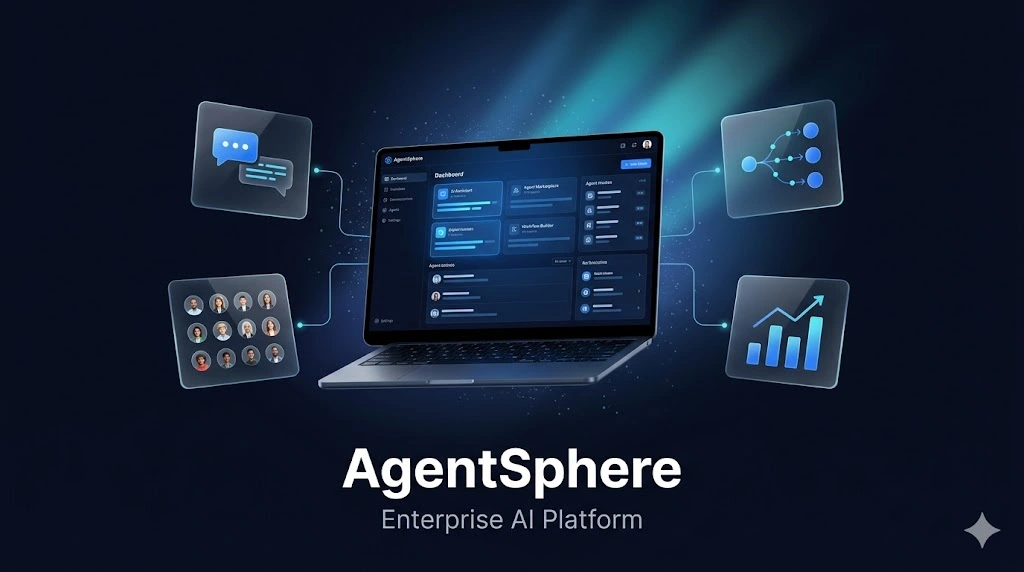
An enterprise-grade AI assistant platform designed and prototyped entirely in Google Stitch during the Stitch Challenge window. AgentSphere brings together four core modules into a unified, motion-rich interface system.
Agent Marketplace
The Four Modules
1. AI Chat Assistant (Nexus AI)
A conversational interface with streaming text generation, code blocks with syntax highlighting, inline data visualizations, and expandable source references from the knowledge base. The streaming effect was built using Stitch's native motion capabilities.
2. Agent Marketplace
A browsable catalog of enterprise AI agents organized by department (HR, Engineering, Finance, Marketing, Design, Security, Legal, Sales). Features include:
Agent cards with hover lift animations and capability tags
Star ratings and usage statistics
"Top Rated This Week" horizontal scroll section
Full agent detail view with version history, permissions, and "Fork This Agent" functionality
3. Workflow Orchestration Canvas
A visual drag-and-drop workflow builder with:
Node palette (Triggers, AI Models, Logic, Actions)
Animated connection lines with glowing dots showing data flow direction
Real-time node status indicators (completed/running/pending)
Bezier curve connections between nodes
Node configuration panel with prompt templates and variable mapping
4. Analytics Dashboard (Aura Intelligence)
A data analysis dashboard featuring:
Natural language query bar ("Ask anything about your data...")
KPI cards with sparkline mini-charts (Revenue $2.4M +12%, Active Users 1,847 +8%, Tasks Automated 3,291 +34%, Cost Saved $890K +21%)
Revenue trend area chart, department comparison bar chart, budget allocation donut chart
AI-generated insights panel with severity indicators
Recent query history with SQL preview
How I Used Google Stitch
Stitch was the core design and prototyping tool for the entire project. Key Stitch features used:
Streaming generations directly to canvas for rapid iteration on all 5 screens
In-place AI edits to refine layout, spacing, and component details through prompts
Native motion and animation for hover states, card entrance stagger, flowing data dots on workflow connections, and streaming text effect in the chat interface
HTML-native canvas rendering for interactive hover states and micro-interactions across all modules
Design System
Color palette: Deep Navy (#0A0F1E), Electric Blue (#3B82F6), Cyan (#22D3EE), Emerald (#10B981)
Typography: Inter (Headline, Body, Label weights)
Style: Glassmorphism cards, smooth transitions, dark theme throughout
Components: Consistent button styles (Primary, Secondary, Inverted, Outlined), icon system, card patterns
Stitch Feedback
Stitch made it remarkably fast to go from concept to polished, interactive prototypes. The streaming generation feature was a game-changer for exploring layout variations. In-place AI edits let me refine details without starting over. The native motion support meant I could add meaningful animations (data flow dots, card hover lifts, streaming text) directly in the tool rather than mocking them up separately.
The ability to generate multiple screen variants and iterate through prompts felt like pair-designing with an AI collaborator. For an enterprise UI system with this many screens and states, Stitch compressed what would normally be days of work into hours.
Links
Like this project
Posted Jun 2, 2026
Likes
0
Views
7
Timeline
May 27, 2026 - Jun 2, 2026
ClientsGoogle