Pixelary A Real-Time ASCII Art Studio Built from Scratch by Nuzair IbrahimPixelary A Real-Time ASCII Art Studio Built from Scratch by Nuzair Ibrahim

Pixelary A Real-Time ASCII Art Studio Built from Scratch

Nuzair Ibrahim

Nuzair Ibrahim

Overview

Pixelary is a self-initiated project I built to push my frontend engineering and design craft into new territory. The goal was to create a polished, production-quality creative tool in the browser — the kind of thing that usually requires a native app — entirely from scratch.
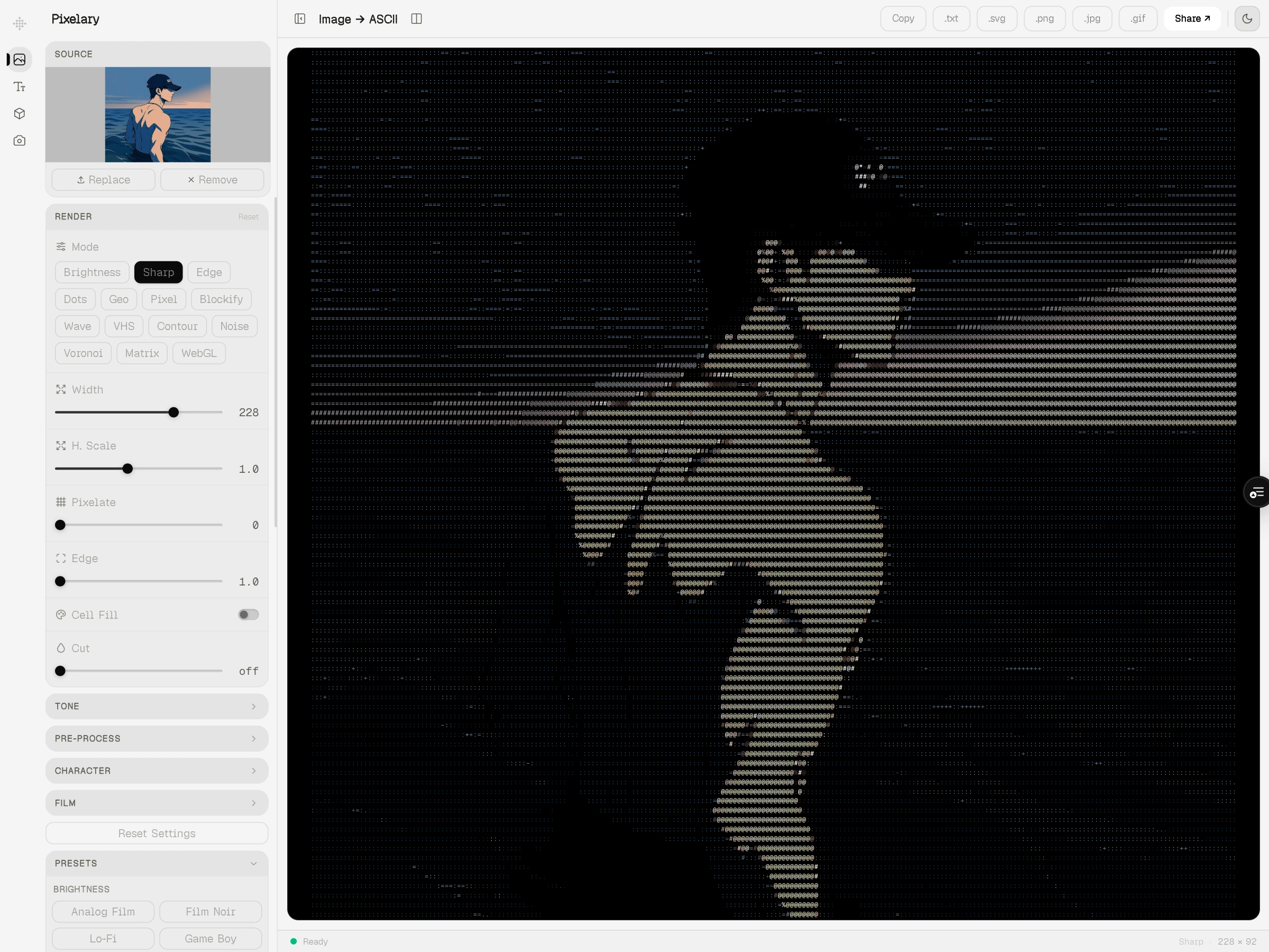
What started as a weekend experiment with character-based image rendering became a fully-featured studio with 15+ render modes, real-time video support, WebGL shaders, export options across five file formats, and an interface refined to the level I hold client work to.

The Problem

ASCII art converters exist, but almost all of them are terrible.
They're either CLI tools with no UI, web apps with a single slider and no visual feedback, or legacy Flash-era software that's barely functional. None of them treat the output as something worth caring about — something you'd actually want to share.
I wanted to build the tool I'd actually want to use: one where the output looks intentional, the controls feel immediate, and the interface doesn't get in the way.

Constraints I Set for Myself

Entirely client-side — no server, no database, no API calls
Real-time output with no perceptible lag on typical hardware
Exportable in every format a designer or developer would actually need
An interface that feels like a professional product, not a weekend hack

Process

Starting with the rendering core

The first thing I built was the brightness-to-character pipeline — mapping pixel luminance to an ordered character set to produce ASCII from any image. This sounds simple but it immediately surfaces hard problems: character aspect ratios distort the output, browser font rendering is inconsistent, and scaling to large images is slow enough to block the main thread.
I solved the performance problem by moving all image processing into a Web Worker. The main thread handles UI; the worker handles the expensive pixel math. A 150ms debounce prevents thrashing during slider adjustments. The result is an interface that feels instant, even at high resolutions.

Expanding the render system

Once the core pipeline was stable, I started building alternative render modes:
Sharp — maps pixel values to 6-directional shape vectors (based on Alex Harri's technique), producing geometric hard-edged output
Edge — runs Sobel or Difference-of-Gaussians edge detection, then maps detected edges to characters — the output reads like a technical illustration
WebGL — renders characters as GLSL shader quads on a Three.js canvas, enabling GPU-driven effects impossible in 2D Canvas
Dots — replaces characters with variable-radius circles, producing a halftone poster effect
Geo — overlays geometric shapes (hatching, crosshatch, symbols) scaled by luminance
Pixel — outputs colored pixel circles with interactive distortion modes (repel, attract, swirl) that respond to mouse position
Blockify — reduces the image to solid color blocks with configurable borders
Wavelines — draws horizontal or vertical sine waves whose amplitude is driven by image brightness
VHS — simulates analog tape degradation: color bleed, tracking noise, scan distortion
Contour — generates topographic contour bands from luminance data
Noise Field — displaces pixels using fractional Brownian motion (fBm) layered across octaves
Voronoi — segments the image into Voronoi cells and flood-fills each with its average color
Matrix Rain — renders the image as cascading green characters in the style of the films
Shader Gradient — a standalone animated WebGL gradient built on @shadergradient/react, with 3-color mixing, grain, and multiple shape primitives
Each mode required designing its own control surface — sliders, toggles, and chips that made sense for that mode's specific parameters.

Video support

Getting video to work required a separate processing loop: a request AnimationFrame hook captures the current frame from a element, routes it into the same worker pipeline, and updates the canvas every frame. At 120 columns, this runs at 30fps+ on a modern laptop without dropping frames.

The output effects system

The canvas output layer supports a compositing stack of real-time visual effects applied as CSS filters and SVG overlays:
grain, scanlines, vignette, chromatic aberration, glitch shift, glow, duotone, color grading, phosphor burn, mouse spotlight, click ripples, and a reveal animation system (diagonal, radial, random).
These transform plain ASCII output into something that looks intentional — like it came from a design tool, not a text converter.

Export

Export was a deliberate priority. Users can download output as:
.png — high-res canvas snapshot
.svg — vector-clean text rendering, infinitely scalable
.txt — raw character string
.gif — animated GIF from video, encoded frame-by-frame in the browser
.mp4 — live canvas recording via MediaRecorder
All encoding happens client-side. No uploads, no waiting, no server round-trips.

Interface design

The shell is a two-column layout: a collapsible sidebar with card-based settings panels, and a canvas output area. The sidebar uses a CollapsibleCard / CardHeader / CardRow component system that keeps related controls grouped and scannable without overwhelming the user.
I built a command palette (Cmd+K), global keyboard shortcuts for all major actions, a split-view mode to compare original and output side-by-side, and a preset system with named configurations across all render modes.
The output canvas supports zoom levels, curvature simulation (CRT screen warp), aspect ratio locking, and a dark/light theme that doesn't compromise readability.

The Result

Pixelary covers more render modes and output types than any comparable browser tool I've found — and it does it with an interface I'm genuinely proud of. Every slider has a purpose, every panel collapses cleanly, and the output looks like something worth screenshotting.
From a technical standpoint, it demonstrates:
Complex rendering pipelines across Canvas 2D, WebGL, and Three.js
Web Worker architecture for main-thread performance
Real-time video processing at 30fps
Client-side GIF and MP4 encoding
A compositable effects system with 12+ layers
A design system built entirely from scratch with Tailwind v4 and Radix primitives

Reflections

This project taught me that the hardest part of building a creative tool isn't the rendering — it's the surface. Every slider affects every other slider. Mode-switching needs to be instant. Controls need to be discoverable but not cluttered. Getting all of that right took more iterations than the rendering code did.
It also clarified something about my working style: I'm most motivated when I'm building something I'd actually want to use. Pixelary is a product I reach for. That's the bar I try to hold everything to.

Stack

Next.js 16 · TypeScript · Tailwind CSS v4 · Three.js · @react-three/fiber · WebGL / GLSL · Web Workers · Zustand · Radix UI · @shadergradient/react · Vitest
Like this project

Posted May 18, 2026

A high-performance browser tool that converts images, video, text, and 3D models into ASCII art using 15+ custom render engines