Auditable Sales Data Cleaning & Excel Reporting

Julian Vance

Project overview
This synthetic demo shows how I turn a messy recurring sales export into a reviewable reporting workflow. The goal is not only to produce a clean spreadsheet, but also to preserve an audit trail so every removed or rejected row can be explained.
The problem
Raw order files often contain inconsistent dates, names, email addresses, regions, product labels, payment statuses, duplicate records, and invalid amounts. A script that silently drops bad rows can create reporting errors and make later review difficult.
The workflow
Standardize dates, customer names, emails, regions, products, and payment statuses.
Detect duplicate records using stable order identifiers.
Validate required fields, dates, quantities, prices, and payment values.
Quarantine invalid rows with a clear rejection reason instead of deleting them.
Export clean data, rejected rows, and a transformation audit log.
Build an Excel dashboard from the validated output.
Demo results
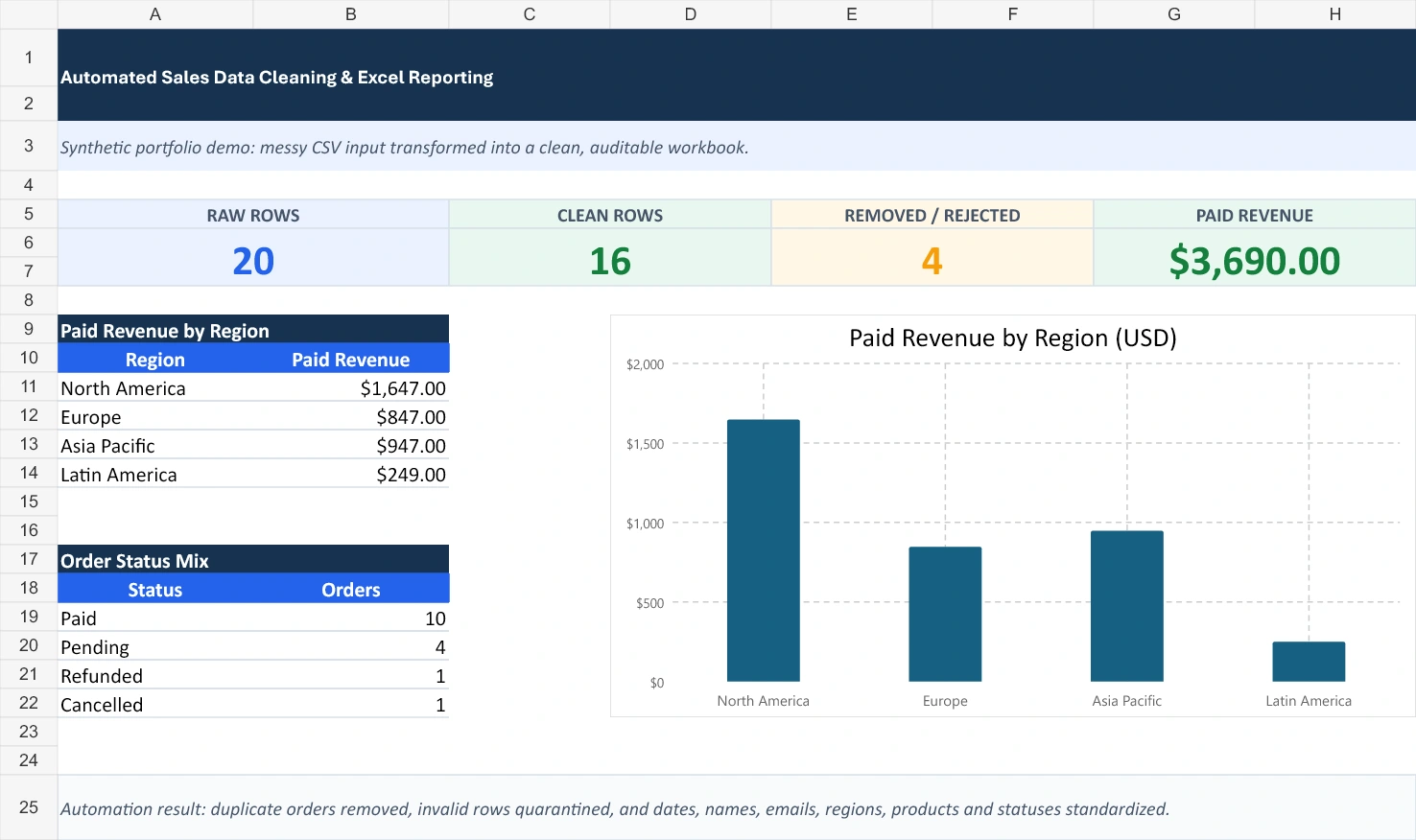
• 20 raw order records
• 16 clean rows
• 2 duplicate records removed
• 2 invalid records quarantined
• $3,690 in paid revenue reconciled
Deliverables
• Clean CSV ready for analysis or import
• Rejected-row file with validation reasons
• Audit log showing transformations
• Excel workbook with summary metrics and regional revenue reporting
• Reusable Python workflow for future exports
Quality controls
The workflow keeps the original raw file unchanged, uses deterministic cleaning rules, separates rejected records for review, and reconciles dashboard totals against the cleaned dataset. This makes the output easier to verify and safer to repeat.
Best fit
This approach works well for recurring sales exports, CRM downloads, marketplace orders, survey data, inventory files, and operational spreadsheets that currently require manual cleanup.
All data shown here is synthetic. No client or personal data was used.
Like this project
Posted Jul 21, 2026
Cleaned 20 synthetic sales records into 16 validated rows, quarantined 2 invalid rows, removed 2 duplicates, and reconciled $3,690 paid revenue.
Likes
0
Views
19