Shardrop File Transfer Application Development

Peter Ikechukwu


Shardrop
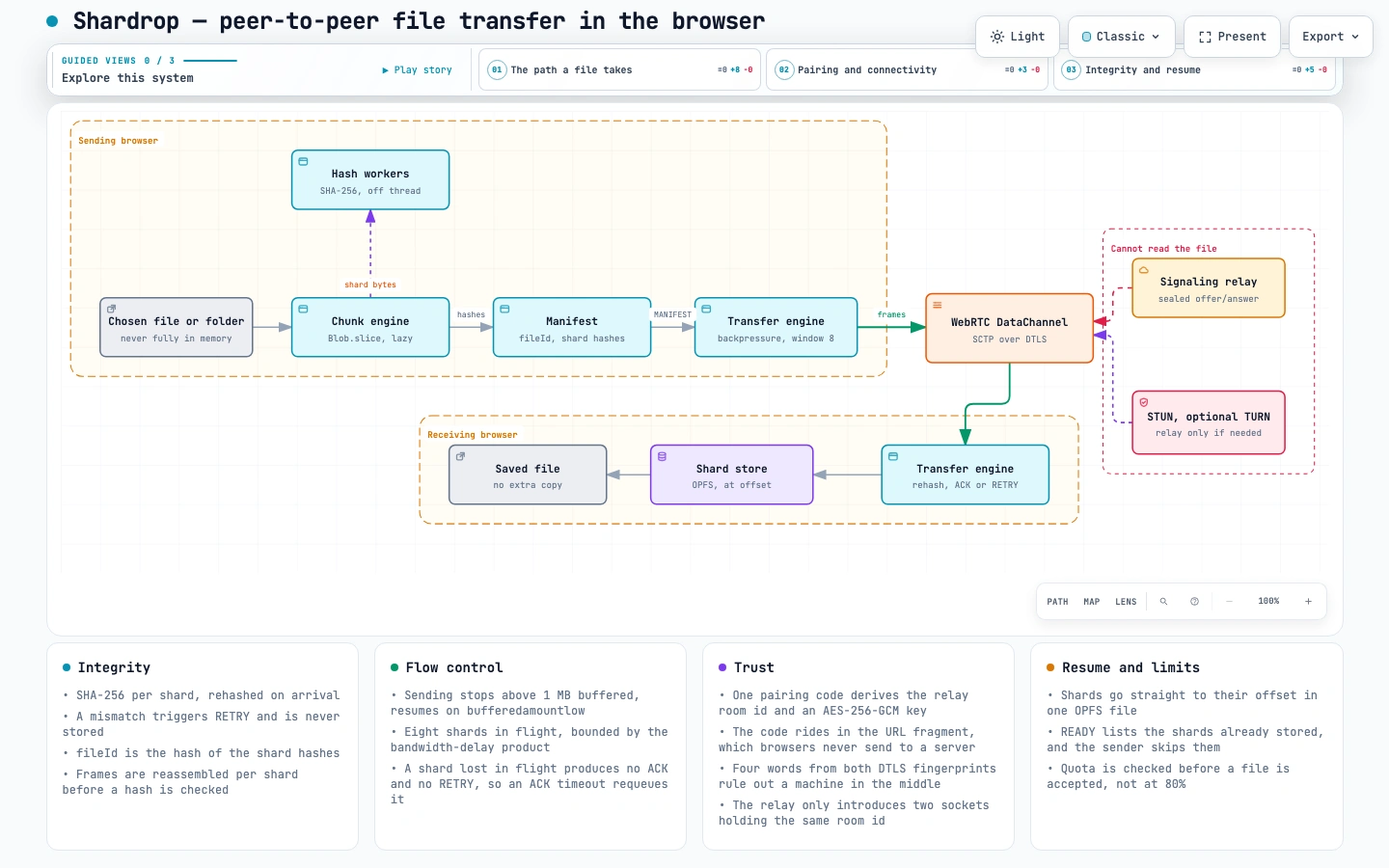
Chunked, verified, resumable file transfer directly between two browsers. The file is split, hashed and streamed over a WebRTC DataChannel. No server can read it. Where the two devices can reach each other — the same Wi-Fi, or home broadband — the bytes go straight between them and no server handles the file at all. Where a network forbids that — typically mobile data — a TURN relay forwards the encrypted packets without being able to decrypt them, and the app labels the connection relayed. Which servers are involved, and when spells it out.
Try it: shardrop.vercel.app — open it on two devices, create a code on one, scan it with the other. Works across networks, including a phone on mobile data.
Read the case study for the design, the trade-offs, and the bugs — including the ones only production found.
The diagrams are interactive and self-contained: open architecture.html or protocol-sequence.html in a browser for guided views, tracing and export.
What it does
Chunks a file without loading it into memory.
Blob.slice() and a generator, so a multi-gigabyte file streams with flat memory use.Verifies every shard. SHA-256 per shard, checked on arrival. A shard that fails is re-requested, never stored.
Respects backpressure. The sender stops while the DataChannel has more than 1 MB queued and waits for
bufferedamountlow, with at most 8 shards in flight. Without this, a large file kills the tab.Resumes. Shards are written to their offset in an OPFS file and which ones arrived is persisted, so an interrupted transfer continues instead of restarting, and the UI says how many were already there.
Recovers from loss and corruption. A corrupted shard triggers RETRY; a shard lost entirely is caught by an ACK timeout, since nothing else would ever report it.
Never trusts the wire. Indexes outside the manifest, over-long shards and data arriving before a manifest are all rejected.
Sends files and folders. Pick files, pick a folder, or drop either; folder paths are kept, and each file keeps its own manifest, verification and resume state.
Pairs with one code. Scan a QR code, open a link or type 16 characters. The code encrypts the pairing messages, so the relay that introduces the devices cannot read or forge them.
Proves who you are connected to. Both devices show four words derived from the two DTLS certificates. If they match, nothing is sitting in the middle of the connection.
Works across networks. Direct where possible; through a TURN relay where carrier NAT or a firewall forces one, with short-lived credentials minted server-side. The badge always says
paired · direct or paired · relayed.Fails with a reason. Every wait on the network has a deadline and a message: a relay that does not answer, a network that refuses a connection, a transfer too large for the browser's storage quota.
Shows the shards. The progress display is a mosaic with one tile per shard: green once its hash checks out, amber when it had to be resent.
Run it locally
The e2e suite starts its own dev server and relay, pairs two browser contexts both ways (shared link and typed code), transfers a file and a folder, checks every downloaded file's SHA-256 against the source, and checks what the relay sees: both devices ask it for TURN credentials, and it forgets the room once they connect.
Manual mode is still there, collapsed under the pairing panel: copy the offer and answer by hand, so no relay carries the pairing messages, at the cost of working only on one network. The devices still ask STUN for their addresses, as every connection does.
How it fits together
Which servers are involved, and when
Four servers play a part, and only one of them ever handles the file itself — and only on some networks.
Server Used What it sees Web host (Vercel) When the page loads Requests for the app's code. Never files, never pairing messages. Signaling relay (Fly) Every pairing, on every network Two sealed messages it cannot read. The page lets go of it once the devices connect. STUN Every pairing, on every network A device asking "what is my public address?". Nothing else. TURN (metered) Only when a direct connection is impossible The file's encrypted packets, which it forwards but cannot decrypt.
Whether the file touches a server depends on the network, not on whether a device uses Wi-Fi or mobile data:
Where the two devices are Usually Why Same Wi-Fi Direct They can reach each other on the local network. Home broadband in two places Direct STUN finds each device's public address, and home routers let the connection through. A phone on mobile data Relayed Carriers put phones behind carrier-grade NAT, which nothing outside can reach. Hotel, office or university Wi-Fi Often relayed Those networks commonly block direct connections or UDP.
These are tendencies, not rules: a strict Wi-Fi network can force a relay, and some mobile networks allow a direct path. There is no need to guess, because every connection says which it is:
paired · direct means the file went straight between the devices; paired · relayed means its encrypted packets passed through the TURN server. Only relayed transfers count against the TURN quota.Things worth knowing
A shard is not a wire message. The SDP reports
max-message-size: 262144 in Chrome, and other browsers differ, so shards (256 KB–25 MB) are cut into frames sized from pc.sctp.maxMessageSize at runtime.A DataChannel is already reliable and encrypted. Per-shard hashes therefore do not guard against network corruption, which cannot happen; they guard against bugs, storage faults and a hostile peer. ACKs exist for durability and resume, not for delivery.
The signaling relay is untrusted. One 80-bit pairing code is the only secret: HKDF derives the relay's room id from it and an AES-256-GCM key that never leaves the browser, so the relay sees an opaque room id and ciphertext. This matters because the SDP carries the DTLS fingerprint — a relay able to rewrite it could sit inside a supposedly direct connection. The code rides in the URL fragment, which browsers never send to a server. See decision 003.
The relay is needed for a moment, not a session. It carries one sealed offer and one sealed answer. As soon as the devices connect, the page closes its socket; the page also wakes the relay on load, so a suspended one is awake by the time a code is scanned. See decision 006.
TURN credentials never reach the page as secrets. The page asks the relay at
GET /turn, which mints short-lived credentials from the provider and is CORS-restricted to the site. The TURN server forwards DTLS packets it cannot decrypt.Deploy it
The page is static; the relay is one small Node process.
Fly needs a payment method. A trial account stops machines after five minutes, and a stopped relay cannot pair anyone. With the relay suspending when idle, the cost is close to nothing.
VITE_SIGNAL_URL is inlined at build time, so it must exist in the build environment before the build runs.A serverless platform cannot host the relay: it holds WebSocket connections, which is why it runs as a container.
Cap the TURN allowance. The site is public, so anyone whose network needs a relay spends it. Give the metered project a quota that disables credentials when exceeded: relayed connections stop, direct ones carry on, and the page says why.
Check TURN from the network you care about with
npm run turn:check https://<relay-host>/turn. It gathers ICE with iceTransportPolicy: "relay", so only candidates the TURN server itself issued can appear, and says which layer failed if none do: hostname resolution, blocked UDP, or refused credentials.Other TURN providers work too — Cloudflare Realtime, a coturn server with a static secret, or any fixed username and password. The variables for each are in .env.example and decision 006; the relay logs which one it picked at startup.
Status
Working and deployed: chunking, hashing in a worker pool, manifests, code and QR pairing with encrypted signaling, safety words, manual signaling, files and folders by picker or drop, transfer with backpressure, verification, retry, pause and resume, resume after interruption, OPFS storage with quota checks and cleanup, and connections across networks through TURN, labelled direct or relayed.
Measured rather than assumed: hashing runs at 600–1100 MB/s in Chromium, so the DataChannel is the bottleneck, not hashing. See benchmarks.md and decision 005.
Not built: batching many tiny files into one manifest, so a thousand small files each pay a manifest round trip (decision 004); refreshing TURN credentials for a page left open past their lifetime; testing across a matrix of phones and browsers rather than one phone on Wi-Fi and mobile data.
Credits
The chunker, hasher and manifest, including the content-derived
fileId, were written by hand. The transport layer (framing, storage, transfer state machine), the relay, the deployment and the UI were written with AI assistance, reviewed and tested, and hardened against the bugs that real devices and real networks turned up; the design decisions and trade-offs in docs/decisions/ are documented as they were reasoned through.Like this project
Posted Sep 23, 2026
Developed Shardrop, a secure browser-based file transfer tool using WebRTC.