Contentfill

Sondhayni Murmu



Contentfill
Every bulk operation missing from Contentful — AI-powered transforms, schema changes, and mass creation that non-engineers can safely run themselves.
Role
End-to-end design · Implementation via Claude Code
Timeline
April 2026
Tools
Contentful CMA, React, TypeScript, Claude Code
Contentfill is an internal GUI I designed and shipped at Big Health — a tool for bulk Contentful operations that non-technical users could run themselves, safely, without engineering involvement.
The Problem
What bulk editing looks like in Contentful today:
The content team at Big Health manages hundreds of Contentful entries across dozens of content types. The people keeping them accurate — content admins, PMs, designers, clinical staff — are not engineers. Adding a field across twenty content types means opening each one individually. Deriving a
slug from a title means touching every entry by hand. There's no other path.Each reference opens a new modal. Three levels deep, the original entry is buried. Each level requires its own explicit publish — miss one and the change doesn't reach delivery.
Bulk-edit tools exist in Contentful's marketplace. None covered the three operations the team kept needing: schema changes across content types, computed field transforms, and bulk creation. The engineering path — the
CMA — can do all three, but it's code-only, has no preview, and requires a dev cycle.Lore
Contentful

Contentfill
The name is a pun. Contentful is the CMS. Contentfill fills the gaps in what it can do. It's an internal tool at a real company — not a commercial product — so the logos can coexist without anyone calling a lawyer.
The repo is public and forkable. The core design — three-step flow, mandatory preview, per-entry error handling — holds for any org running Contentful. Sensitive configuration (space IDs, API keys, environment names) lives in environment variables at the deployment level, so there's nothing in the codebase that's Big Health-specific.
The Contentfill logo borrows the Contentful C-mark and its color palette, then adds a golden diamond at the center — a quick Figma job that somehow came out looking deliberate.
The Flow
Contentfill has three steps. They're always visible at the top of the screen, and they're always in this order.

Initial load — select an operation and the three-step flow begins.
Step 1: Configure
Pick an operation (
Update Entries, Add Field, Delete Field, CSV Import), select your content types, and configure the transform. The schema for your selection stays visible in the right rail throughout — every field, type, and constraint — no tab-switching to look things up.Update Entries — content type selected, transform configured, schema visible in the right rail.Transforms as first-class operations
Every other bulk-edit tool sets a static value across all entries. Contentfill computes new values from existing field data. Transforms are menu-selectable —
slugify, copy-field, prepend, append — or described in plain English and generated by the AI Agent. No code required.Computed from existing field data — not a static value written to all entries.
AI Agent transform — describe the operation in plain English. Schema visible while configuring.
Step 2: Preview
What reviewing a batch looks like before anything is written:
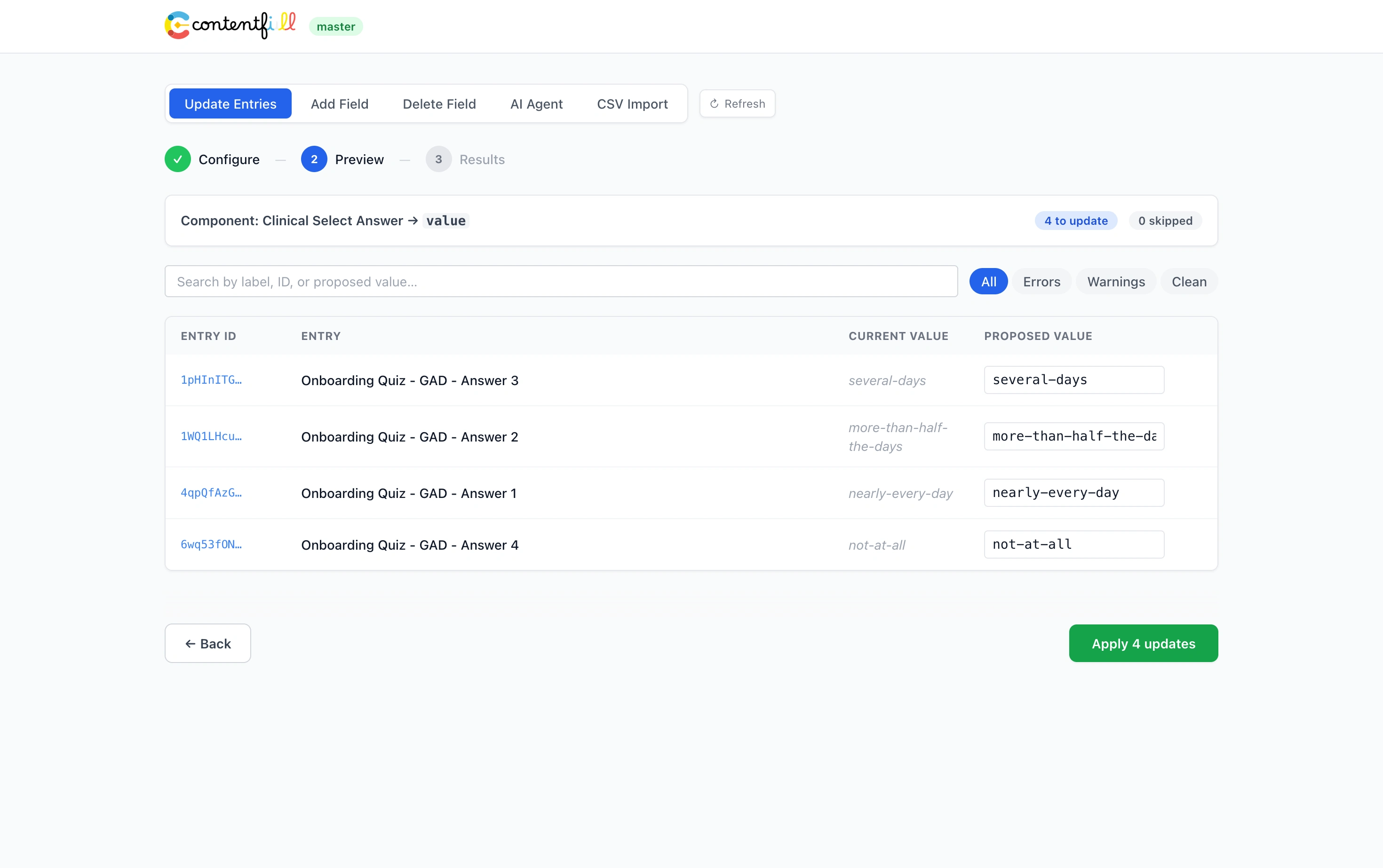
Every entry in the batch is shown current value vs. proposed change before anything is written. Step 3 is inaccessible until step 2 is complete — the stepper is a commitment contract, not navigation.
Preview cannot be skipped. It's architecturally enforced.
Per-entry errors, inline
Errors surface inline — plain-language message, editable proposed-value field, link to the entry in Contentful. Apply stays disabled until every error is resolved. One bad entry doesn't abort the batch; it waits for a decision.
Plain language — not a stack trace.

Step 3: Results
Results
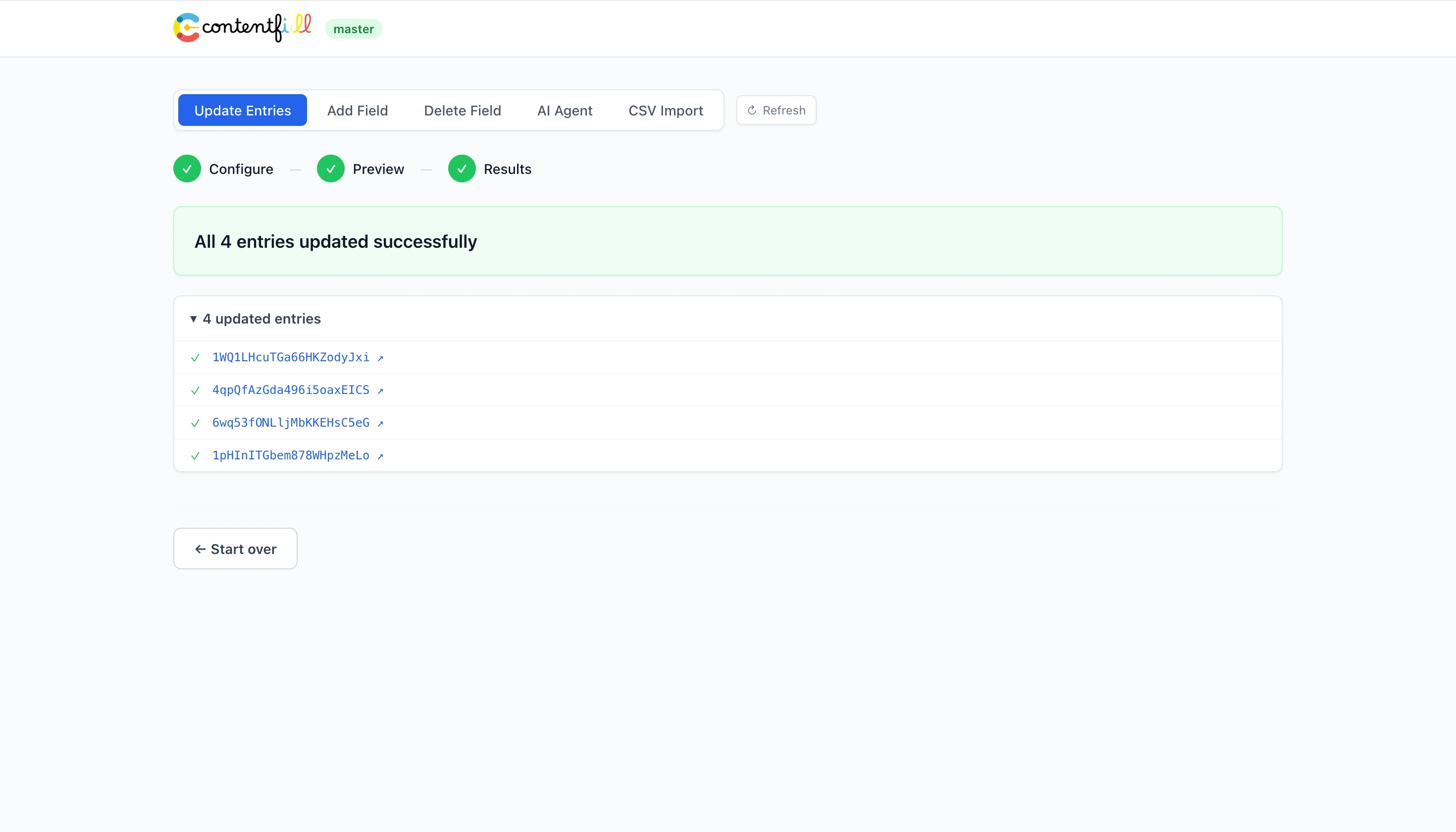
After applying, the results screen shows the outcome per entry: updated, skipped, errored. Every updated entry links directly back to Contentful.
Design Decisions
Three more decisions shaped how Contentfill handles the things that can't be undone.
Schema operations with the same care as content operations
Add Field and Delete Field are dedicated workflows — each with their own ConfigStep, PreviewStep, and ApplyStep. The delete flow surfaces Contentful's required two-phase deletion as an explicit named sequence: the warning comes at the entry point, not at the moment of no return.Add Field — content type selected, new field configured. Schema visible throughout.Delete Field — destructive operation warning at the entry point, content types grouped by domain.Risk is named before the user selects a single content type. Content types grouped by domain taxonomy, not API name.
A consistent design language for dangerous operations
Two affordances instead of a confirmation modal: an always-visible environment badge so you know which environment you're in before touching anything; and an Apply button that stays disabled until every error in the batch is resolved — consent earned through action, not assumed.
CSV Import — Excel as an access bridge for bulk creation
CSV Import — Excel as an access bridge for bulk creationContentfill generates an Excel template from the live content model — correctly-named columns, required fields marked, field types embedded. Fill it in offline, re-upload via
CSV Import. It flows through the same PreviewStep as every other operation. The first content admin to use it needed one sentence of direction and didn't come back with questions.
The generated template — columns pulled directly from the live content model.
CSV Import — template downloaded, filled in offline, re-uploaded and parsed into the preview table.The spreadsheet re-enters the same preview-before-write pipeline as every other operation.
On AI Implementation
I used Claude Code as the implementation partner. The engineering path was available to me — I'm a software engineer — but the design problems were the ones worth spending time on.
Claude Code handled
React components · TypeScript · Contentful CMA API wiring · Build tooling
I handled
What the tool does · Who it serves · Safety affordances · Error handling · When and how the UI communicates risk
The deletion flow is the clearest example. Claude Code implemented two-phase field deletion as a single step with no visible progress. I recognized it immediately: the operation was running, but Contentful's two-phase structure was invisible. I directed it to surface both phases with a named progress indicator. That's the difference between a user trusting the tool and hitting refresh because nothing appeared to happen.
Using AI to implement a design tool is different from using AI to design one. The decisions about what Contentfill should do and how it should handle the moment before an irreversible operation — those were mine.
Impact
Operations that previously required hours of manual work — or waiting out a development cycle — can now be executed by the content owner in under fifteen minutes.
This isn't an estimate — it follows from how the tool works. Any operation Contentfill supports is faster than the manual alternative by construction.
A colleague needed to create and update hundreds of entries. Before Contentfill, there was no tool for this. They spent hours working through Contentful's native editor. With Contentfill, the same class of operation runs in a single session.
~15 min
Time to execute a bulk operation that previously took hours
Structural estimate — follows from the tool's design
1 sentence
Direction needed for a new user to complete their first Excel-template operation
Observed
Content owners can now execute operations that used to require engineering resources or hours of manual work — without asking anyone for help.
What I'd Do Differently
The AI Agent transform is presented as one option among several in a dropdown:
slugify, copy-field, prepend, append, AI Agent. Nothing signals that the AI path is the most powerful one. I'd make it more primary — not buried alongside static presets, but the default starting point, with the presets as quick-select shortcuts. The tool already has the intelligence; it just doesn't lead with it.The other thing I'd revisit: saved, named transforms. The second time you run the same operation, you're describing it from scratch again. A content admin running the same transform every quarter shouldn't have to.
Like this project
Posted Jun 6, 2026
Internal tool for bulk Contentful operations, allowing non-technical users to manage content efficiently.