Built with Rive
Handyman App, Rive Data Binding + State Machines in React Native

Adetomiwa Adewunmi


Overview
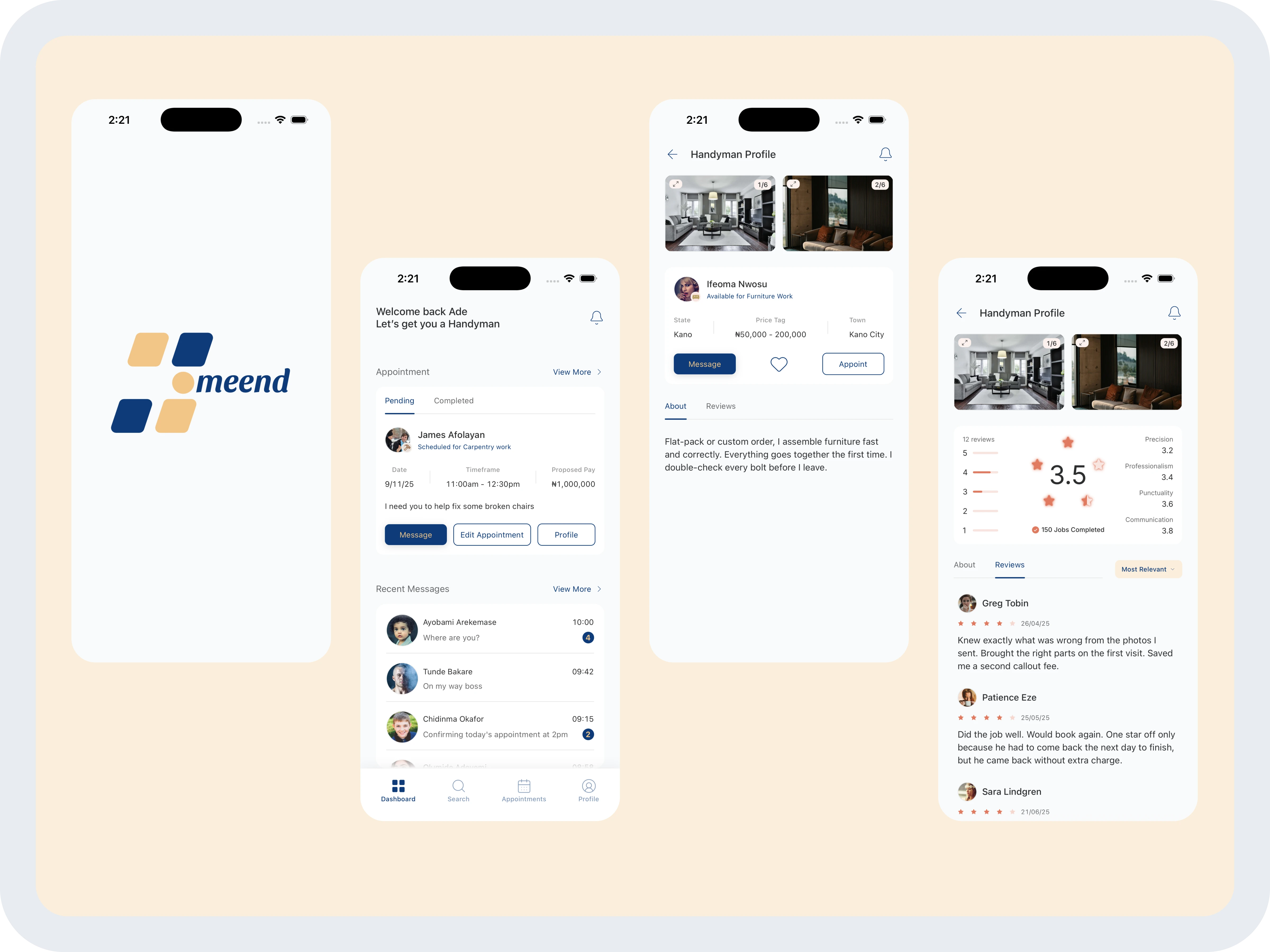
Hommend is a concept handyman hiring app built in React Native. Users browse professionals by category (carpentry, electrical, plumbing and six more), tap through to individual profiles, and land on a reviews tab that fires a unique Rive animation per category. Every rating label, star state, bar percentage, and color in that animation is driven live from the app's data layer. Two Rive files, three screens, one coherent system.
The Brief
I built Hommend as a portfolio project with a specific goal: show Rive integrated into a React Native app as a data-driven component, not just a decorative splash.
Most Rive-in-mobile demos stop at looping animations.
I wanted to push further:
State machines with runtime inputs,
AutoBind
Triggers
Color properties all responding to real data.
The scope I set:
A splash that drives its own navigation via Rive events
A dashboard with full category-based color theming
A profile screen where the reviews tab fires a Rive animation that knows the handyman's actual ratings.
Process
Built in roughly five days in React Native with Expo and TypeScript.
The Splash Screen
It is a Rive state machine on autoplay. No timer drives the transition to the dashboard. Instead, the animation fires an
end event through onRiveEventReceived, and that callback triggers navigation. The animation controls the timing, not the app.The Dashboard
It has nine categories, each with a unique accent color. Switching between them re-tints the active state, star icon, and bottom nav shadow through the same token, so the whole UI shifts together. The top-rated handyman listing is the main interactive section: users browse 16 profiles, each in a card with name, photo, and rating, and tap through to the full profile.
Profile Screen
The profile screen has a header card with location data, a bio selected per category and handyman, a horizontally scrollable image gallery with a full-screen lightbox expand, and two tabs: About and Reviews.
The reviews tab is where the Rive work gets detailed. When the tab activates, a
startAnimation trigger fires. The runtime then pulls from inputs set in code before the animation plays:
useRiveColor pushes the category's accent color into a single colorProperty, useRiveString fills seven text fields (overall rating, precision, professionalism, punctuality, communication, jobs completed, total reviews), and useRiveNumber drives five bar percentage inputs for the star breakdown. Nine triggers (star1 through star5 in 0.5 steps) select the correct star display. AutoBind wires the data binding layer so the Rive runtime reads inputs directly without manual sync.
A few things required reworking mid-build. Several artboard elements in the Rive editor didn't have layout assigned, which broke sizing inside the React Native view. I had to go back into the editor and explicitly set layout on those nodes. The splash artboard also had a name with a trailing space in the editor that had to be matched exactly in code or the runtime couldn't find it. The bigger refactor was on the splash: I originally used triggers to advance the state machine, then switched to Rive events so the animation signals the app when to navigate, which is cleaner and more resilient.
Outcome
Hommend is a standalone portfolio project, not published to the App Store.
All three screens are fully implemented with a complete data layer: 16 handymen, 9 categories, category-specific bios, and per-handyman review data feeding directly into the Rive runtime.
The review card is the centrepiece: a genuinely data-driven Rive component where nothing is hardcoded and every visual state reflects real inputs.
Got a mobile project that could use Rive? Let's build it.
Like this project
Posted Jun 2, 2026
Handyman hiring app in React Native. Rive splash screen + data-driven review card with state machines, data binding, triggers, and AutoBind across 3 screens.