R365 Safety

Howie Y

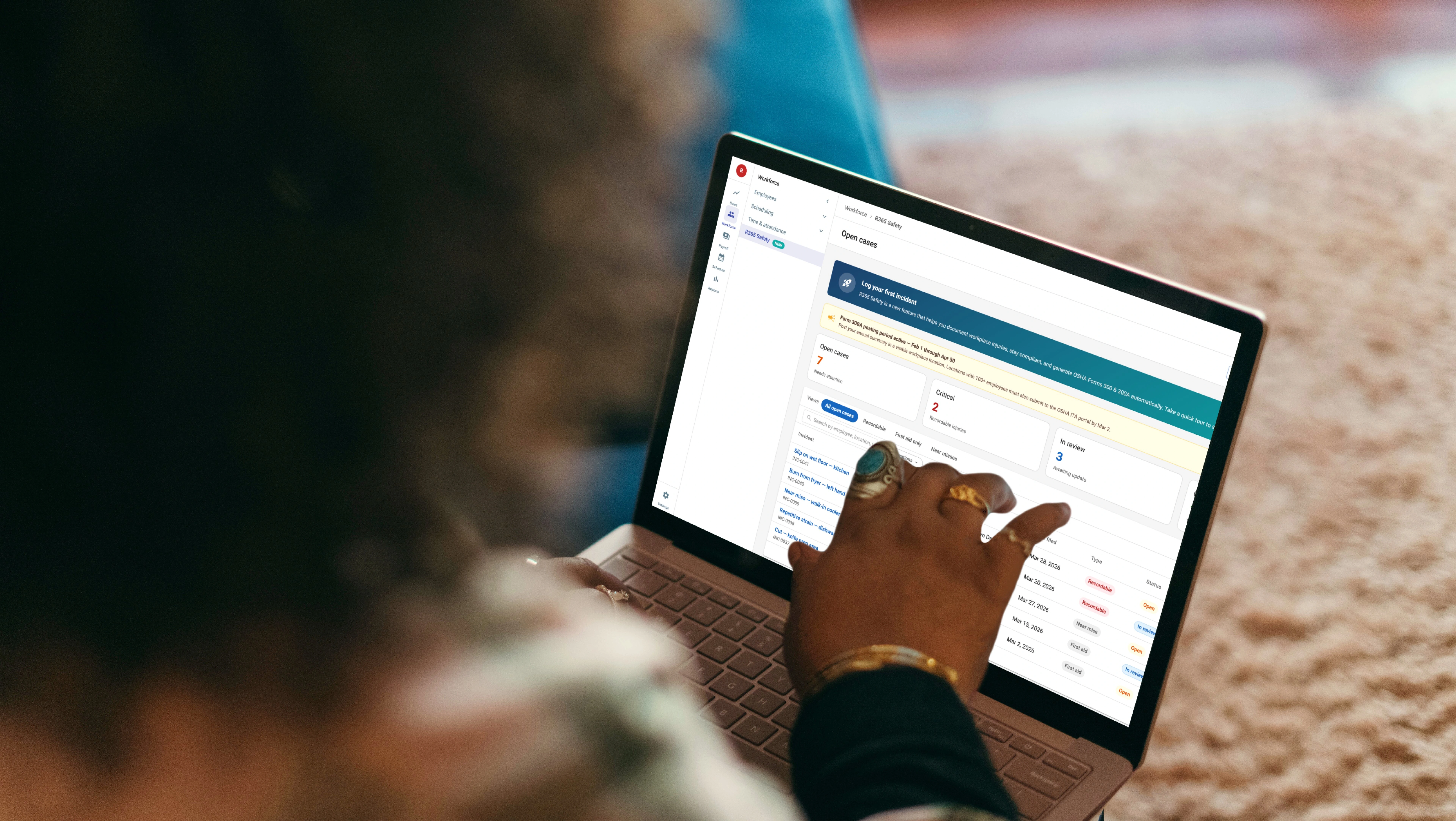
R365 Safety
OSHA compliance, logged on the floor in 90 seconds.
A new compliance module for Restaurant365 that turns OSHA injury recordkeeping — usually a year-end spreadsheet scramble — into a guided, few-minute task, with one-click Form 300/300A export.
Role
Senior Product Designer
Type
SaaS · Web
Year
2026
Deliverables
Product Design · UI/UX · Design System
01 Brief
R365's first compliance module, designed for the floor
Restaurants are among the highest-injury workplaces in the U.S. — slips, cuts, burns, and repetitive strain happen weekly. OSHA requires every recordable incident to be logged, classified, and rolled into Form 300 each year. Most R365 customers track this in spreadsheets that never line up with what OSHA wants to see — and the legacy workflow gave managers no confident way to fix it.
Compliance risk is real
OSHA penalties can reach six figures per violation.
Missed deadlines, altered records, and incomplete logs are common citation triggers.
Customers are asking for it
Operators want compliance built into the platform they already use for payroll — not bolted on through a separate vendor.
Strategic for R365
The first dedicated compliance module.
Differentiates against generic HCM tools and sets the architecture for adjacent compliance work.
02 Problem
OSHA compliance is built for safety managers, not line managers
OSHA reporting is high-risk and time-sensitive.

Restaurant managers are not compliance experts.

Existing workflows were fragmented and intimidating.

Errors could create legal and financial exposure.

Managers often delayed reporting because the process felt overwhelming.

03 Insight
“
When an employee gets hurt, the last thing a manager should do is decode OSHA terminology.
Compliance can't live in a manual; it has to live in the field, the label, and the moment of entry — so a non-specialist can log a perfectly compliant incident without ever knowing what “case classification” means.
04 Goal
Compliance built into the floor, not bolted on at year-end
User goals
Log it fast, get it right.
Report incidents quickly, avoid compliance mistakes, and understand what's required at each step.
Business goals
Lower risk, clearer records.
Reduce compliance risk, improve reporting accuracy, and centralize records, auditability, and operational visibility.
Design goals
Clarity over complexity.
Improve workflow clarity with progressive disclosure, contextual guidance, and a scalable workflow architecture.
05 Flow 01 · Logging on the floor
Logging an incident — two entry points, one wizard
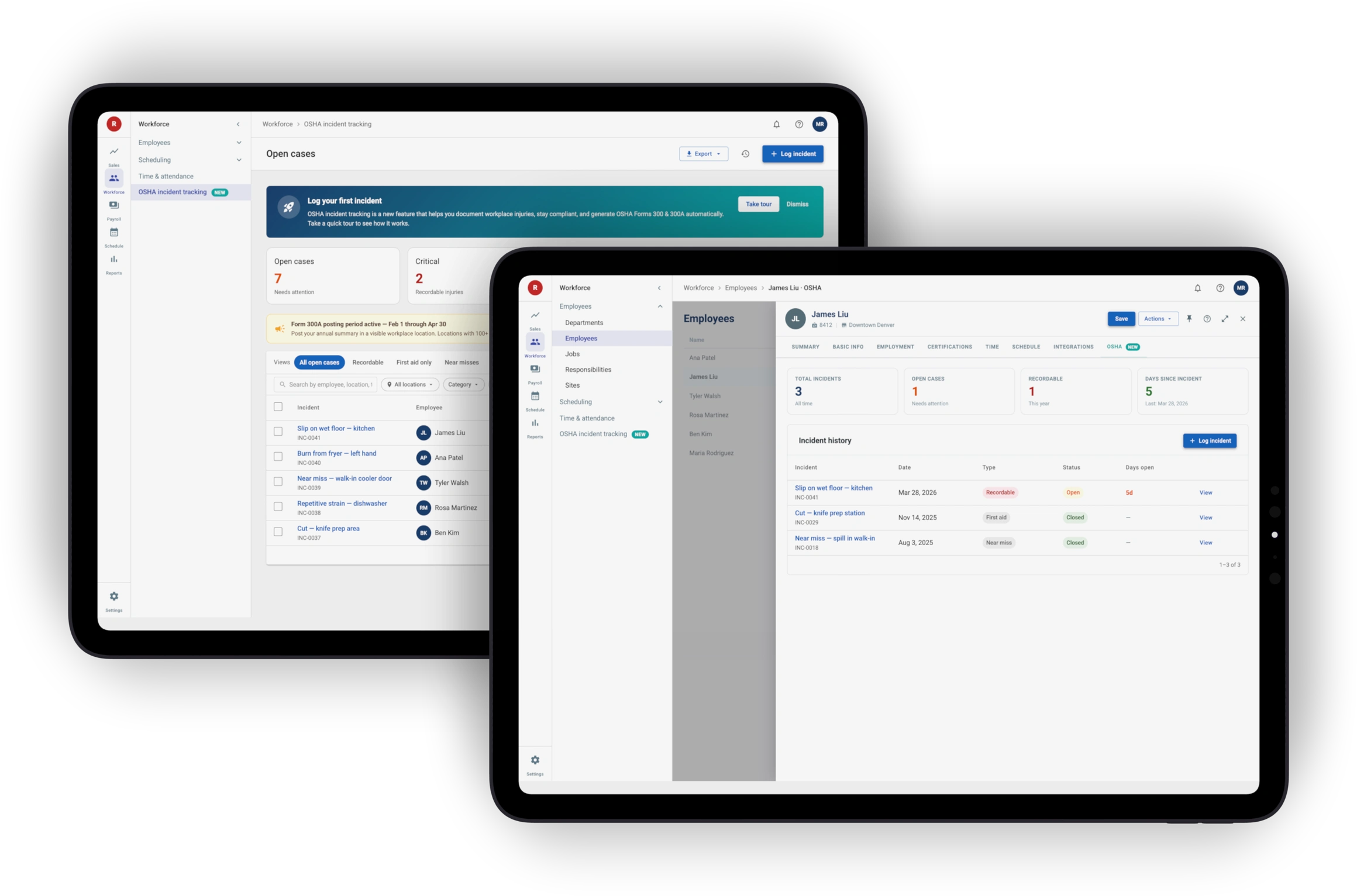
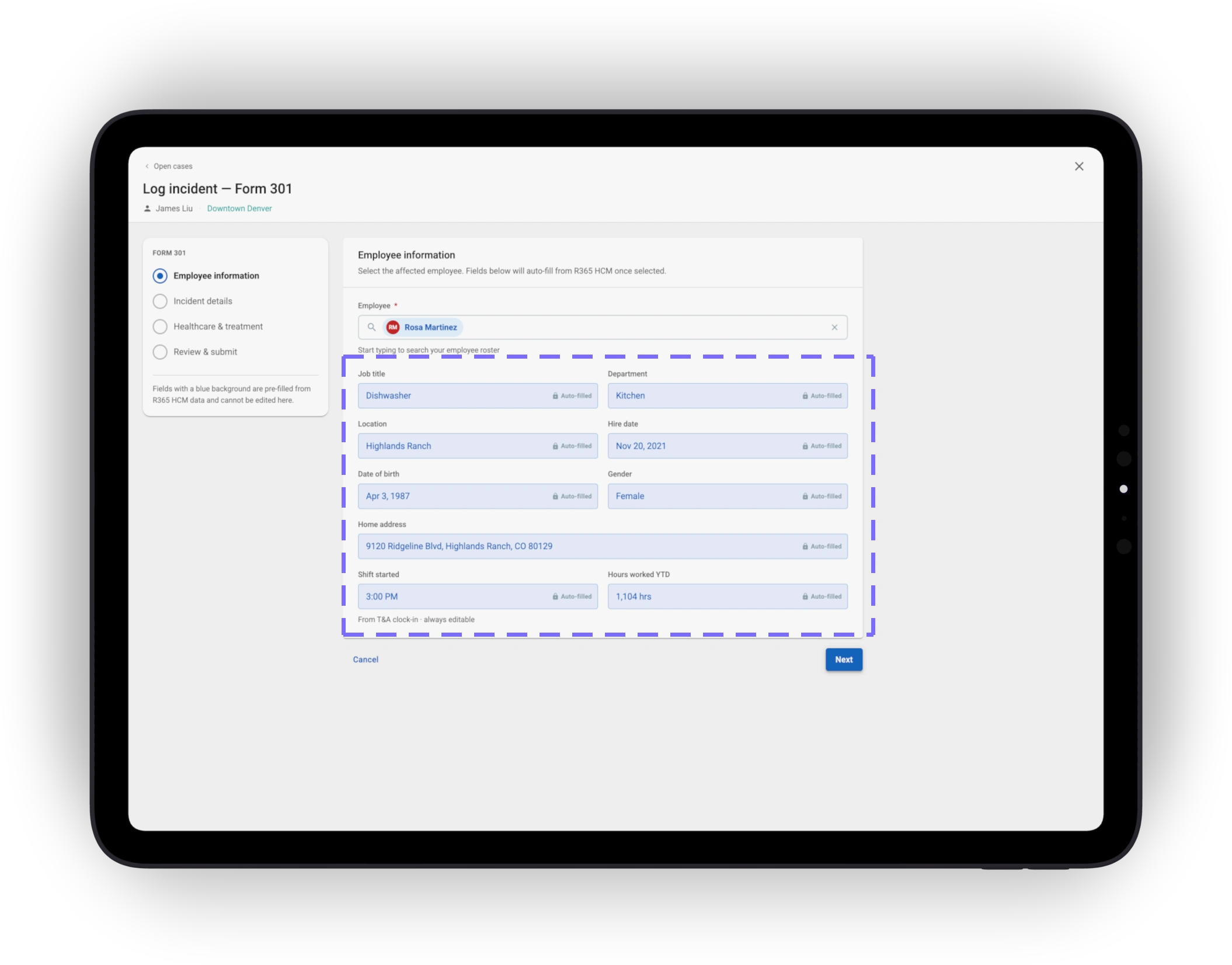
Managers log from where they already are — an employee profile, or the dedicated R365 Safety tab. Either path opens the same focused wizard.
Two entry points
Employee profile when the manager knows who's hurt; the Safety tab when starting from the dashboard.
4-step wizard
Employee info → Incident details → Healthcare & treatment → Review & submit. The full OSHA dataset, in emotionally manageable chunks.
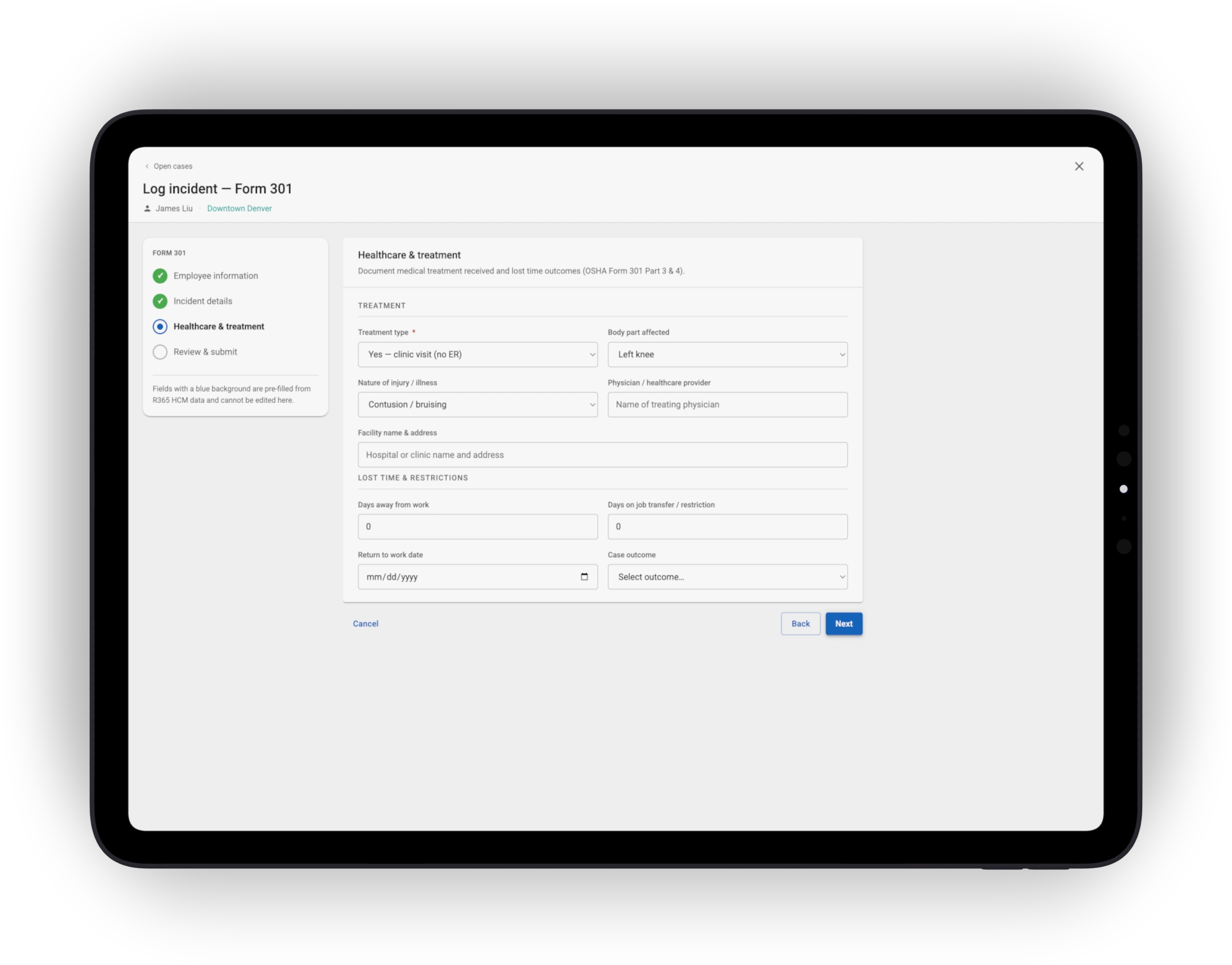
HCM pre-fill
Name, ID, title, hire date, and location come from existing R365 HCM data. The manager only enters what's new.
06 Flow 02 · Compliance built-in
Compliance alerts at the moment of entry
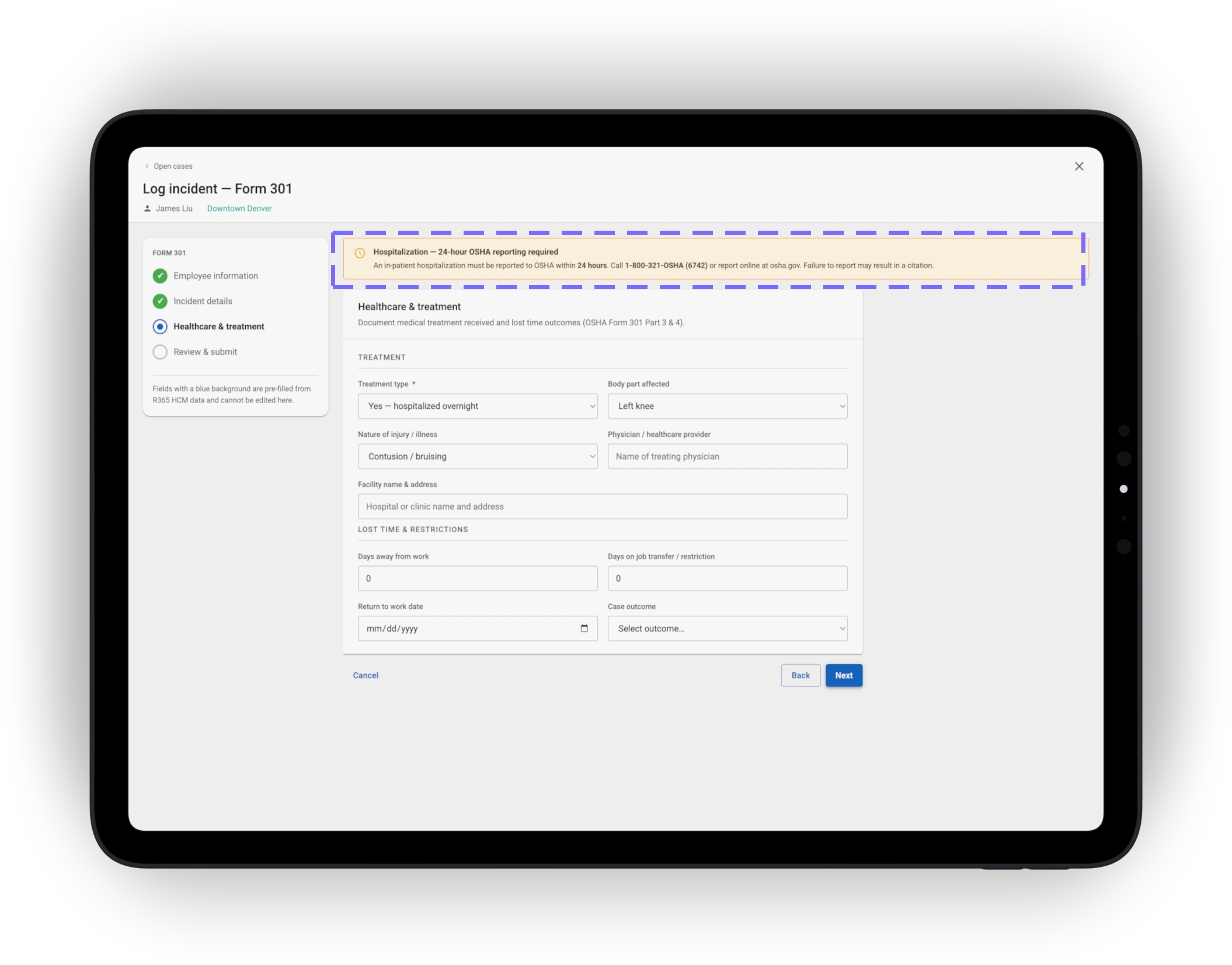
When a manager checks “hospitalized overnight,” the wizard fires the 24-hour OSHA reporting requirement in real time — at the moment of selection, before the wizard is even saved.
Real-time, not at submit
Alerts fire on data change, not after save, so the rule is visible when the choice is fresh rather than as a post-action surprise.
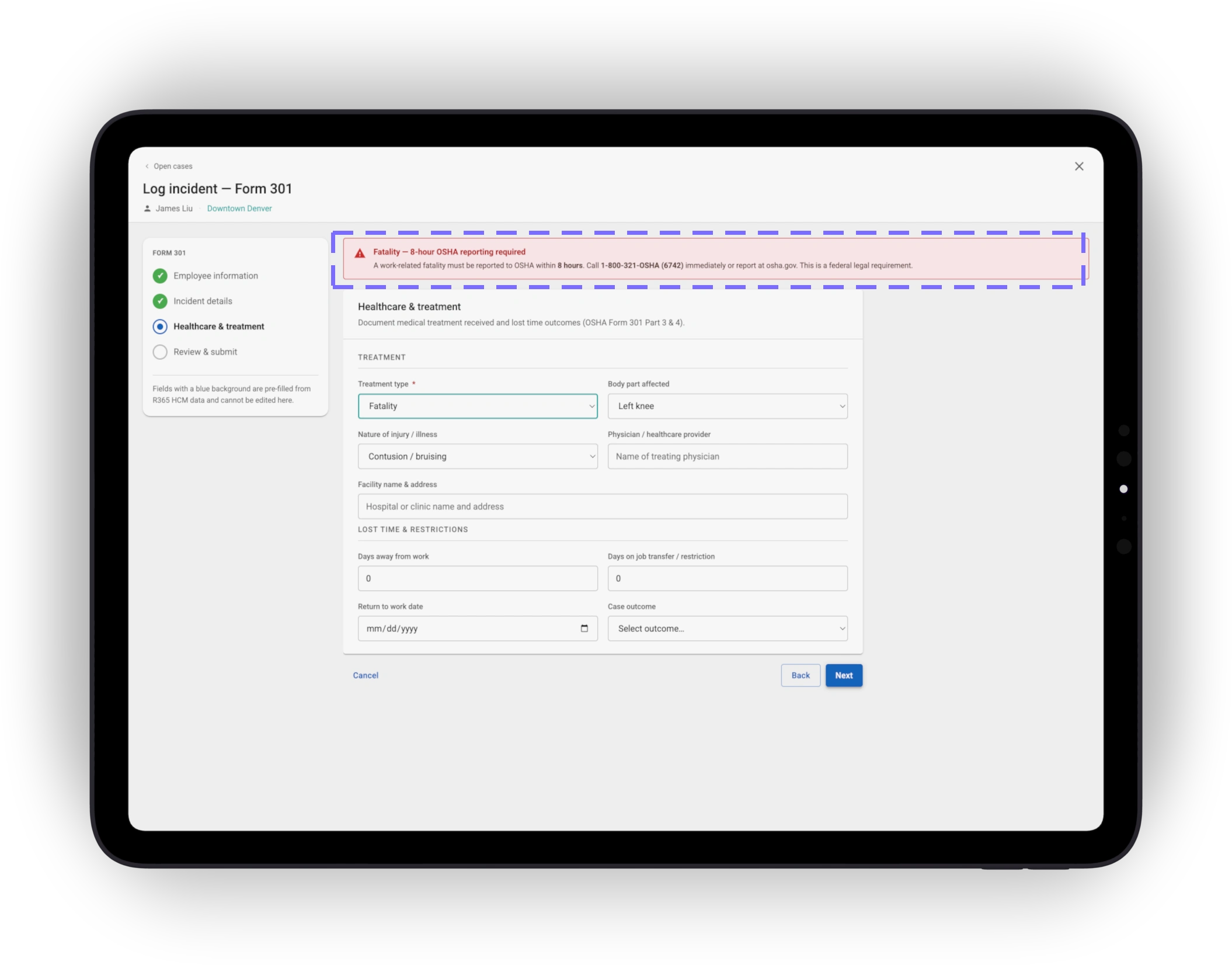
Names the deadline, not just the risk
The alert specifies the 8- or 24-hour federal reporting window, so managers know exactly what to do next.
07 Flow 03 · Org-wide view
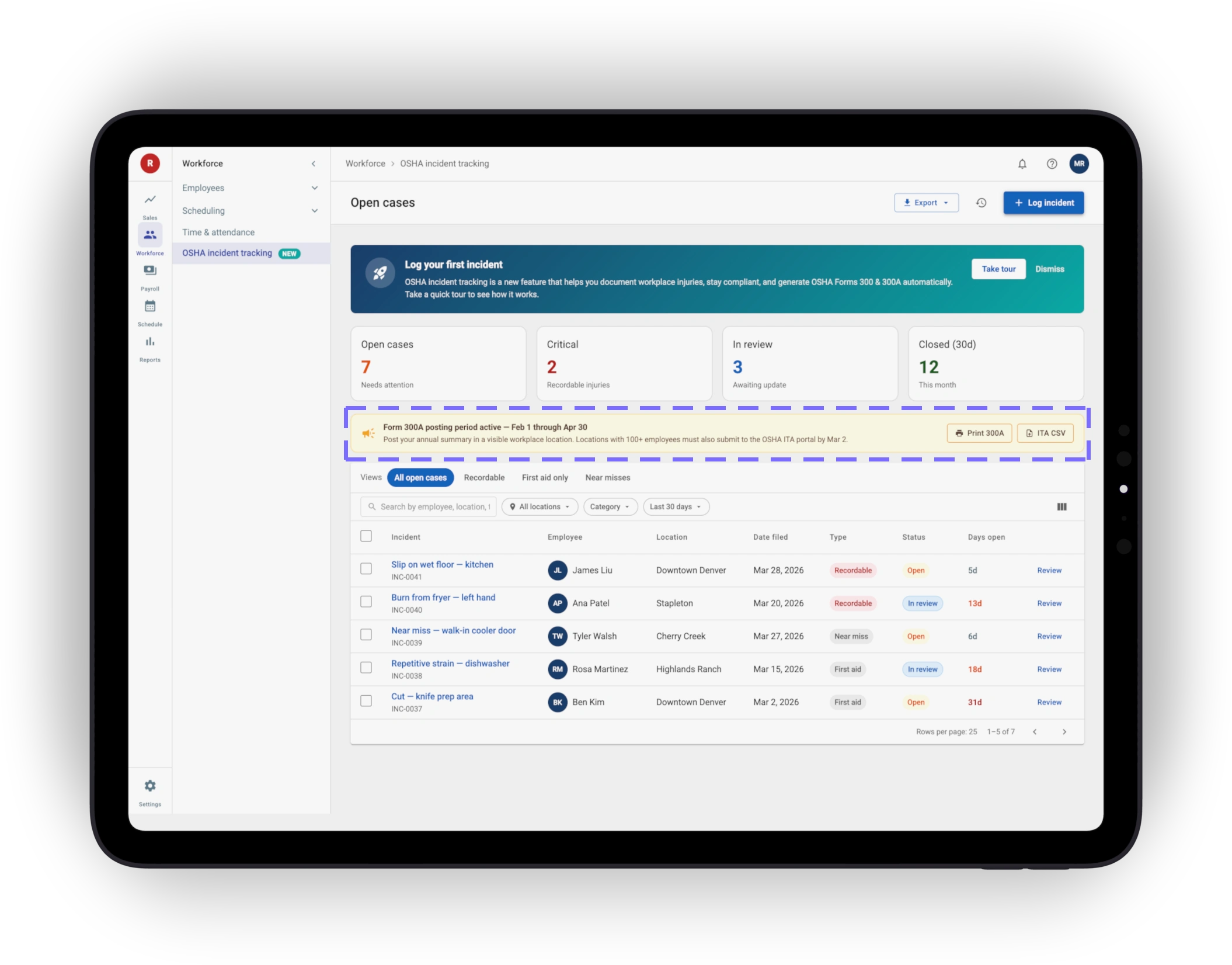
The R365 Safety tab — every case, every store, in one view
The dedicated Safety tab consolidates incidents across locations into a single case-management view. Scorecards, saved views, and filters make the long-tail searchable — and deadline banners surface where the work happens.
Scorecards + saved views
Open / Critical / In review / Closed (30d). Filter by location, category, and date range — long-tail searchable, not a giant list.
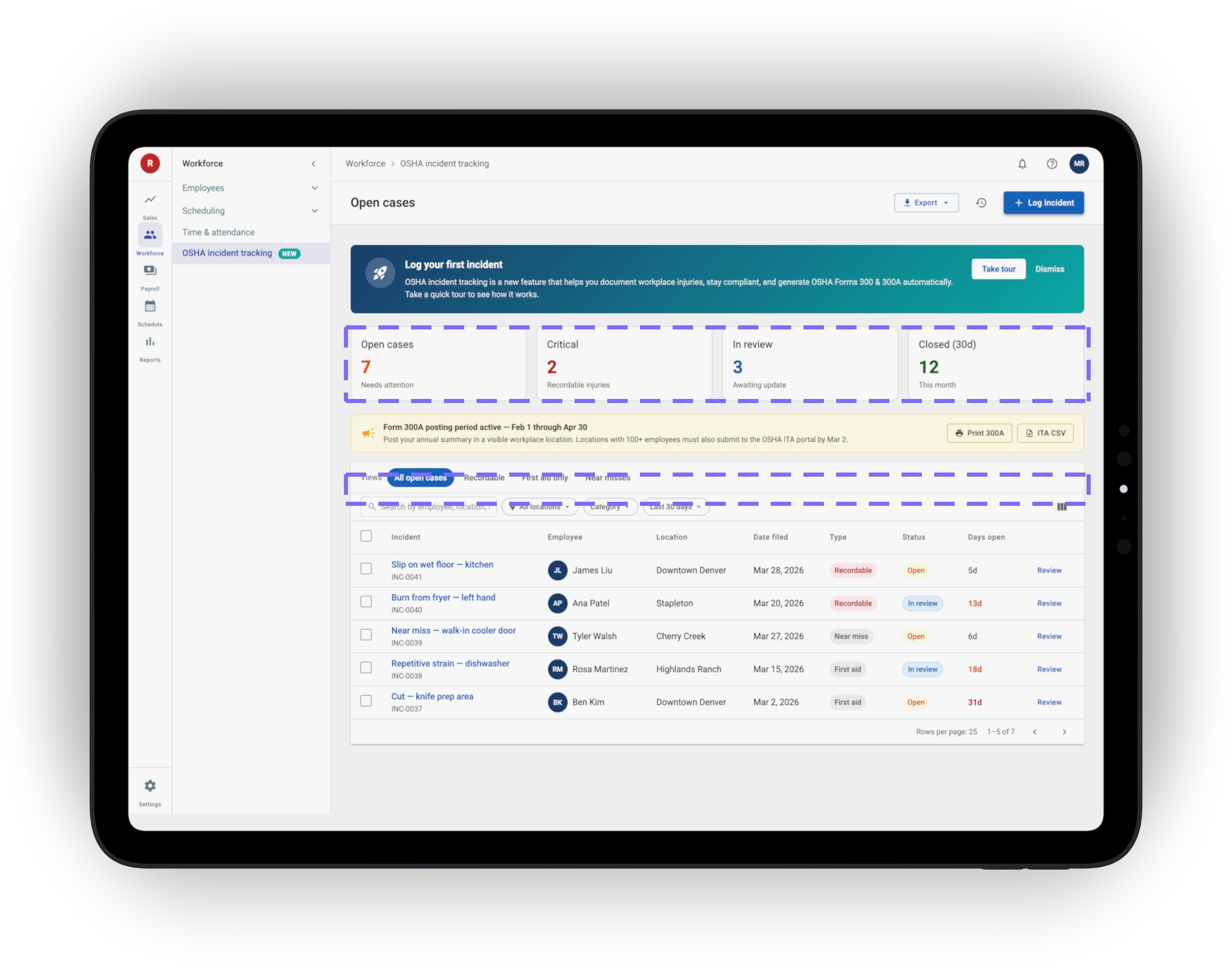
Deadline banners in context
Form 300A posting window (Feb 1 – Apr 30) and ITA filing (Mar 2) surface as banners on the dashboard, not a separate calendar.
08 Flow 04 · First-time onboarding
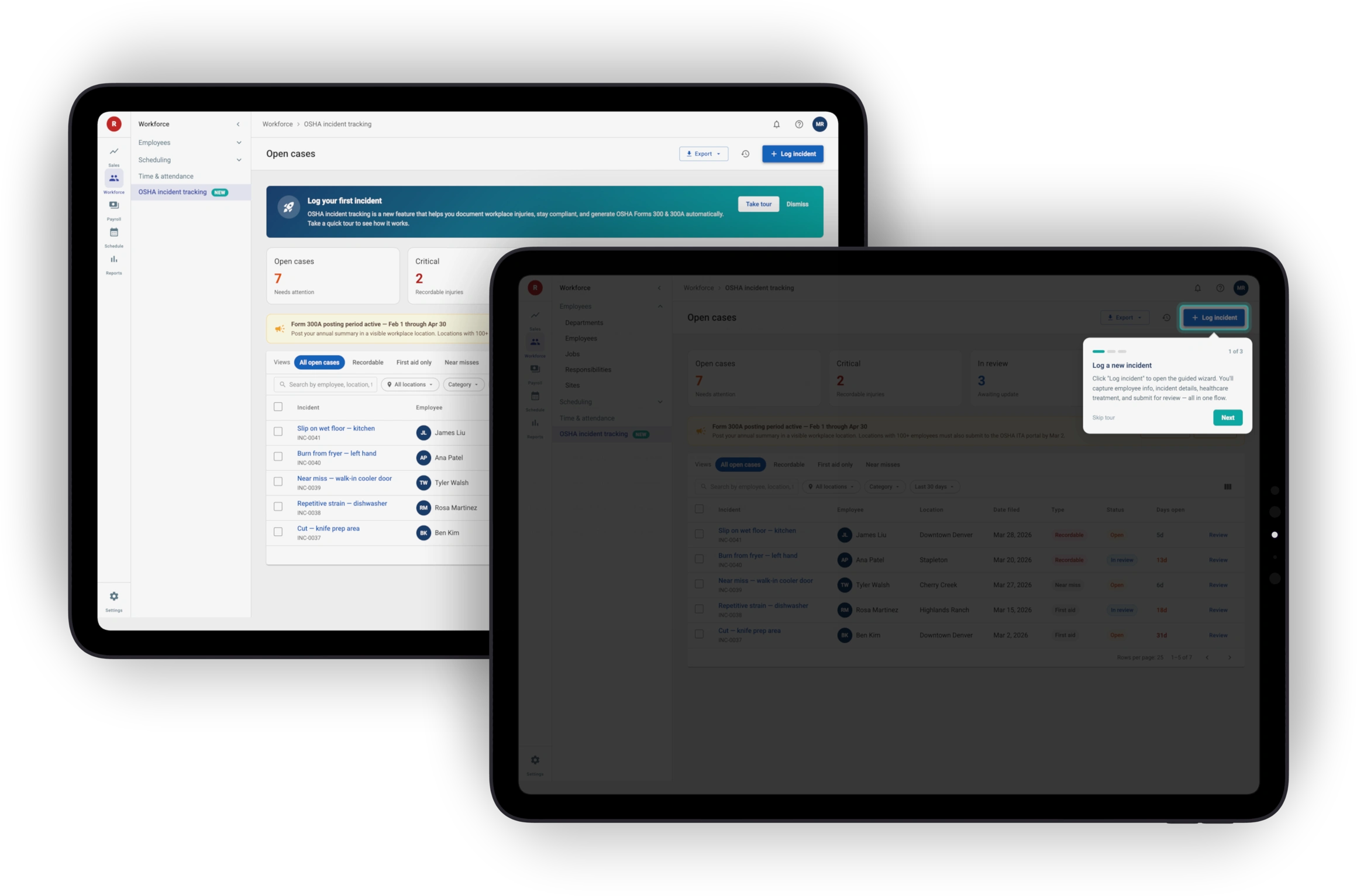
First-time tour
A persistent “Log your first incident” banner introduces the module on first use. Selecting it launches a 3-step welcome tour without leaving the page — designed alongside R365's broader onboarding effort.
Banner → modal → guided tour
Three components, one rhythm. Users learn the onboarding pattern once, even as new modules ship.
Adopted cross-platform
Built first for R365 Safety; the same pattern now introduces other new modules system-wide.
09 Flow 05 · Year-end compliance
From spreadsheet reconciliation to one-click compliance
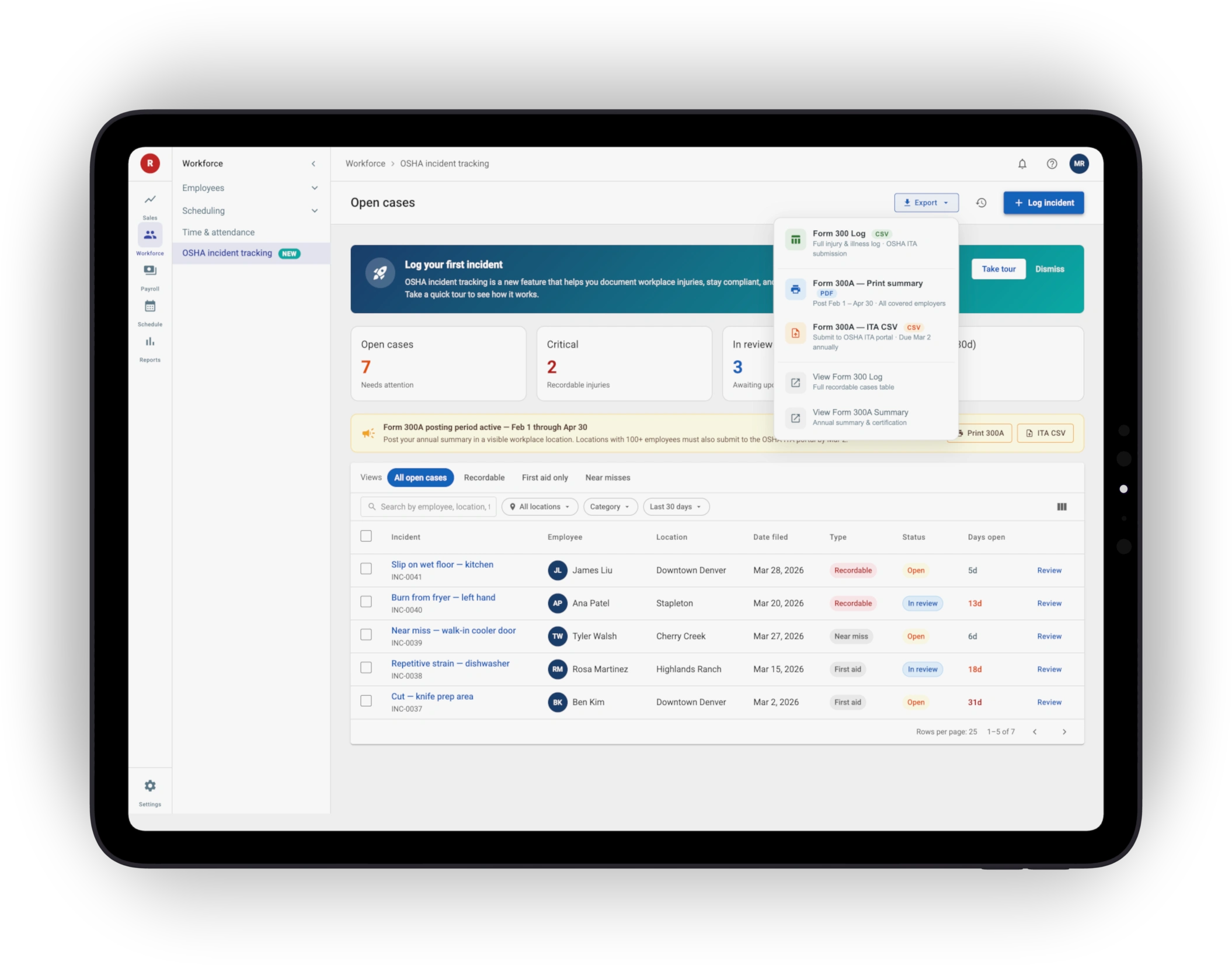
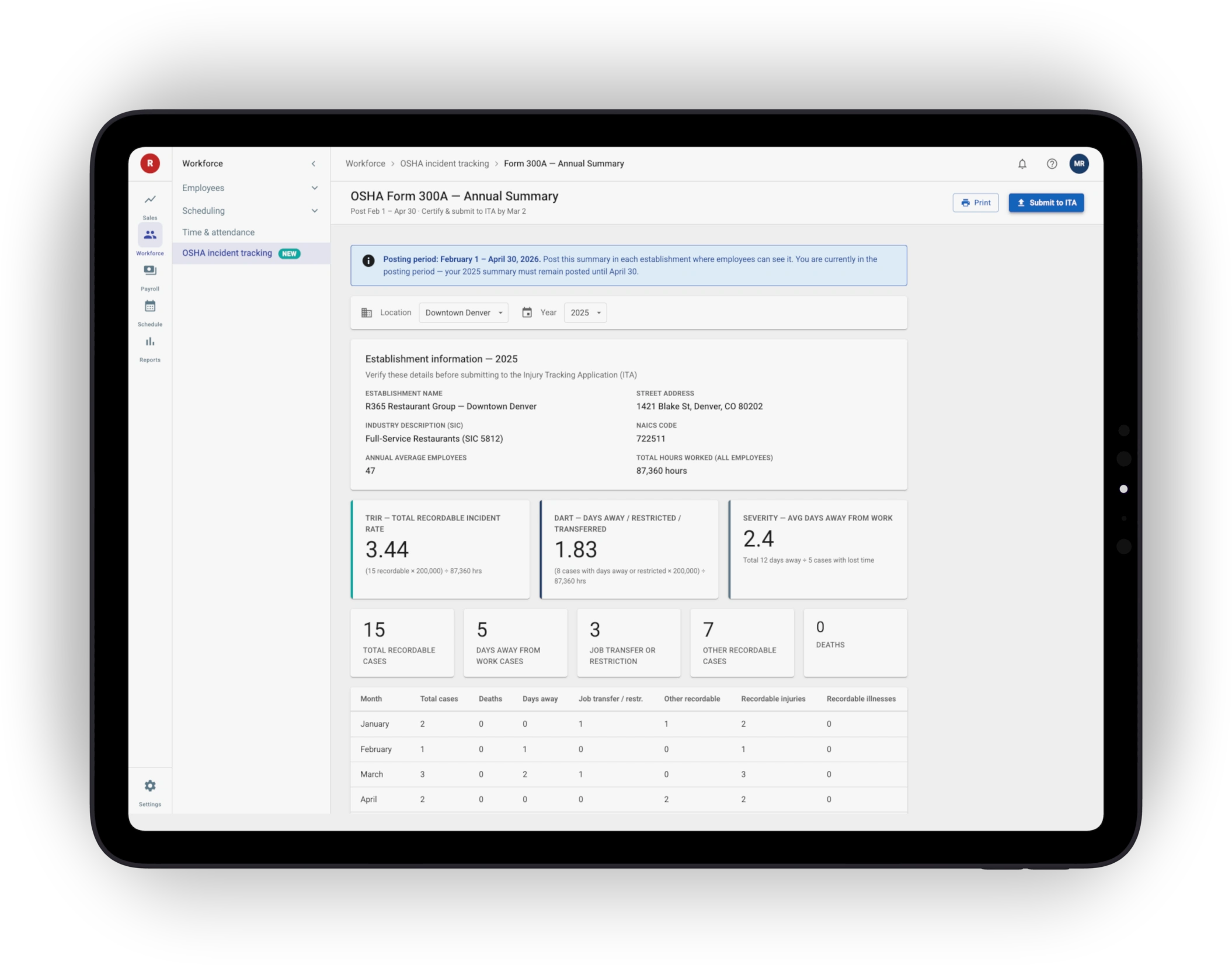
Year-end shifts from days of manual reconciliation to a single export action. The Export menu produces OSHA Form 300, Form 300A Print, and Form 300A ITA CSV — auto-mapped from the data managers already entered.
Three export targets, one action
Form 300 · Form 300A Print · Form 300A ITA CSV. One export menu covers the full year-end compliance set.
1:1 field mapping
Every wizard field maps to a specific OSHA column or box. Exports are verifiable; audits are answerable in minutes, not days.
10 Design decisions
6 choices that shaped the module
Wizard over single form
A 3-step wizard chunks 20+ OSHA fields into Who → What → Treatment, reusing the deductions wizard pattern.
Inline OSHA guidance, not a help center
Compliance terms defined where they're used.
Trade-off: more in-product copy. Payoff: never leave the form.
HCM pre-fill
Name, ID, title, hire date, and location come from R365 HCM.
Cuts a third of the fields and removes a class of typos.
Make the audit log visible
Showing the audit trail by default improved transparency, simplified investigations, and made incident history easier to review during audits.
Map incident data directly to OSHA forms
Each wizard field has a documented mapping to a Form 300 column or Form 301 box.
Exports are verifiable; audits are answerable.
Compliance reminders on the dashboard
Form 300A posting (Feb 1 – Apr 30) and ITA filing (Mar 2) show as banners, so deadlines stop being something to remember.
11 Outcomes
What we're aiming for at MVP launch
~90s
Target time to log a recordable incident — down from 8–12 min in the legacy spreadsheet workflow.
1-click
Year-end Form 300 / 300A export — down from days of manual cross-referencing.
12 What's next
From recordkeeping to safety intelligence
The MVP solves the foundational problem — compliant recordkeeping that doesn't depend on OSHA expertise. The next phases turn that data into action.
Phase 2 · Investigation workflows
Witness statements, corrective actions, follow-up reminders, and auto-generated Forms 300, 300A, 301.
Phase 3 · Analytics & safety insights
Trend dashboards, root-cause analysis, and F&B-specific metrics like heat exposure and repetitive strain.
Phase 4 · AI-driven training
Incident analytics drive training assignments, and gamification makes completion something employees want to do.
Beyond · Adjacent compliance
The architecture becomes the template for wage-and-hour, FMLA, EEO, and federal-posters compliance.
13 The bigger opportunity
One platform for everything restaurants already do
The bigger opportunity
Restaurant operators often manage payroll, safety, training, and compliance across disconnected systems.
R365 Safety explored how compliance workflows could live directly inside the operational platform managers already use every day. The long-term opportunity isn't just OSHA reporting — it's a unified operational compliance layer.
Like this project
Posted Jun 9, 2026
A compliance module for Restaurant365 streamlining OSHA injury recordkeeping.
Likes
0
Views
5