UniGo – Accessible College Navigation App for Immigrant Parents

Daisy Pham


UniGo – Accessible College Navigation App for Immigrant Parents

Weather app image
Overview
A mobile-first college navigation app that helps immigrant parents understand, compare, and track college information in one place.
Rather than adding information source to an already overwhelming landscape, Unigo simplifies, personalizes, and guides users through the U.S. college admissions process in their preferred language.
UX RESEARCH
UX/UI DESIGN
ACCESSIBILITY STRATEGY
PROTOTYPING
Role:
UI/UX Designer
Team:
UI/UX Designers
Type:
School Project
Timeline:
10 weeks
Problem
A System That Wasn't Built for Everyone
The U.S. college process is built on information.
But that information is often hard to find, hard to understand, and hard to compare. For immigrant parents, this creates a painful gap. They want to support their children, but the system often speaks in language they may not know yet: Early Decision, FAFSA, credit hours, cost of attendance, financial aid packages. Even when the information is technically available, it is spread across different websites, written in institutional language, and rarely designed for mobile-first access.
So the challenge became:
How might we help immigrant parents feel more informed, included, and confident in the college decision-making process?
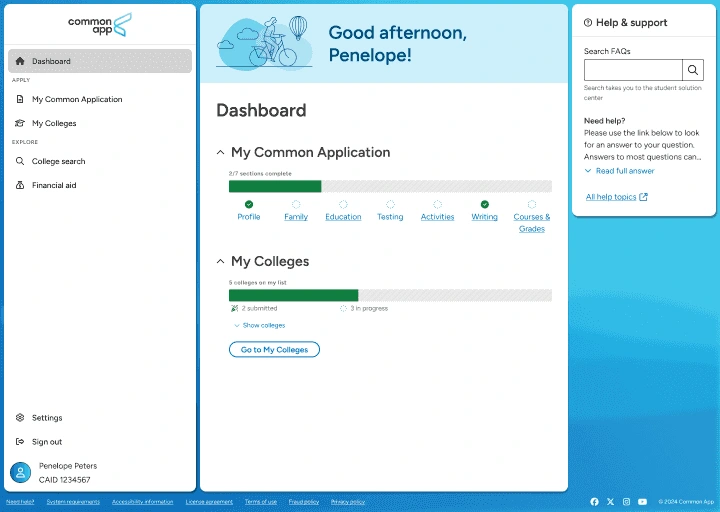
Current college application and research websites often contain multiple pages, dense information, and complex language, making them difficult to navigate, especially for users whose first language is not English.
Initial Observations
We began with a literature review across ACM Digital Library, Springer, and JSTOR. We looked at research about immigrant parents, international families, postsecondary education, and education technology.
Across the research, four barriers kept appearing:
Fragmented information
Important details like tuition, requirements, deadlines, and support services live across multiple school websites.
Complex terminology
Admissions and financial aid language often assumes prior knowledge of the U.S. higher education system.
Limited language support
Most college information is English-centered, which creates extra work for parents who are more comfortable in another language.
Mobile dependence
Many parents rely heavily on smartphones, but college websites are often easier to navigate on desktop.
The Solution
UniGo is a mobile-first college navigation experience designed around 6 main flows:
Change preferred language
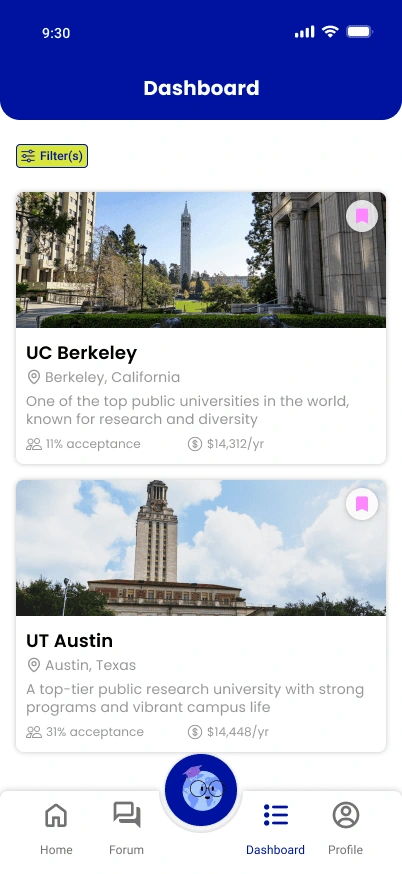
Explore college profiles
Compare colleges
Track application deadlines
Learn from community stories
Chat with AI Chatbot
Together, these flows turn scattered college information into a more guided experience. Instead of asking parents to search, translate, compare, and remember everything on their own, UniGo gives them one place to move through the process step by step.
View Prototype
Key User Flows
Flow 01 | CHANGED PREFERRED LANGUAGE
Switch the app to a preferred language so college information feels easier to understand from the start.
UniGo lets users change their preferred language on , then applies that choice across key parts of the experience, including college profiles, timeline reminders, term explanations, and support content. This helps parents move through the college process with less translation work and more confidence.
Flow 01 | Explore College Profiles
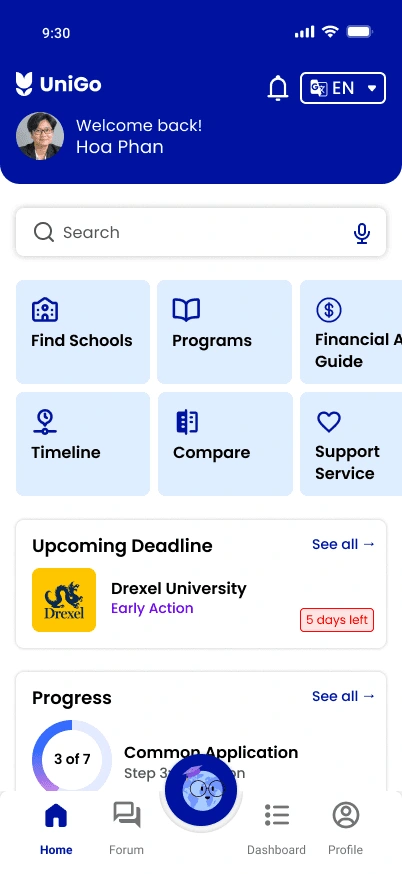
Browse centralized college profiles and scan tuition, deadlines, requirements, majors, and support services without jumping between school websites.
Parents do not need to start with five tabs open. Each profile brings the most important college information into one structured view, so they can quickly understand what a school offers and whether it is worth exploring further. The goal is simple: show what matters first, then let parents go deeper when they are ready.
Flow 02 | COMPARE COLLEGES
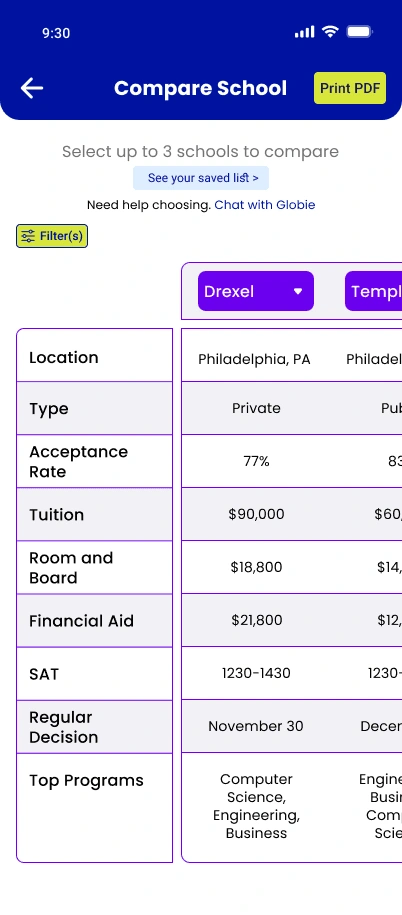
Select multiple schools and compare tuition, deadlines, requirements, majors, and support services side by side.
College comparison usually happens across scattered websites, screenshots, notes, and memory. UniGo brings tuition, deadlines, requirements, majors, and support services into one comparison view, helping parents see tradeoffs more clearly. Since many parents may prefer paper or need a larger view than a phone screen can offer, UniGo also allows them to print the comparison table and review it offline with their family.
Flow 03 | Track application deadlines
Follow a visual application timeline, check upcoming tasks, and get reminders before important deadlines are missed.
The application process can feel like a pile of disconnected steps. UniGo turns it into a visible path, showing what is coming next, what is already done, and what still needs attention. Progress becomes easier to understand, and deadlines become harder to lose.
Flow 04 | Learn from community stories
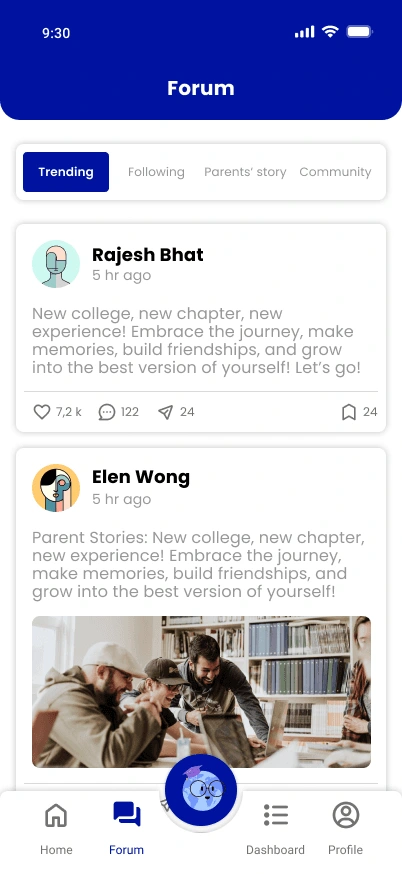
Join a parent community forum to ask questions, share experiences, and learn from families going through the same college process.
College planning is not only informational. It is emotional. Parents may have questions that feel too specific, too simple, or too personal to ask in formal settings. UniGo gives them a community space where they can read parent stories, share their own experiences, and feel less alone in the process. To keep trust clear, community stories support the journey, while verified college information stays separate.
Flow 05 | CHAT WITH AI CHATBOT
Ask questions in everyday language and get simple, personalized guidance without searching through multiple college websites.
Parents may not always know where to look or how to phrase their questions. UniGo’s AI College Guide gives them a conversational way to ask about admissions terms, deadlines, tuition, financial aid, and next steps. Instead of overwhelming parents with long search results, the chatbot responds in plain language, suggests relevant UniGo pages, and helps them understand what to do next. To keep trust clear, the assistant supports decision-making but does not replace school counselors or official college resources.
Flow 01 | CHANGED PREFERRED LANGUAGE
Switch the app to a preferred language so college information feels easier to understand from the start.
UniGo lets users change their preferred language on , then applies that choice across key parts of the experience, including college profiles, timeline reminders, term explanations, and support content. This helps parents move through the college process with less translation work and more confidence.
Flow 01 | Explore College Profiles
Browse centralized college profiles and scan tuition, deadlines, requirements, majors, and support services without jumping between school websites.
Parents do not need to start with five tabs open. Each profile brings the most important college information into one structured view, so they can quickly understand what a school offers and whether it is worth exploring further. The goal is simple: show what matters first, then let parents go deeper when they are ready.
Flow 02 | COMPARE COLLEGES
Select multiple schools and compare tuition, deadlines, requirements, majors, and support services side by side.
College comparison usually happens across scattered websites, screenshots, notes, and memory. UniGo brings tuition, deadlines, requirements, majors, and support services into one comparison view, helping parents see tradeoffs more clearly. Since many parents may prefer paper or need a larger view than a phone screen can offer, UniGo also allows them to print the comparison table and review it offline with their family.
Flow 03 | Track application deadlines
Follow a visual application timeline, check upcoming tasks, and get reminders before important deadlines are missed.
The application process can feel like a pile of disconnected steps. UniGo turns it into a visible path, showing what is coming next, what is already done, and what still needs attention. Progress becomes easier to understand, and deadlines become harder to lose.
Flow 04 | Learn from community stories
Join a parent community forum to ask questions, share experiences, and learn from families going through the same college process.
College planning is not only informational. It is emotional. Parents may have questions that feel too specific, too simple, or too personal to ask in formal settings. UniGo gives them a community space where they can read parent stories, share their own experiences, and feel less alone in the process. To keep trust clear, community stories support the journey, while verified college information stays separate.
Flow 05 | CHAT WITH AI CHATBOT
Ask questions in everyday language and get simple, personalized guidance without searching through multiple college websites.
Parents may not always know where to look or how to phrase their questions. UniGo’s AI College Guide gives them a conversational way to ask about admissions terms, deadlines, tuition, financial aid, and next steps. Instead of overwhelming parents with long search results, the chatbot responds in plain language, suggests relevant UniGo pages, and helps them understand what to do next. To keep trust clear, the assistant supports decision-making but does not replace school counselors or official college resources.
Flow 01 | CHANGED PREFERRED LANGUAGE
Switch the app to a preferred language so college information feels easier to understand from the start.
UniGo lets users change their preferred language on , then applies that choice across key parts of the experience, including college profiles, timeline reminders, term explanations, and support content. This helps parents move through the college process with less translation work and more confidence.
Flow 01 | Explore College Profiles
Browse centralized college profiles and scan tuition, deadlines, requirements, majors, and support services without jumping between school websites.
Parents do not need to start with five tabs open. Each profile brings the most important college information into one structured view, so they can quickly understand what a school offers and whether it is worth exploring further. The goal is simple: show what matters first, then let parents go deeper when they are ready.
Flow 02 | COMPARE COLLEGES
Select multiple schools and compare tuition, deadlines, requirements, majors, and support services side by side.
College comparison usually happens across scattered websites, screenshots, notes, and memory. UniGo brings tuition, deadlines, requirements, majors, and support services into one comparison view, helping parents see tradeoffs more clearly. Since many parents may prefer paper or need a larger view than a phone screen can offer, UniGo also allows them to print the comparison table and review it offline with their family.
Flow 03 | Track application deadlines
Follow a visual application timeline, check upcoming tasks, and get reminders before important deadlines are missed.
The application process can feel like a pile of disconnected steps. UniGo turns it into a visible path, showing what is coming next, what is already done, and what still needs attention. Progress becomes easier to understand, and deadlines become harder to lose.
Flow 04 | Learn from community stories
Join a parent community forum to ask questions, share experiences, and learn from families going through the same college process.
College planning is not only informational. It is emotional. Parents may have questions that feel too specific, too simple, or too personal to ask in formal settings. UniGo gives them a community space where they can read parent stories, share their own experiences, and feel less alone in the process. To keep trust clear, community stories support the journey, while verified college information stays separate.
Flow 05 | CHAT WITH AI CHATBOT
Ask questions in everyday language and get simple, personalized guidance without searching through multiple college websites.
Parents may not always know where to look or how to phrase their questions. UniGo’s AI College Guide gives them a conversational way to ask about admissions terms, deadlines, tuition, financial aid, and next steps. Instead of overwhelming parents with long search results, the chatbot responds in plain language, suggests relevant UniGo pages, and helps them understand what to do next. To keep trust clear, the assistant supports decision-making but does not replace school counselors or official college resources.
Flow 01 | CHANGED PREFERRED LANGUAGE
Switch the app to a preferred language so college information feels easier to understand from the start.
UniGo lets users change their preferred language on , then applies that choice across key parts of the experience, including college profiles, timeline reminders, term explanations, and support content. This helps parents move through the college process with less translation work and more confidence.
Flow 01 | Explore College Profiles
Browse centralized college profiles and scan tuition, deadlines, requirements, majors, and support services without jumping between school websites.
Parents do not need to start with five tabs open. Each profile brings the most important college information into one structured view, so they can quickly understand what a school offers and whether it is worth exploring further. The goal is simple: show what matters first, then let parents go deeper when they are ready.
Flow 02 | COMPARE COLLEGES
Select multiple schools and compare tuition, deadlines, requirements, majors, and support services side by side.
College comparison usually happens across scattered websites, screenshots, notes, and memory. UniGo brings tuition, deadlines, requirements, majors, and support services into one comparison view, helping parents see tradeoffs more clearly. Since many parents may prefer paper or need a larger view than a phone screen can offer, UniGo also allows them to print the comparison table and review it offline with their family.
Flow 03 | Track application deadlines
Follow a visual application timeline, check upcoming tasks, and get reminders before important deadlines are missed.
The application process can feel like a pile of disconnected steps. UniGo turns it into a visible path, showing what is coming next, what is already done, and what still needs attention. Progress becomes easier to understand, and deadlines become harder to lose.
Flow 04 | Learn from community stories
Join a parent community forum to ask questions, share experiences, and learn from families going through the same college process.
College planning is not only informational. It is emotional. Parents may have questions that feel too specific, too simple, or too personal to ask in formal settings. UniGo gives them a community space where they can read parent stories, share their own experiences, and feel less alone in the process. To keep trust clear, community stories support the journey, while verified college information stays separate.
Flow 05 | CHAT WITH AI CHATBOT
Ask questions in everyday language and get simple, personalized guidance without searching through multiple college websites.
Parents may not always know where to look or how to phrase their questions. UniGo’s AI College Guide gives them a conversational way to ask about admissions terms, deadlines, tuition, financial aid, and next steps. Instead of overwhelming parents with long search results, the chatbot responds in plain language, suggests relevant UniGo pages, and helps them understand what to do next. To keep trust clear, the assistant supports decision-making but does not replace school counselors or official college resources.
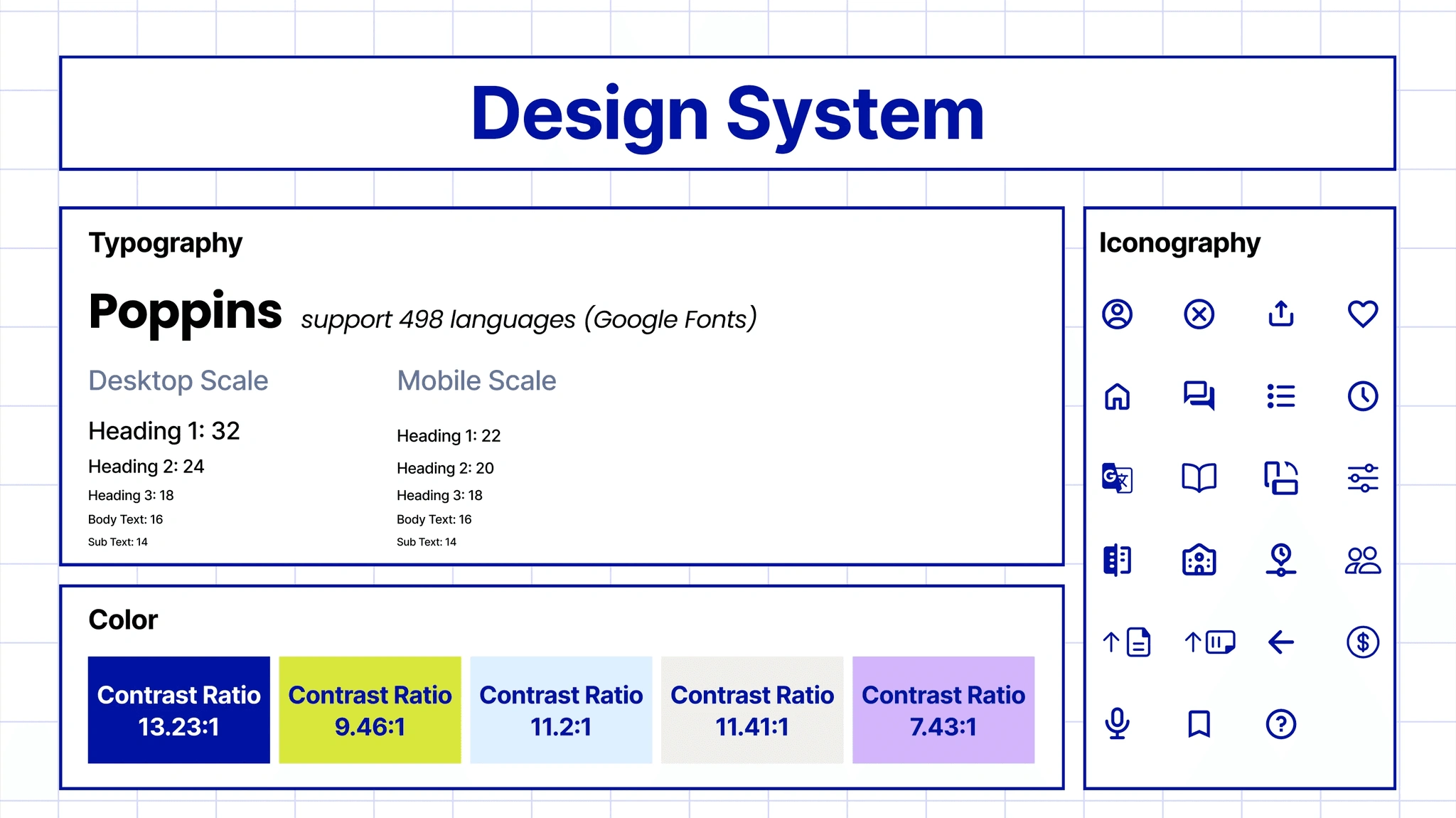
Design System and Accessibility Approach
Accessibility shaped both the interface and the content.
We referenced WCAG standards, Microsoft Inclusive Design, and Apple accessibility guidelines to guide decisions around structure, contrast, navigation, readability, and interaction patterns. For UniGo, accessibility was not only about whether someone could use the interface. It was about whether they could understand the system behind it. That distinction shaped the entire product.
Limitations & Next Steps
UniGo was developed as a school project, so the prototype focuses on defining the problem space, translating research into product requirements, and exploring the first version of the experience. To move it beyond a concept, the next phase would need deeper validation with the people it is designed for.
The next step would be testing the main flow with users, especially college profiles, language settings, AI guidance, comparison tools, and timeline tracking. We would also need to improve data reliability, since tuition, deadlines, majors, and support services change often. A future version would require verified data sources or institutional partnerships to keep information accurate.
Reflections
This project changed how I think about accessibility.
Accessibility is more than interface standards
Contrast, text size, labels, navigation, and layout still matter, but they are only part of the experience.
Accessibility is also emotional
A product can be technically usable and still make people feel excluded if the language is too complex or the structure assumes too much prior knowledge.
Designing for immigrant parents pushed me beyond screens.
I had to think about confidence, cultural context, language, and trust — not just usability.
The biggest lesson
Simplifying information does not mean making it less serious. It means creating a better path into complexity.
Like this project
Posted Jul 8, 2026
UniGo — mobile-first college navigation app for immigrant parents with language support, comparisons, timelines, and an AI chatbot.
Likes
0
Views
7