🚀 Project Spotlight: Upgrading Excel

HENRY JR Cabang


🚀 Project Spotlight: Upgrading Excel to an Executive Web-App UI 📊✨
Most corporate reporting falls into two traps: it is either a dense, unreadable wall of numbers, or a pretty graphic that has to be manually redrawn every single week.
I built this CL FY'2026 Market Performance Tracker to prove that you can achieve automated, heavy-duty backend engineering AND an immersive, software-like user experience entirely within native systems.
Here is the exact 3-tier workflow behind this build:
⚙️ Tier 1: The Automated Pipeline (Power Query)
No manual data entry. No copy-pasting. Raw transactional data is fed directly into Power Query, which acts as the automated data-cleaning engine. With a single click, the query automatically shapes, cleans, and runs ETL processes on thousands of rolling rows, refreshing the dashboard in seconds.
📊 Tier 2: The Core Logic Matrix (Dynamic Pivot Table & 3D Chart)
• The Grid: The transformed data consolidates seamlessly into a multi-period Pivot Table, mapping 15 distinct regional markets across an active 12-month calendar. It handles everything effortlessly, highlighting Market 5 as our heavy hitter with 2,936,685 in total volume.
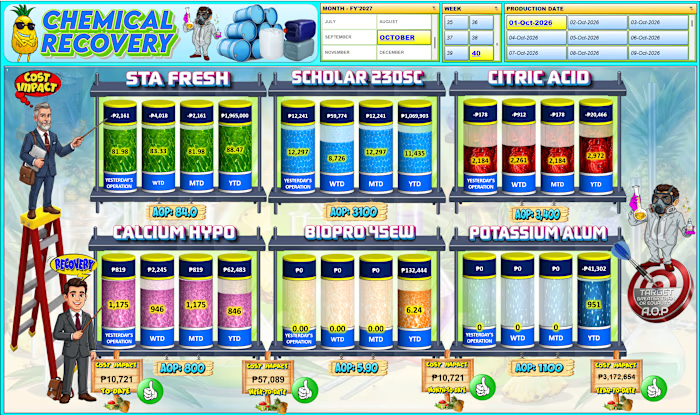
• The Volumetric Display: The lower chart panel isn't a stagnant graphic—it is a live, native 3D Pivot Chart configured into cylinder metrics. As new numbers hit the backend table, the liquid fill-levels automatically rise or drop in real time to show progress against a 6,299,300 Grand Total.
🎨 Tier 3: The Premium UI Skin (Photopea Enhancement)
To lift the dashboard completely out of the standard "spreadsheet look," I engineered a high-fidelity background framework inside Photopea. Dropping the functional, live Excel components into this polished visual skin provides an immersive app environment, clean visual hierarchy, and polished title framing without compromising a single cell of live functionality.
The Takeaway: Spreadsheets don't have to be boring to be powerful. By treating data architecture like a product, you give clients and executive teams instant clarity at a single glance.
🛠️ Built with: Microsoft Excel (Power Query, Pivot Tables, 3D Charting) & Photopea (UI Layout Design).
Like this project
Posted Oct 6, 2026
🚀 Project Spotlight: Upgrading Excel to an Executive Web-App UI 📊✨ Most corporate reporting falls into two traps: it is either a dense, unreadable wall of ...
Likes
0
Views
2