Google Meet Auto Join Pro Extension Development

Abdullah Al Naiem

Google Meet Auto Join Pro
A browser extension for joining conference / class / meeting automatically
🌐 Browser Specs
Chrome Required Version v100.0 or higher 🟠 Due to upgrading the latest manifest version, this extension isn't available for other browsers except for Chrome.
Features
1 Create a new slot / Make a schedule for auto-join to Google Meet.

2 Save the slot/meet schedule with Title and short description.

3 Customize icon and color for every slot for a better look in every slot.

4 Set date, and time for joining.

5 Set “From Date” and “To Repeat Date” if you want to join automatically every day at a certain time.

6 Join to scheduled meet date-wise or join continuously weekly/day basis.

7 Automatically join from individual or multiple Google accounts at the same time.

8 Get notified when a tab is created to join the meet automatically.

9 Control camera and microphone on the automatically joining moment.

10 Control joining preference e.g. [Present Now] or [Companion Mode] (If needed).

11 Leave / End call at a specific / scheduled time.

12 Set meeting duration and left from the meeting automatically.

13 Leave / End call if the meeting has below a certain number of participants.

14 Access additional features like “Auto accept participant requests” (For the meet host only).

15 The meet host can access automatically join, and accept participant requests at the same time.

16 The meet host can also just use the ‘Accept participant requests’ feature only.

17 Automatically retry/refresh if internet connection makes occurs on the joining moment. You can set minutes a minimum of 6 and up to 15 minutes to automatically retry/refresh.

18 Re-join request options are available if ‘Join request is Denied’ or ‘No respond to the join request’.

19 You can set different times for sending up to 5 messages after joining automatically.

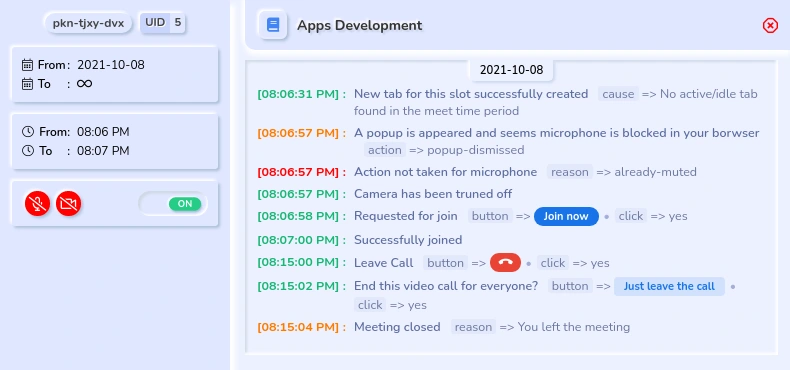
20 View every action log on the options page with warning, success, failure status, and more details.

21 Turn on/off controls later on in the `Options` page view slot section.

22 Generate Javascript code as an alternative to creating a new slot. Use this option anytime or in case creating a new slot option does not work.

23 Get log report to the browser console to see what action was completed, when started, who joined, the meeting closed, and many other logs.
24 Generate code option is also available for participants and meet host both.
⬇️ Installation and access
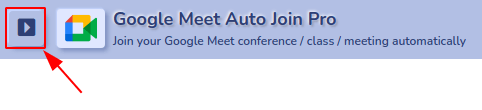
Click on the
Add to Chrome (or your preffered browser) link from the above table. After installing the addon you can pin it to your borwser in order to access and save preferences instantly.Then click on the

>

icon from the borwser toolbar or right click on the

3 dots icon that associated with

> click
options to access the options page and other features.⚙️ Settings
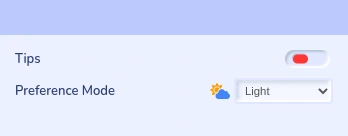
Hide Tips: On the slot form, you can see the tips with an

icon above of the every field when mouse is hovered. You can enable and disable the tips feature from this setting.
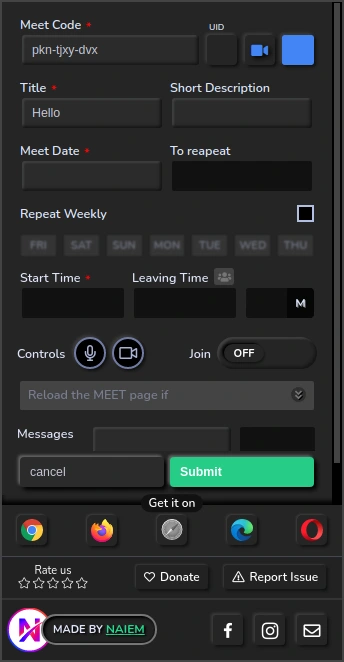
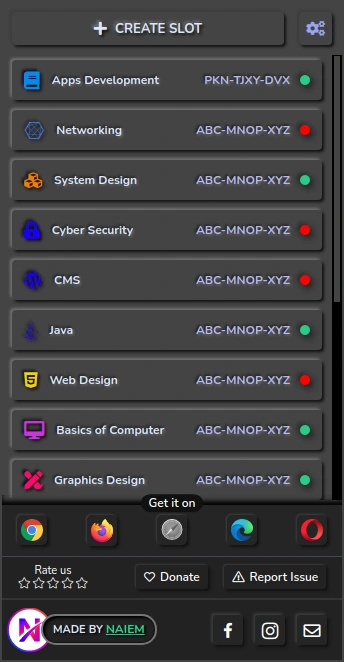
Preference Mode: From the options page click on the arrow icon from the top left corener. From this option you can change display preference Light, Dark, or System Auto
➕ Create a new slot
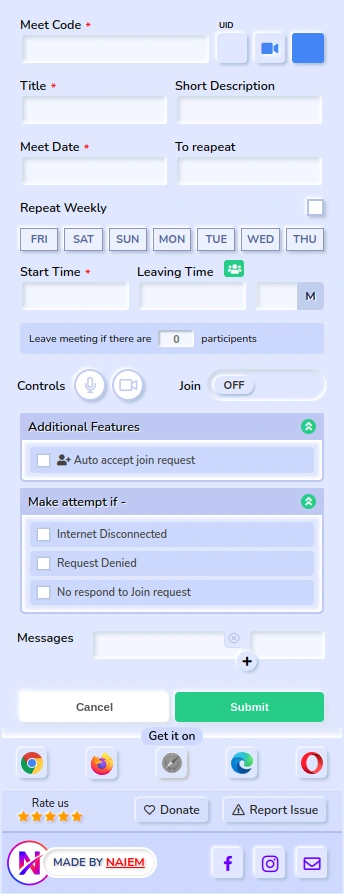
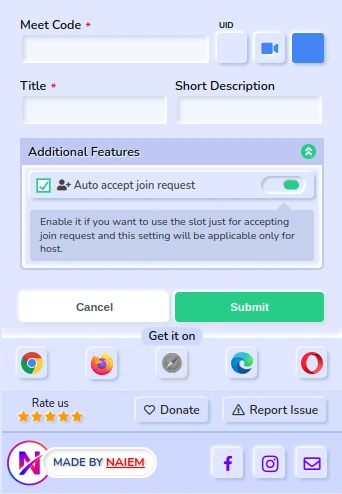
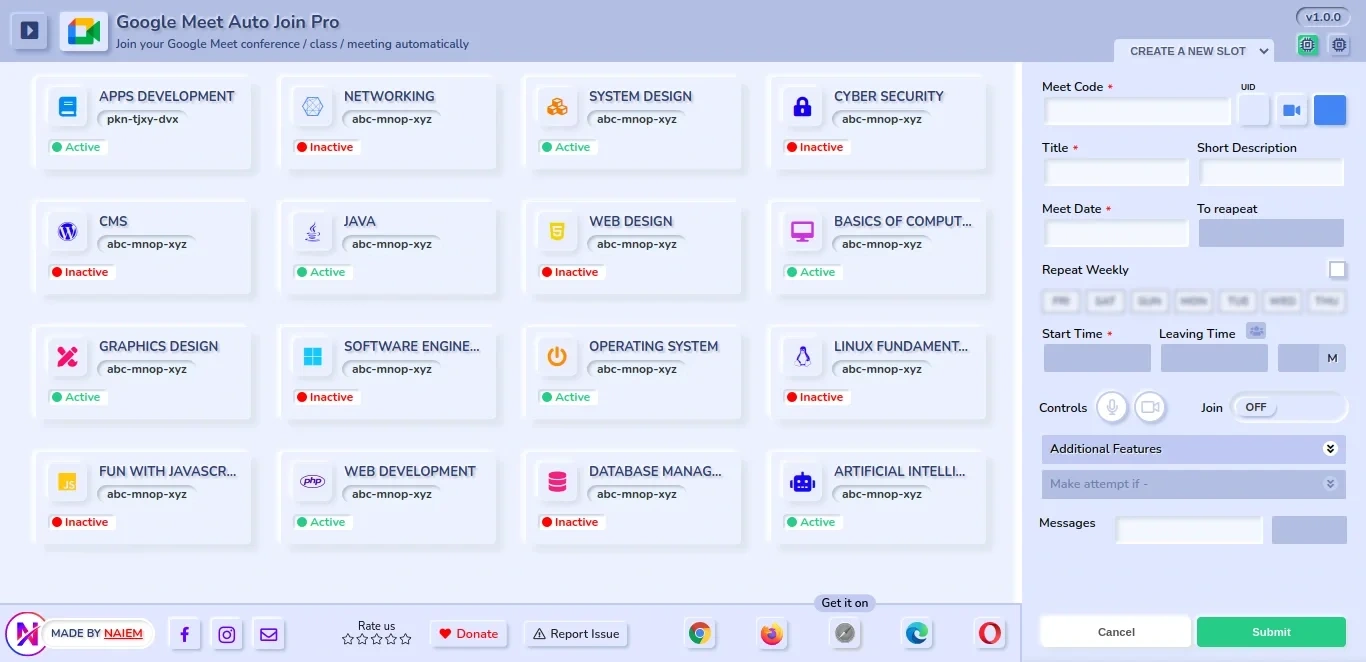
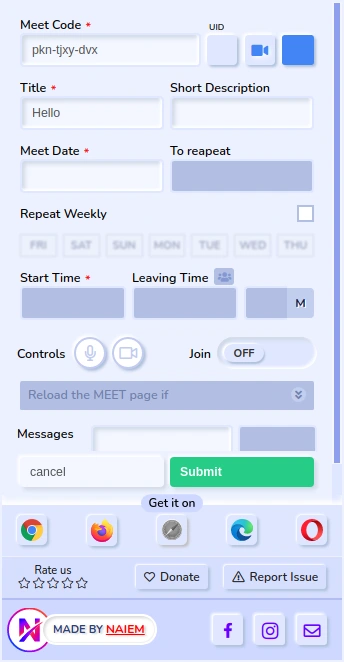
Meet Code*: Enter your Google Meet Code.
UID: If you have logged into multiple Google account. Then you can select your target Google Account to join your Google Meet. Normally the default user UID is zero (0). Here's the example of UID
Icon: Select a relevant icon according to your meet to identify the slot.
Color: Select your preferred icon color for the slot.
Title*: Enter your Google Meet class / conference or meeting name as title.
Short Description: Enter a description for your Google Meet slot. It's not necessary.
Meet Date*: Enter the meeting date that you want to join
Repeat Date Enter the repeat date. Automatic join will be continue to till this date everyday.
Repeat Weekly: Check it from the right side, if you want to repeat automatic join weekly or based on the day(s). [Note: If you enable this option, the date option will be disabled]
Start Time*: Select your meeting time
Leaving Time*: Select the leaving time, if you wish to leave automatically in your preffered time. Or you can enter the leaving time difference value (as minutes) manually that labeled with "M".
You can also set leaving time/moment from

if meeting has certain number of recipients.
[Note: If your joined meet manually closed by you or the host, then automatic leave won't take any action.]
Controls:


Turn on/off your meeting camera & microphone
Join: The automatic join and execution will be happen if it's enabled or turned ON
Present Now: Enable this if you want to join by clicking "Present" button
Companion Mode: Enable this if you want to join as companion mode
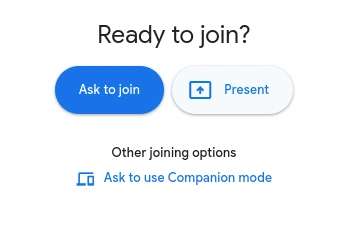
Additional Features :

Auto accept join request: Enable this option if you want to accept join request automatically.

Accept join request only: Turn on this option if you want to create this slot for just only for accepting participant requests but not for the automatically join yourself.
Note: This fetaure will only work if you joined as a host
Make attempt if -:
Internet Disconnected: Enable it if you think your internet connection may lost on the joining time.
The default try will be happened on the selected time or one minute. By enabling this option it will try to next 5 minutes of joining time if internet connection is disabled.
If you enter a value more than 5 minutes then it will try to next entered minutes (value).

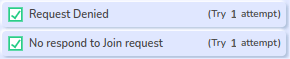
No respond / Denied to the Join request: If the extension try it self to join and if no respond or denied to the join request. You can make one more attempt by enabling this option.
Messages To send message in your joined meeting, you can add message text and sending time from here.
💻 Generate Code
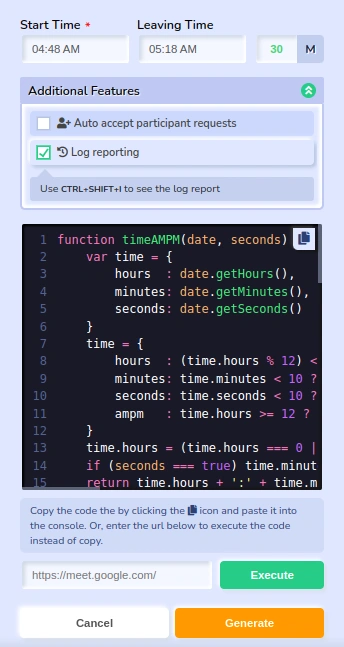
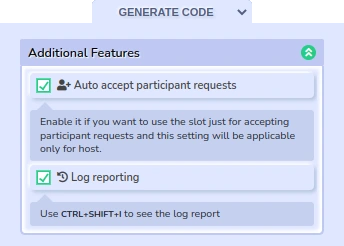
Generate code is an option where you don't need to create a new slot to automatically join or participant requests. This is a limited feature if the main form doesn't work properly or if you don't wish to create a new slot.
To do that follow the below steps:-
Go to
options page. Select the Generate Code option above of the create a new slot form.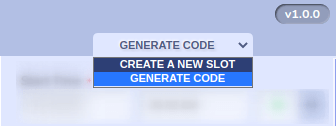
To join the call
Enter the time to join
Enter the time to leave the call (not required)
To accept the participant requests
Enable the
Auto accept particiapnt requests option from the Additional feature tab
You can enable the
Log reporting option to see the update while the generated code were executed.

Execute code
Once you're done with selecting necessary options, click on the
Generate Code button.
[Note: before executing the code make sure the meet page is loaded propery and there's no popup]You will see the generated code. You can execute these codes by entering URL then click on the
Execute buttonOr, you can execute the manually. First click on the copy icon

then go to your Google meet page and press
CTRL+SHIFT+I or mouse right click and select inspect / inspect element. Go to console tab as below image and paste the code then hit Enter
See result
To see the result, go to you Google meet page and press
CTRL+SHIFT+I or mouse right click and select inspect / inspect element. (as above instruction)Go to
Console tab and click on the 'Info' from the left sidebar panel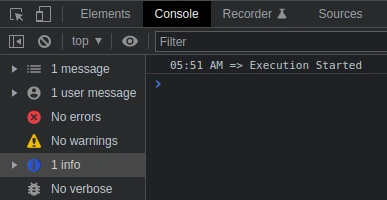
✏️ Edit Slot
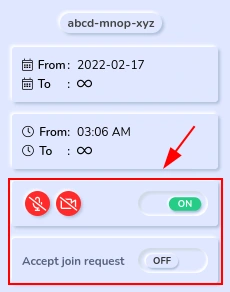
Only controls can be edit for a submitted slot. Click on a submitted slot. The edit option will be available on the left sidebar of Logs panel.
🖼️ Demo(s)
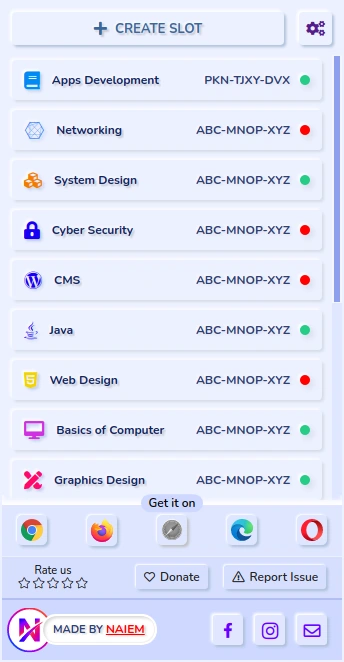
Preference (Light) Preference (Dark) Options Page
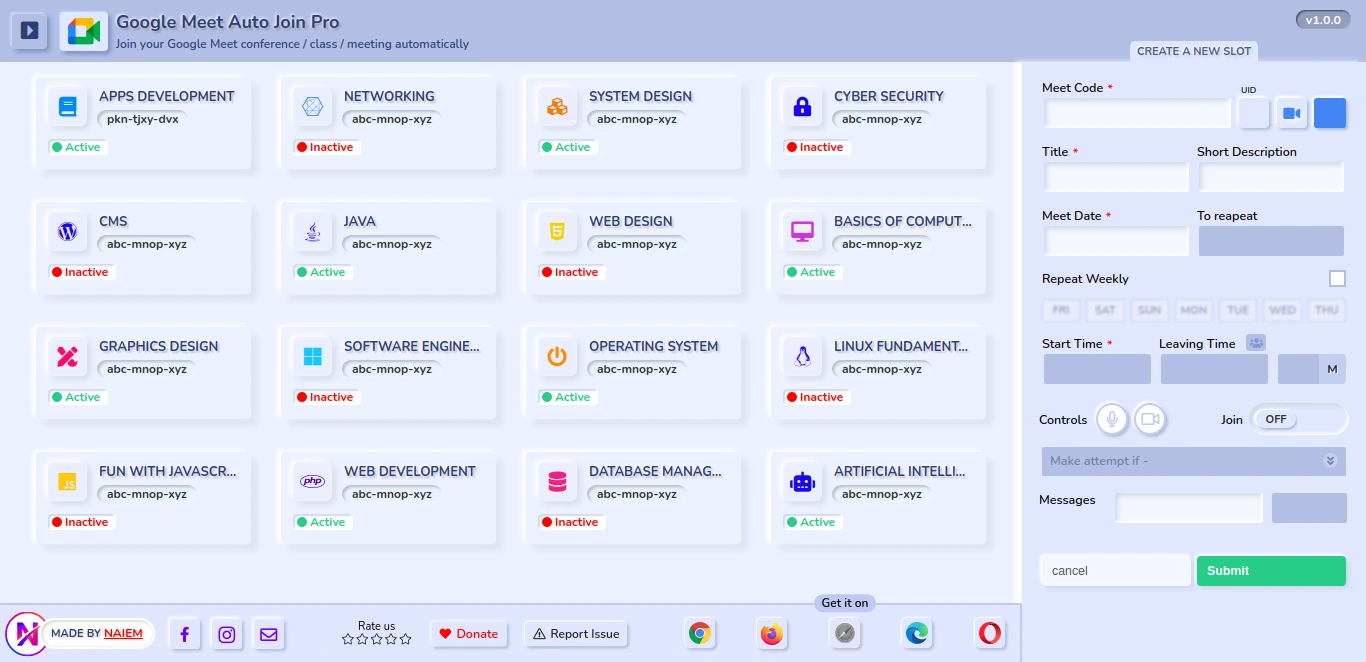
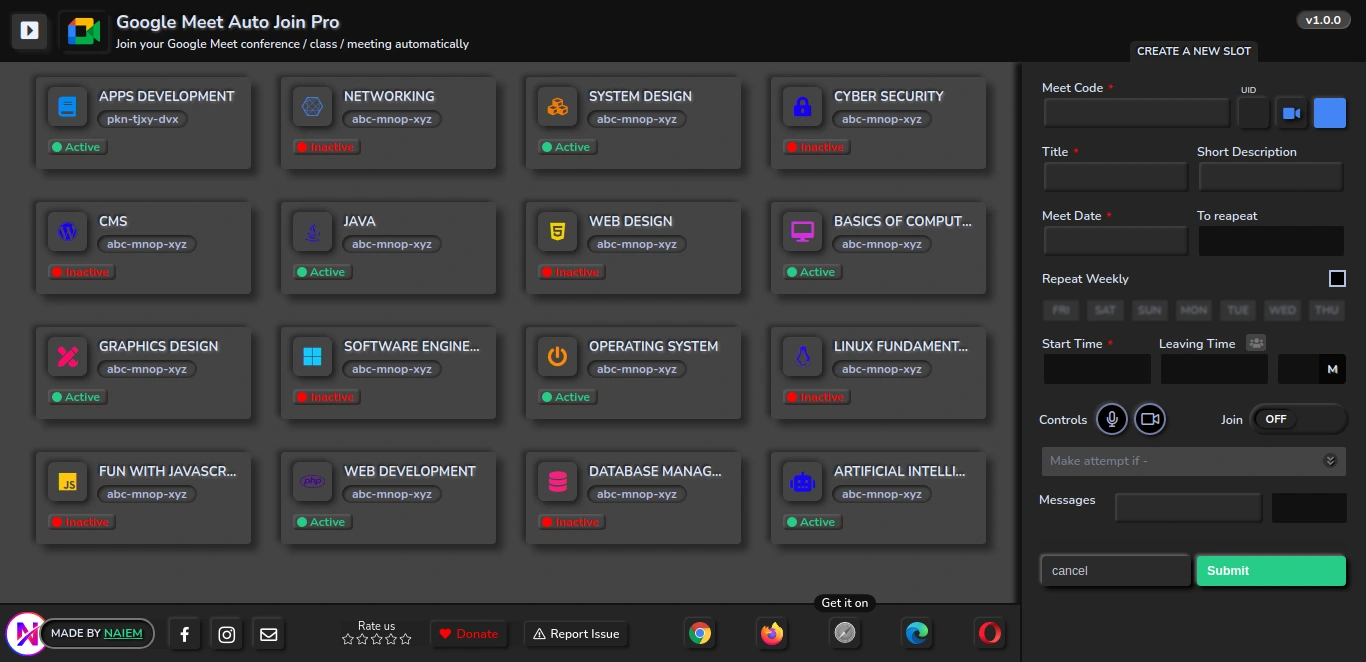
View activy log
(This option track the activites what this extension did automatically and this data stores for 2 days.)
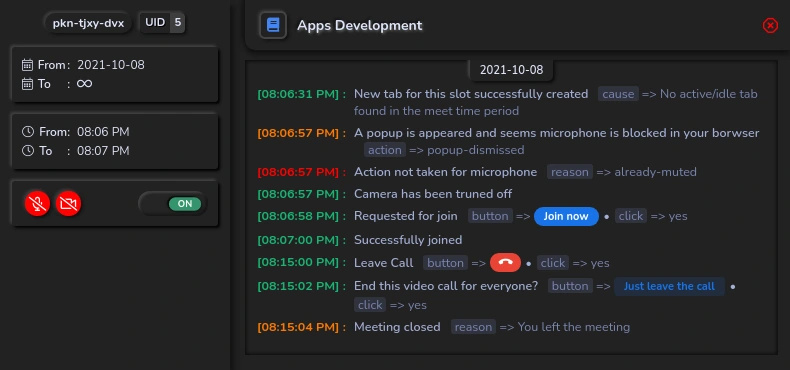
Create a new slot Slot List (Popup view)
📝 Important Notes
Browser must be opened on for that time when automatically join will happen.
Don't update the extension while it's being executed to any Google Meet page.
Don't make multiple slot for the same time with the same input
Don't execute code multiple times untill the call is ended.
To re-execute code in a same tab make the tab is reloaded completely and all popup is closed.
Genrate Code option execution can't control to turn off/on microphone or camera, so make sure you've done your controls preference before execute the code.
Automatically accept participant request will work only if you're joined as a host in the call.
Keep active/ideal the window and tab. Don't minimize the Google meet tab, execution can be interrupted in that case.
🔒 Privacy
This exentension doesn't collect or send any personal information, credentials or any sensetive information. So you can use this addon safely. It will store only the actions that were executed while automatically join action failed or succeeded, you can view these updates in the options page log section.
✉️ Contact
E-mail: mail@naiem.info (for any inquiries)
🗓️ Change log
v1.0.1 : April 15, 2022
Fixed camera/microphone blocked popup auto-closing issue
Compatible with updated Google Meet
Fixed major issues
v1.0.0 : February 18, 2022
Added 2 more joining options
Present and Companion ModeAutomatically make a new attempts if
No one responded or Denied to the join requestAdded
Addiational Features section to Accept participant requests automaticallyAdded
Generate Code option to use instead of creating a new slot.UID issue solved
Informative log panel
Design improved
Service worker (inactive), fixed
Other errors and bugs fixed
v0.0.1 : September 22, 2021
Initial release
Like this project
Posted Jun 12, 2025
Developed a Chrome extension for automatic Google Meet joining.
Likes
0
Views
12