Built with Webflow
Klever | Webflow Design & Development

Abigail Garcia


PORTFOLIO CASE STUDY: Klever
Global Talent Hiring Platform
Webflow Design & Development | CMS-Driven Talent Profiles | Custom JS Audio Carousel | Multi-Page Marketing Site
Client: Klever (global talent hiring platform)
Role: Full design & Webflow development
Platform: Webflow (CMS-driven)
Live URL: useklever.com
Industry: HR Tech / Staffing / Marketplace
Overview
Klever is an AI-powered global talent hiring platform that connects companies with pre-vetted remote workers from the Philippines, South Africa, and other countries. The platform promises to help businesses save up to 80% on payroll by providing access to vetted virtual assistants, sales reps, bookkeepers, developers, marketers, and more — with hires delivered in days rather than months.
I designed and developed the entire Klever marketing website in Webflow, including the homepage with its interactive talent carousel, the About page with the founder’s story and company values, CMS-powered featured talent profile pages, a talent application form, and supporting pages like the affiliate program and legal pages.
The site’s primary conversion goals are twofold: attracting companies looking to hire remote talent (“Find Talent” flow) and attracting talent who want to join the Klever network (“Apply as Talent” flow). Every design decision — from the homepage carousel showcasing real profiles to the step-by-step hiring process section — was made to build trust and drive action from both audiences.
1. Site Structure & Page Design
A breakdown of every major page and section I designed and built.
Homepage
The homepage is a long-form conversion page designed to take visitors from awareness to action. It targets two audiences: companies looking to hire and talent looking to apply. Key sections include:
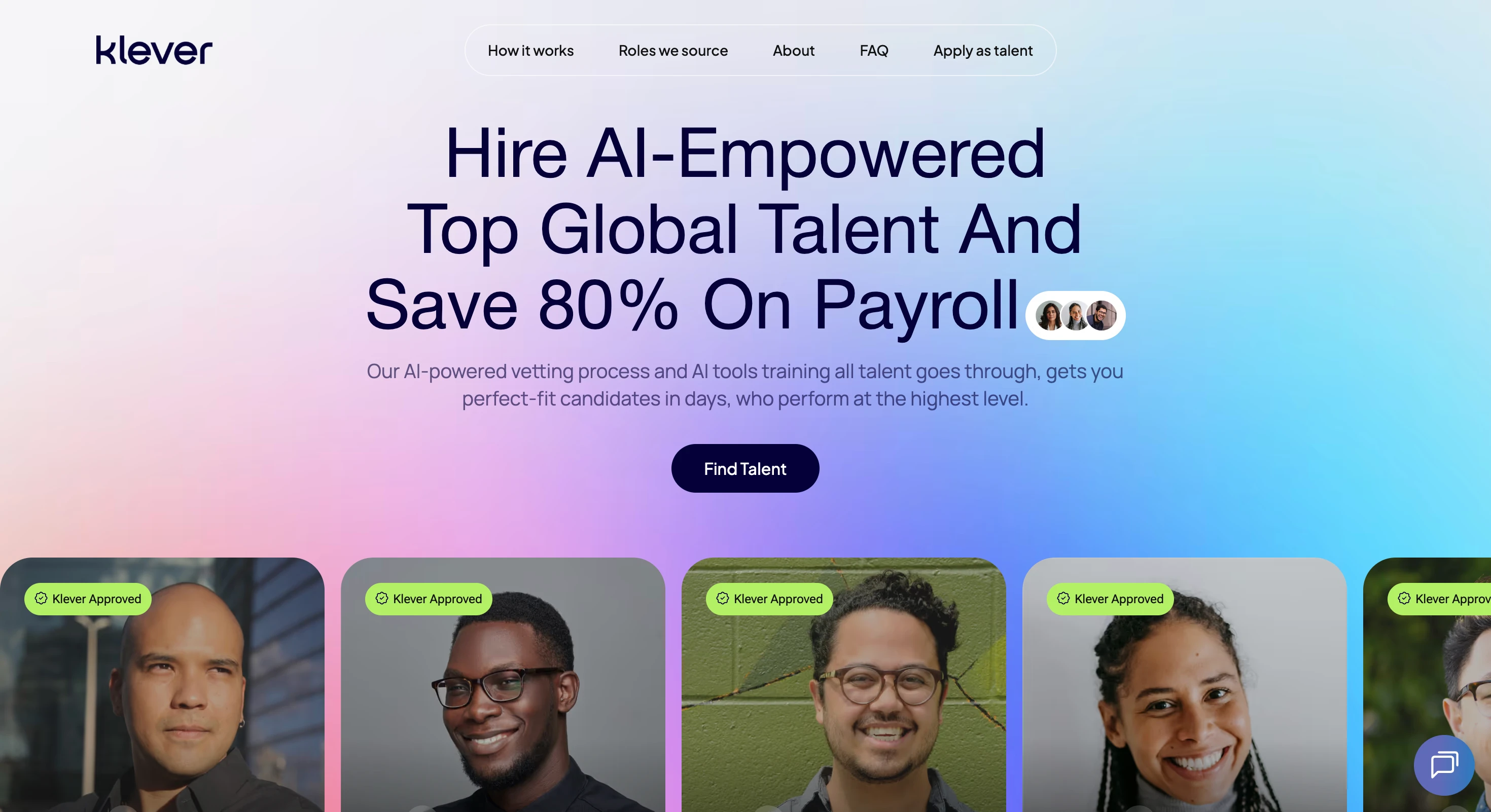
Hero section with headline (“Hire AI-Empowered Top Global Talent and save 80% on payroll”), a primary “Find Talent” CTA, and an interactive talent card carousel that cycles through 11 featured talent profiles showing their name, role, top skills (as tags), and country.
Client logo marquee — an auto-scrolling infinite marquee displaying 5+ company logos as social proof, duplicated for seamless looping.
“Hire better talent. Faster. For less.” section — three value proposition cards with numbered illustrations. On desktop these use a stacked layout with image + description pairs; on mobile they switch to a simpler swipeable carousel (1/3 indicator) with each card showing the illustration and description vertically.
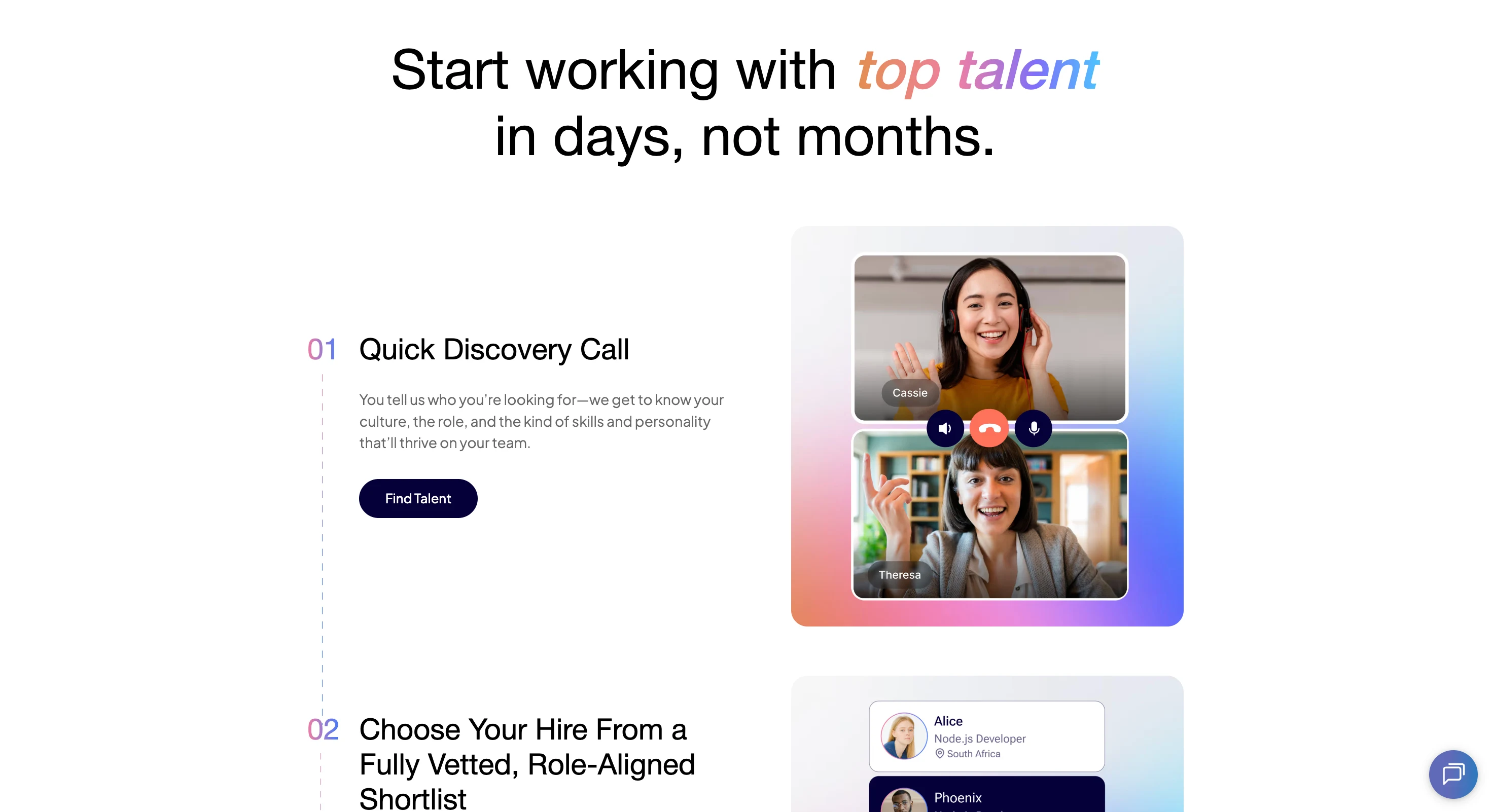
3-step hiring process section — numbered steps (Quick Discovery Call → Choose from Vetted Shortlist → Start Working Together) with a description for each step, a “Find Talent” CTA per step, and an accompanying illustration/image that changes per step.
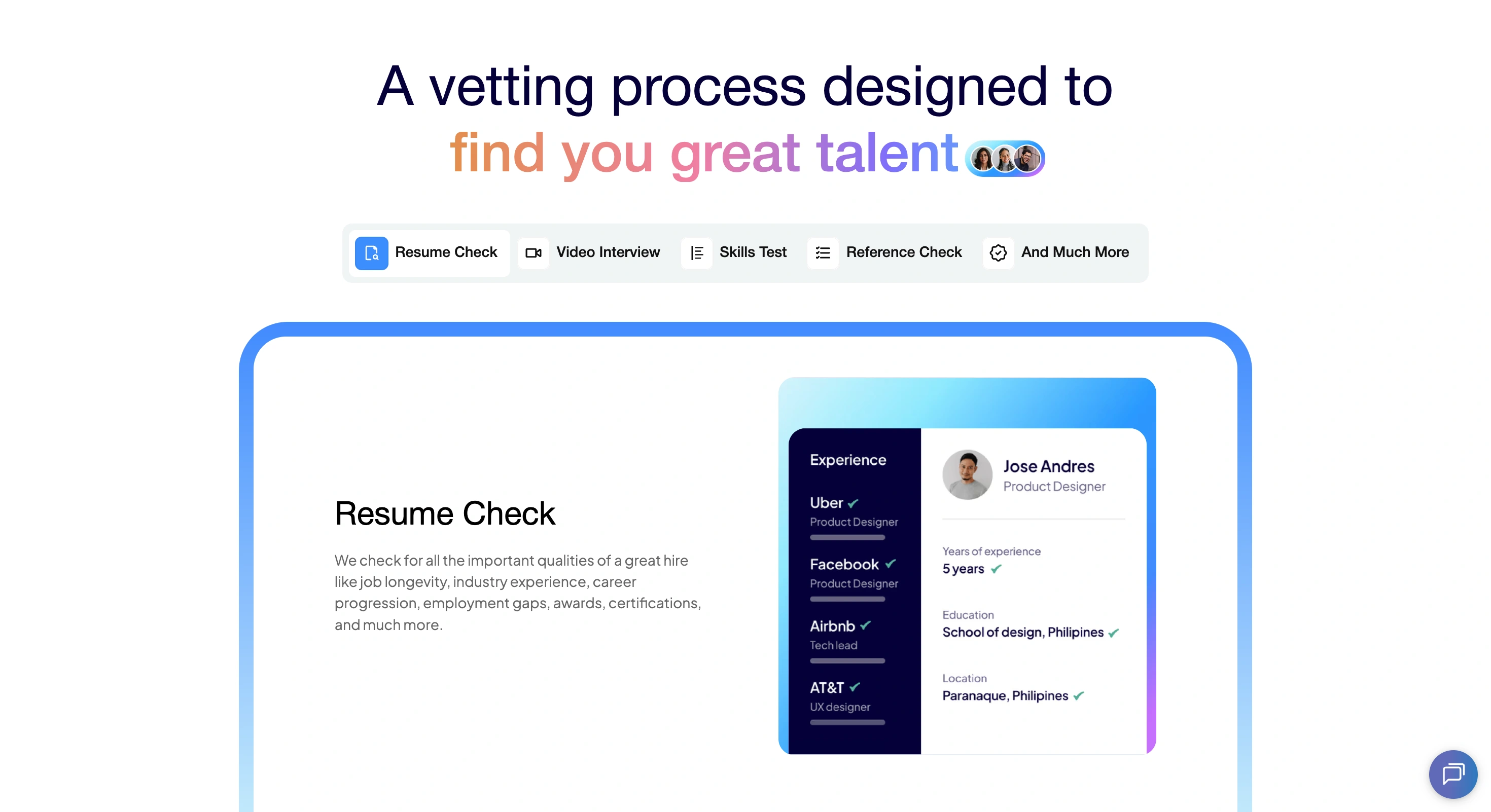
Vetting process section — a visual breakdown of Klever’s AI-powered vetting steps (Resume Check, Video Interview, Skills Test, Reference Check, And Much More). On desktop this is presented as a graphic with expandable cards; on mobile it uses a tabbed interface where tapping a tab reveals the description and illustration for that step.
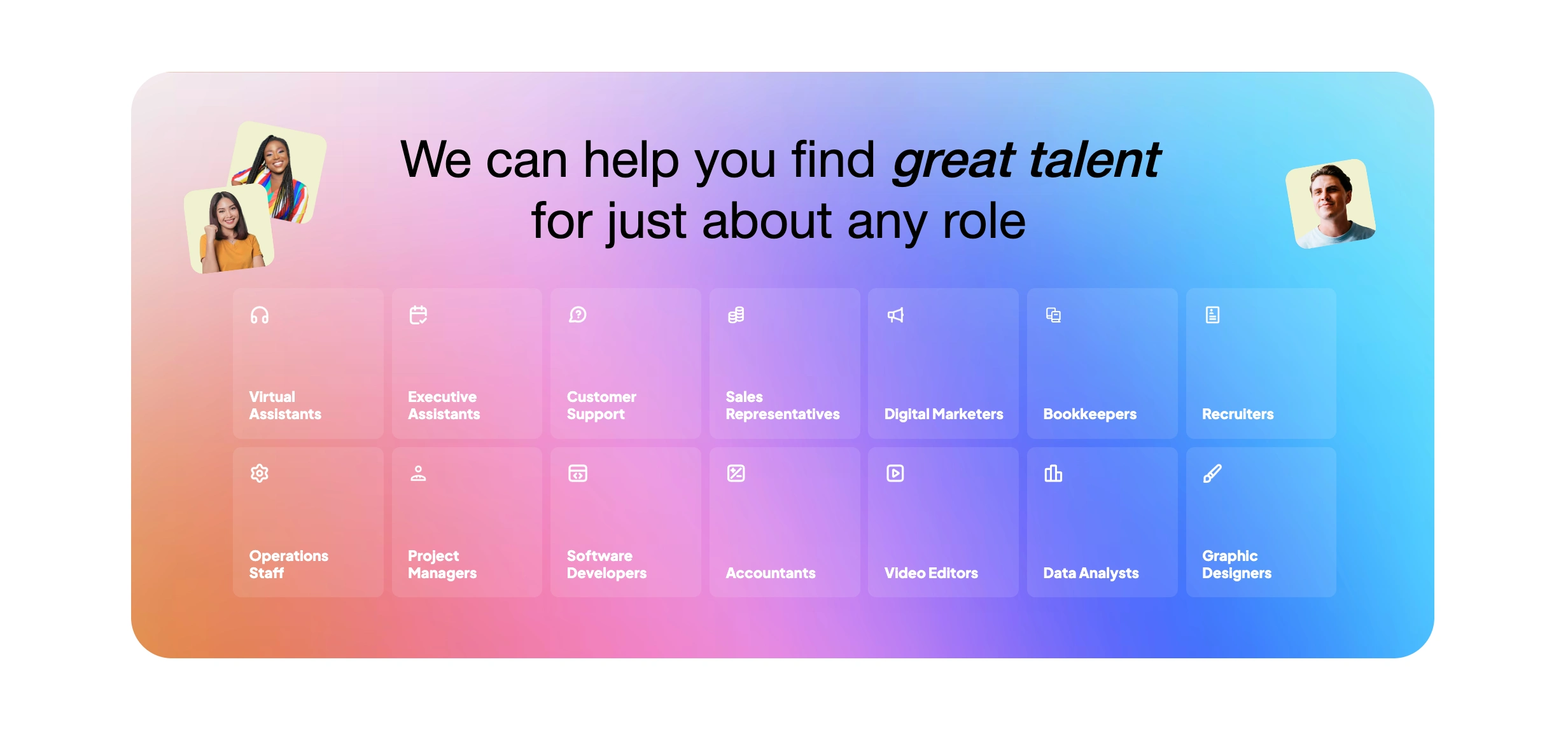
Roles grid — a grid of 14 role cards (Virtual Assistants, Executive Assistants, Customer Support, Sales Representatives, Digital Marketers, Bookkeepers, Recruiters, Operations Staff, Project Managers, Software Developers, Accountants, Video Editors, Data Analysts, Graphic Designers), each with an icon and role title.
FAQ accordion — five expandable questions covering what makes Klever talent different, where talent is sourced from, contract terms, minimum hours (20hrs/week), and how billing/payments work.
Bottom CTA section — a high-impact closing section with the message “You could have hired your dream employee by now” and a final “Find Top Talent Now” button.
About Page
The About page tells the Klever origin story and establishes trust through transparency. Key sections include:
Founder story — a long-form narrative from Nat (Klever’s founder) explaining how the company was born from repeatedly being asked “Can you find me someone too?” by other entrepreneurs, with a photo of the founder.
Mission section — with accompanying illustration, explaining Klever’s goal to help the world work better together.
Vision section — describing a world where every business builds globally distributed teams.
Values grid — five value cards (Opportunity, Simplicity, Quality, Speed, Partnership), each with an icon and short description.
Talent showcase + CTA — the page closes with a grid of featured talent cards (same CMS-driven profiles as the homepage) and a “Find Talent” call to action.
Featured Talent Profiles (CMS)
Each featured talent member has their own CMS-generated profile page (e.g., /featured/thomas, /featured/eric). These are minimal, focused pages showing the talent member’s name, role title, skill tags (up to 3), country, and a “Klever Approved” badge. The profiles serve as landing pages linked from the homepage carousel and the About page talent grid, giving potential clients a quick sense of who they could be hiring.
Talent Application Form
A dedicated application page (/talent-application-forms) for prospective talent to apply to join the Klever network. This page serves the supply side of the marketplace, collecting candidate information for the vetting pipeline. It’s linked from the top navigation across the entire site.
Supporting Pages
Affiliate page — promoting Klever’s referral program offering 50% lifetime commission for referred paid memberships.
Privacy Policy & Terms of Service — standard legal pages under /companies/.
Footer — consistent across the site with links to Find Talent, How it Works, Apply as Talent, FAQ, About, Support, Privacy Policy, and Terms of Service.
2. CMS Architecture
How the Webflow CMS is structured to power the talent marketplace.
CMS Collections
Featured Talent
The primary collection powering the homepage carousel, About page talent grid, and individual profile pages. Fields include: name, slug, role title, photo, skill tag 1/2/3, country, Klever Approved badge (boolean), and an audio file field for the carousel audio feature.
Skills
A reference collection for skill tags (e.g., “Appt. Setting”, “Google Ads”, “Customer Support”). Referenced by Featured Talent profiles and used to generate skill tag links (e.g., /skills/technical-support).
FAQ
Stores the five homepage FAQ items with question and answer fields, powering the accordion component.
Roles
The 14 role types displayed in the “Roles we source” grid (Virtual Assistants, Executive Assistants, etc.), each with an icon and title.
Design Decisions
Audio stored in CMS: Each Featured Talent item includes an audio file field. This was necessary because the homepage carousel needed to play a short audio clip associated with each talent card, and storing the audio in the CMS meant Klever’s team could update or swap audio files without touching the site’s code.
Skill tags as a separate collection: Rather than hardcoding skill labels, skills are their own collection so they can be reused across multiple talent profiles and potentially linked to dedicated skill pages (/skills/[slug]).
Dual-audience CMS structure: The CMS serves both the company-facing side (showcasing talent to potential clients) and the talent-facing side (the application flow). The Featured Talent collection is the bridge — it populates marketing content while also serving as aspirational proof for talent applicants.
3. Key Challenges & Decisions
Technical and design challenges I solved during the build.
Challenge 1: Connecting CMS Audio to the Homepage Carousel
The Problem
The hero section’s talent carousel needed to play a short audio clip for each featured talent card as it became active. Webflow’s native carousel (slider) component has no built-in audio support, and there’s no native way to trigger audio playback based on which slide is currently visible. The audio files were stored in the CMS alongside each talent profile, but Webflow provides no out-of-the-box method to read a CMS file URL and play it in sync with a slider.
The Solution
I wrote custom JavaScript that bridges the Webflow CMS and the slider component. The script reads the audio file URL from a data attribute on each CMS-generated slide element, creates an HTML5 Audio object, and manages playback in sync with the carousel’s active slide state. When a new slide becomes active (via Webflow’s slider change event or a MutationObserver watching for class changes), the script pauses any currently playing audio and starts the new slide’s audio clip.
Trade-offs
Custom JS adds a maintenance consideration — if Klever’s team changes the slider structure in the Webflow Designer, the script may need to be updated to match new class names or DOM structure.
Browser autoplay policies can block audio on first visit if the user hasn’t interacted with the page yet, so the audio may not play automatically until the user clicks or taps somewhere on the page.
Storing audio in the CMS keeps things easy for Klever’s team to manage (just upload a new file), but adds to page weight since the browser may preload audio assets.
Challenge 2: Designing for Two Audiences on One Site
The Problem
Klever serves two distinct audiences: companies looking to hire remote talent and professionals looking to join the Klever talent network. Both audiences land on the same website, but they have very different needs, motivations, and actions to take. The navigation, page structure, and CTAs all needed to serve both groups without creating confusion or a cluttered experience.
The Solution
I designed the site with a clear primary/secondary hierarchy. The homepage and main content are oriented toward companies (the demand side), since that’s the revenue-generating audience. The “Apply as Talent” path is accessible through a persistent navigation link but doesn’t compete with the primary “Find Talent” flow. The featured talent profiles serve both audiences simultaneously — they’re social proof for companies and aspirational examples for applicants.
Trade-offs
The talent-facing experience is intentionally lighter than the company-facing side — this keeps the site focused but means talent applicants get less dedicated content.
The same talent cards appear on both the homepage and About page, which creates consistency but means visitors who browse both pages see repeated content.
Challenge 3: Responsive Layouts for Complex Sections
The Problem
Several homepage sections use complex multi-element layouts on desktop — the value proposition section has side-by-side image/text pairs with numbered illustrations, the vetting process section uses an expandable card layout with a central graphic, and the 3-step process has alternating image positions. These layouts needed to work equally well on mobile without losing their impact or becoming confusing.
The Solution
I built separate layout variants for desktop and mobile rather than trying to force a single layout to adapt. The value proposition section switches from a stacked desktop layout to a mobile carousel with a slide indicator (1/3). The vetting process section transforms from expandable cards around a central graphic to a tabbed interface on mobile. This approach means maintaining two versions of some sections in Webflow, but it ensures each breakpoint gets an optimised experience.
Trade-offs
Duplicate content blocks for desktop and mobile increase the complexity of the Webflow project — any content update needs to be made in both the desktop and mobile versions of a section.
The mobile carousel approach for the value props adds a swipe interaction that isn’t present on desktop, creating slightly different user experiences across devices.
Challenge 4: CMS-Driven Talent Card Carousel with Infinite Loop
The Problem
The hero section needed an auto-advancing carousel of talent profile cards that loops infinitely, pulls data from the CMS, and shows each person’s name, role, skills, country, and Klever Approved badge. Webflow’s native slider has limited CMS integration and achieving a smooth infinite loop with CMS content requires workarounds.
The Solution
The carousel is built using a CMS collection list inside Webflow’s slider component. To create the appearance of an infinite loop, the collection list is duplicated so the cards repeat. The slider is set to auto-advance with a timed interval. Each card is styled as a profile card with the talent member’s CMS data rendered via dynamic fields — name, role title, three skill tags, country, and the Klever Approved badge. The audio integration (Challenge 1) layers on top of this same carousel.
Trade-offs
Duplicating the collection list for infinite looping means the DOM has twice as many card elements, which could affect performance if the talent roster grows significantly.
The carousel’s auto-advance timing needs to account for the audio clip duration to avoid cutting off playback mid-clip.
4. Design Approach
Visual and UX decisions that shape the Klever brand.
Dark/light contrast: The site uses a predominantly white and light background with dark navy/black text for readability, accented with purple gradients and teal/green tones for CTAs and highlights. This creates a modern, professional SaaS aesthetic that builds trust.
Card-based talent profiles: Every talent profile is presented as a consistent card component with photo, name, role, skill tags, country, and badge. This modular design scales easily as new talent is added to the CMS and creates visual consistency across the homepage, About page, and individual profile pages.
Illustration-heavy storytelling: Custom illustrations are used throughout — the value proposition section, the 3-step process, the vetting process, and the About page — creating a friendly, approachable feel that counterbalances the transactional nature of a hiring platform.
Trust signals everywhere: The “Klever Approved” badge appears on every talent card, the vetting process is given a full homepage section, and the FAQ directly addresses common concerns (contracts, payments, sourcing). The design prioritises building trust at every scroll depth.
Dual navigation paths: The navbar cleanly separates the two audiences with anchor links for companies (How it works, Roles we source, FAQ) and a distinct “Apply as Talent” link for candidates, using visual hierarchy to prioritise the company flow without hiding the talent path.
Mobile-first interaction patterns: Swipeable carousels, tabbed interfaces, and accordion FAQs ensure the mobile experience feels native and tap-friendly rather than being a shrunk-down desktop layout.
5. Scale of the Build
Total pages designed & built: 5+ static pages + CMS template pages
CMS collections: 4+ (Featured Talent, Skills, FAQ, Roles)
Featured talent profiles (CMS): 11+ individual profile pages
Role categories displayed: 14
FAQ items: 5
Homepage sections: 8+ distinct sections
Custom JavaScript: Audio-to-carousel CMS integration
Responsive breakpoints: Desktop + tablet + mobile (with separate layouts)
Audience flows: 2 (companies + talent applicants)
Navigation links: 7 (How it works, Roles, About, FAQ, Apply, Find Talent, Support)
Summary
The Klever website demonstrates the ability to design and build a complete B2B marketplace marketing site in Webflow, combining CMS architecture, custom JavaScript, responsive design, and conversion-focused page structure. Key accomplishments:
Built a CMS-driven talent carousel with custom JS audio integration — bridging Webflow’s CMS with an HTML5 Audio API to play profile-specific audio clips in sync with the homepage slider, a feature with no native Webflow support.
Designed for two audiences on one site — created a clear primary/secondary flow that serves companies (demand) and talent applicants (supply) without either audience getting lost or confused.
Built complex responsive layouts with separate mobile components — including a desktop-to-carousel value prop section, a desktop-to-tabs vetting process, and an infinite-looping talent card slider.
Structured a scalable CMS for a growing talent marketplace — with interconnected collections (Talent, Skills, Roles, FAQ) that Klever’s team can update independently without touching the site’s design or code.
Full design and development from scratch — every page, component, interaction, and CMS structure was designed and implemented as a cohesive system, resulting in a polished, conversion-focused marketing site for a growing HR tech startup.
Like this project
Posted Feb 8, 2024
The goal for Klever's website is to establish it as the leading online platform for connecting clients.