Development of OXXO Retail Mobile App

Devowise Studios


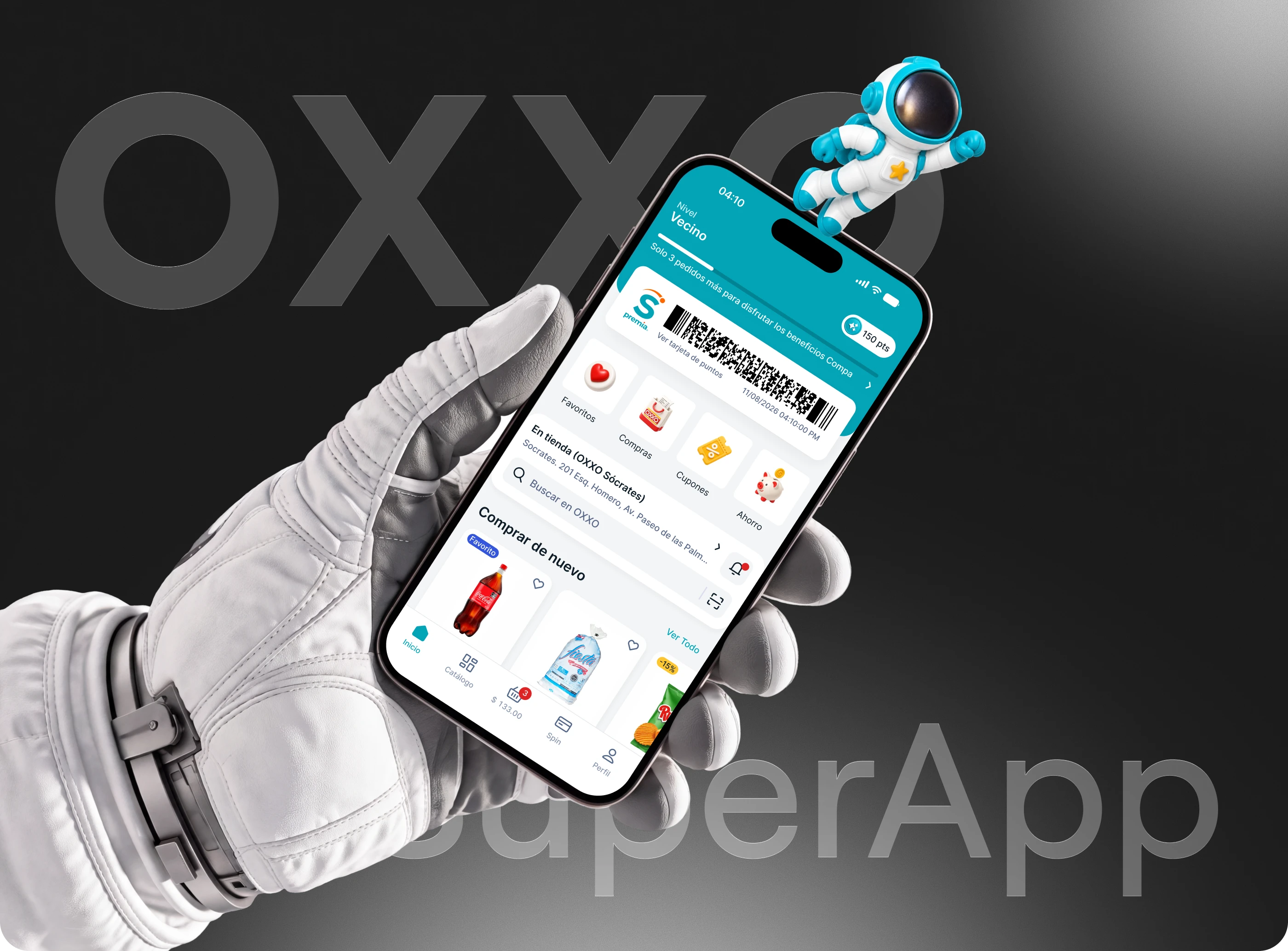
OXXO Retail App
Project Overview
A mobile retail application focused on making product discovery, shopping, and everyday retail interactions faster and more convenient.
My Role
Full-Stack Developer responsible for translating the product design into a functional mobile application, developing the frontend and backend, connecting APIs, handling application logic, and preparing the product for deployment.
How We Built It
1. Product & Architecture
We first broke the product into core modules such as authentication, home, categories, products, search, cart, orders, profile, and notifications. The application was structured using reusable components and separate service layers so new features could be added without affecting the rest of the application.
2. Mobile Frontend
The mobile application was developed with [React Native / Flutter / actual technology], allowing us to maintain a consistent experience across mobile devices.
We converted the UI designs into reusable components for:
Product cards
Navigation
Category sections
Search
Product details
Cart
Checkout
User profile
Forms and interactive states
3. Backend
The backend was built using [Node.js / Laravel / Django / actual technology] and handled the application's core business logic.
It was responsible for:
User accounts
Authentication
Product data
Categories
Cart management
Orders
User profiles
Application permissions
API communication
4. Database
We used [PostgreSQL / MySQL / MongoDB / actual database] to store and manage application data.
The database structure was organized around users, products, categories, carts, orders, and other application entities, with relationships designed to keep the system scalable.
5. API Integration
The mobile frontend communicated with the backend through REST APIs.
API services handled operations such as retrieving products, searching the catalog, updating the cart, submitting orders, and managing user information.
6. Authentication & Security
Authentication was implemented to protect user accounts and application data. User sessions and API requests were handled through [JWT / OAuth / actual method], with protected endpoints for account-specific functionality.
7. Performance
We focused on reducing unnecessary API requests, reusing components, optimizing assets, and keeping product lists and navigation responsive on mobile devices.
8. Testing
The application was tested across different screen sizes and common user flows, including authentication, product browsing, cart updates, and checkout, to identify UI and functional issues before release.
9. Deployment
The backend was prepared for cloud deployment using [AWS / Firebase / Vercel / actual hosting], while the mobile application was prepared for distribution through the relevant mobile platforms.
Technology Stack
Mobile: [React Native / Flutter]
Frontend: [Technology]
Backend: [Node.js / etc.]
Database: [PostgreSQL / etc.]
APIs: REST API
Authentication: [JWT / etc.]
Cloud: [AWS / Firebase / etc.]
Version Control: Git / GitHub
Deployment: [Actual platform]
Result
The final product combined a polished mobile interface with a structured full-stack architecture, giving the retail experience a foundation that could support additional products, users, transactions, integrations, and future features.
OXXO Retail App
Project Overview
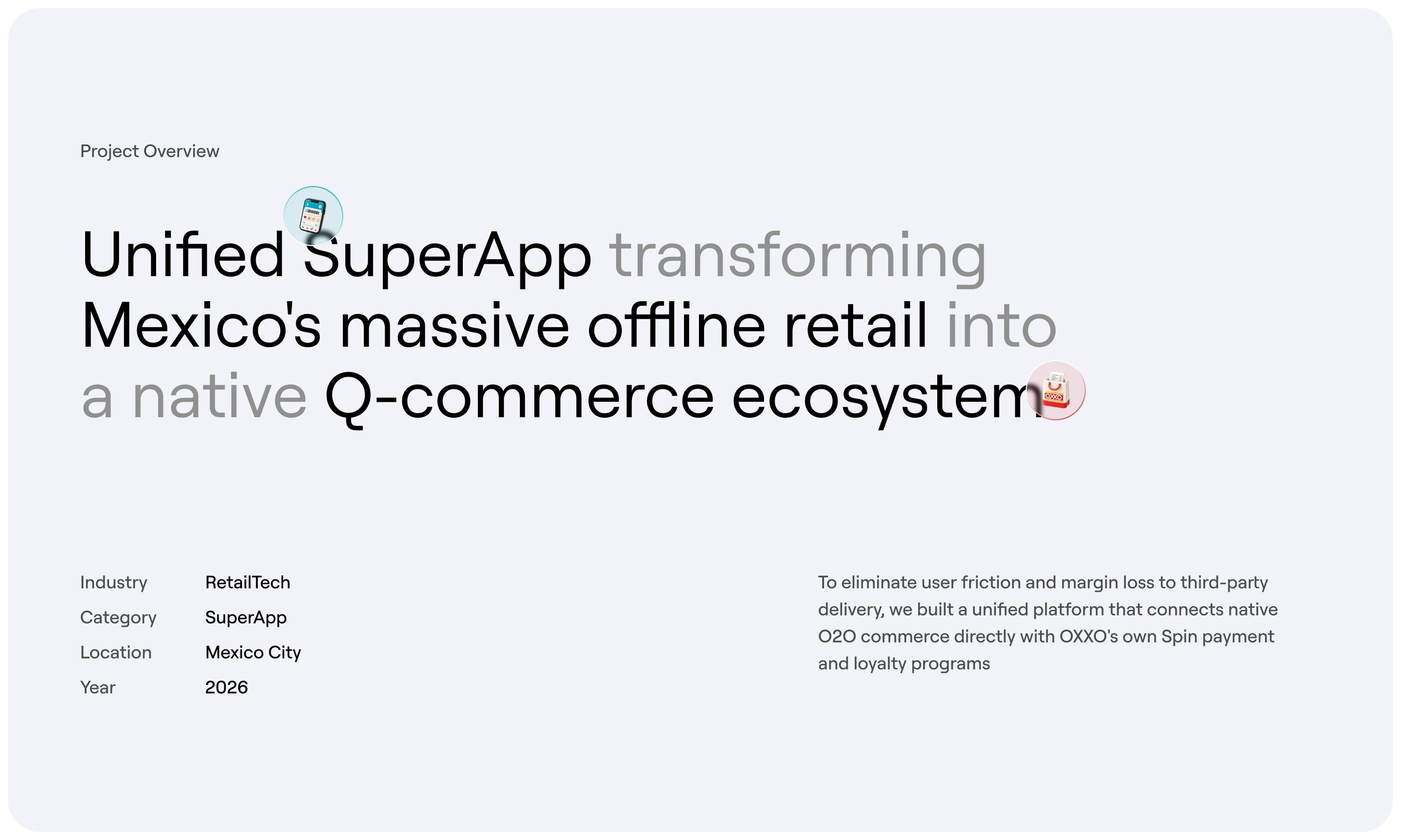
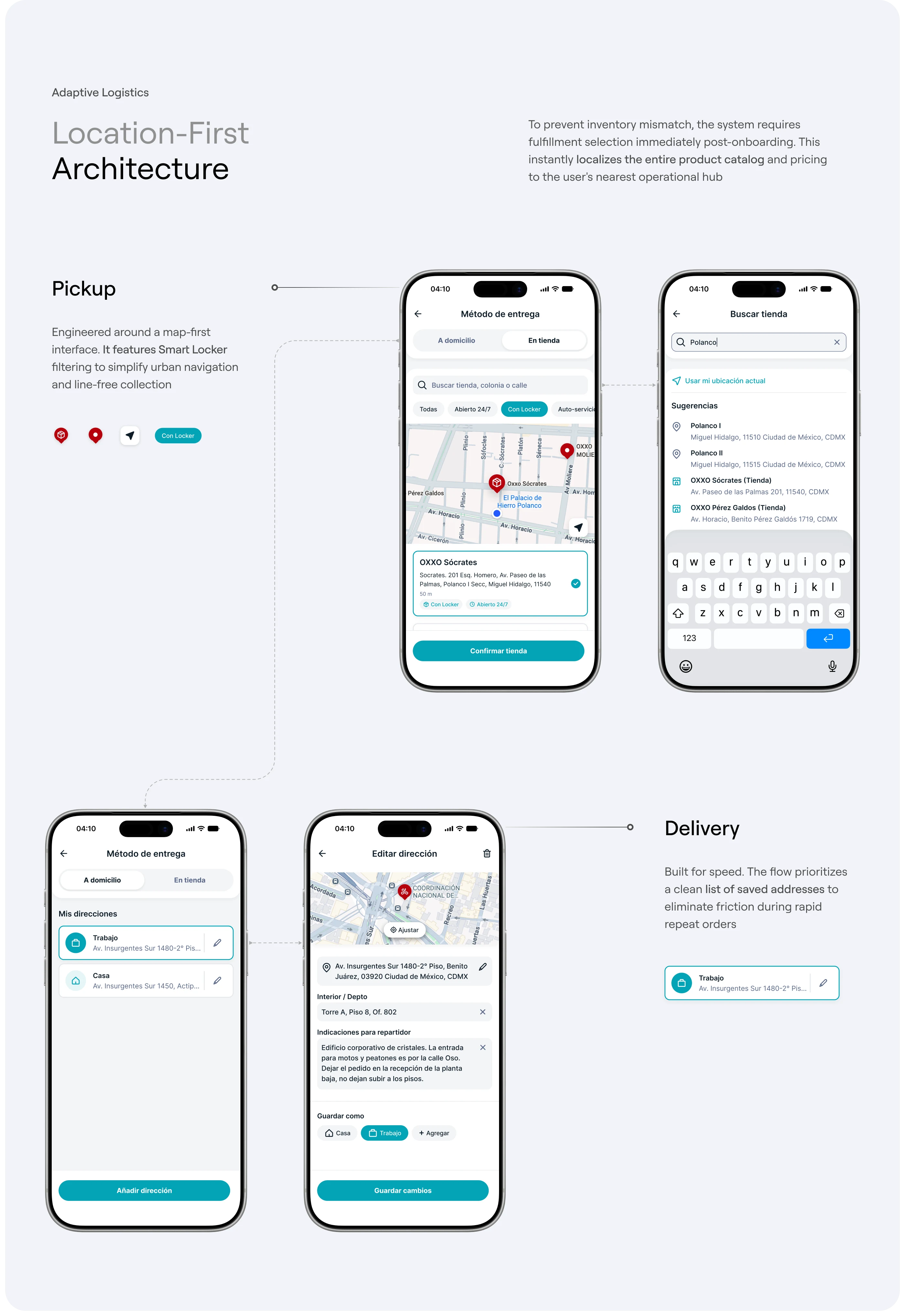
OXXO Retail App is a mobile retail platform designed to bring the shopping experience directly to users' smartphones. The product focuses on making product discovery, browsing, purchasing, and account management simple through a structured mobile experience.
My role focused on the technical development of the product, covering the mobile frontend, backend architecture, API communication, database structure, application logic, and integration between the different parts of the system.
The goal was not only to reproduce the visual interface, but to build a functional mobile product with a scalable architecture that could support real-world retail operations.
The Challenge
Building a retail application requires much more than creating individual mobile screens.
The application needs to handle multiple interconnected processes:
User registration and authentication
Product discovery
Categories and product collections
Product details
Search and filtering
Cart management
User information
Order processing
Data synchronization
API communication
Error and loading states
Secure handling of user data
One of the main technical challenges was creating a structure where these different features could work together while keeping the application maintainable and easy to expand.
The architecture therefore needed to separate the presentation layer, application logic, API services, and data layer instead of placing everything inside individual screens.
My Role
As the Full-Stack Developer, I worked across both the mobile application and server-side architecture.
My responsibilities included:
Translating the product designs into functional mobile interfaces
Building reusable mobile components
Structuring application navigation
Developing frontend application logic
Connecting the mobile application with backend APIs
Designing backend services
Structuring application data
Implementing authentication
Managing product and user data
Handling cart and order logic
Implementing loading, validation, and error states
Testing important user flows
Optimizing the application for mobile devices
Preparing the application architecture for future expansion
Product Architecture
The application was divided into several major layers.
Mobile Application
The mobile application acts as the primary interface between the customer and the retail platform.
The frontend handles:
User interaction
Navigation
Product presentation
Search
Cart interactions
Forms
Application state
API requests
Validation
Loading states
Error handling
The interface was built using reusable components rather than creating every screen independently.
This made it possible to maintain consistent behavior across the application and simplify future changes.
Backend
The backend acts as the central layer responsible for application logic and data processing.
Instead of allowing the mobile application to directly manipulate the database, requests are passed through backend APIs.
For example:
User → Mobile App → API → Backend → Database
The backend processes the request, validates the information, performs the required operation, and returns the appropriate response to the mobile application.
This approach keeps sensitive operations and business logic on the server side.
Database
The database stores the core information required by the application.
The structure can be organized around entities such as:
Users
Products
Categories
Product variants
Cart items
Orders
Order items
Addresses
User preferences
Relationships between these entities allow the application to retrieve and update information without duplicating unnecessary data.
For example, an order can reference a specific user while its individual order items reference the products purchased during that transaction.
Mobile Frontend Development
The mobile frontend was developed with a component-based approach.
Instead of building every element separately, common interface elements were converted into reusable components.
Examples include:
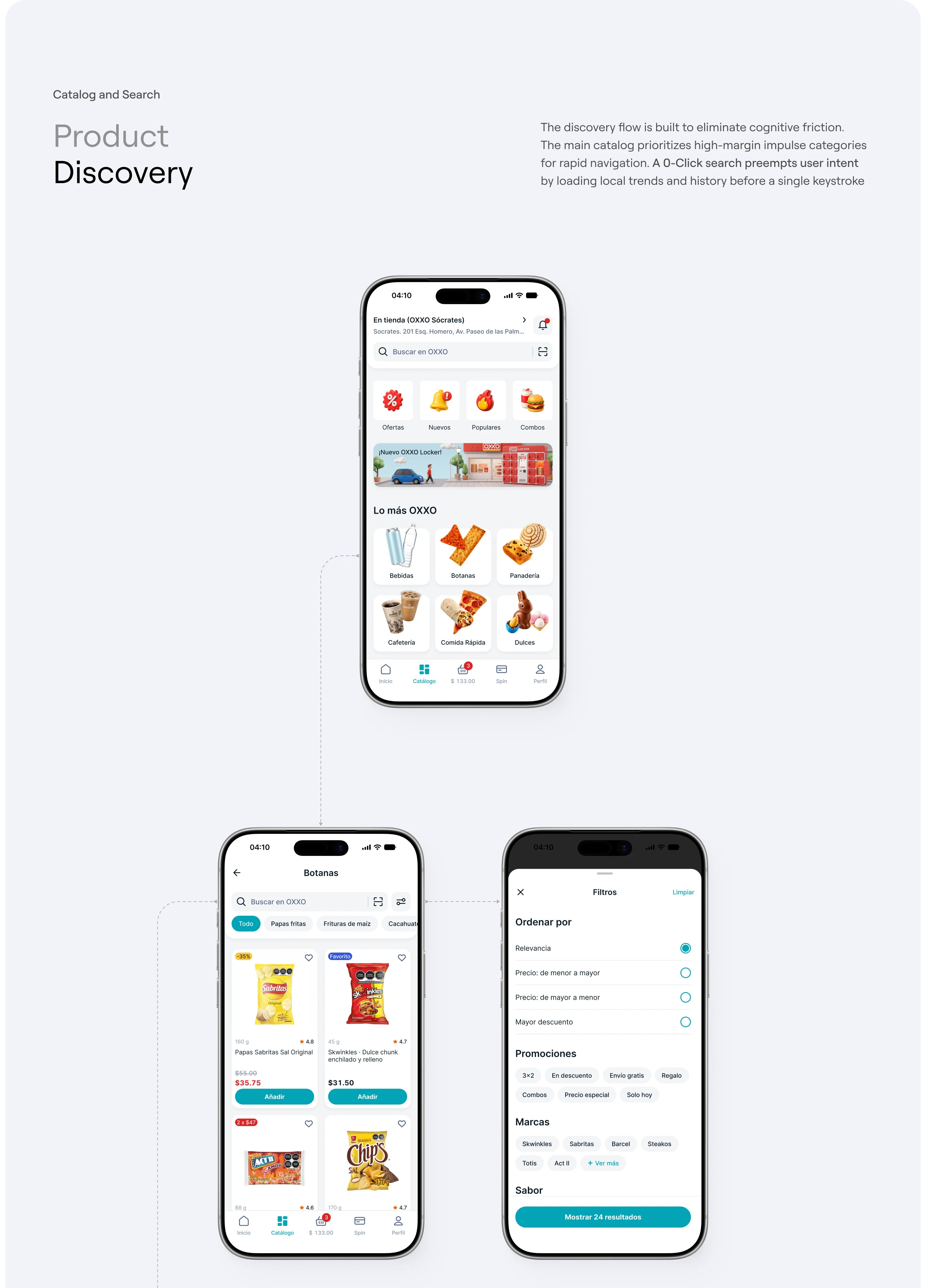
Product cards
Buttons
Input fields
Navigation elements
Category cards
Product galleries
Search components
Cart items
Profile sections
Modal components
Loading states
Empty states
This approach helped keep the interface consistent while reducing duplicated development work.
Navigation
The navigation architecture was organized around the primary areas of the application.
Users can move between important sections without losing context.
Navigation states were also considered for situations such as:
Opening a product from a category
Returning from product details
Adding products to the cart
Moving between authentication and the main application
Returning to previously viewed content
Product Discovery
Product discovery was one of the core parts of the application.
The frontend communicates with the backend to retrieve product information rather than storing the entire catalog directly inside the mobile application.
Product data can include:
Product name
Images
Description
Category
Pricing
Availability
Variants
Additional product information
This makes the application more flexible because product information can be updated from the backend without requiring a new mobile application release for every content change.
Search & Filtering
The search experience was designed to help users quickly locate products.
Search requests are sent through the API layer, where the backend processes the query and returns the relevant results.
Filtering can then be applied based on available product attributes such as categories, price ranges, or other product-specific properties.
The frontend handles the presentation of those results while the backend remains responsible for processing and retrieving the underlying data.
Product Details
The product detail experience brings together the information a customer needs before making a purchase.
The screen can combine:
Product imagery
Product name
Description
Pricing
Product options
Availability
Quantity selection
Add-to-cart functionality
Rather than hardcoding this information into the screen, the interface consumes product data from the backend API.
This allows the same product component to dynamically display different products.
Cart Architecture
The shopping cart requires synchronization between the user's actions and the application's stored state.
When a user adds an item, the application updates the cart state and communicates the change through the backend when required.
Cart functionality includes:
Adding products
Removing products
Updating quantities
Calculating totals
Maintaining selected products
Handling empty-cart states
The cart was designed as a separate functional module so that it could evolve independently from product browsing.
Backend API
The frontend communicates with the backend through structured APIs.
Typical endpoints can include operations such as:
The API layer creates a clear separation between the mobile interface and backend services.
This also means additional clients, such as a web application or administrative dashboard, can potentially consume the same backend services.
Authentication
Authentication was treated as a separate part of the application architecture.
The authentication flow manages:
Registration
Login
Session management
Protected requests
Logout
User-specific data
Authenticated API requests can be protected using token-based authentication, allowing the backend to identify the current user without exposing sensitive database operations to the mobile client.
Application State
State management is important in a retail application because information can change across different screens.
For example:
A user selects a product → adds it to the cart → continues browsing → opens another product → returns to the cart.
The cart state needs to remain consistent throughout this journey.
The application therefore separates temporary interface state from persistent application data and backend data.
This makes navigation and user interactions more predictable.
Error Handling
Real-world applications need to account for situations where requests fail or information is unavailable.
The application architecture includes states for:
Loading
Successful requests
Empty results
Failed requests
Invalid input
Authentication errors
Network problems
Instead of leaving users with blank screens, these states provide appropriate feedback and allow users to recover from common errors.
Performance Optimization
Mobile performance was considered throughout development.
Key areas included:
Reusable components
Optimized image handling
Efficient API requests
Avoiding unnecessary re-renders
Efficient list rendering
Controlled application state
Reducing duplicated logic
Keeping navigation responsive
For product-heavy screens, efficient rendering is particularly important because a retail application can potentially display hundreds or thousands of products.
Security Considerations
Because the application handles user accounts and potentially order-related information, security needs to be considered at both the frontend and backend levels.
The architecture separates public product information from protected user-specific operations.
Backend validation is also important because frontend validation alone cannot be trusted.
Requests are validated server-side before sensitive operations are performed.
Testing
Testing focused on the major user journeys rather than individual screens alone.
Important flows included:
Opening the application
Creating or accessing an account
Browsing products
Searching for products
Opening product details
Adding products to the cart
Updating cart quantities
Removing products
Proceeding through the purchase flow
Returning to previous screens
Testing was performed across different mobile screen sizes and interaction states to identify both visual and functional issues.
Technology Stack
The final case study should list the actual technologies used on the project, rather than generic technologies.
A typical stack section would be structured as:
Mobile
React Native / Flutter
TypeScript / Dart
Frontend
Component-based architecture
State management
Responsive mobile layouts
Form validation
Backend
Node.js / Laravel / Django
REST APIs
Authentication
Business logic
Database
PostgreSQL / MySQL / MongoDB
Infrastructure
Cloud hosting
API deployment
Database hosting
Environment configuration
Development
Git
GitHub
API testing
Mobile debugging
Development Workflow
The development process followed a structured workflow.
01 — Design Analysis
The provided product designs were first analyzed to understand the complete application structure, navigation, reusable elements, and expected interactions.
02 — Application Architecture
The application was broken into independent modules before development began.
This included authentication, products, categories, search, cart, user profile, and orders.
03 — Frontend Development
The mobile interface was then developed using reusable components and a consistent design system.
04 — Backend Development
Backend services and APIs were developed to handle application data, authentication, business logic, and communication with the database.
05 — API Integration
The mobile application was connected to the backend services and tested against real application flows.
06 — Testing & Refinement
The application was tested across different states and devices, followed by performance and usability refinements.
07 — Deployment
The final application and backend infrastructure were prepared for deployment and future maintenance.
Technical Outcome
The result was more than a collection of mobile screens.
The project established a complete product structure connecting the mobile interface, application logic, APIs, backend services, and database layer.
The modular approach also makes the application easier to maintain and extend with additional functionality in the future.
Conclusion
The OXXO Retail App demonstrates how a retail product can be translated from a product design into a functional mobile technology solution.
My focus as a Full-Stack Developer was to connect the visual experience with the technical infrastructure behind it, creating reusable frontend components, structured backend services, API communication, data management, authentication, and scalable application architecture.
The result is a mobile-first foundation designed around real product flows rather than isolated interface screens.
Like this project
Posted Sep 23, 2026
A full-stack mobile retail app built with scalable frontend, backend, APIs, authentication, product management, cart, and order functionality.