Delete the State File. Redeploy. Nothing Should Happen.

Muhammad Indrawan


How generated Terraform learns to adopt infrastructure it did not create — and the three ways a cloud inventory lies about what things are called.
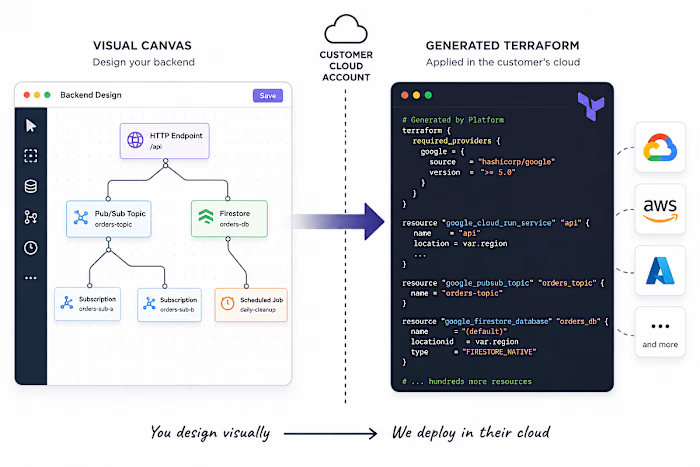
Hand-written Terraform gets to assume its state file is the truth. If a resource is not in state, it does not exist; so create it. That assumption is load-bearing, and almost everything about it is wrong once a machine is writing the Terraform.
This is the third post in a series about an internal developer platform that generates infrastructure and applies it into the customer's own cloud project. The first covers the architecture; the second covers a throughput regression. This one is about the assumption above, and what replacing it cost.
Why state stops being authoritative
Four things happen routinely on a platform like this, and every one of them breaks “not in state means not in the cloud”:
A tenant is onboarded with resources already running. They had a cloud project before they had us. The interesting starting state is never the empty project.
Somebody uses the console. A support engineer creates a topic at 2am to unblock something.
State is lost. Not often. But “not often” is not “never”, and the blast radius is a whole project's workloads.
The generator re-emits everything, every time. The deploy graph is regenerated wholesale on every canvas change. It is not a diff against what exists; it is a full description, produced fresh.
In all four cases the create path runs against a resource that is already there. The good outcome is Error 409: Resource already exists and a failed deploy. The bad outcome is a create that succeeds by overwriting something.
Adoption, not creation
The fix is to stop creating things that exist and adopt them instead. Terraform has two ways to do that.
The obvious one is the CLI: terraform import <address> <id>, once per resource. We started there. It works, and it is the wrong shape for this workload — each invocation is a separate Terraform run that takes the state lock, reads the state, writes it back. Cost grows linearly in resources, and every one of them is serialised on the same lock.
The other is the config-driven form introduced in Terraform 1.5:
import {
to = google_pubsub_topic.orders
id = "projects/example-project/topics/orders"
}
These resolve inside a single plan and apply, with the provider's reads running in parallel. For a graph of several hundred resources that is the difference between a deploy and a coffee break — the same wide-and-shallow property that made concurrency the dominant factor in the last post.
So the generator emits an import {} block for every node whose type can be adopted. Ten types can be: Cloud Run services, service accounts, Pub/Sub topics, subscriptions and schemas, Firestore databases, BigQuery datasets and tables, Cloud Tasks queues and Cloud Scheduler jobs.
An import block for a resource that does not exist is a hard error
Not a warning. Not a no-op that falls through to create. The plan fails.
So the generator cannot simply emit a block for every candidate and hope. Something has to answer “does this actually exist?” for every one of them, before the HCL is written. That component is an existence gate, and it sits between generation and commit.
The cheap way to answer it is a bulk inventory API — one call that lists everything in the project, intersect it with your candidate ids, keep the matches. That is what we do: a single Cloud Asset Inventory SearchAllResources scoped to the project, restricted to the asset types we care about.
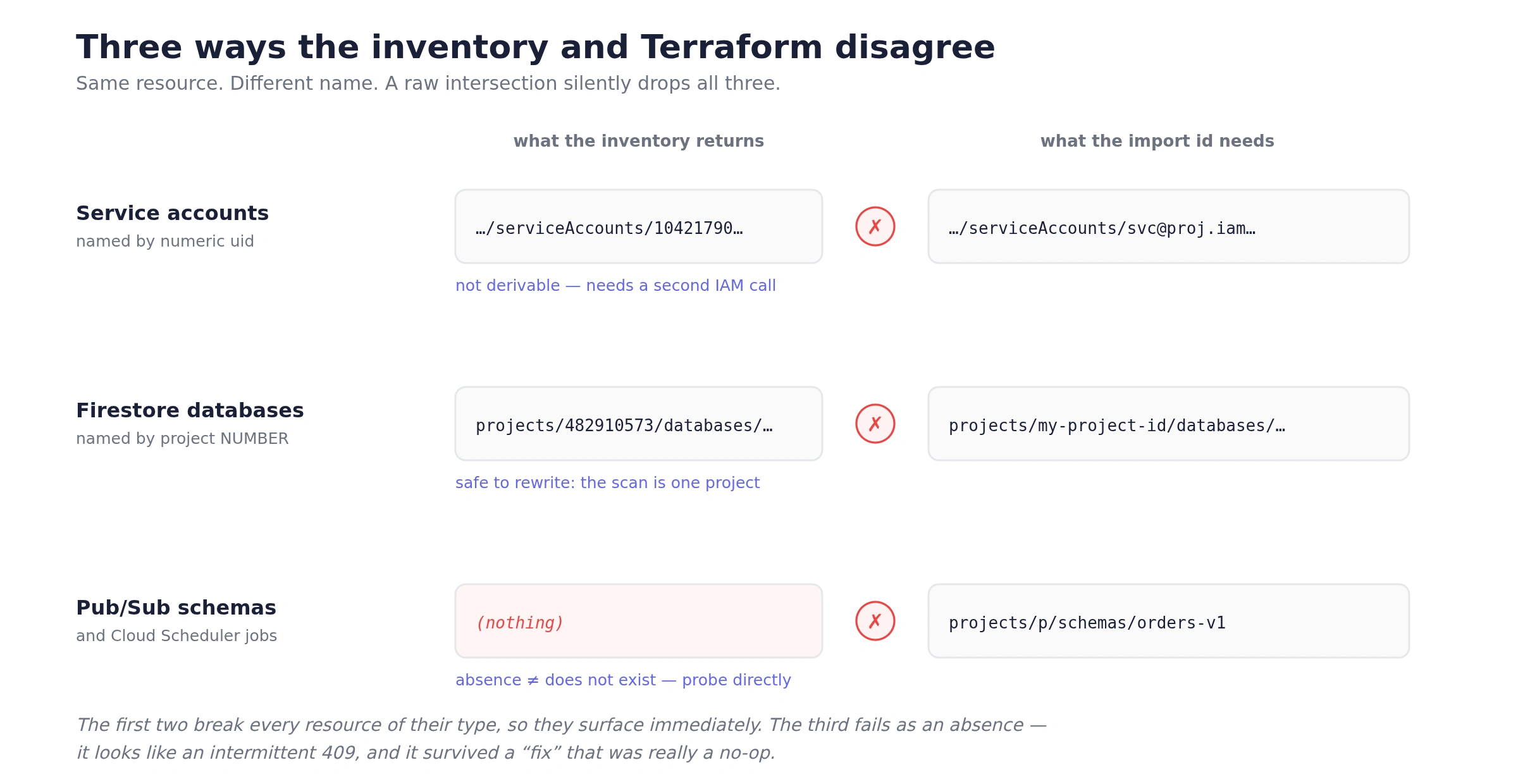
It is the right primitive. It is also where all the interesting failures live, because the inventory and Terraform do not agree on what a resource is called. Three separate times, in three different ways.
Lie 1: service accounts are named by a number
Cloud Asset Inventory identifies a service account by its numeric unique id. The Terraform import id uses the email. Intersect those two sets directly and you match nothing — every service account is judged non-existent, takes the create path, and 409s.
The fix is not a string transform, because the number and the email are not derivable from each other. It needs a second, different API call: list the project's service accounts via the IAM API, which returns emails, and merge those ids into the set. We run it concurrently with the asset scan, and we treat its failure as non-fatal — if the IAM list fails, service-account imports get dropped, but the rest of the gate still works.
Lie 2: Firestore is named by project number
Some resources come back keyed by the project number rather than the project ID. Same database, different string. This one is fixable with a transform: the scan is scoped to a single project, so a leading numeric project segment can only be this project, and rewriting it to the project ID is safe. That reasoning matters more than the code — it is only sound because of the scope, and it would be a bug in a scan that spanned projects.
Lie 3: two types are never returned at all
Pub/Sub Schemas and Cloud Scheduler Jobs do not appear in the inventory results. Ever. Eight of our ten adoptable types are visible; those two are not.
This is the nastiest of the three, because the other two fail loudly and consistently — every service account breaks, every Firestore database breaks, you notice on the first run. This one fails as an absence. Absence from the inventory is indistinguishable from absence from the cloud, so the gate concludes “does not exist”, drops the import block, takes the create path, and 409s on a schema that has been sitting there for months.
We had the asset type listed in the scan filter for a while, which made it look handled. It was a no-op: the API simply never returns that type, so listing it changes nothing.
The fix is a second signal. For exactly those two types, the gate issues a direct GET per candidate — and conveniently, their Terraform import ids are their API resource names, so the id needs no translation. A 404 means genuinely new: create it. Any other error is logged and the candidate skipped, which degrades to the old behaviour rather than failing the deploy. The probes run concurrently with a cap of 8 in flight, and skip anything the bulk scan already confirmed — so on a project with no pre-existing schemas it costs nothing.
Slower than the bulk call. Correct, which the bulk call is not.
A multi-tenant detail: whose quota is this?
One subtlety that only exists because we are operating in someone else's project. Every one of these API calls is made with the customer's service account, but by default the call is attributed to the service account's own home project for quota and enablement purposes.
That is the wrong project. It means the call fails unless the Cloud Asset API happens to be enabled where the credential lives, rather than where the resources live. Setting the quota project explicitly to the target project fixes it, and it has to be set on every client the gate constructs — the asset client, the IAM client, and both probe clients.
Existence is not enough: the running image
Here is the failure I did not anticipate, and the one that makes state loss genuinely dangerous rather than merely annoying.
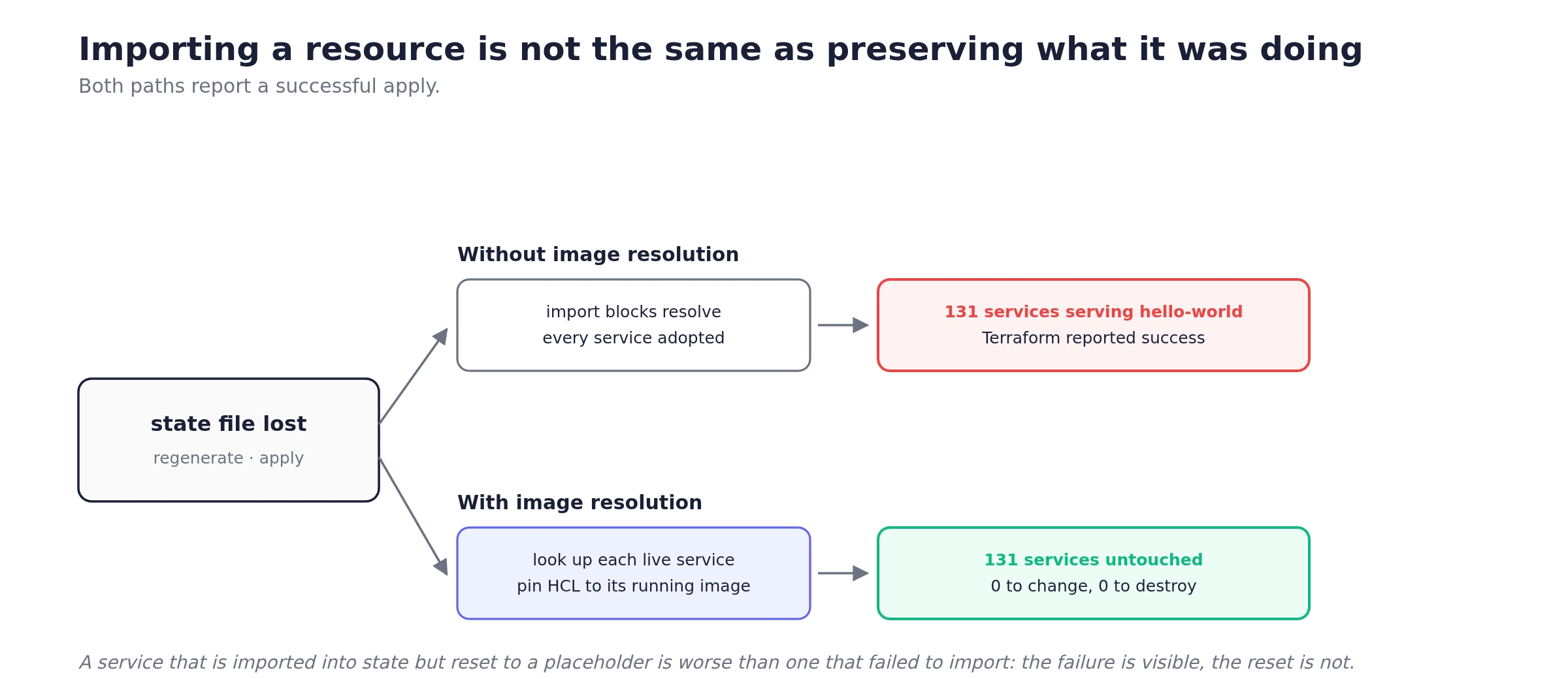
Terraform has to create a Cloud Run service before its container image exists, so the generator emits a placeholder image and CI replaces it with the real one later. Now consider what happens when a state file is lost and the project is redeployed from scratch.
Every Cloud Run service gets imported correctly. The gate works. The plan is clean. And every one of them is reset to the placeholder image, because that is what the regenerated HCL says the image should be. You would take a whole tenant's production workloads down to a hello-world page, with a Terraform run that reported success.
So adoption cannot stop at “does this resource exist”. For Cloud Run it has to ask a second question: what is it currently running? Before emitting HCL, the generator looks up each Cloud Run service that already exists and pins the HCL to its live image. Services that come back 404 are genuinely new and keep the placeholder.
The result is that a brand-new service comes up on the stub, an existing service is pinned to exactly what it is already serving, and Terraform sees no image drift in either case. No accidental redeploy, no accidental downgrade.
The acceptance criterion
All of this exists to make one sentence true: delete the state file entirely, redeploy, and the plan comes back 0 to add, 0 to change, 0 to destroy.
That is the only test I trust for this, because it is the only one that exercises every path at once. Every resource must be found, its id must match in whatever dialect the inventory speaks, the two invisible types must be probed, and every Cloud Run service must resolve to its live image. Miss any one of them and the number is not zero.
It is also a test you can run on a real tenant, which is worth more than a fixture. Nothing is destroyed by being adopted.
What I would take from this
“Does it exist?” is a harder question than it looks. It is really “does the thing I am about to create already exist, under a name I would recognise, in a system that may not report it at all?” Bulk inventory APIs answer a slightly different question than the one you are asking, and the gap is silent.
Distrust absence. Presence in an inventory is evidence. Absence is not — it may mean the resource is not there, or that the API does not model it, or that you lack permission to see it. Those three need different responses, and only the first one means “create it”.
Loud bugs are cheap; quiet ones are not. The service-account mismatch broke every single service account and was fixed almost immediately. The two missing types broke rarely, looked like flaky 409s, and survived far longer — including a fix that was really a no-op.
Adoption has to preserve behaviour, not just existence. A resource that is imported into state but reset to a placeholder is arguably worse than one that failed to import, because the failure is visible and the reset is not.
Design for the recovery you hope never to need. The state-loss path is not a disaster-recovery document here; it is the same code path as an ordinary deploy. That is the only reason I believe it works — it runs constantly, not once a year during a drill.
Like this project
Posted Aug 6, 2026
Improved Terraform to adopt existing cloud resources instead of creating them.