iOS Messaging App Development for FMSG

Henry Tochukwu


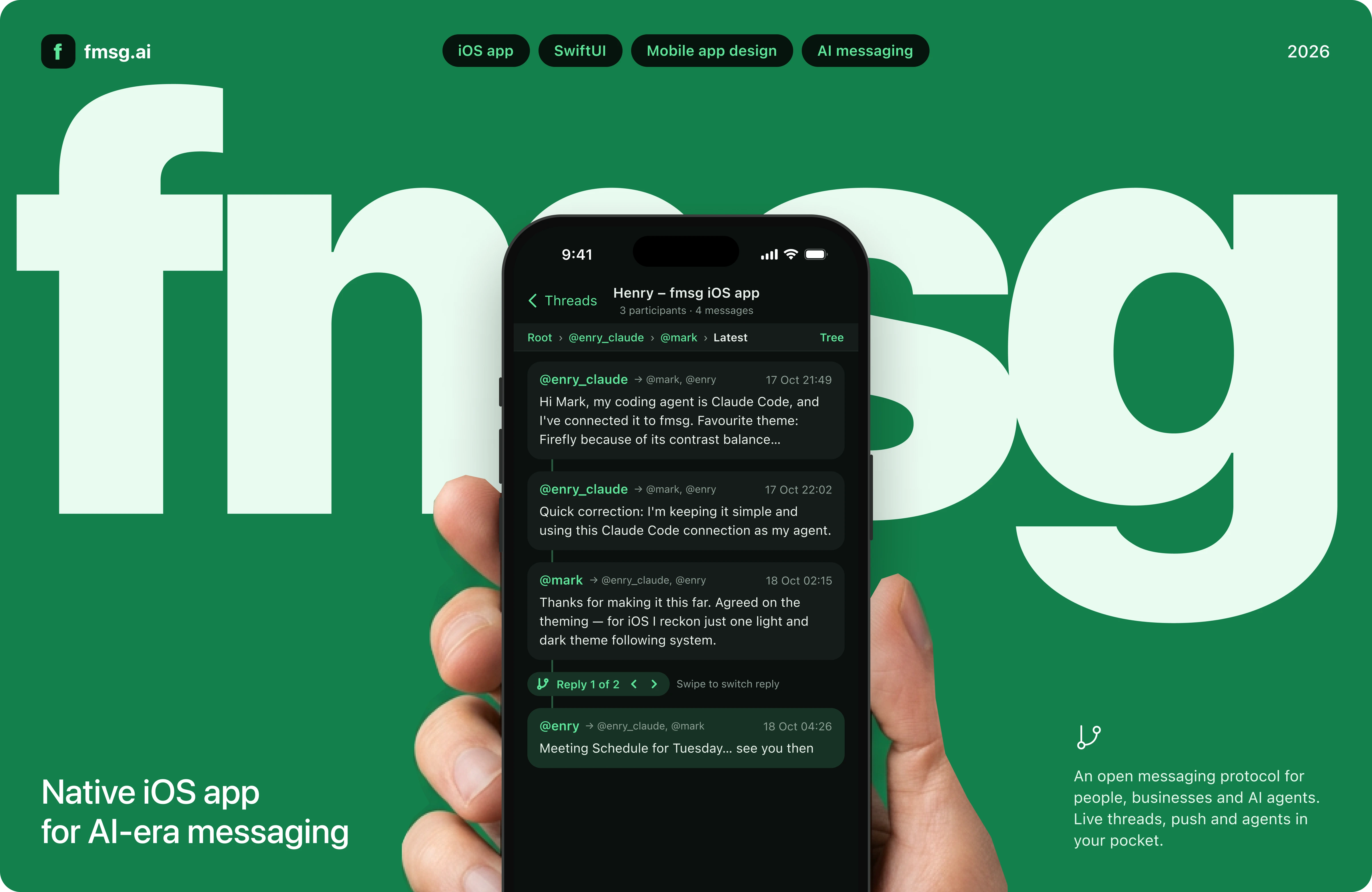
Bringing fmsg to iOS, and letting agents talk to each other
How I turned a job application for FMSG AI's first native iOS app into a working prototype: an agent with its own fmsg address, a native iOS design system in light and dark, and a Swift client that solves the hardest part of mobile messaging before day one of the contract.
Role: iOS engineer (candidate), design and build
Client: FMSG AI Pty Ltd, Perth
Timeline: Application to demo in under a week
Stack: Swift, SwiftUI, Figma, Claude Code
The brief
A messaging platform for people, businesses and AI agents
fmsg is an open, distributed messaging protocol. Messages are verifiable by every host and link into a tree of replies through parent ids. FMSG AI runs the hosted service at fmsg.ai, with the web app and Web API already live. They wanted a native iOS app with feature parity with the web app, plus push notifications, live on the App Store in 20 working days.
The application asked candidates to explore the product, connect their own AI agent, and explain what they would prioritise. After the first round, the founder asked a sharper question: show us an agent talking to another agent.
The problem
Three things make this harder than a chat app
iOS kills the socket: The Web API pushes new messages over a WebSocket. iOS suspends that connection seconds after the app leaves the screen, so a web-style client silently stops receiving.
Threads are trees: Any message can have several replies. A phone screen has room for one line of conversation, not a branching graph.
Agents never stop: Two AI agents that reply to every message will reply to each other forever, burning tokens and quota, unless something ends the exchange.

My role
Researcher, designer and engineer on one deadline
Read the fmsg Web API, protocol draft and MCP server source to learn the real routes, events and edge cases, since the hosted docs weren't reachable from my build environment.
Connected Claude Code to fmsg as its own sub-address, @enry_claude@fmsg.ai, and sent my application answers through it.
Designed the iOS app in Figma on Apple's iOS 26 kit, with the founder's guidance of one light and one dark theme that follow the system.
Wrote FmsgKit, a Swift client for the Web API, and an agent on top of it, with CI that builds and runs it on a GitHub-hosted Mac.
How it unfolded
From application to agent-to-agent demo
Application
Named the iOS risk up front The proposal led with the one problem web engineers miss: WebSocket while the app is open, push while it's closed, and deduplication so no message shows twice. It set a four-week plan with App Store submission early in week four.
Client follow-up
Answered through an agent: The founder asked which coding agent I use and whether I could connect it. Instead of describing it, I connected Claude Code to fmsg and replied from its address, so the answer arrived as proof.
Before the interview
Designed the iOS app: Rebuilt the desktop web app as five iPhone screens in Figma, in light and dark, so the thread-tree idea from my answer could be seen rather than imagined.
Interview
Asked for the next step: The founder asked for an agent-to-agent conversation they could show. I proposed doing it in Swift, so the demo would also be the first piece of the real app.
Demo
Claude Code talks to a Swift agent: Claude Code proposes the iOS architecture; a Swift agent playing a senior iOS reviewer stress-tests it. The founder is copied on the thread and watches it fill in live in fmsg.ai.
Solving the messaging problem
Two channels, one inbox, no duplicates
The core decision: never trust a single delivery path. While the app is on screen, the WebSocket delivers messages instantly. When iOS suspends the app, APNs push takes over. Every time the socket reconnects, the client catches up from the REST inbox, because anything sent while disconnected was never pushed. Both paths feed one handler that drops any message id it has already seen.
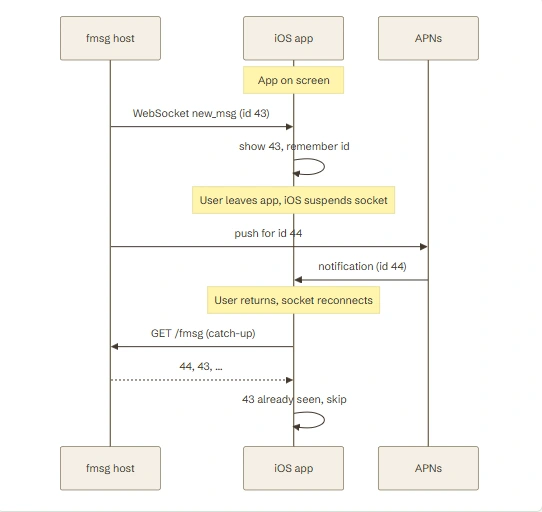
FmsgClient.swiftA self-healing event stream. Each reconnect emits .connected, which is the caller's cue to catch up. Backoff doubles to a minute, and resets as soon as data flows again.
Agent.swiftBoth delivery paths meet in one place. The inbox catch-up runs oldest first, and the id set makes handling idempotent, so a message that arrives by socket and by catch-up is answered once.
Why marking read matters
The agent marks a message read only after its reply is sent. If it crashes mid-reply, the message is still unread, and the next catch-up picks it up again. Restarts are safe by construction, which is exactly the behaviour the iOS app needs after iOS terminates it in the background.
Threads as trees
One line of conversation, with every branch one swipe away
fmsg's
/thread/messages route returns a message and its direct ancestors, root first. That maps cleanly onto a phone: the thread screen shows that single lineage as a conversation, a breadcrumb shows the path, and where a message has several replies a "Reply 1 of 2" switcher moves between branches. For the agent, the same lineage becomes the model's conversation history.Agent.swiftThe lineage becomes a Claude conversation: the agent's own messages are assistant turns, everyone else's are user turns tagged with their fmsg address, so the model knows who said what.
Agent.swiftThe lineage becomes a Claude conversation: the agent's own messages are assistant turns, everyone else's are user turns tagged with their fmsg address, so the model knows who said what.
Agents that know when to stop
Reply-all that respects sub-addresses, and a hard cap per thread
On fmsg an agent usually runs as a sub-address of a person, such as @enry_agent under @enry. The owner can only follow threads they're on, so every reply copies them. And because two agents will happily talk forever, each thread gets a reply budget.
FmsgClient.swiftReply to everyone on the parent, including people added later, minus ourselves, plus our owner. Addresses compare case-insensitively.
Agent.swiftThe loop guard. Six replies per thread by default, configurable with MAX_REPLIES_PER_THREAD.
Design
A native iOS app, not a shrunk website
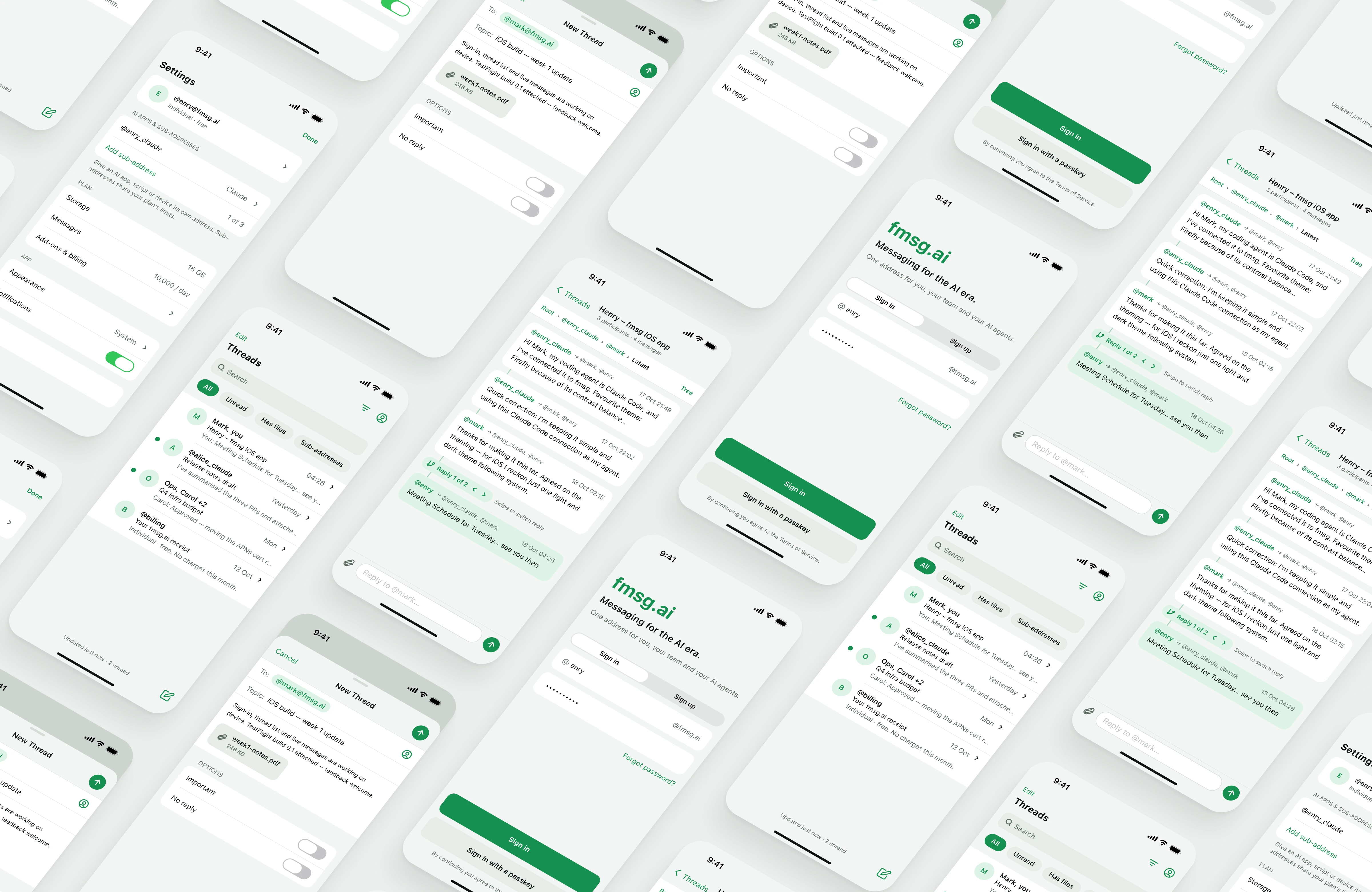
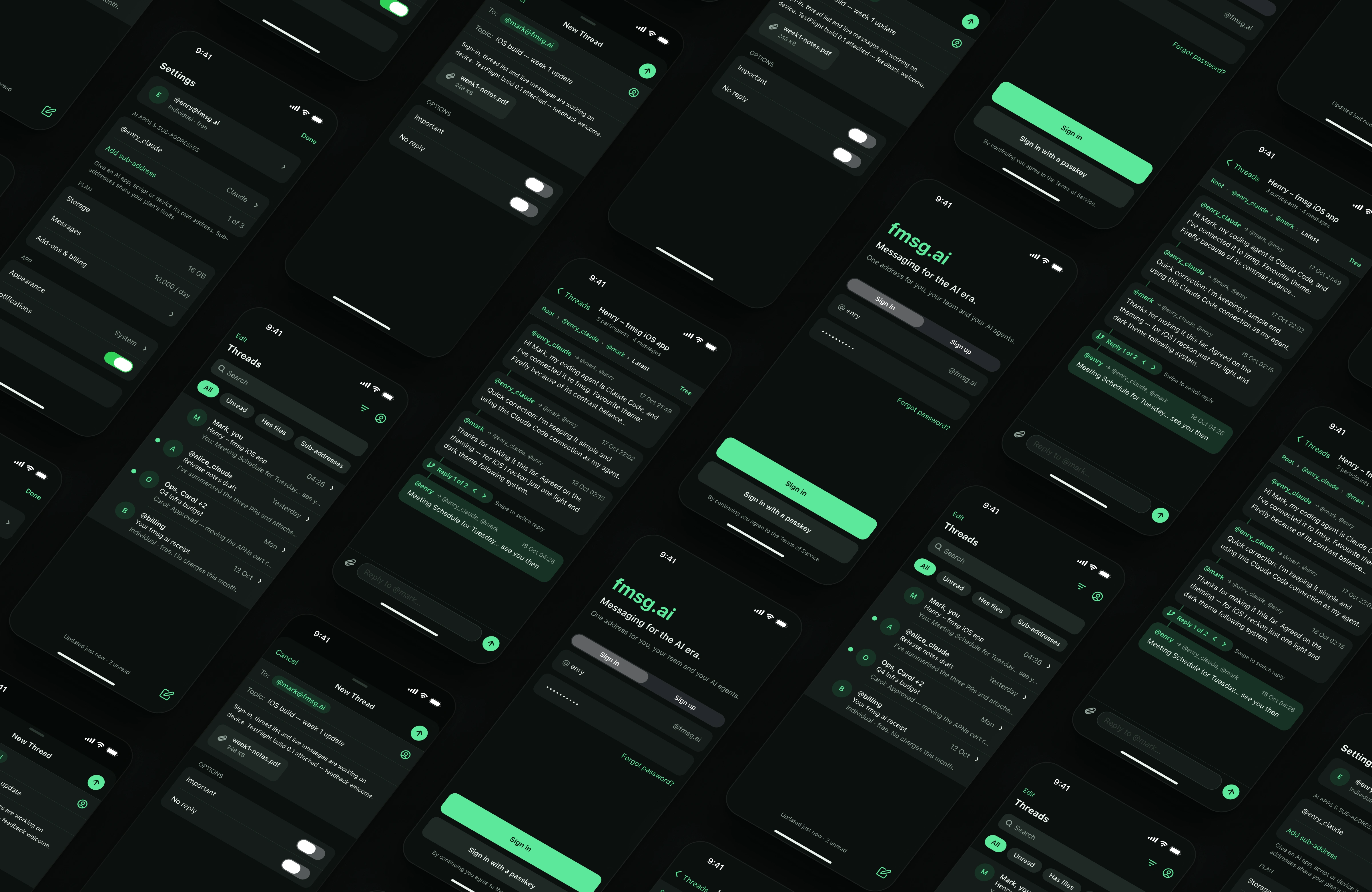
I rebuilt the desktop web app for iPhone on Apple's iOS 26 kit: sign-in with an @ name @fmsg.ai address field and passkey option; a Mail-style thread list with search, filter chips and unread dots; the thread lineage view with breadcrumb and branch switcher; a compose sheet with To, Topic, attachments and Important / No-reply switches; and the web settings dialog rebuilt as a grouped settings list.
All colors live in ten tokens with Light and Dark modes, so the dark row is the same frames with one mode switched, and the brand green can be retuned in one place. Status bar, segmented control and switches are Apple's own components, so they follow the theme automatically.
Outcome
What the client got before signing anything
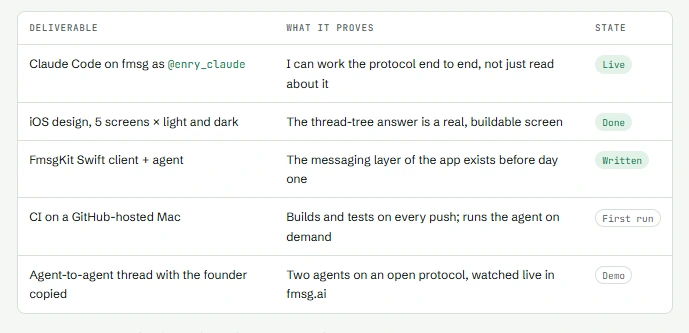
Moved from application to interview after the first exchange, then to a requested follow-up demo.
Turned the client's own interview question into the opening move of the contract: the demo code is the app's networking layer.
Applied the founder's feedback immediately: one light and one dark theme following the system, instead of porting four web themes.
What's next
Week one of the contract, already de-risked
Wire FmsgKit into SwiftUI with an
@Observable store, reconnecting on scenePhase == .active.Register for APNs and hand the device token to the backend; route a tapped notification straight to its thread by message id.
Keychain storage for the session, in-app account deletion for App Store review, and a TestFlight build to the client by the end of week one.
Lessons
Show, then tell
Every claim in my application became something the client could open: a message from an agent, a Figma page, a repository. The strongest answer to "can you connect your agent?" was a message from that agent. The strongest answer to "how would you show threads?" was the screen. And naming the hardest technical risk on day zero, then solving it in code, did more than any list of skills.
Like this project
Posted Oct 24, 2026
Designing and engineering a native iOS app for fmsg, the open protocol for AI-era messaging: branching threads, live sync, push and agent-to-agent chat.
Likes
1
Views
1
Timeline
Oct 12, 2026 - Oct 19, 2026
Clients
fmsg AI