Installing LAMP Stack on Ubuntu 24.04 for Vultr

Abraham Dahunsi


Introduction
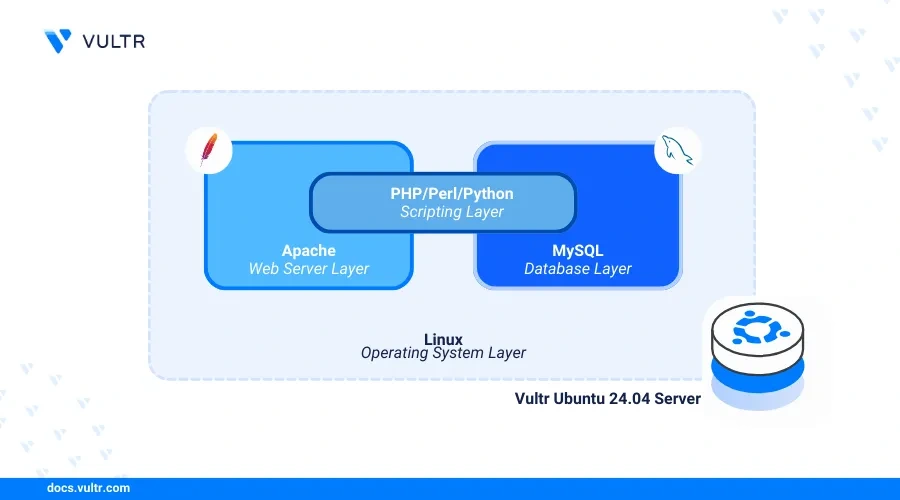
Apache, MySQL, and PHP (LAMP stack) is a collection of open-source applications that enable the development and delivery of dynamic web applications on a server. Linux runs as the operating system to deploy the applications, Apache works as the web server, MySQL as the database backend, and PHP processes dynamic web application contents on the server.
This article explains how to install the LAMP stack on Ubuntu 24.04 and configure the server to deliver web applications using the stack.
Prerequisites
Before you begin:
Deploy an Ubuntu 24.04 instance on Vultr.
Access the server using SSH as a non-root user with sudo privileges.
Install Apache
The latest Apache version is available in the default APT repositories on Ubuntu 24.04. Follow the steps below to update the default package index and install the latest Apache web server package on your server.
Update the server's package index.
console
Install Apache.
console
Start the Apache service.
console
Enable the Apache service to start automatically at boot time.
console
Verify that the Apache server service is running.
console
Output:
Allow connections to the HTTP port
80 through the default firewall configuration. console
Access your domain or server IP using a web browser such as Chrome and verify that the default Apache web page displays.

Test access to the default Apache web page
Install MySQL
MySQL works as the database backend within the LAMP stack and you can substitute it with MariaDB depending on your needs. The latest MySQL package is available in the default repositories on Ubuntu 24.04. Follow the steps below to install the latest MySQL version on your server using the default APT package manager.
Install the MySQL database server package.
console
Enable the MySQL service to start automatically at boot time.
console
Start the MySQL service.
console
View the MySQL service status and verify that it's running.
console
Output:
Based on the
active (running) result in the above output, the MySQL database server is active and running on your server.Run the MySQL secure installation script to disable insecure defaults and enable authentication on your database server.
console
Reply to the following MySQL database server options when prompted:
VALIDATE PASSWORD: Enter Y to enable password strength checks on the database server.Password strength policy: Enter 2 to enable multi-character password usage on the server.Remove anonymous users: Enter Y to remove anonymous users from the database server.Disallow root login remotely: Enter Y to disable remote access to the root database user.Remove test database: Enter Y to delete the default MySQL test database on your server.Reload privileges tables now: Enter Y to reload the MySQL privilege tables and apply your configuration changes.Your output should look like the one below when successful:
Log in to the MySQL console as the
root user. console
Alter the
root database user to use a new strong password. Replace Strong@@password123 with your desired password. sql
Replace
password with a strong password.Flush the MySQL privileges table to apply the new user changes.
sql
Exit the MySQL console.
sql
Log in to the MySQL console again as the
root user and enter the password you set earlier when prompted. console
Create a new sample database
content_database. sql
View all databases and verify that the new database is available.
sql
Output:
Create a new MySQL user such as
dbadmin with a strong password. Replace Strong@@password123 with your desired password. sql
Grant the user full privileges to your sample database
content_database. sql
Flush the MySQL privileges table to apply changes.
sql
Exit the MySQL shell.
sql
Install PHP and Configure PHP-FPM
PHP is a core LAMP stack component that processes dynamic content and integrates with your MySQL database server to read or create database records. PHP-FPM (FastCGI Process Manager) manages the connection to the PHP service and optimizes the application performance using pools of worker processes. Follow the steps below to install the latest PHP version and configure PHP-FPM to enable dynamic web application processes on your server.
Install PHP and the PHP-FPM module.
console
Install common PHP extensions on your server.
console
The above command installs the following PHP modules:
php-mysql: Enables PHP to connect and interact with the MySQL database server.libapache2-mod-php: Enables the Apache web server to process and run PHP scripts.php-opcache: Enables caching of precompiled PHP scripts in memory for faster execution.php-cli: Enables access to PHP in your server terminal.View the installed PHP version on your server.
console
Output:
Start the PHP-FPM service based on the installed PHP version on your server. For example,
PHP 8.3. console
Enable PHP-FPM to start at boot time.
console
View the PHP-FPM service status and verify that it's running.
console
Output:
Configure PHP-FPM
PHP-FPM ensures optimized performance for PHP applications on your server using pools depending on your server memory. Follow the steps below to configure PHP-FPM to work with the Apache web server and modify the default pool configurations to enable efficient resource management.
Enable the required Apache modules.
console
The above command enables the following modules on your web server:
proxy_fcgi: Enables Apache to work as a proxy with PHP-FPM.setenvif: Sets the necessary environment variables to enable connections between Apache and PHP-FPM.Enable the default PHP-FPM configuration.
console
Restart the Apache web server to apply the changes.
console
Switch to the PHP-FPM pool configurations directory.
Open the default
www.conf PHP-FPM pool configuration. console
Verify that the default PHP-FPM pool name
www. ini
Find and verify the following directives are set to
www-data to enable PHP-FPM to use the default web server user profile. ini
Find the following pool configurations and modify them to suite your desired server needs:
pm: Sets the default process manager. The value dynamic enables PHP child processes to dynamically adjust on your server.pm.start_servers: Defines the number of PHP child processes to create at startup. The default value is 2.pm.max_children: Sets the maximum number of PHP child processes that can be active simultaneously. The default value is 5.pm.min_spare_servers: Setsthe minimum number of idle PHP child processes. The default value is 1.pm.max_spare_servers: Specifies the maximum number of idle PHP child processes. The default value is 3.pm.max_requests: Limits the number of requests a PHP child process can handle before it's recycled.Save and close the file.
Restart the PHP-FPM service to apply your configuration changes.
console
Configure Apache with PHP-FPM
The Apache web server uses the
mod_proxy_fcgi module to communicate with PHP-FPM using the service UNIX socket or the default TCP port 9000 depending on your pool configuration. In the following steps, set up a new Apache virtual host configuration and connect to the PHP-FPM service using the UNIX socket.Remove the default Apache virtual host configuration files.
console
Create a new Apache virtual host configuration file. For example,
app.example.com.conf. console
Add the following configurations to the file. Replace
app.example.com with your actual domain. ini
Save and close the file.
The above configuration creates a new Apache virtual host that listens for incoming connections on the default HTTP port
80 and serves web contents using your app.example.com domain. Then, all PHP file requests are forwarded to the PHP-FPM process using the /var/run/php/php8.3-fpm.sock UNIX socket. Within the configuration:<VirtualHost *:80>: Enables the virtual host profile to listen for connections on port 80.<Directory /var/www/app.example.com>: Sets the web root directory to deliver web application files.<FilesMatch \.php$>: Forwards all PHP file requests to the PHP-FPM socket /var/run/php/php8.3-fpm.sock using the FastCGI protocol.ErrorLog, CustomLog: Enable custom paths to store the virtual host error and access logs respectively.Enable the new Apache virtual host configuration.
console
Test the Apache configuration for syntax errors.
console
Output:
Create the virtual host web root directory
/var/www/app.example.com defined in your configuration. console
Create a new sample PHP file
info.php. console
Add the following contents to the file.
php
Save and close the file.
The above application code displays information about the PHP version and installed modules on your server when accessed in a web browser.
Restart Apache to apply your configuration changes.
console
Access your domain using a web browser such as Chrome and append the
/info.php path to verify that your PHP application information displays.Secure the server
Uncomplicated Firewall (UFW) is available and active on Vultr Ubuntu 24.04 servers by default. The Apache web server delivers dynamic web applications on your server using the default HTTP port
80 while other LAMP stack components use internal TCP ports such as the MySQL port 3306 and the PHP-FPM port 9000. Follow the sections below to configure the default firewall to allow connections to the default web server port 80 and set up trusted SSL certificates to enable HTTPS connections on port 443.Configure the Firewall
View the default firewall status and verify that it's active.
console
Output:
console
View the available UFW application profiles and verify that the Apache profile is available.
console
Output:
Allow the
Apache Full profile to enable HTTP and HTTPS connections on the server. console
Reload the firewall rules to apply changes.
console
View the UFW status and verify that the Apache connection rules are available in the firewall table.
console
Output:
Generate Trusted Let's Encrypt SSL Certificates
Install the Certbot Let's Encrypt client tool using Snap.
console
Request a new SSL certificate for your domain. Replace
app.example.com with your actual domain and admin@example.com with your email. console
Output:
Test the Certbot automatic SSL certificate renewal process.
console
Restart the Apache web server to apply your SSL configuration changes.
console
Test the LAMP Stack Installation
Follow the steps below to set up a new sample table in your existing
content_database MySQL database to connect with your PHP application and display the message Hello World! Greetings from Vultr when accessed in a web browser.Log in to the MySQL console using the sample database user
dbadmin you created earlier. console
Enter the
dbadmin user password when prompted to access the MySQL console.Switch to the sample database
content_database. sql
Create a new sample table
messages with two columns, content_id and content to store your data. sql
The above SQL query creates a new table with the following specifications:
content_id: Contains numeric values and automatically increments unique data on each new row.content: Holds mixed content data with up to 255 characters.Insert new data to the
messages table. For example, add a new Hello World! Greetings from Vultr string to the content column. sql
View all table data to verify that the new string is added to the column.
sql
Output:
Exit the MySQL console.
sql
Create a new sample PHP application file
setup.php in your web root directory /var/www/html/app.example.com. console
Add the following contents to the file.
php
Save and close the file.
The above PHP application code connects to the MySQL database
content_database and displays data from the content column in the messages table when accessed. When the MySQL database does not contain any records, a No records found message displays or Connection Failed. when the connection to the database server fails.Grant the Apache user
www-data full privileges to your web root directory. console
Access your domain using the
/setup.php path in your web browser to verify that your PHP application displays the Hello World! Greetings from Vultr string content from your MySQL database.Conclusion
You have installed and configured Apache, MySQL, and PHP (LAMP stack) on your Ubuntu 24.04 server. In addition, you created sample dynamic applications to test access between all LAMP stack components and securely run the applications on your server. For more information and configuration options about each component, visit the following official documentation resources:
Tags:
Related Content
How to Install Apache, MySQL, PHP (LAMP Stack) on Ubuntu 22.0429 April, 2025ArticleHow to Install Apache, MySQL, PHP (LAMP Stack) on Ubuntu 20.0407 May, 2025ArticleHow to Install Apache, MySQL, PHP (LAMP Stack) on Debian 1201 April, 2025ArticleHow to Install Apache, MySQL, PHP (LAMP Stack) on Rocky Linux 921 November, 2023Article
Comments
No comments yet.
Like this project
Posted Jun 19, 2025
Guide on installing LAMP stack on Ubuntu 24.04 for Vultr.