AI vs Human Text Classification Using BERT

Vaibhav Kumar


AI vs Human Text Classification
This project is designed to classify text as either AI-generated or human-written using a fine-tuned BERT model. The entire process includes data preprocessing, training, evaluation, and prediction.
🚀 Project Setup
1. Mount Google Drive (Colab Users)
If using Google Colab, first mount your Google Drive:
📦 Install Dependencies
Ensure the required libraries are installed:
📂 Dataset Preparation
2. Update Dataset Paths
Modify the paths to match your Google Drive structure:
3. Load Datasets
4. Preprocess Data
Ensure correct column names
Assign labels:
0 for Human, 1 for AIMerge and shuffle the dataset
🔠 Tokenization & Dataset Creation
5. Load BERT Tokenizer
6. Convert Data into Tensor Format
7. Create DataLoaders
🏗️ Model Setup
8. Load or Initialize Model
9. Define Optimizer
🎯 Training & Evaluation
10. Train the Model
11. Evaluate the Model
12. Train & Evaluate
🧐 Text Prediction
13. Define Prediction Function
14. User Input for Testing
🎯 Final Notes
Ensure dataset paths are correct.
Model saves automatically after training.
Run the script in Google Colab or a local Python environment.
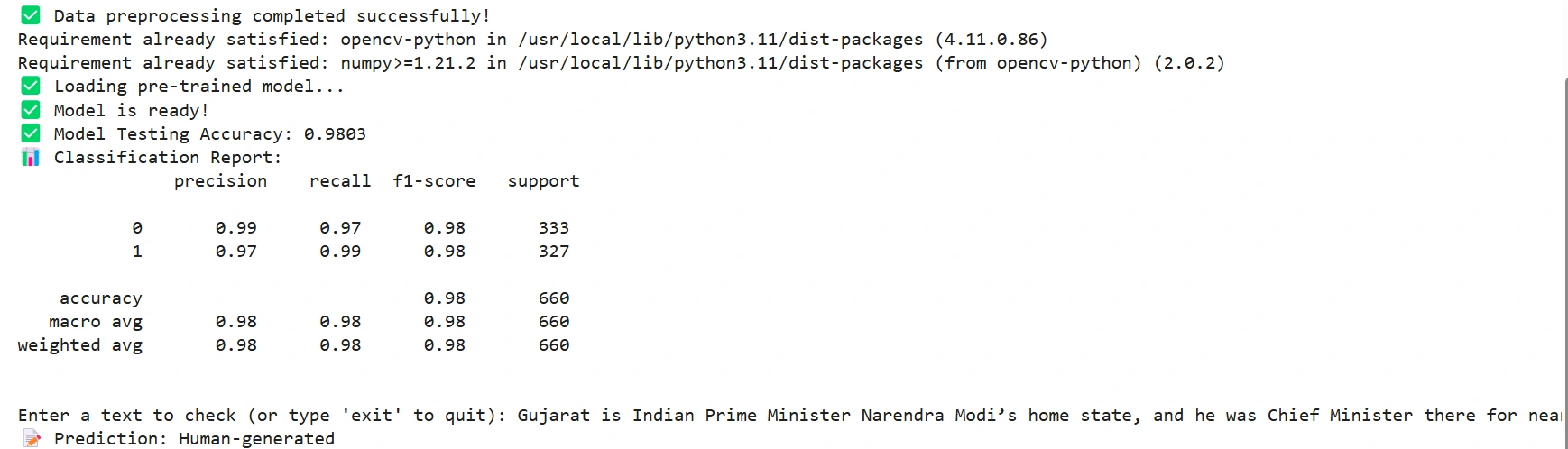
##💹Screenshots
✅ Now you are ready to classify AI vs Human text!
Like this project
Posted Aug 3, 2026
Developed a BERT-based model to classify AI vs human text.
Likes
0
Views
2