
ROLE
UX and UI design
YEAR
2025
LINKS
01 —
The problem
Pacific EcoSolutions was a new agency offering AI-powered web and digital services to clients in the United States. Its core idea was an AI agent that would help each client identify their needs and find solutions, adapting to them instead of offering a fixed menu of services. The landing page had to present the agency and that idea.
02 —
My role
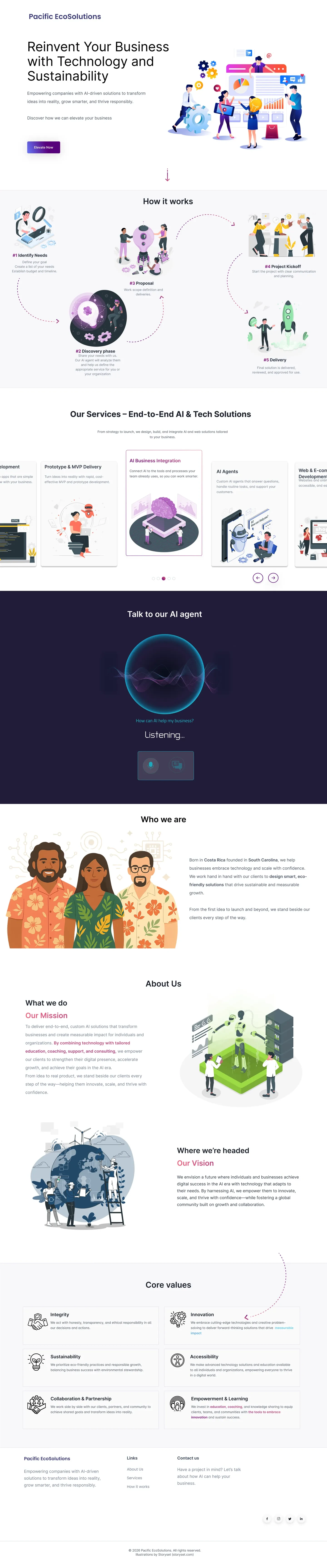
I worked on the venture as an employee-partner and designed the landing page end to end in Figma: UX, page structure, content flow and visual design, for desktop (1440) and mobile (390). I started from a basic UI kit so I didn’t begin from zero, then redesigned most of it.
03 —
Process
The kit gave me a generic agency layout. I rebuilt the page around the one idea that made this agency different, the AI agent, and organized everything else to support it: a hero, a five-step “How it works”, the services, a section to talk to the agent, who we are, mission and vision, and core values. I designed desktop and mobile versions, with illustrations from Storyset to keep a consistent, friendly visual language.
04 —
Key decisions
The AI agent is the process, not an add-on. In “How it works”, step 2, Discovery, is where the agent analyzes the client’s needs. The business idea becomes the path the visitor reads, from identifying needs to delivery.
“Talk to our AI agent” as the main moment. A voice-first interface (an animated orb, the question “How can AI help my business?” and a “Listening…” state), with the option to switch to chat. It’s the strongest call to action on the page.
A dark section for the agent. In contrast with the light page, the agent section reads as the product moment, not as one more block.
From strategy to delivery. Services are presented as one end-to-end path (AI business integration, AI agents, prototypes and MVPs, web development) instead of a loose list.
05 —
Honest result
This is a design only. The venture didn’t move past the design stage and the site was never launched, so there are no users, traffic or results. What the case shows is how I turn a generic kit into a page built around one clear idea, and how I design an AI interaction (its states and the switch between voice and chat) before any code exists.
06 —
What’s pending
If the venture resumed, the next steps would be:
Building the site and the AI agent behind it.
Designing the agent’s conversation, including what happens when it can’t help.
Testing the page and the agent with real prospective clients.
07 —
What I learned
A UI kit is a starting point, not a design. The value was in reorganizing the page around one idea.
Make the core idea the structure. When the AI agent became the process, the page didn’t need to explain it twice.
Designing for AI means designing states. Listening, thinking, and switching to chat are part of the interface, not details for later.
Illustrations by Storyset. Design only; the site was never launched.
0 likes · 0 views · Nov 1, 2026
UX and UI design for an AI and web agency landing page, adapted from a UI kit. Design only; the venture did not launch.
