AI Video Generation Pipeline - Model Training to Final Render

Adnan Aslam



AI Video Generation Pipeline — From User Photos to a Finished Personalized Video
This project is a production-oriented AI video creation platform that transforms a user's photos and creative direction into a personalized finished video.
Users upload a collection of reference images, describe the video they want, and submit the project. Behind the interface, the system prepares training data, fine-tunes a user-specific model to preserve likeness, generates multiple short visual clips, stores intermediate assets, and assembles the approved outputs into a final rendered video.
I worked across the complete product and infrastructure pipeline:
Next.js application
Upload and project workflows
Prompt generation and refinement
Personalized model training
RunPod GPU orchestration
Asynchronous job processing
Image and video generation
Cloud asset storage
FFmpeg-based composition and rendering
Final-video delivery
The platform was designed as a reusable generation system rather than a single model-specific demo.
The challenge
Generating an isolated AI image or short clip is relatively straightforward.
Building a product that reliably creates a personalized multi-scene video is much harder.
The system had to coordinate several long-running and failure-prone stages:
Receive and validate user photos.
Preserve the identity associated with those photos.
Prepare a user-specific training dataset.
Allocate suitable GPU infrastructure.
Train and store a personalized model artifact.
Convert creative direction into structured generation prompts.
Generate multiple visual assets and short clips.
Track partial successes, failures, and retries.
Preserve files between temporary GPU sessions.
Assemble the resulting clips into one coherent video.
Deliver the final result without exposing sensitive model files.
Each stage could take a different amount of time and could fail independently. The application therefore could not be implemented as a normal synchronous request-response flow.
The central engineering challenge was to turn unpredictable GPU and generative-model workloads into a controlled product workflow.
What I built
User photo and project intake
The workflow begins with the user uploading a set of reference photos, typically at least 12 images when personalized likeness is required.
The platform captures:
User reference photos
Creative prompt or visual concept
Optional prompt refinements
Video format and aspect ratio
Generation configuration
Project ownership
Training and generation status
The upload flow was designed to preserve the original source material while creating a reliable input package for the downstream training process.
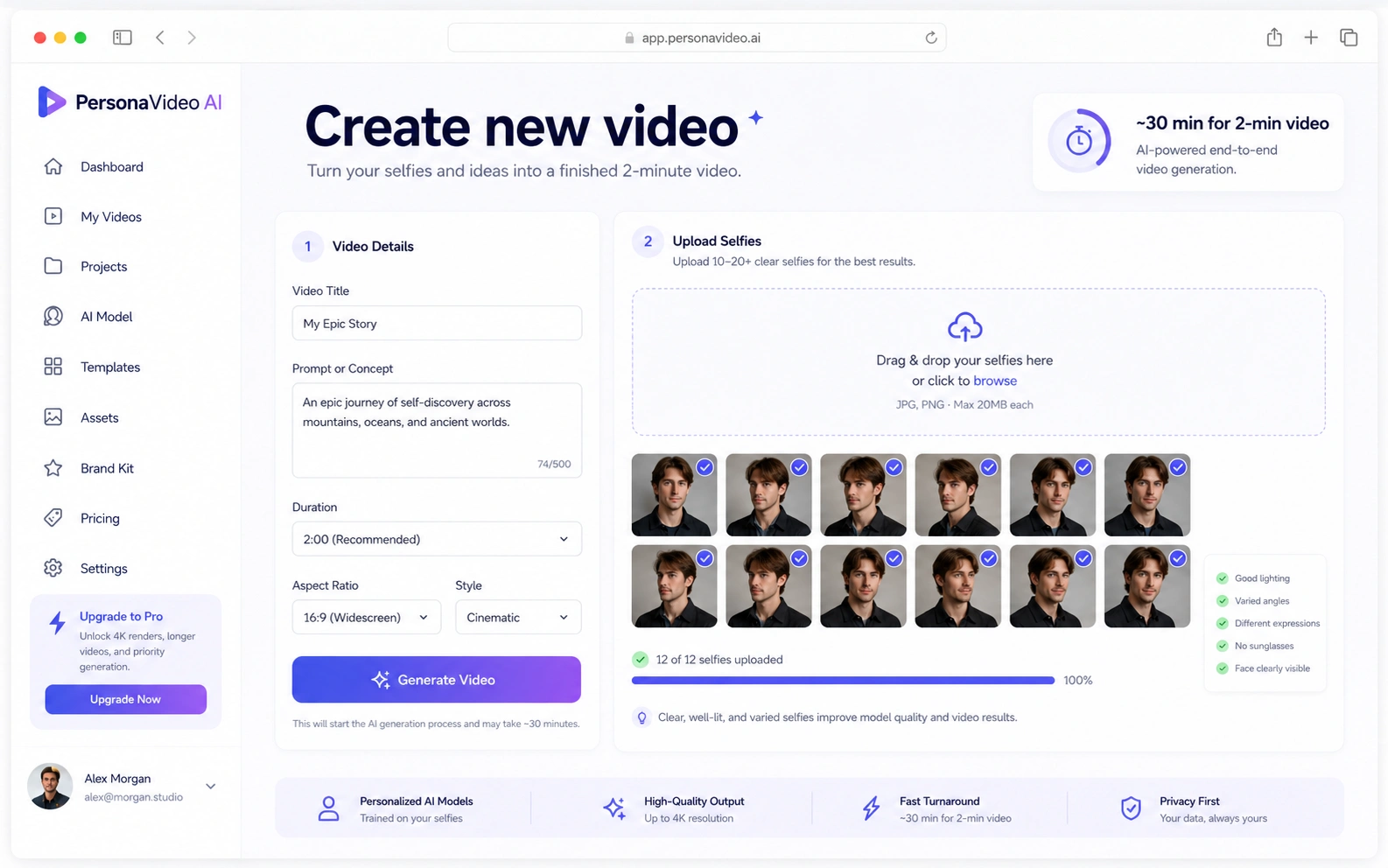
Project creation and selfie upload
Personalized model fine-tuning
For projects requiring likeness preservation, the platform creates a user-specific fine-tuned model from the uploaded reference images.
The training workflow includes:
Validating the number and format of reference images
Preparing training assets
Starting a GPU-backed fine-tuning job
Tracking training progress
Persisting the resulting model artifact
Associating that artifact with the correct user and project
The trained model enables subsequent generation stages to create content that is visually associated with the person represented in the uploaded photos.
The model artifact remains an internal production asset. It is not exposed as a downloadable file to the end user.
Prompt generation and refinement
A user's initial idea is rarely detailed enough to drive a complete multi-scene generation process.
I implemented a prompt layer that can transform broad creative direction into more structured generation instructions.
Depending on the project, this can include:
Subject appearance
Clothing
Environment
Framing
Camera direction
Lighting
Visual style
Motion
Negative constraints
Aspect ratio
Model-specific generation parameters
The prompt system was separated from the individual model integration so that creative logic would not become tightly coupled to one provider's API format.
Each generation adapter could translate the structured creative request into the payload required by its corresponding model.
GPU workload orchestration
The AI workloads run through cloud GPU infrastructure on RunPod.
The orchestration layer is responsible for:
Creating or assigning GPU capacity
Submitting training and generation jobs
Passing storage and project references
Tracking queued, running, completed, and failed states
Receiving webhook updates
Falling back to polling when webhook delivery is unavailable
Preserving job output before temporary compute is released
Supporting retries without restarting the entire project
This separation keeps long-running AI work outside the Next.js request lifecycle.
The web application acts as the product and control layer, while the GPU environment performs model training and media generation.
Asynchronous job system
Training and video generation can take significantly longer than a normal web request.
I therefore designed the pipeline around persistent asynchronous jobs rather than waiting for GPU work inside an API request.
Each job records information such as:
Job type
Project and user ownership
Current status
Input payload
External provider or GPU job identifier
Progress information
Output references
Error details
Start and completion timestamps
Retry state
This makes the system easier to monitor, debug, and recover.
A failed clip does not have to invalidate a completed model training job or previously generated assets.
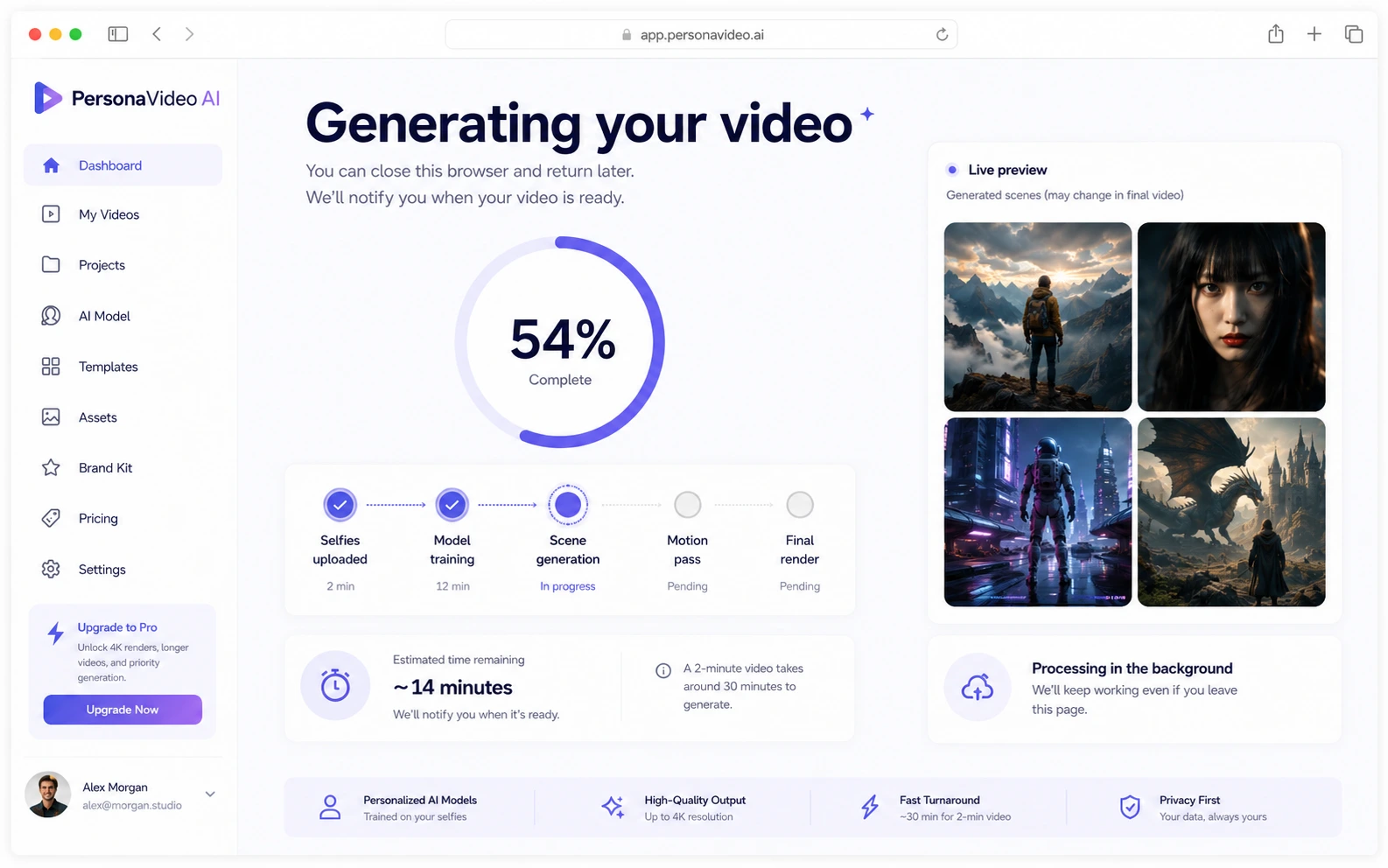
Generation progress and background processing
Clip generation
After the personalized model and generation instructions are ready, the system creates multiple short visual clips.
The pipeline can support reference-driven generation patterns such as:
Personalized text-to-video
Image-to-video
Keyframe-driven motion
Chained clips using the final frame of one scene as the visual starting point for the next
Hybrid image-generation and video-generation workflows
Generated assets are stored independently so that successful clips can be preserved while weak or failed clips are retried.
This is important because regeneration is expensive. A production pipeline should avoid recreating acceptable work merely because one part of the sequence needs improvement.
Identity and visual continuity
Personalized generation introduces challenges beyond simply inserting a trained-model trigger into a prompt.
The system had to account for:
Preserving recognizable likeness
Maintaining identity across different scenes
Avoiding accidental identity swaps
Keeping clothing or appearance aligned with scene instructions
Supporting more than one person in a project
Associating each person with the correct actions and positions
The architecture therefore treats identity references as structured project assets rather than depending only on unstructured prompt text.
This provides a foundation for stronger multi-character binding, reference selection, and scene-level control as the generation layer evolves.
Asset storage
GPU instances should not be treated as permanent storage.
The pipeline separates temporary compute from persistent project assets.
Stored assets can include:
Original uploaded photos
Prepared training data
Personalized model files
Generated keyframes
Individual video clips
Prompt and generation metadata
Render inputs
Final video versions
Persistent storage allows a GPU worker to be replaced, restarted, or released without losing the project.
Files are organized by user, project, and generation stage so they can be retrieved deterministically.
Final video assembly
The finalization layer uses FFmpeg to combine approved clips into one deliverable.
Depending on the project configuration, the render process can handle:
Ordered clip stitching
Aspect-ratio normalization
Resolution normalization
Clip trimming
Transitions
Slow zoom or Ken Burns-style movement
Captions
Background music
Audio mixing
Final encoding and muxing
The completed video is then uploaded to cloud delivery storage and associated with the originating project.
The important product distinction is that the pipeline does not simply return a collection of model outputs. It turns those outputs into a finished video artifact.
My process
1. Break the product into independent stages
I treated the workflow as a pipeline of separate responsibilities:
Upload → Train → Plan → Generate → Store → Assemble → Deliver
Each stage receives defined inputs and produces persisted outputs.
This prevents the entire product from becoming one fragile chain of tightly coupled scripts.
2. Separate the control plane from GPU execution
The Next.js application manages:
Users
Projects
Uploads
Generation settings
Status presentation
API coordination
Result access
The GPU environment manages:
Model training
Model loading
Image generation
Video generation
Heavy media processing
This separation allows the product application and compute infrastructure to scale independently.
It also prevents long-running GPU work from being tied to a browser session or serverless request timeout.
3. Make every long-running action observable
A user should never submit an AI project and receive only a loading spinner with no meaningful system state.
I structured the workflow around explicit statuses such as:
Uploading
Preparing training data
Queued for training
Training
Model ready
Preparing prompts
Generating assets
Generating clips
Rendering
Completed
Failed
Retry required
These states help both users and developers understand where a project is and what failed.
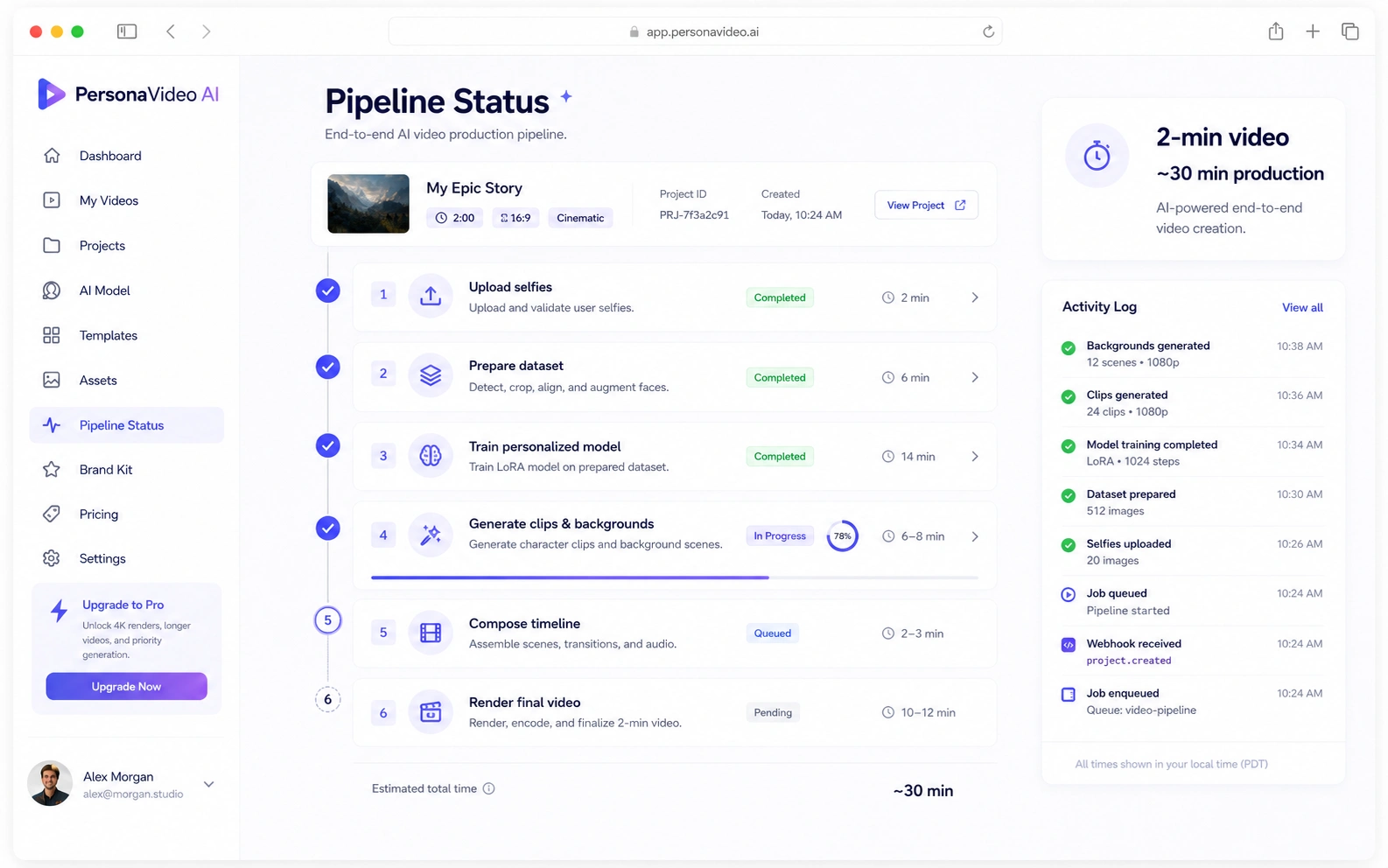
Pipeline status timeline
4. Persist outputs after every expensive stage
Training and video generation consume meaningful GPU time and cost.
The pipeline stores outputs after each expensive operation rather than waiting until the full process finishes.
This means:
A trained model can be reused.
Successful images can be retained.
Successful clips can be retained.
A failed render can be restarted without retraining.
One weak clip can be replaced without regenerating the entire video.
This design reduces waste and improves recoverability.
5. Design integrations behind adapters
AI generation models change quickly.
I avoided embedding provider-specific request formats throughout the core application.
The product works with structured internal generation requests. Individual adapters then convert those requests into the format required by the selected image, video, or training model.
This allows the platform to add or replace generation models with limited changes to the surrounding product workflow.
6. Build for partial failure
A multi-stage AI pipeline rarely fails as one clean unit.
Possible failure points include:
Invalid uploads
Insufficient reference images
GPU allocation failure
Training failure
Provider timeout
Safety rejection
Generation failure
Missing output
Corrupted media
FFmpeg render failure
Delivery-storage failure
I designed the system so these failures could be associated with the specific stage and retried appropriately.
The goal was not to pretend failure would never happen. It was to make failure controlled and recoverable.
Architecture decisions
Next.js as the product layer
Next.js provides the user-facing application and application APIs.
It manages:
User interaction
Project creation
Uploads
Generation requests
Status pages
Webhook endpoints
Result presentation
Access control
It does not directly perform long-running GPU work.
Dedicated orchestration service
A Node.js/Express orchestration layer coordinates GPU operations and external generation jobs.
This service is better suited for:
Persistent worker communication
Webhook processing
Polling fallbacks
Job recovery
Storage coordination
RunPod lifecycle management
Longer-running backend operations
This keeps infrastructure-specific behavior out of the user interface.
RunPod for GPU workloads
RunPod provides on-demand GPU execution for model fine-tuning and generation.
It allows the platform to:
Run specialized AI environments
Select suitable GPU configurations
Attach persistent storage
Start compute only when required
Release expensive resources after work finishes
Scale training and generation independently from the web app
Persistent object storage
Reference images, trained-model artifacts, generated media, and render outputs are stored outside temporary GPU containers.
This supports:
Job recovery
GPU replacement
Output reuse
Model reuse
Controlled file access
Clear user and project ownership
Reliable final delivery
Webhook plus polling fallback
Webhook events are efficient when external jobs complete successfully and the callback is delivered.
However, production systems should not assume webhooks are infallible.
The orchestration layer supports polling as a fallback, allowing the application to reconcile jobs whose webhook was delayed, lost, or not processed.
This reduces the risk of completed GPU work remaining permanently marked as running.
FFmpeg as the deterministic rendering layer
Generative AI creates the source clips, but the final assembly process should remain deterministic.
FFmpeg handles repeatable media operations such as:
Clip ordering
Normalization
Encoding
Audio mixing
Transitions
Captions
Final muxing
This provides more control than asking a generative model to perform every finishing operation.
Secure treatment of personalized model artifacts
The trained model represents sensitive user-specific data.
The architecture therefore keeps model files inside controlled storage and infrastructure workflows.
The end user receives the generated media, not unrestricted access to the underlying model artifact.
Simplified architecture
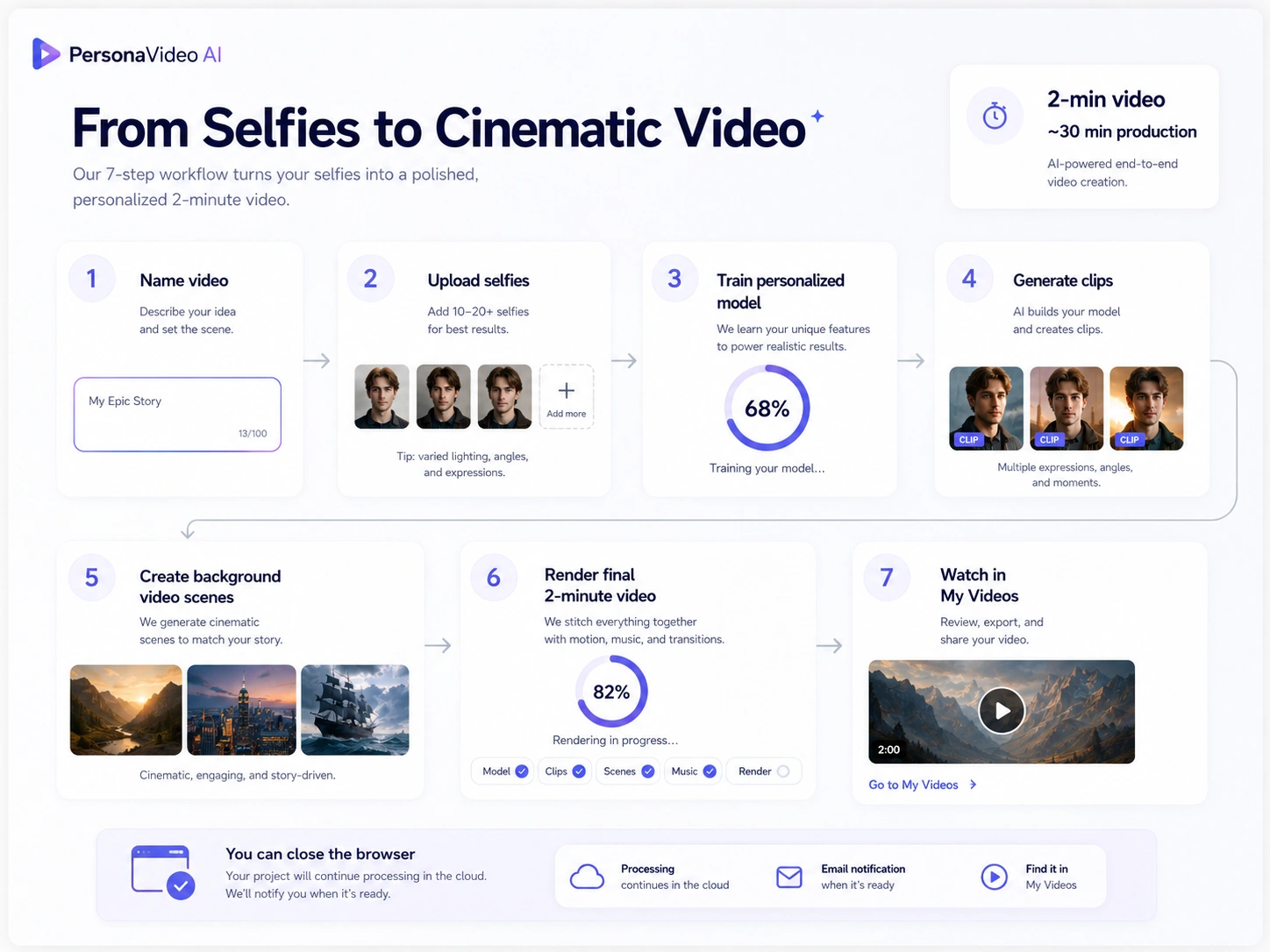
End-to-end workflow diagram
Results
The platform successfully implemented the complete technical path from user-uploaded photos to personalized generated video output.
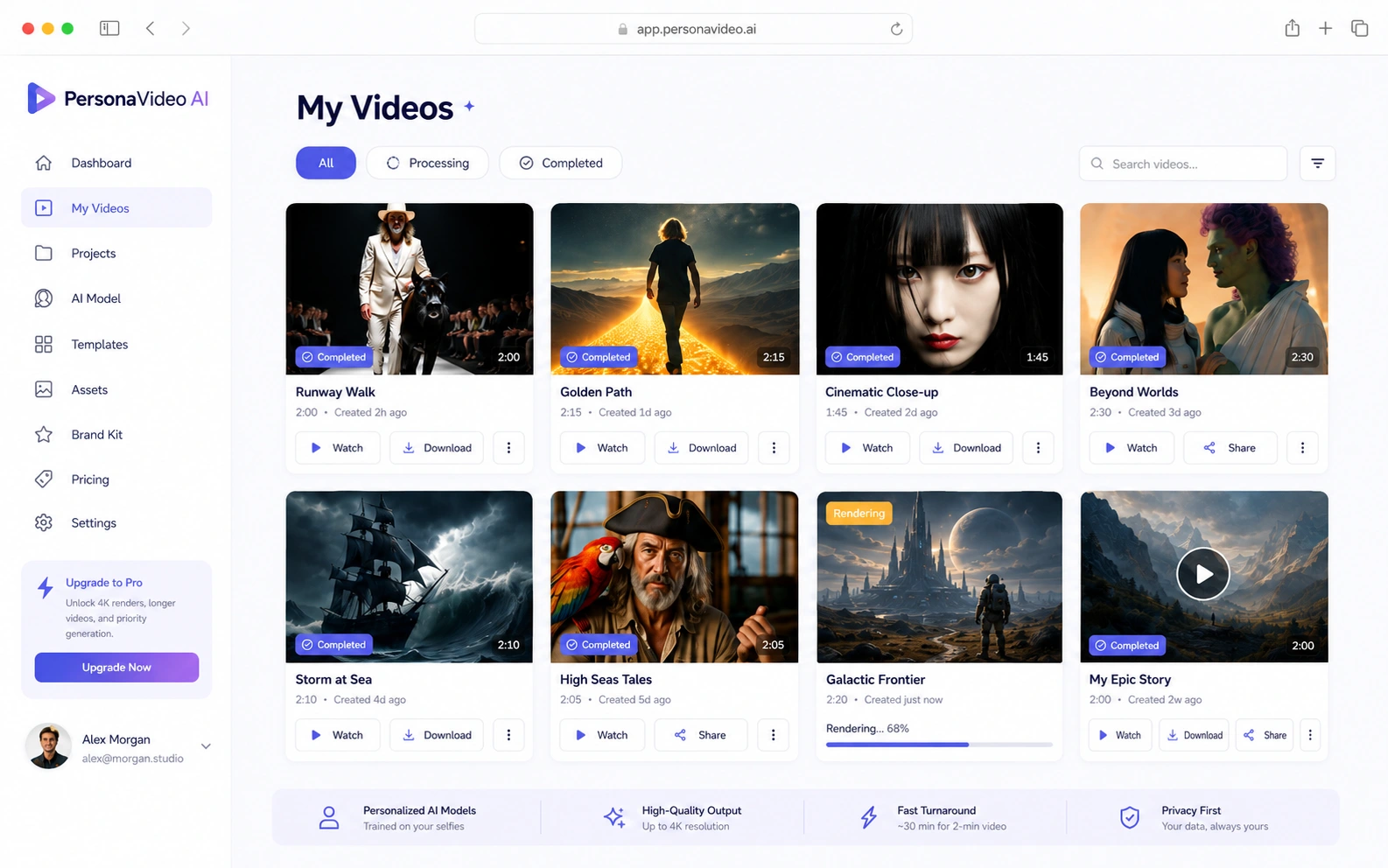
Video library
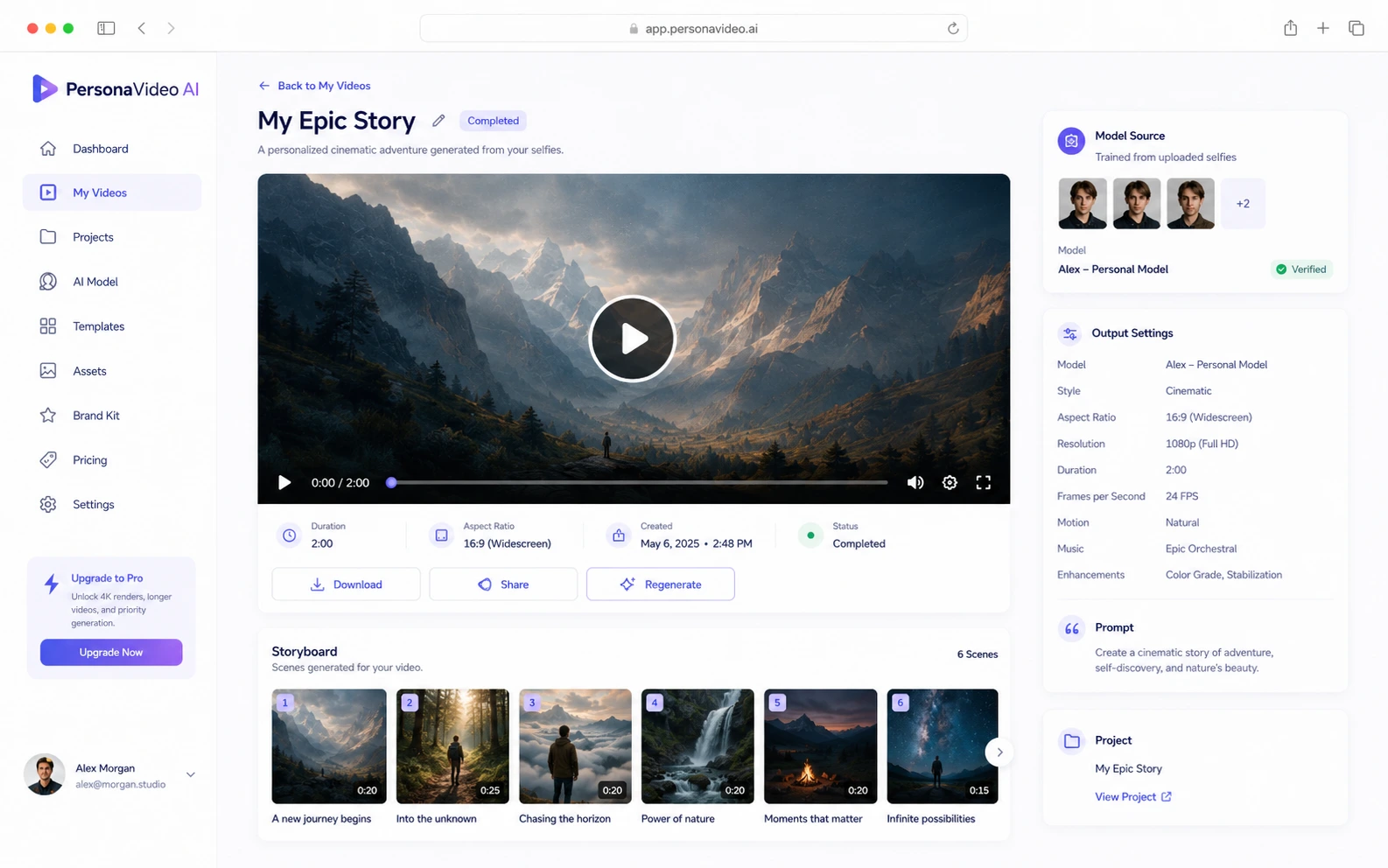
Video detail and playback
It demonstrated:
User photo ingestion
Personalized model fine-tuning
Likeness-aware generation
Cloud GPU orchestration
Persistent training and media assets
Asynchronous job tracking
Multiple generated clips
Retryable generation stages
Automated video assembly
Final video rendering and delivery
Support for visually diverse outputs
The generated examples demonstrate that the pipeline could produce very different creative directions, including:
Fashion and runway sequences
Cinematic landscapes
Science-fiction scenes
Character-led compositions
Fantasy imagery
Ocean and adventure sequences
The strongest result is not a single generated frame.
It is that model training, GPU infrastructure, asset storage, generation, and rendering were connected into one repeatable product workflow.
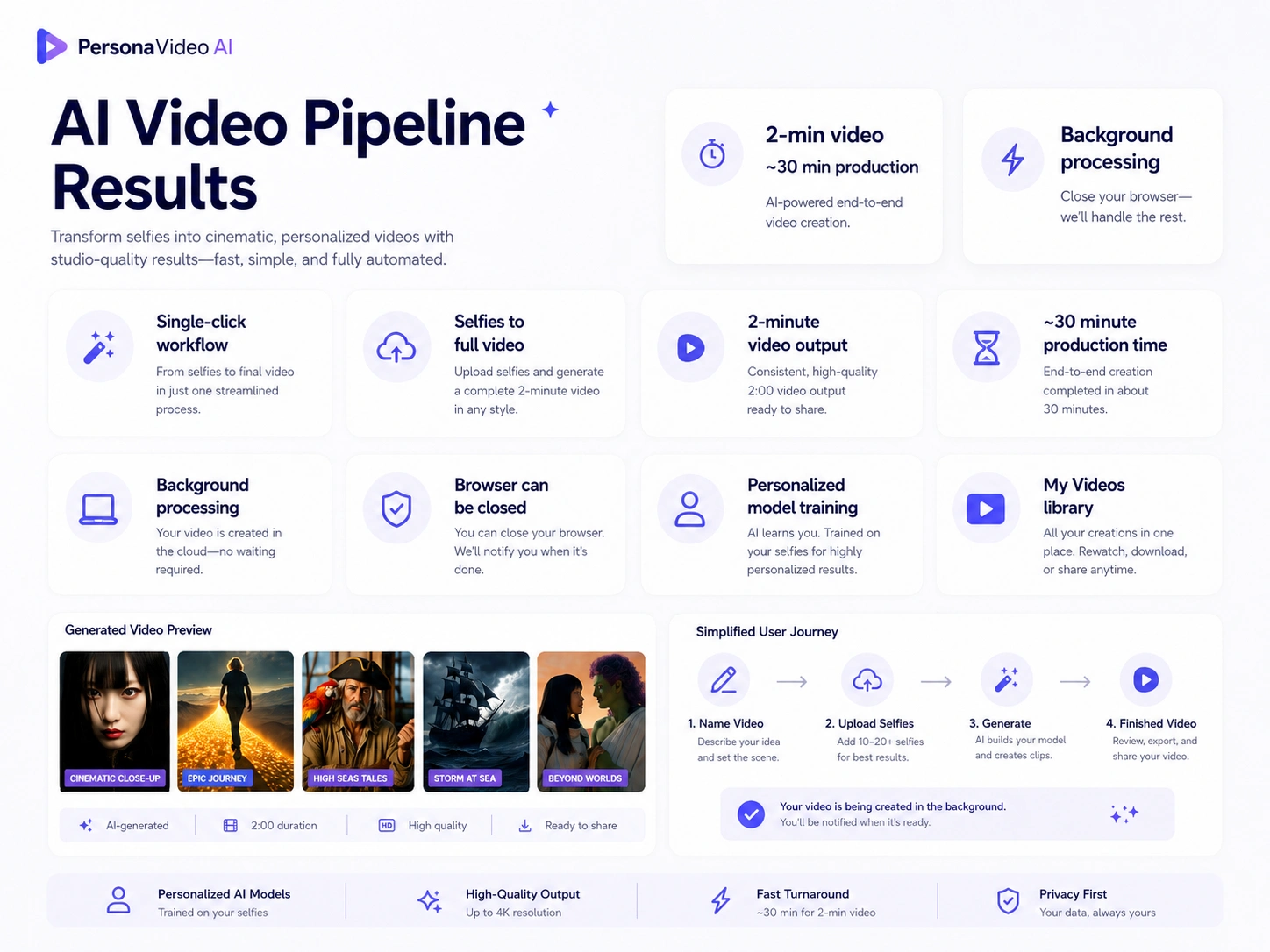
Results summary
My role
I led the full-stack and AI infrastructure implementation across the Next.js product, user upload and project workflows, prompt generation, personalized model training, RunPod GPU orchestration, asynchronous jobs, persistent asset storage, generation integrations, FFmpeg rendering, and final-video delivery. I designed the system so individual AI models could evolve without requiring the surrounding product workflow to be rebuilt.
Technology
Next.js
React
TypeScript
Node.js
Express
Python
RunPod
GPU-based model fine-tuning
Personalized LoRA models
Object storage
Webhooks
Polling-based job reconciliation
FFmpeg
Cloud video delivery
Image and video generation APIs
Like this project
Posted Jul 14, 2026
Built a production pipeline that fine-tunes a custom model from user photos, generates consistent multi-scene clips, and assembles them into polished videos.