
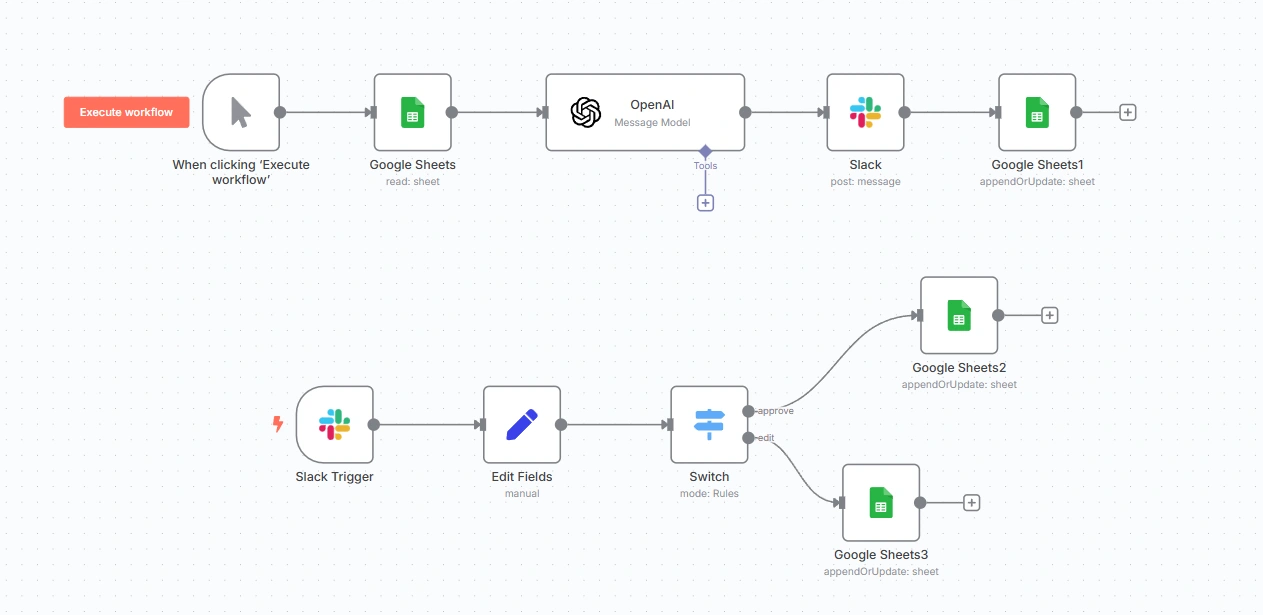
Content Automation & Review Workflow
Google Sheets | OpenAI GPT-3.5 | Slack | n8n
What it does
One-click draft creation – A new row in Google Sheets (topic + summary + audience) triggers n8n to call GPT-3.5 and generate a polished, three-paragraph blog post.
Instant Slack hand-off – The draft is posted to a review channel with clear “
#approve / #edit” instructions.Live feedback loop –
#approve <Topic> ➜ n8n updates the original sheet row to Published.#edit <Topic> ➜ Reviewer’s notes are captured in a Suggested Edits column and status stays In-Work for easy follow-up.Single-source tracking – All content status, revisions, and final copy live in the same Google Sheet for PM visibility or downstream reporting.
Why it matters
Cuts draft-to-publish time by ~80 % (no manual copy/paste between tools).
Keeps SMEs in Slack (their native flow) while maintaining structured data for analytics.
Zero-cost stack – Built entirely on n8n Cloud’s free tier, free Slack plan, and Google Workspace.
Stack / Integrations
Workflow engine: n8n Cloud – orchestrates triggers, branching logic, and API calls
Data layer: Google Sheets – single workbook for inputs, status, and feedback
AI layer: OpenAI GPT-3.5 – generates three-paragraph blog drafts on demand
Communication layer: Slack (bot) – review & approval interface for SMEs and PMs
My role
Scoped and built the end-to-end n8n workflow in < 2 hours.
Authored GPT prompt & regex logic for clean topic / feedback extraction.
Implemented resilient error handling (whitespace trimming, duplicate-row prevention).
Delivered JSON export for easy client hand-off.
Result: a plug-and-play automation the client can showcase to prospects or scale to WordPress publishing with one extra node.
1 like · 27 views · Jun 11, 2025
Developed an automated content workflow using n8n, Google Sheets, GPT-3.5, and Slack.


