BioDex: Wildlife Camera Analysis AI Development

Kyle Bean


Maturity
Field Value Status Research prototype Maturity Low Field-ready No — not clinical, not field-certified Last reviewed 2026-08-07
Biodiversity platform scaffold for Fratres X Natura. Research only.
BioDex
Local, privacy-first AI for wildlife camera-trap analysis.
Detect animals · filter blanks · identify species · export field-ready results — on your machine, not in the cloud.
Note: This repository lives under the Fratres-X-Natura account as the dedicated home for wildlife and defensive monitoring tooling.
Quick start — install and run
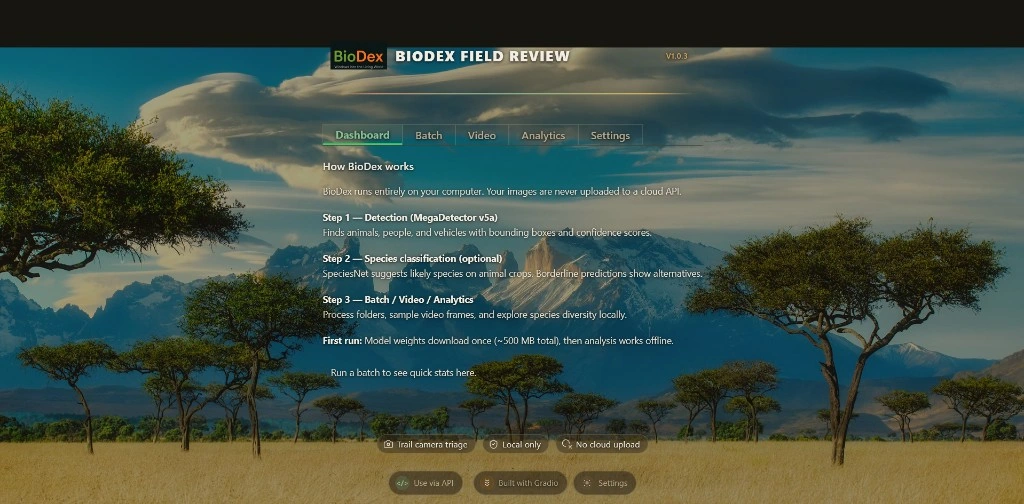
This is how you use BioDex. Install from PyPI, then launch the field-review UI.
Python 3.10, 3.11, or 3.12 Platforms macOS · Linux · Windows First run Downloads model weights once (~500 MB), then runs offline Browser http://127.0.0.1:7860 (auto-fallback 7860–7879)
Mac / Linux / Windows — run in order:
Open the URL printed in your terminal. Use Batch to process a folder, or Quick demo for an instant preview.
One-liner (copy-paste)
Tip Detail Windows Always pass
--prefer-binary on the heavy step to avoid slow or failed source builds (cmake, onnx). Do not use pip install "biodex[all]" — it does not include MegaDetector/SpeciesNet. Use the commands above. Privacy Images never leave your machine during detection. Optional LLM review is bring-your-own-key only.Why BioDex
Camera traps generate millions of frames. Most pipelines are cloud-only, expensive per image, or awkward for sensitive field data. BioDex is built for teams who need reproducible, offline-first triage on their own hardware.
Capability What you get Detection MegaDetector v5a — animal, person, vehicle, blank filtering Species ID SpeciesNet classification with confidence scores Batch review Annotated frames, tables, exports, optional per-frame LLM notes Video Frame sampling and timeline export (
[video] extra) Exports Wildlife Insights, iNaturalist drafts, SQLite, timelapse JSON, EcoSentinel hook CLI Headless biodex batch for large folders without a browserBuilt for conservation research, field review, and defensive wildlife monitoring.
Optional AI review (BYOK)
Core detection runs fully offline. AI review is an optional power feature — your API key, your provider, your choice of model.
Open Use via API in the footer.
Choose a provider, paste your API key, pick a model (or type a custom model ID), then Save.
After a batch run, select a frame and click AI review (LLM) for a field note: scene summary, species second opinion, and data-quality flags.
Privacy: Keys are stored locally in
~/.cache/biodex/settings.json and sent only to the provider you choose — never to BioDex servers. See SECURITY.md.PyPI extras (reference)
Extra What it installs When to use
ui Gradio web UI Required — included in quick start video OpenCV (headless, wheel-pinned) Recommended — Video tab / biodex video heavy / models MegaDetector, SpeciesNet, PyTorch, protobuf pin Required — detection and species ID analytics matplotlib, seaborn Library/API only (not used by the UI) edge onnxruntime stubs Experimental edge deploy dev pytest, ruff, mypy Contributors all ui + video + analytics + dev + desktop + edge No inference stack — not a substitute for quick startInstallation troubleshooting
Clean install (upgrading from 0.5.0 or fixing a broken env)
On Windows, prefer a fresh virtual environment:
Then run the Quick start commands again.
cmake / onnx build errors on WindowsUse
--prefer-binary on every BioDex extra install.Pin protobuf first:
pip install protobuf==3.20.1Install
[heavy] in a separate command after [ui,video].If it still fails, create a fresh venv and repeat quick start from scratch.
Slow dependency resolution
Avoid
biodex[all,heavy] in one command on Windows. Install in the four-step order from Quick start.Batch CLI
For large folders (100+ images), no browser:
Environment variables:
BIODEX_DETECTOR_MODEL, BIODEX_TORCH_COMPILE, BIODEX_GEOFENCE_REGION, BIODEX_AUDIT_LOG=1Docker
GPU image:
docker build -t biodex:gpu -f Dockerfile.gpu .Developers
Clone the repository:
Install in editable mode with development dependencies:
Run tests and linting:
For full contribution guidelines see CONTRIBUTING.md.
MIT License · Powered by MegaDetector and SpeciesNet
Like this project
Posted Aug 11, 2026
Developed BioDex, an AI tool for offline wildlife camera-trap data analysis for Fratres X Natura.
Likes
1
Views
16