
Mohit Kothari
Product | Designing to Development and everything in between
Profile in progress
Mohit is building their profile!
Hey everyone.
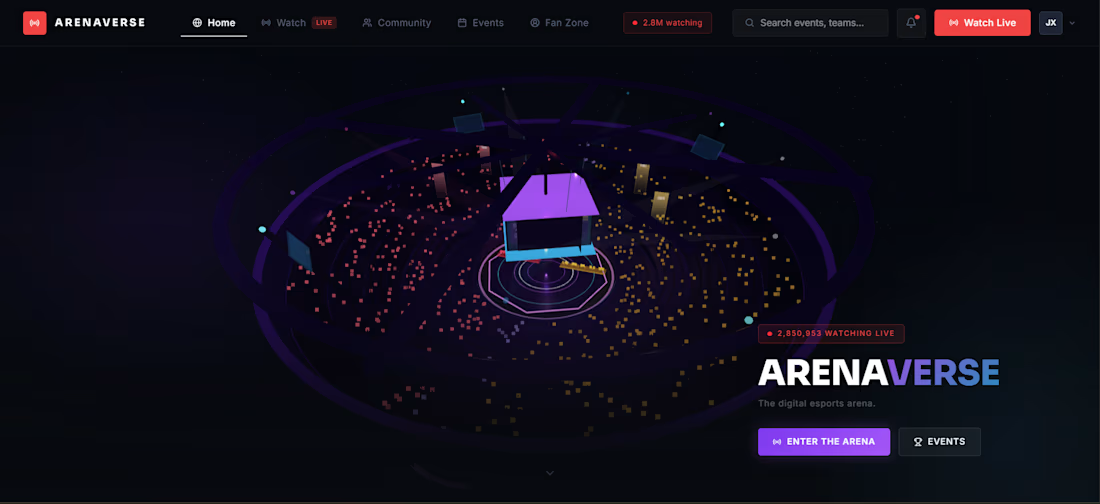
Today, I want to walk you through ArenaVerse. A virtual esports stadium.
💡The idea arose from my love for esports, gaming and streaming.
Millions of fans watch streams for games like Valorant, League of Legends, and other esports every day. We have Twitch chats, Discord servers, Reddit communities, and YouTube streams.
But all of these experiences are fragmented.
- The match is in one place.
- The community is somewhere else.
- The discussion happens elsewhere.
- The analytics are on another website.
There is no true digital home for esports spectators.
ArenaVerse is my attempt to solve that problem.
🤔 THE PROBLEM: Traditional sports have stadiums.
When people attend a football match or a basketball game, they don't just watch the game. They experience the atmosphere.
- They hear the crowd.
- They celebrate together.
- They react together.
- They become part of something larger.
Esports has incredible viewership, but most fans still experience events through isolated screens and disconnected communities.
I wanted to explore:
What if esports had its own digital stadium?
Not just another dashboard.
Not another streaming site.
A place where fans could watch, interact, compete, predict, discuss, and feel like they were inside a living esports venue.
🚀 THE VISION: ArenaVerse is designed as a Virtual Esports Stadium.
The goal is to combine:
- Live match viewing
- Community interaction
- AI-powered analysis
- Team fan zones
- Predictions and challenges
- Real-time crowd energy
into one connected experience.
Instead of navigating multiple websites, users enter a single digital venue where everything revolves around the live event.
🏠 HOME PAGE
It acts as the visual identity of the platform.
Live audience numbers, crowd energy, lighting effects, and animated stadium elements create the feeling that an event is already taking place before the user even clicks anything.
👀 WATCH EXPERIENCE
The Watch section is where the live event happens.
Users can watch actual tournament broadcasts while simultaneously interacting with the surrounding ecosystem.
Instead of forcing users to leave the stream for stats, discussion, or insights, everything exists around the viewing experience.
This creates a more immersive environment similar to attending a live esports event in person.
👥 COMMUNITY LAYER
One of the major goals of ArenaVerse was to bring the community closer to the match.
The Community experience includes:
- Live discussions
- Fan conversations
- Match reactions
- Community engagement
The idea is that fans shouldn't have to jump between Twitch chat, Discord, Reddit, and social media. The conversation should live directly alongside the event.
🧑🤝🧑TEAM FAN ZONES
This became one of the most exciting parts of the project.
Each team has its own Fan Zone.
For example:
- Sentinels
- Fnatic
- Team Liquid
- PRX
and others.
These zones function as digital clubhouses where supporters can gather around their favourite team.
Fans can see community activity, supporter rankings, events, predictions, and match-related discussions.
The goal is to create the feeling of belonging that traditional sports fans experience with clubs and supporter communities.
🤖 AI MATCH COMPANION
Another key component is the Arena AI Analyst.
Many esports broadcasts assume viewers already understand advanced strategies and game terminology.
Arena AI acts as an always-available companion.
Users can ask questions like:
- Why did a team rotate?
- Why was a certain strategy effective?
- What changed the momentum of the game?
The goal is to make esports more accessible while also providing deeper insights for experienced fans.
🖌️ DESIGN PROCESS
The workflow behind ArenaVerse was highly iterative.
I started with:
-Figma Make
- UI experimentation
- AI-assisted design exploration
As the concept evolved, I realized the experience needed more than traditional UI components.
That's when I began incorporating:
- Interactive 3D scenes
- Stadium-inspired environments
- Real-time visual effects
A large part of the process involved repeatedly refining the balance between functionality and immersion.
The challenge wasn't building more screens. The challenge was creating a sense of presence.
🔑 KEY LEARNINGS
One of the biggest lessons from this project was that AI is exceptional at accelerating exploration, but not at replacing design thinking.
Figma Make helped me rapidly generate concepts, experiment with layouts, and explore multiple directions that would have taken significantly longer to create manually. However, the most valuable outcomes came from iteration rather than the first generated result. Prototyping works best when ideas are continuously tested, refined, and challenged rather than accepted as-is.
Built with Figma Make and MCP
Prototype: https://arenaverse.figma.site/
Community link: https://www.figma.com/community/file/1649663751720659037/arenaverse
1
105
LyfStyle: Vitality AI Lifestyle OS
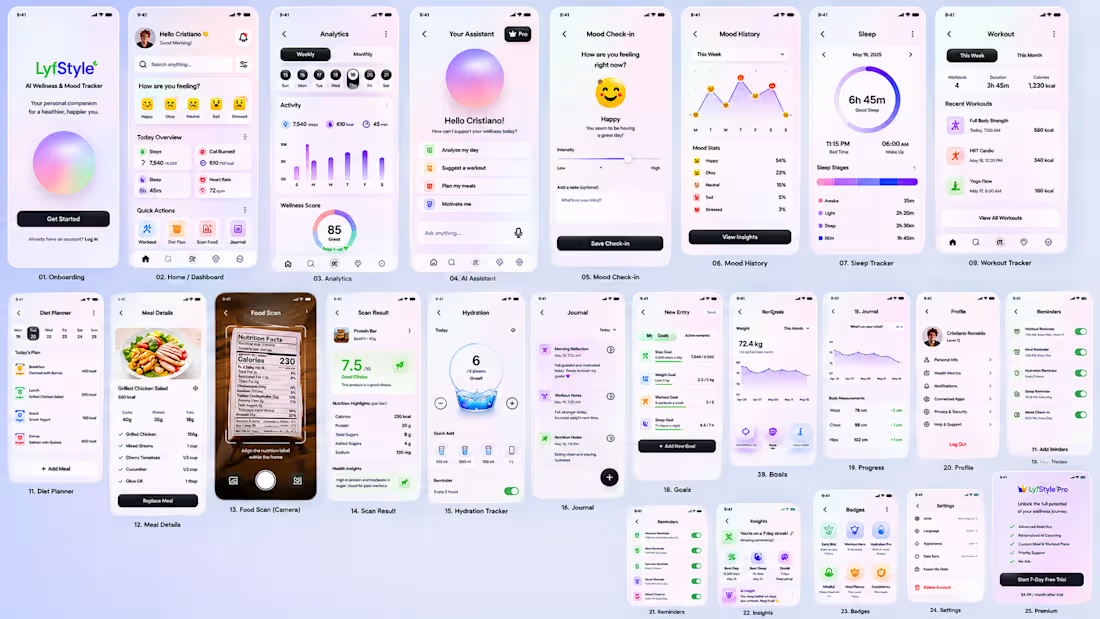
The vision behind LyfStyle was simple: health is interconnected, so the app should be too.
Instead of forcing users to switch between multiple apps for calorie tracking, workouts, journaling, mood monitoring, hydration, sleep, and coaching, LyfStyle brings everything together into one intelligent ecosystem.
From a design perspective, I intentionally moved away from the overwhelming look of traditional fitness applications. The UI follows a calm, wellness-focused aesthetic with soft gradients, glassmorphism elements, rounded components, and subtle interactions that make health tracking feel approachable rather than stressful. The goal was to create an interface that users would enjoy returning to every day.
One of the biggest challenges during the design phase was information architecture and navigation. As features expanded to include mood tracking, calorie tracking, workout planning, journaling, hydration, sleep monitoring, AI coaching, challenges, and analytics, the application began to feel like a collection of disconnected screens. To solve this, I introduced dedicated Track Hub and Plan Hub navigation layers, allowing users to discover and access all major features within two taps while maintaining a clean five-tab navigation structure. This significantly improved usability without increasing interface complexity.
I encountered an additional limitation with Stitch: it doesn't generate all the screens at once, even after I've specified this in the DESIGN.md (https://DESIGN.md) file. It seems that Stitch follows a "Core happy path" approach. After my initial prompt, it only created the Home Dashboard, AI Wellness Coach, Mood Tracker, and Calorie Tracker screens, along with a Design System. While this is sufficient for the MVP, I later added another prompt to generate more screens for the app.
Prompt I used for the second attempt to generate the remaining screens:
"Generate the remaining screens not yet created: AI Food Scanner, Food Analysis Results, Workout Planner, Active Workout Mode, Meal Planner, Grocery List, Sleep Tracker, Hydration Tracker, Habit Tracker, Journal, Progress Insights, Challenges, Premium Subscription, Settings, Notifications, and Health Integrations. Reuse the existing design system and maintain identical visual language."
App Preview: https://stitch.withgoogle.com/preview/11778724477651265361?node-id=daa53fbd005849f1818f299af5061a17
App workspace with DESIGN.md (https://DESIGN.md) file: https://stitch.withgoogle.com/projects/11778724477651265361
Overall, my experience with Stitch was great. I had a great time Vibe Designing. I created everything in just a few hours, and I plan to export this design to Bolt as a potential future project to evaluate how effectively Bolt can develop a real app using this design. I will keep this app available even after the challenge wraps up. I'm thrilled to see what happens in the next phase.
1
1
112