Freelancers using CapCut in RaiwindFreelancers using CapCut in Raiwind
Builder of End-to-End AI Apps | Sr. Graphic Designer

Data Analyst | Logo Design | Video Editing | Frontend Dev |
New to Contra
Data Analyst | Logo Design | Video Editing | Frontend Dev |
Cover image for Dashboard Overview: A Three-Pillar System
The
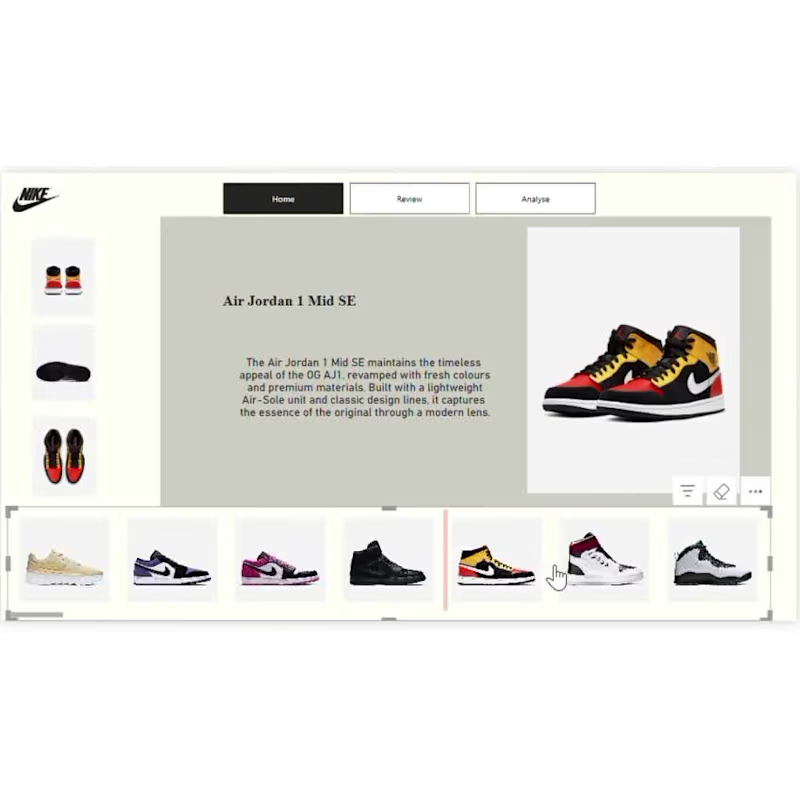
Dashboard Overview: A Three-Pillar System The interface is divided into three functional tabs, providing a comprehensive view of the product lifecycle: The Home Tab (Product Showcase): * Features a sleek carousel of iconic models like Air Jordan 1 Low SE, Jordan Aerospace 720, and Air Max 97. Provides high-quality product imagery alongside narrative descriptions of the shoe's heritage and design features. The Review Tab (Sales Performance): Displays critical KPIs: Total Profit (reaching up to $1.21M for the Air Jordan 5 Retro), Total Units Sold, and User Ratings/Reviews. Uses a "Sold Out" badge to visually highlight high-demand inventory. The Analyse Tab (Geographic Insights): Visualizes regional performance through "Units Sold by Region" line graphs and "Profit by Region" bar charts (categorized into South, Northeast, Southwest, and Midwest). Key Insights for Portfolio Posting If you are listing this project on Contra or LinkedIn, highlight these technical and business strengths: Integrated UX/UI Design: The dashboard seamlessly transitions from a retail catalog to a data-heavy analytics tool, maintaining a consistent brand aesthetic. Data-Driven Decision Making: By linking specific shoe models to regional profit data, the dashboard allows managers to see exactly where a product is trending (e.g., higher profit in the "South" vs. "Midwest"). Interactive Navigation: The bottom carousel serves as a global filter, allowing the user to switch products and instantly update the sales and geographic data across all tabs. Technical Skillset Demonstrated Data Visualization: Mastery of multi-series charts and KPI cards. Frontend Design: Clean, "Nike-inspired" minimalist layout with high attention to white space and typography. Business Intelligence: Creating a closed-loop system where product features are directly tied to financial outcomes.
0
129
Cover image for Professional Power BI Dashboard Design
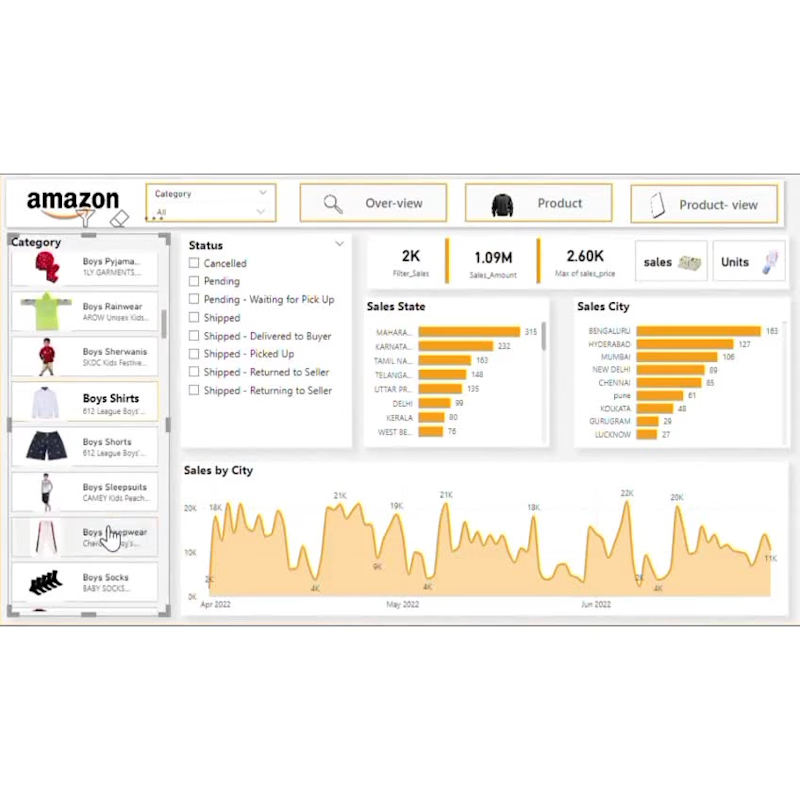
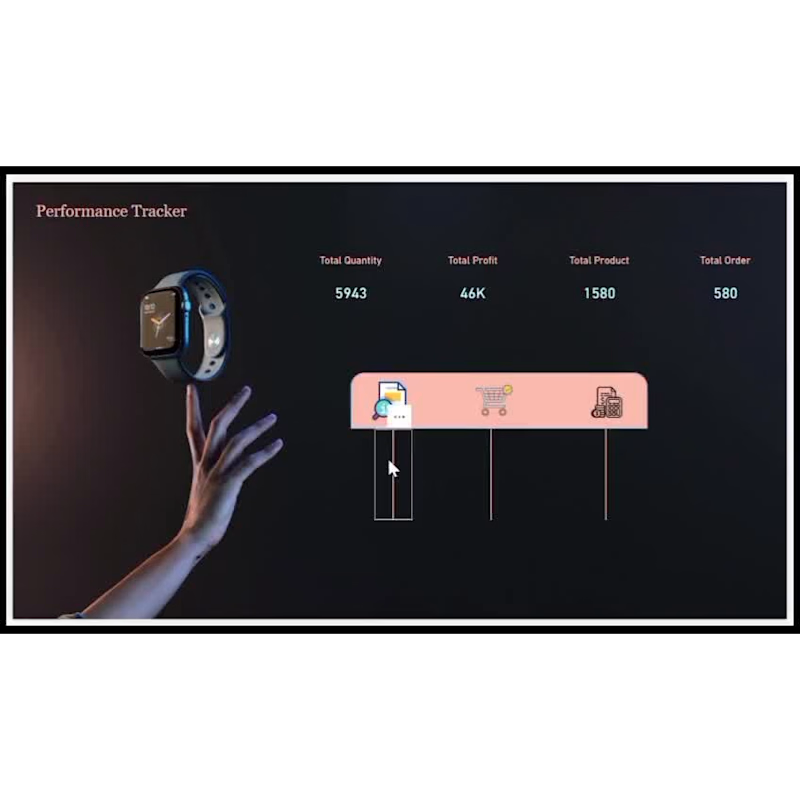
Professional Power BI Dashboard Design for Business Data Analysis 👨‍💻 What I Do I am a Power BI Dashboard Designer who transforms your raw, unorganized business data into stunning, interactive, and professional dashboards. I build multi-page dark-themed dashboards with KPI cards, dynamic charts, slicers, and filters that give you a complete 360° view of your business performance — all in one place. Whether you have sales data, ecommerce orders, product performance, or financial records — I will turn it into a beautiful visual story that is easy to understand and act upon. ❌ What Is The Problem Here Most business owners and managers are drowning in raw Excel sheets and CSV files with thousands of rows of data. The real problems are: ❌ You cannot see your business performance at a glance ❌ Important insights are hidden inside messy spreadsheets ❌ You waste hours manually calculating sales, profit and orders ❌ Your reports look boring and unprofessional ❌ You have no interactive filters to explore your data easily ❌ Decision making becomes slow and guesswork-based ❌ No proper trend analysis for daily, monthly or yearly performance This is exactly where most businesses lose money and opportunities — because they simply cannot read their own data properly. ✅ What I Fixed I solve all of these problems by building you a fully interactive Power BI dashboard that includes: ✔ KPI Cards — See Total Sales, Profit, Orders and Quantity at one glance ✔ Bar Charts — Compare profit and performance across all products instantly ✔ Donut Chart — Understand your payment mode distribution clearly ✔ Area & Line Charts — Track yearly and daily order trends by product ✔ Slicers & Filters — Filter your entire dashboard by product, category or payment mode in one click ✔ Multi-Page Layout — Separate pages for Overview, Trends and Category analysis ✔ Dark Professional Theme — A dashboard that looks premium and impressive ✔ Sub-Category Analysis — Drill down into profit and amount by sub-category No more confusion. No more manual calculations. Just clear, beautiful, actionable insights at your fingertips. 🏆 Why I Am Best For You There are hundreds of dashboard designers out there — here is why you should choose me: ⭐ I understand your data — I do not just make pretty charts. I study your data first and build a dashboard that actually makes sense for your business. ⭐ Dark theme specialist — My dashboards have a unique, premium dark theme design that stands out from generic white dashboards everyone else delivers. ⭐ Fast & reliable — I deliver on time, every time. Starter in 7 days, Standard in 3 days and Advanced in just 1 day. ⭐ Full communication — I keep you updated at every step. No ghosting, no delays, no surprises. ⭐ Revision guarantee — I do not stop until you are 100% satisfied with the final result. ⭐ Clean file delivery — You get a professionally organized .pbix file that is easy to use and update anytime. ⭐ Affordable pricing — Starting from just $5, you get a professional dashboard that would cost hundreds elsewhere. ⭐ Proven results — My dashboards have helped businesses track performance, identify trends and make faster and smarter decisions. 📩 Ready To Get Started? Stop wasting time in Excel sheets and start making data-driven decisions with a professional Power BI dashboard. Message me now — tell me about your data and I will get started right away! 🚀
0
28
Your one stop destination for digital marketing!