Freelancers using Canva in NairobiFreelancers using Canva in Nairobi
Brand Designer & Content Strategist | Purpose-Driven

5.0
Rating
35
Followers
Brand Designer & Content Strategist | Purpose-Driven

Your VA for Strategy, Canva Design & Getting Things Done

5.0
Rating
8
Followers
Your VA for Strategy, Canva Design & Getting Things Done

Administrative Virtual Assistant | AI Automation of workflow
10
Followers
Administrative Virtual Assistant | AI Automation of workflow
Cover image for AI-Powered Gmail Inbox Assistant: Turning
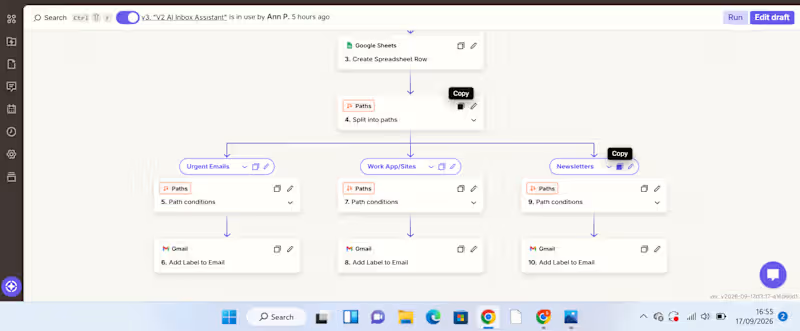
AI-Powered Gmail Inbox Assistant: Turning Email Overload into an Organized Workflow A busy inbox can become a productivity problem. For a VA or business owner handling a high volume of emails, manually reading every message, deciding its priority, summarizing it, determining what action is needed, and organizing it takes time. And when everything sits in one inbox, important messages can easily get lost among routine notifications and newsletters. I built an automation to solve that problem. The Solution I created an AI-powered Gmail inbox assistant that captures, analyzes, organizes, and records incoming emails automatically. The workflow starts when a new email arrives in Gmail. New Gmail → AI analyzes the email → Information is recorded in Google Sheets → Zapier Paths route the email → Gmail label is applied The AI extracts useful information from each email, including: Priority – how urgently the email needs attention Email summary – a concise explanation of what the message is about Recommended action – what should be done next Service/category – used to determine how the email should be handled The information is then captured in a Google Sheet, creating a structured record that can be reviewed, tracked, and used for further workflows. From there, Zapier Paths use the classification to route the email to the appropriate action. For example: Urgent email → AI identifies the priority and summarizes the message → information is recorded in Google Sheets → Urgent Path runs → Gmail applies the Urgent label. WorkApp/Sites notification → AI identifies the category → details are recorded in Google Sheets → WorkApp/Sites Path runs → the corresponding Gmail label is applied. Newsletter → AI classifies and summarizes it → information is recorded in Google Sheets → Newsletter Path runs → the Newsletters label is applied. What Problem Does This Solve? This automation addresses several repetitive administrative tasks at once. Instead of manually opening emails, interpreting them, recording important details, and organizing them, the workflow handles the first layer of processing automatically. It helps create: Less manual sorting Emails are categorized automatically. Better visibility The Google Sheet provides a structured overview of incoming messages, their priority, summaries, and recommended actions. Faster prioritization Users can identify emails requiring attention without reading through the entire inbox first. A searchable record Important email information is captured in one place instead of remaining buried inside an inbox. How Businesses Can Use It The workflow can be adapted to different businesses and inboxes. For example, a company could create categories such as: Client enquiries | Leads | Support requests | Finance | Internal communication | Urgent | Newsletters The Google Sheet can then become a simple operational dashboard or the starting point for additional automations. For example, a business could later extend the workflow to: Urgent email → notify the responsible team member Client enquiry → create a lead in a CRM Follow-up required → create a task Support request → route to the appropriate team This makes the workflow more than an inbox organizer. It can become part of a wider business process automation system. Tools Used Gmail – captures incoming emails and applies labels AI by Zapier – analyzes and classifies email content Google Sheets – stores the email priority, summary, recommended action, and category Zapier Paths – applies conditional logic and routes emails based on their classification What This Project Demonstrates My approach to automation is simple: Find the repetitive problem first. Then build the system around it. This project started with a common administrative problem—too much email and too much manual sorting—and turned it into a workflow that can analyze information, structure it, make routing decisions, and trigger actions automatically. I'm building my skills in AI automation with a VA mindset: understanding the business problem first, then creating practical systems that reduce manual work and improve how information flows.
1
70
✨Turning your vision into stunning, Liveable spaces✨
New to Contra
✨Turning your vision into stunning, Liveable spaces✨

AI Commercial Producer & Creative Director

Your reliable Social Media Manager

Holistic designer for impactful graphics