The network for creativity
Join 1.25M professional creatives like you
Connect with clients, get discovered, and run your business 100% commission-free
Creatives on Contra have earned over $150M and we are just getting started
Back to feedPost
Silent service hangs: Why naive systemd service definitions either mask deadlocked processes or destroy clusters in high-speed restart crash loops.
When managing background services on Linux, engineering teams routinely rely on two simplistic systemd settings: ``Restart=always`` and ``RestartSec=2s``. While well-intentioned, this minimal configuration creates two catastrophic production failure modes:
1. The Undetected Deadlock: A multi-threaded daemon enters a database connection pool deadlock or memory thrashing state. The main process does not crash, so systemd reports the unit as ``active (running)``. However, the service stops processing traffic, health checks fail at the load balancer, and on-call engineers are left debugging phantom hangs while systemd does nothing. 2. The Flapping Storm: When a hard dependency fails—such as an unavailable database, corrupted config file, or missing TLS secret—the service crashes immediately on startup. With unthrottled restarts, systemd rapidly relaunches the binary thousands of times per minute. This consumes CPU cycles, fills disk partitions with gigabytes of redundant journald crash logs, and triggers cascade failures across downstream systems.
Modern systemd provides production-grade **hardware and software watchdog orchestration** paired with strict restart rate limiting: • Implement Application Heartbeat Watchdogs: Configure ``WatchdogSec=30s`` in the ``[Service]`` block. Integrate the application event loop with ``sd_notify("WATCHDOG=1")`` so the daemon actively proves it is healthy. If the application deadlocks or its event loop blocks beyond the interval, systemd terminates the hung process with SIGABRT and executes a clean restart. • Define Bounded Restart Intervals: Protect host stability by defining ``StartLimitIntervalSec=300s`` and ``StartLimitBurst=5`` in the ``[Unit]`` block. If a service crashes more than 5 times within a 5-minute window, systemd halts the flapping loop and marks the unit as failed, preventing log exhaustion. • Add Graceful Backoff with RestartSec: Set ``RestartSec=5s`` combined with ``Restart=on-failure`` rather than ``Restart=always``, ensuring planned administrative stops via SIGTERM are respected while unexpected terminations trigger controlled recovery. • Configure Automated OnFailure Handlers: Use ``OnFailure=service-alert@%n.service`` to trigger an automated notification script, capturing stack traces and alerting SRE teams the moment a unit exceeds its restart budget.
Turn unmonitored background daemons into self-healing, deterministic system components.
Harden your production Linux infrastructure with our 2-week Hardened Linux & Container Infrastructure Sprint on Contra: https://contra.com/s/Xbg7ALqN-hardened-linux-and-container-infrastructure
#Linux #DevOps #SRE #Infrastructure #Architecture #SystemsEngineering


The network for creativity
Join 1.25M professional creatives like you
Connect with clients, get discovered, and run your business 100% commission-free
Creatives on Contra have earned over $150M and we are just getting started

Challenges
View all


Related posts


Check it out
Just published: 0-1 design for an Energy Management System (EMS) ⚡
Designed a desktop platform monitoring wind turbines, PV parks, and battery storage across multiple sites. Keeping the interface mostly white, so green and red status indicators do the talking.
Operators managing critical infrastructure need to assess system health instantly. No visual noise, no cognitive overload. Just unmistakable state communication.


Cool work 👌

Built an n8n automation that recovers missed customer calls, starts an AI conversation, checks CRM context, routes urgent requests, and tracks callback SLAs until the customer is handled.


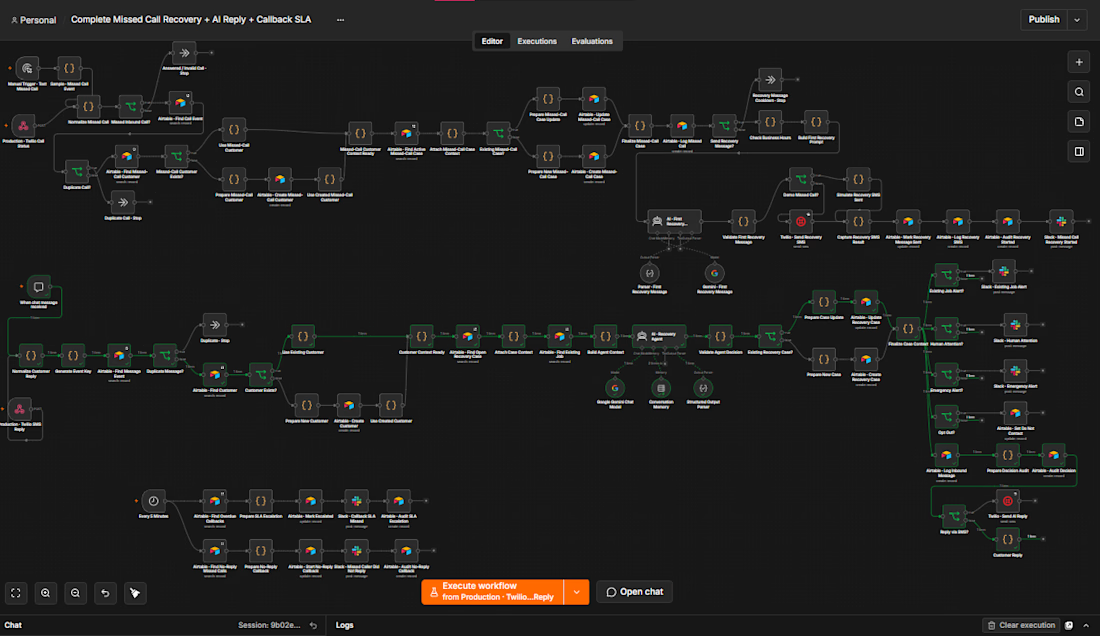

nice that it tracks the callback until someone actually handles it. which businesses is this built for, trades or more like clinics

The Let's Encrypt 429 lockout: Why automatic ACME issuance in ephemeral testing environments paralyzes releases and how centralized storage prevents outages.
Modern web servers like Caddy have revolutionized HTTPS by enabling automatic, zero-configuration TLS certificate issuance through Let's Encrypt and ZeroSSL. You point a domain name to your server, start the daemon, and within seconds, production-grade TLS 1.3 certificates are provisioned and renewed automatically.
However, when engineering teams introduce automated ACME servers into dynamic CI/CD staging environments, ephemeral Kubernetes clusters, or multi-node container stacks, a catastrophic failure mode frequently occurs: **the Let's Encrypt rate limit lockout**.
1. The Ephemeral Container Trap: In ephemeral staging or testing clusters, containers spin up and tear down constantly. If certificate storage is not persistently mounted to disk, every newly spawned container requests fresh certificates from Let's Encrypt production endpoints upon startup. 2. The 5-Certificate-per-Week Ceiling: Let's Encrypt enforces strict production rate limits: a maximum of 5 duplicate certificates per exact domain per week, and 50 new certificates per registered domain per week. Once exceeded, Let's Encrypt returns HTTP 429: ``too many certificates already issued for exact set of domains``. 3. Blocked Production Deployments: The rate limit cannot be manually reset or cleared by support tickets. Your domain is locked out for an entire 7-day rolling window. If this happens to a production domain or wild-card sub-domain during a scheduled release, the deployment halts completely.
Hardened enterprise TLS architecture isolates staging environments and centralizes certificate storage: • Use the Let's Encrypt Staging Environment for Testing: Configure test environments, PR preview apps, and staging clusters to point explicitly to the ACME staging endpoint (in Caddy: ``acme_ca https://acme-staging-v02.api.letsencrypt.org/directory``). Staging endpoints enforce massively higher rate limits, allowing unlimited test deployments without consuming production quotas. • Shared Storage Backends for Clustered Ingress: In multi-node proxy deployments, never allow individual instances to request certificates independently. Configure shared storage modules (e.g., PostgreSQL, Redis, or S3 storage plugins) so that all proxy instances share a single authoritative certificate cache and distributed mutex lock. • Implement Internal Enterprise CA for Staging: For non-public internal domains and staging environments, bypass public ACME entirely. Issue certificates using an internal FreeIPA or step-ca Private PKI, eliminating third-party rate limits and external dependency risks. • Graceful Fallback Strategies: Ensure ingress proxies maintain valid fallback certificates and cache existing valid keys on disk before attempting renewal.
Eliminate TLS lockout risks and guarantee seamless, automated certificate lifecycles across all environments.
Deploy hardened, high-availability ingress with our 1-week High-Availability Ingress & Hardened Reverse Proxies Sprint on Contra: https://contra.com/s/Ec6sEAUW-high-availability-ingress-and-hardened-reverse-proxies-ha-proxy-and-caddy
#Security #Infrastructure #DevOps #Architecture #SRE #Networking #Cloud