The network for creativity
Join 1.25M professional creatives like you
Connect with clients, get discovered, and run your business 100% commission-free
Creatives on Contra have earned over $150M and we are just getting started
Back to feedPost

When modernizing legacy .NET apps, I often see this pattern:
“Let’s wrap the sync code in Task.Run() and await it.”
-> It looks async.
-> It compiles async.
-> But it’s fake async.
What really happens:
-> Blocking I/O is moved to the ThreadPool
-> Threads are still consumed
-> Under load, scalability gets worse, not better
Task.Run() doesn’t turn synchronous database or API calls into non-blocking ones — it just hides the problem.
I break this down (with better alternatives) in my full article:
“Async Isn’t a Keyword: Modernizing a Legacy Synchronous .NET Application”
If async “didn’t help” your .NET app then this might be why.
-> [Medium Article]


The network for creativity
Join 1.25M professional creatives like you
Connect with clients, get discovered, and run your business 100% commission-free
Creatives on Contra have earned over $150M and we are just getting started
Trending
retrofuturism
Share your favorite designs from the past exploring the distant future. Or your own take on the aesthetic 🚀
halftone
Dots. Texture. Grain. Let's see your designs using the halftone technique.

Midjourney
Creatives are showing off what they're making with Midjourney.
colorgrade
Video editors sound off: How do you enhance the mood of your video in color grading?





Related posts

I engineered a hybrid-rendered Next.js 15 frontend leveraging Incremental Static Regeneration (ISR) to absorb repeat traffic at the edge, reducing public GET requests to near zero. The core system is powered by a custom Node.js/Express REST API, containerized with Docker and deployed for auto-scaling on Google Cloud Run. To bridge the cached frontend with the dynamic CMS, I implemented an on-demand ISR webhook. This allows admins—secured via stateless HttpOnly JWT cookies—to publish updates that instantly bypass the cache and go live globally in seconds.




The publish flow is the part I'd show a client. An editor updates the CMS once, and the page refreshes worldwide in seconds without a developer touching it.

Best Hosting Platforms for Next.js in 2026 — ISR & PPR Compared
A feature-level comparison of Next.js hosting platforms — Vercel, Netlify, Cloudflare Workers, AWS Amplify, Railway/Render, and self-hosting — focused on how each one actually handles ISR and PPR/Cache Components in practice, not just marketing claims. Breaks down functional vs. performance fidelity so developers can pick a platform based on real feature support. Published on DevStacked, my developer blog covering practical Next.js and SaaS implementation guides.

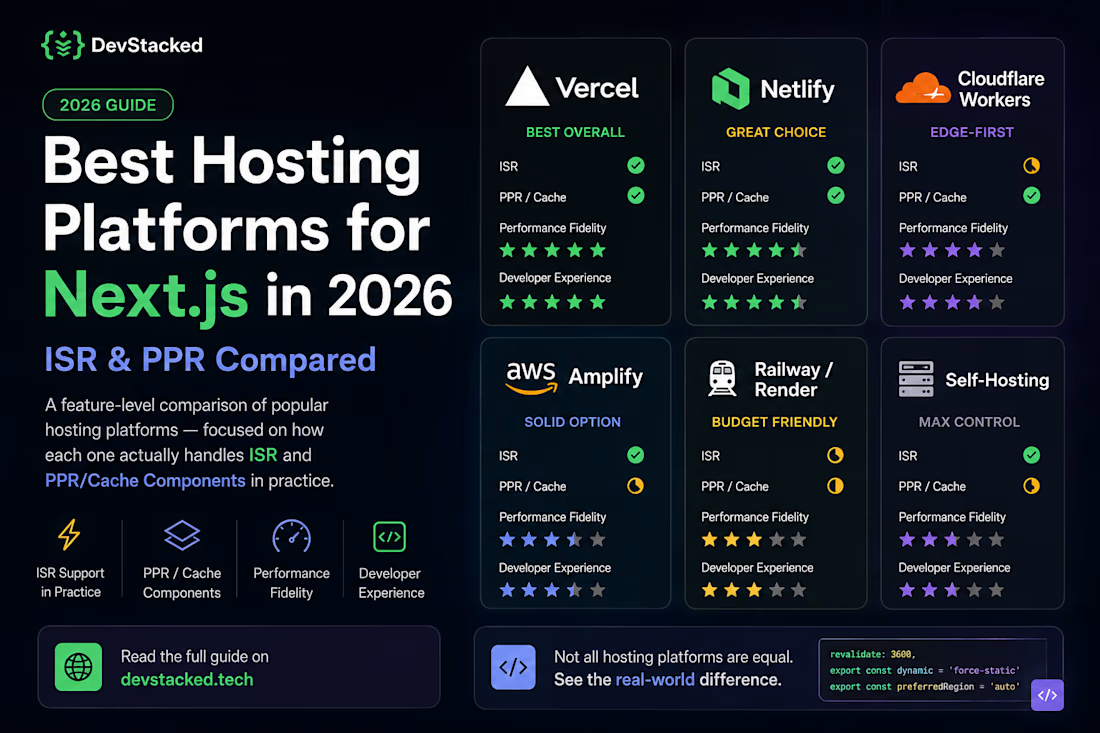


Comparing PPR and ISR across runtime environments is a critical engineering breakdown! Edge platforms handling static shell stitching versus containerized buffering for PPR is a huge blind spot for full stack teams. Fantastic technical write up!

🚀 Built Academix — a Full-Stack Institute Management System
I built Academix using the MERN stack to manage core institute operations through role-based dashboards for Admin, Teacher, and Student users.
Key features include:
• JWT authentication & role-based access control
• Course & batch management
• Student enrollment
• Fees & attendance management
• RESTful APIs
• MongoDB/Mongoose database design
• Form validation & error handling
• Email functionality
• Responsive React.js dashboards
Tech Stack:
React.js • Node.js • Express.js • MongoDB • Mongoose • JavaScript • Tailwind CSS • JWT
This project helped me work with real-world authentication, business logic, database relationships, API development, and frontend-backend integration.
🔗 Live Demo: https://academix-nine-kappa.vercel.app/
#MERN #ReactJS #NodeJS #MongoDB #WebDevelopment #FullStackDevelopment

Solid scope for a solo build, especially fees and attendance management alongside the role based dashboards. I mostly work with Firebase and Supabase instead of MongoDB, but the pattern ends up the same, JWT or session auth deciding what each role sees on the React side....