The network for creativity
Join 1.25M professional creatives like you
Connect with clients, get discovered, and run your business 100% commission-free
Creatives on Contra have earned over $150M and we are just getting started
Back to feedPost

Make (Integromat) – Integration of Typeform and HubSpot
Objective:
Automate lead management by integrating Typeform responses with HubSpot CRM and sending updates via Telegram.
Process:
1. Trigger: Typeform captures a new response.
2. Search Contact: HubSpot CRM checks if the contact exists.
3. Router Logic: If found → Update contact in HubSpot & send a Telegram notification. If not found → Create a new contact in HubSpot & send a Telegram notification.
Outcome:
Streamlined lead processing, real-time CRM updates, and instant notifications in Telegram.


The network for creativity
Join 1.25M professional creatives like you
Connect with clients, get discovered, and run your business 100% commission-free
Creatives on Contra have earned over $150M and we are just getting started



Related posts

Your Logistics Team Shouldn't Have to Chase Every Shipment Manually. 🚢
A shipment is delayed. Your customer wants an update. Your operations team is checking carrier portals, copying tracking numbers into spreadsheets, and sending the same status emails repeatedly.
By the time everyone has the right information, the next shipment needs attention.
The problem isn't a lack of effort. It's disconnected logistics operations.
Common challenges:
Shipment updates scattered across multiple carrier systems.
Delayed shipments discovered too late.
Manual customer status emails.
Tracking spreadsheets that quickly become outdated.
Repetitive follow-ups between operations and customer service.
Limited visibility into shipment exceptions.
The solution: An automated logistics operations workflow built with n8n.
I can design an automation that connects carrier tracking APIs, your shipment database, and customer communication channels.
Instead of manually checking every shipment, your team receives structured updates when something actually needs attention.
What the automation handles:
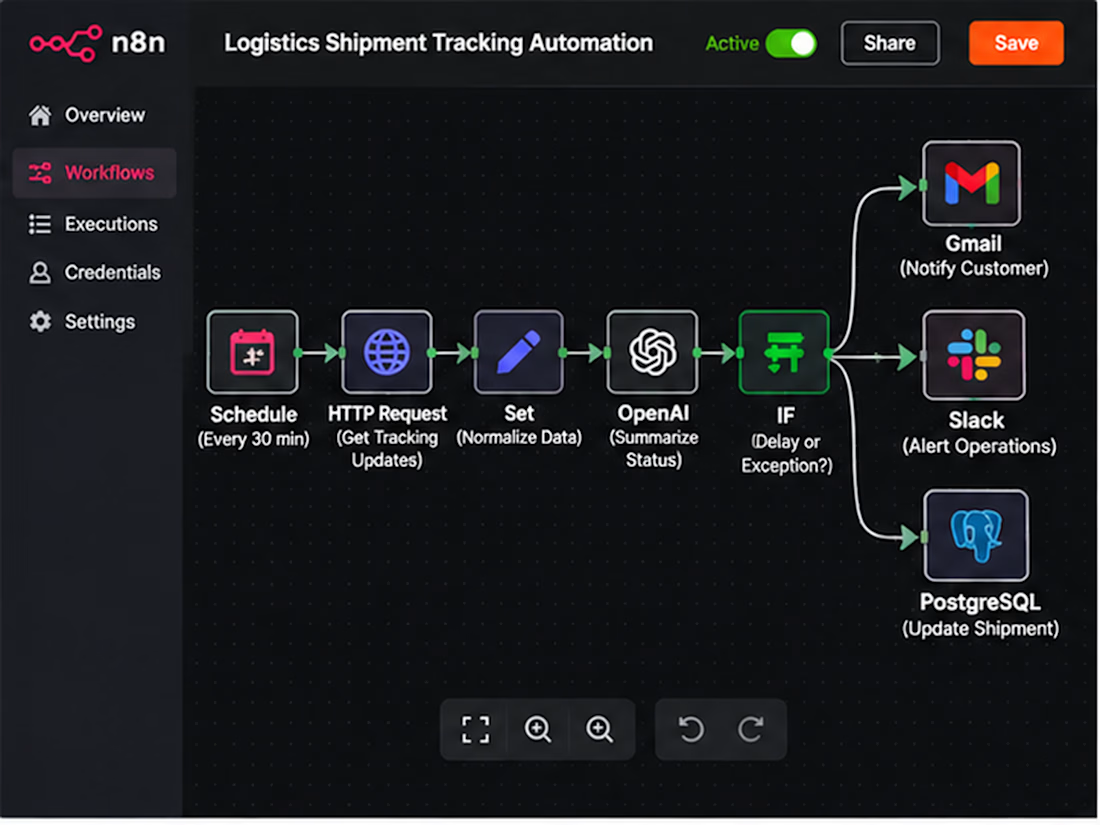
📦 Shipment Tracking — Retrieve updates from supported carrier APIs.
🚨 Exception Detection — Identify delays, customs holds, and missed milestones.
🤖 AI-Assisted Updates — Convert complex tracking events into clear, customer-friendly messages.
📧 Customer Notifications — Send relevant shipment updates automatically.
📊 Operations Visibility — Maintain synchronized shipment records and exception histories.
🔁 Escalation Management — Notify the responsible team when an exception requires action.
The goal: Less repetitive tracking work, faster exception awareness, and more consistent customer communication.
Two ways we can work together:
Option 1: Already have carrier APIs, a TMS, or a defined tracking workflow? Share your requirements, and I'll help design the integration.
Option 2: Not sure which logistics tasks should be automated? We can map your shipment lifecycle and identify the highest-value starting point.
Make your logistics operations easier to manage as shipment volume grows.
Workflow architecture
Scheduled Trigger → Carrier API Request → Normalize Tracking Events → Match Shipment Records → Detect Status Changes → Route Exceptions → AI Summary → Customer Email / Operations Alert → Database Update
Implementation: Authenticate carrier integrations, normalize differing event codes, compare timestamps and event IDs, prevent duplicate alerts, route exceptions by severity, and log delivery failures for retry.
Benefits: Reduced manual tracking, clearer exception ownership, more timely customer updates, and an auditable shipment history.
Result: A centralized shipment monitoring workflow that allows operations teams to focus on resolving exceptions instead of repeatedly checking tracking portals.
SEO Keywords
n8n logistics automation • freight forwarding automation • shipment tracking automation • AI logistics workflow • 3PL automation • logistics API integration • freight tracking software • supply chain automation • carrier tracking API • automated shipment notifications • freight forwarder software • logistics operations automation • shipment exception management • customs clearance alerts • AI shipment updates • freight status monitoring • transportation workflow automation • logistics email automation • carrier integration services • shipment delay alerts • freight operations workflow • logistics customer communication • n8n freight automation • logistics data synchronization • TMS integration • transportation management integration • shipment event processing • automated logistics reporting • shipping status API • logistics workflow developer • freight technology consultant • 3PL workflow integration • automated delivery updates • shipment milestone tracking • freight customer portal integration • logistics exception alerts • carrier API developer • logistics process optimization • AI supply chain automation • logistics database automation • freight forwarding API • shipment tracking dashboard • logistics business automation • automated freight communication • shipment lifecycle automation • n8n API workflows • logistics SaaS integration • freight management automation • shipping notification workflow • custom logistics automation • shipment reconciliation • freight exception escalation
Hashtags
#n8n #n8nAutomation #LogisticsAutomation #FreightForwarding #FreightTech #SupplyChainAutomation #ShipmentTracking #3PL #LogisticsTechnology #WorkflowAutomation #AIAutomation #CarrierIntegration #APIAutomation #FreightManagement #ShipmentVisibility #SupplyChainTech #LogisticsSoftware #BusinessAutomation #CustomAutomation #LogisticsOperations #ShipmentAlerts #FreightSoftware #TransportationManagement #SupplyChainVisibility #AIWorkflow #AutomationEngineer #B2BAutomation #SystemIntegration #OperationsAutomation #FreightOperations #ShippingAutomation #CustomSoftware



The customs-hold exception is the one I'd find hardest to route, since it needs a different owner than a plain delay. Do you map each exception type to its own team in the escalation step, or is it one shared alert queue?

Clients often start with the same request: "Let's build an AI agent."
My counter-question is always: which manual process actually costs you time, errors, or money right now?
My selection rule: remove it first. If it can't be removed, simplify it. If it's still needed, automate it with a plain script. Only then add an integration or an agent. Often the best result is the process that no longer exists.
Safe automation means real scenarios, error handling, and alerts. Without alerts, a workflow can silently lose data for weeks. I always define what stays with a human and what goes to the system.
Question for you: which process would you automate first, and why is it still manual?
Service for audit and implementation: https://contra.com/s/BmWLbgFU-ai-automation-from-your-dream-to-working-implementation?r=auto_booster



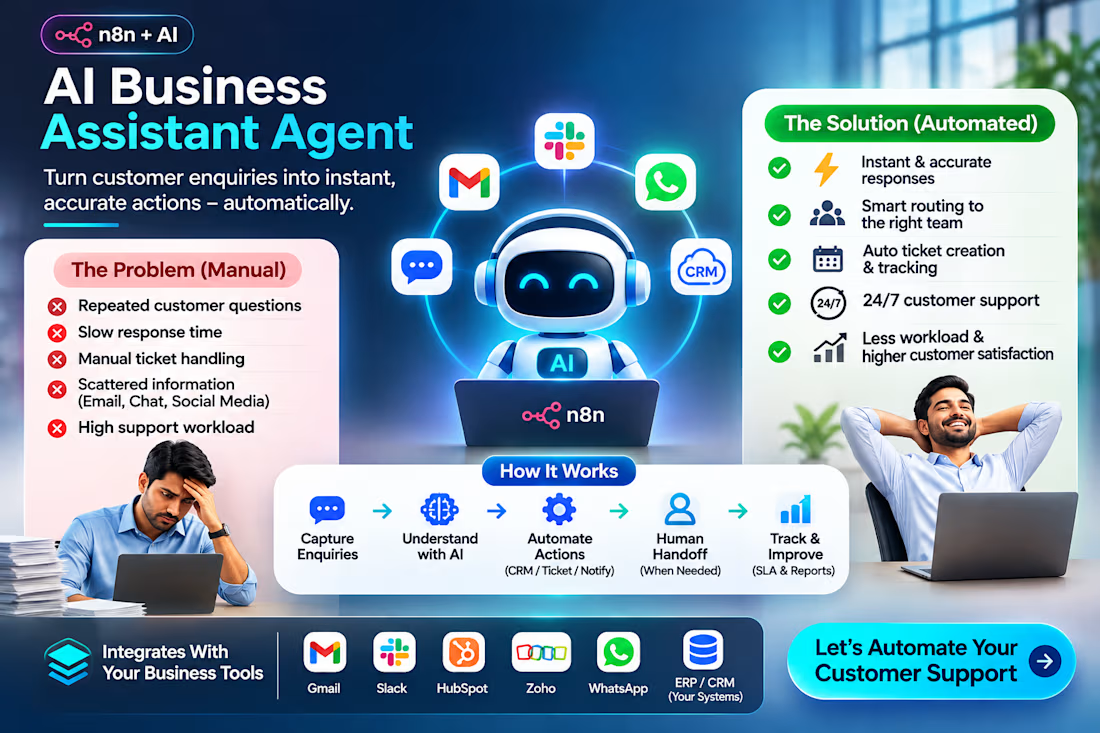
🚀 Is Your Customer Support Team Spending Too Much Time on Repetitive Tasks?
Customer enquiries, delayed responses, manual ticket handling, and disconnected systems can slow down business operations.
I build AI Business Assistant solutions using n8n, AI Agents, and API integrations.
Here's what the solution can automate:
✅ Customer enquiry classification and response drafting
✅ Priority-based routing and escalation
✅ Ticket creation and tracking
✅ CRM updates and team notifications
✅ Human-in-the-loop approvals for complex cases
✅ Integration with existing business tools
The goal: Faster response handling, less repetitive work, and better operational visibility.
I've built working AI assistant and customer support automation demonstrations and am available for custom implementation and subcontracting projects.
Are you a business owner, operations manager, or automation agency looking to automate customer support?
📩 DM me with your requirements. I'll share a relevant workflow demo and discuss a fixed-price implementation.
#n8n #AIAgents #CustomerSupportAutomation #BusinessAutomation #AIIntegration

For the human-in-the-loop approvals on complex cases, what decides when a ticket gets escalated: a confidence score from the classification step, or rules like keywords and customer tier? That threshold is usually where these n8n flows either save time or create review noise.