The network for creativity
Join 1.25M professional creatives like you
Connect with clients, get discovered, and run your business 100% commission-free
Creatives on Contra have earned over $150M and we are just getting started
Back to feedPost

Overview
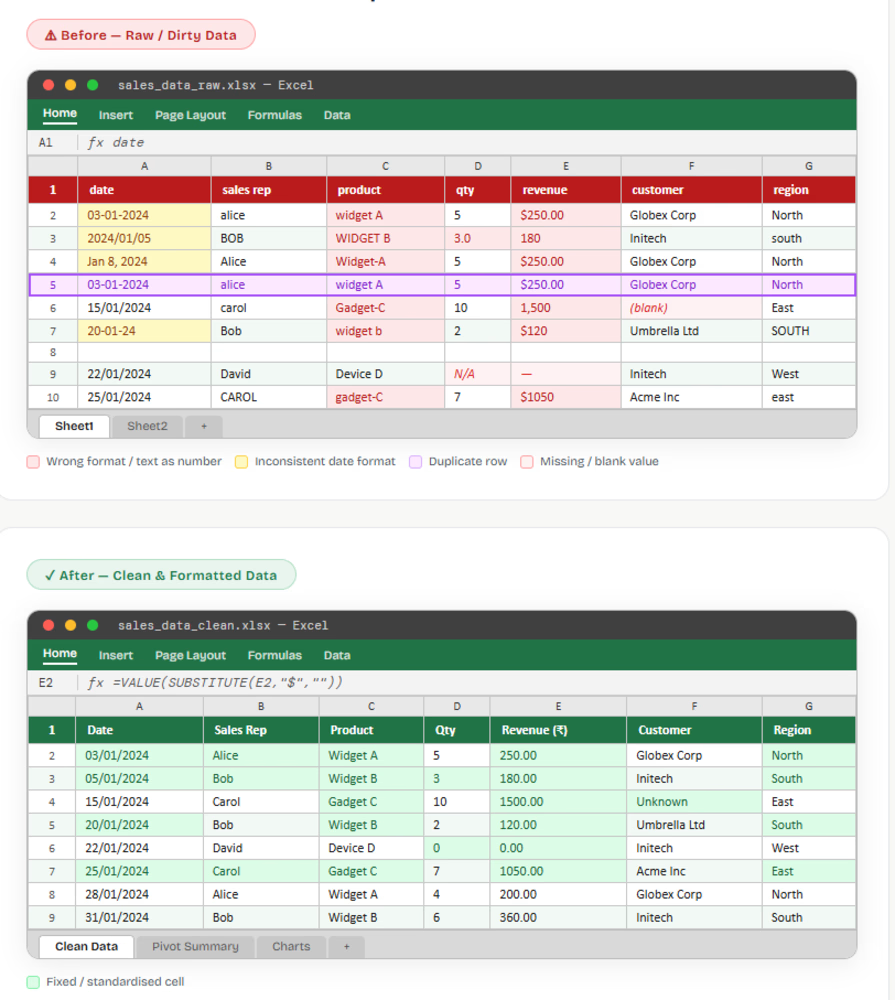
The client provided a monthly sales report exported from their CRM system. The data covered Q1–Q2 sales transactions across 5 regional sales reps, containing product names, quantities, revenue figures, dates, and customer names. The raw export was completely unformatted — inconsistent date formats, mixed-case text, and currency values stored as plain text made it impossible to build pivot tables or charts directly.
GOAL
1.Remove all duplicate rows and standardise date formats
2.Convert revenue and quantity columns from text to proper format
3.Apply consistent column headers, freeze panes, and conditional formatting
4.Make the sheet ready for pivot table analysis and charting
What I Did
1.Removed Duplicate Rows
2.Standardised Date Formats
3.Fixed Text-Stored Numbers
4.Standardised Text Values
5.Formatting & Final Polish


The network for creativity
Join 1.25M professional creatives like you
Connect with clients, get discovered, and run your business 100% commission-free
Creatives on Contra have earned over $150M and we are just getting started
Related posts

Transform Your Data into Actionable Insights 📊
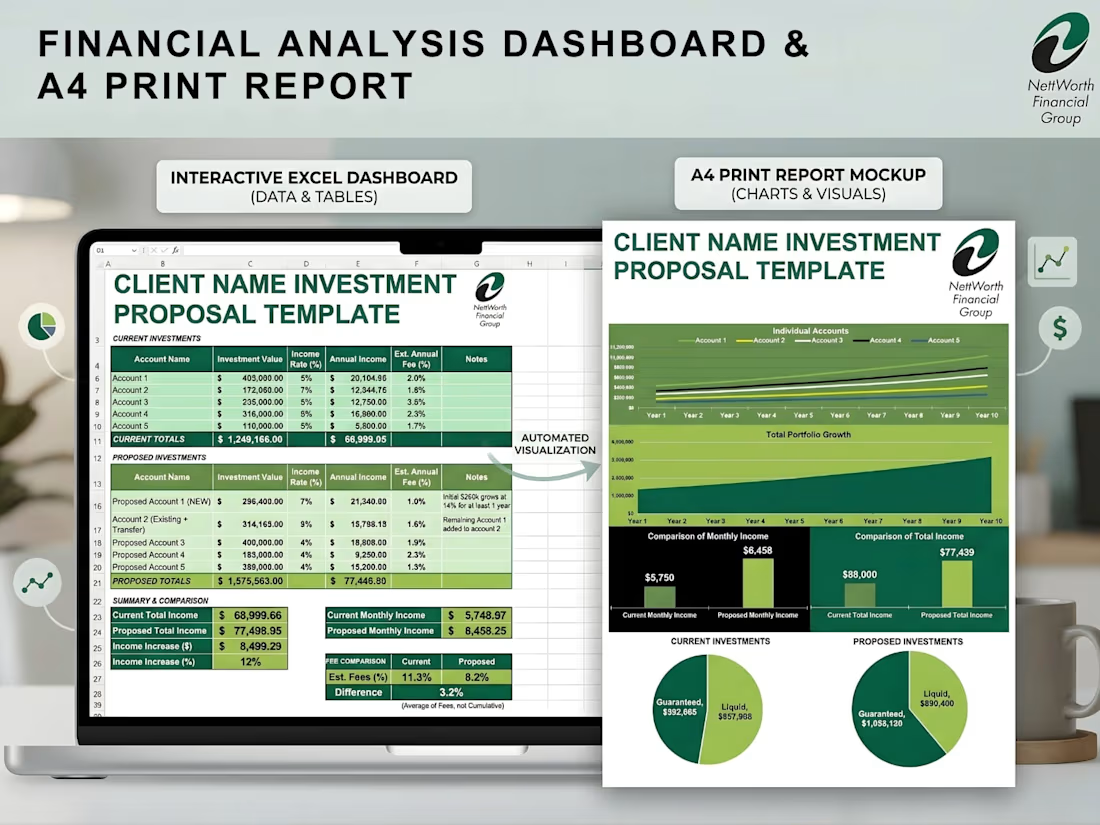
Stop settling for messy spreadsheets. I specialize in building custom, interactive dashboards that not only track your key metrics in real-time but also seamlessly translate into stunning, presentation-ready PDF reports.
Whether you need to monitor daily operations or pitch a financial proposal to a high-ticket client, I bridge the gap between raw data and professional design.
🛠️ What I Built:
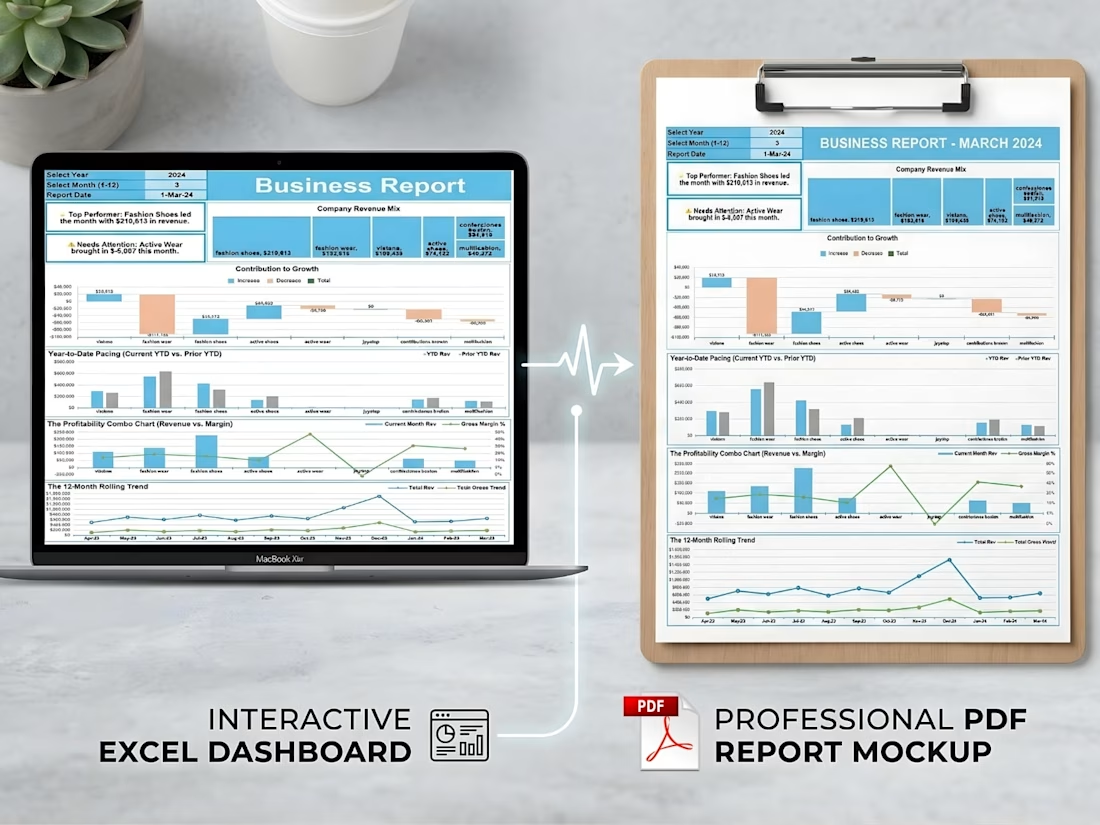
Business & Revenue Reports: Track YTD pacing, profitability margins, and 12-month rolling trends with clear visual hierarchies.
Financial Investment Proposals: Automated systems that turn standard data entry into comprehensive, highly visual portfolio growth projections.
Modern Lead Trackers (Google Sheets): Keep a pulse on sales rep performance, conversion rates, and pipeline health.
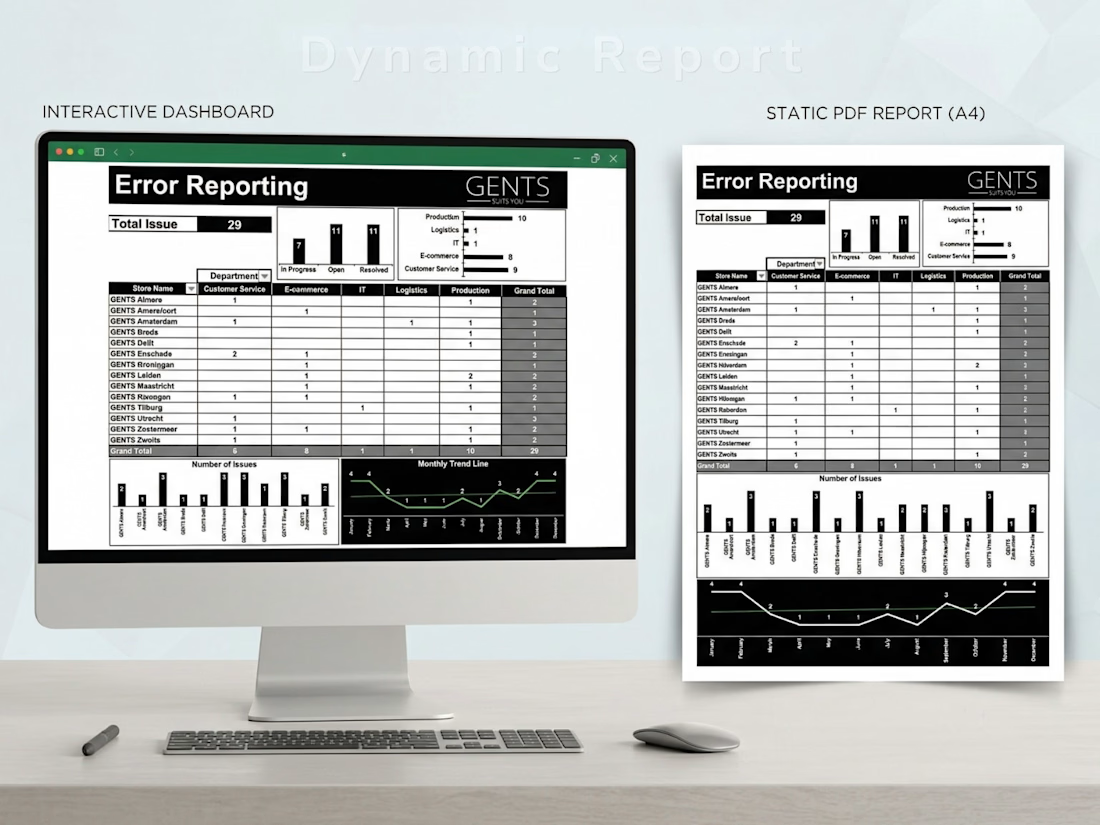
Operational Error Tracking: Dynamic issue-logging systems sorted by department and location to quickly identify bottlenecks.
✨ Key Features of My Dashboards:
Dual-Format Delivery: Fully interactive digital workspaces (Excel/Google Sheets) paired with automated, perfectly formatted A4 PDF print outputs.
Automated Visualizations: Type in your raw data, and watch the charts, graphs, and summary cards update instantly.
Clean UI/UX: Professional, brand-aligned designs that make complex data easy to digest for stakeholders and clients.
Ready to upgrade your reporting and save hours of manual formatting? Let’s collaborate and build a custom data solution tailored to your business needs!
#DataVisualization #ExcelDashboards #GoogleSheets #Reporting #FreelanceDataExpert #BusinessAnalytics


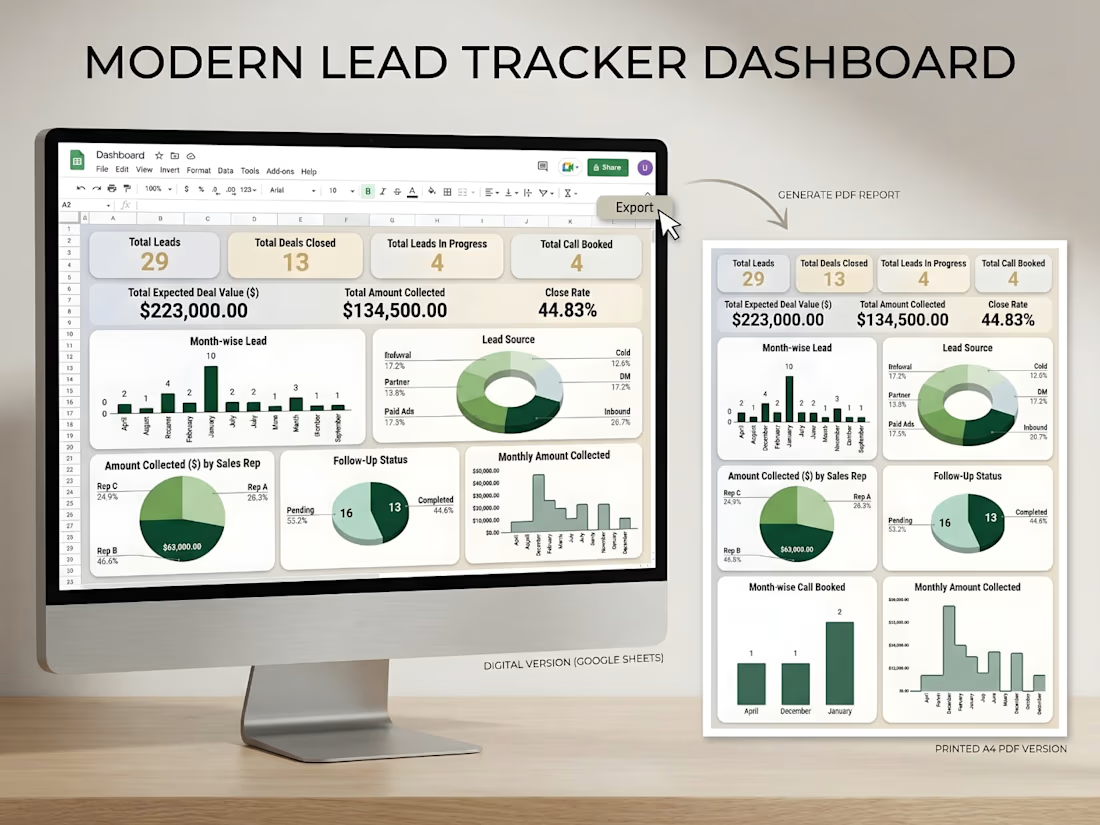

The dual format delivery — interactive Excel plus automated A4 PDF output — is a really smart differentiator. Most clients want something they can both work in and present professionally, and combining both in one system removes a lot of back and forth. The lead tracker with...

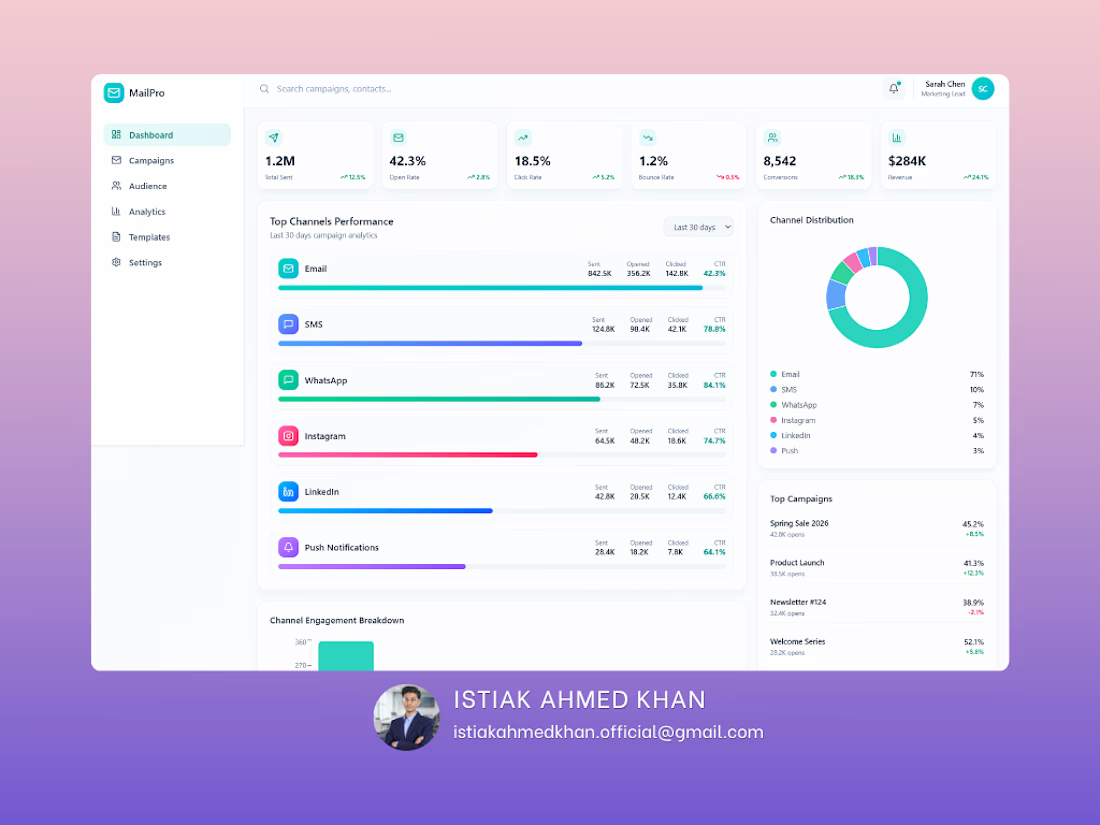
Email Marketing Analytics Dashboard – UI/UX Design
Struggling to track campaign performance across multiple channels? This dashboard is designed to give you a complete, real-time view of your marketing efforts in one clean and intuitive interface.
A powerful, easy-to-use dashboard that helps you monitor email, SMS, social media, and push campaigns without the confusion of scattered data. Every key metric is presented clearly so you can make faster, smarter decisions.
Key Capabilities:
Track open rates, click rates, conversions, and revenue in real time,
Compare performance across multiple marketing channels,
Identify your top-performing campaigns instantly,
Understand audience engagement with clear visual breakdowns,
Spot trends and optimize campaigns quickly.
Most businesses run campaigns but struggle to understand what’s actually working. This dashboard eliminates guesswork by turning your data into clear, actionable insights — helping you improve ROI and scale winning strategies.
Perfect For:
Digital marketers,
E-commerce brands,
Agencies managing multiple campaigns,
Startups looking to optimize growth.
If you want a high-converting, professional dashboard that not only looks great but drives real business decisions — I can help you build it.



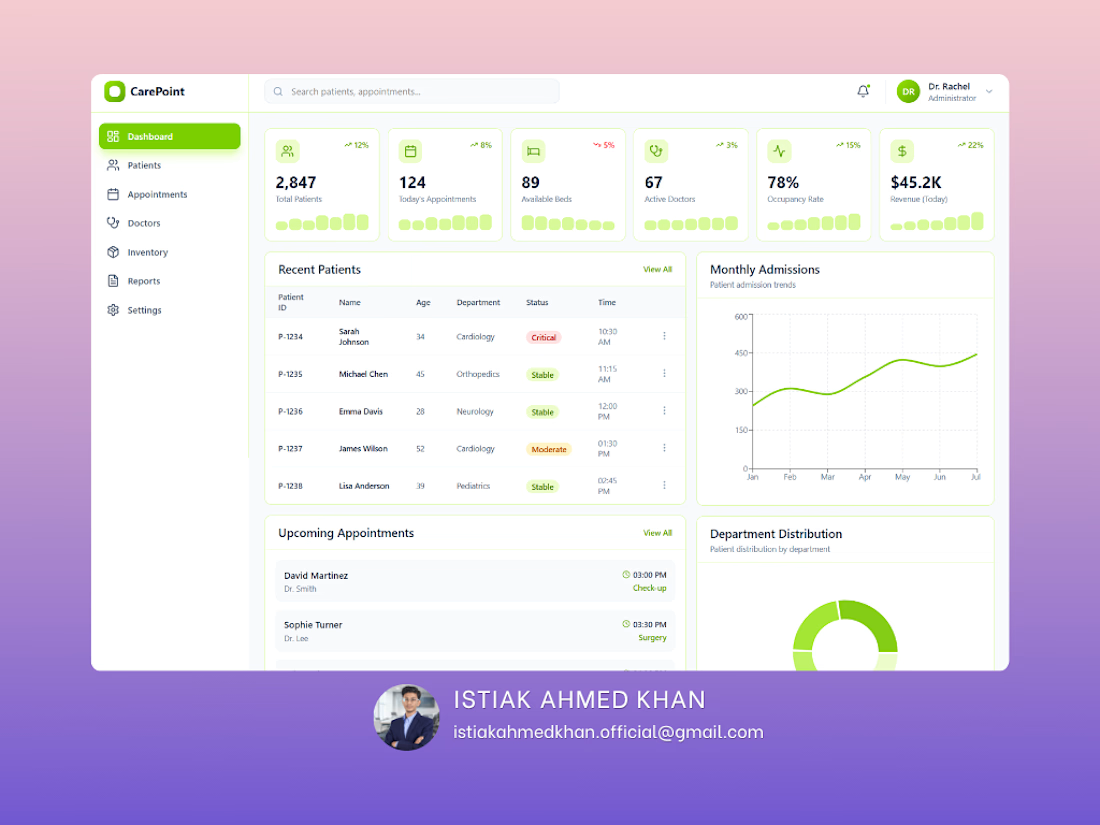
CarePoint Medical Dashboard
The CarePoint Medical Dashboard is a modern, user-friendly healthcare interface designed to streamline patient management and hospital operations. The UI focuses on clarity, accessibility, and real-time data visibility for medical professionals.
The dashboard features a clean layout with intuitive navigation, allowing users to quickly access key modules such as patients, appointments, doctors, and reports. A soft green color palette enhances readability while aligning with healthcare aesthetics.
Real-time KPI cards for patients, appointments, and revenue
Patient status tracking with visual indicators (Critical, Stable, Moderate)
Monthly admissions trend analysis
Upcoming appointments and recent patient records
Department-wise distribution insights
The interface is designed for efficiency, reducing cognitive load through organized sections and clear visual hierarchy. Interactive elements and minimalistic design ensure smooth navigation and quick decision-making.
This dashboard improves operational efficiency, enhances patient monitoring, and supports healthcare professionals in delivering timely and data-driven care.
dashboarddesigndashboarduiuxdesignMicrosoft Power BITableauData AnalysisData VisualizationUX DesignFigma


Is this Figma?



















Trending


FLORA
Reusable workflows are replacing one-off prompts in creative AI. Share what you're building in FLORA.

Contra University
Learn from expert creatives how to earn more using next-gen AI tools.
portfolioreview
The best portfolios tell a story, not just show a grid. Share yours for feedback.
freelancerlife
Freelancer life is wins, pivots, and everything in between. What’s yours right now?
aivideo
AI video tools are moving at warp speed. Which ones are you experimenting with?